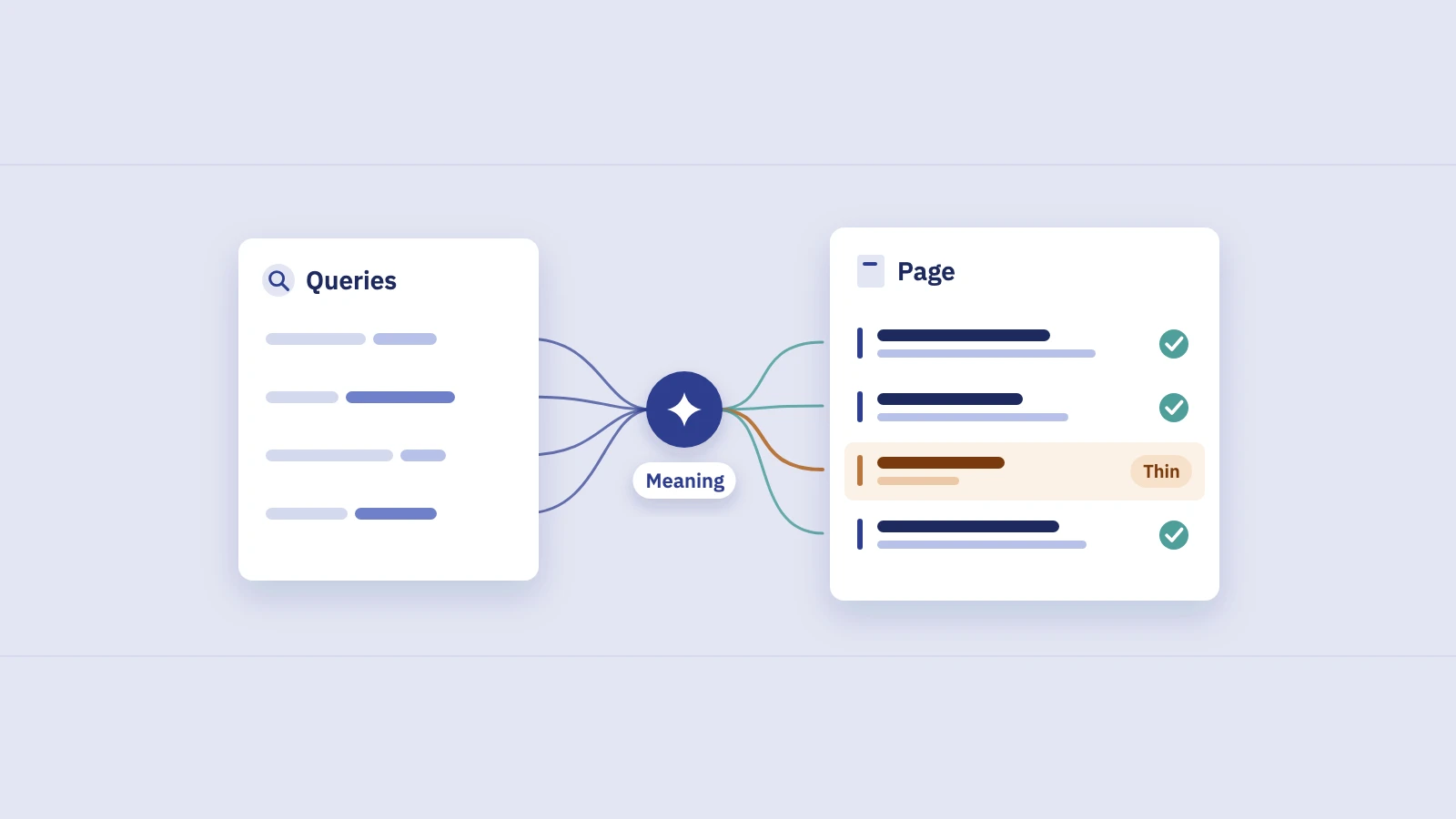
Semantic SEO means writing for what a search means, not for the exact string someone typed. Google has spent more than a decade building systems that match meaning, and your Search Console data already shows how they read your pages. Here's what Google actually documents, what it doesn't, and how to check a page's topic coverage from the queries it gets today.
What semantic SEO means
"Semantic SEO" isn't a term Google uses. It's an industry label for a shift Google has described many times: search moved from matching words to matching meaning. In practice it comes down to two ideas:
- Google understands language, so you don't have to spell out every variant. A page can rank for queries that don't contain its exact words.
- Relevance comes from covering a topic well, not from repeating a phrase. A page that answers the questions people bring to a topic is a better match than one that says the keyword more often.
Neither is a trick. The useful part of semantic SEO is plain editorial work: knowing what people want to learn about a topic and covering it.
What Google says about understanding meaning
You don't need patents or guesswork here. Google has described its language systems on its own blog and in its guide to ranking systems.
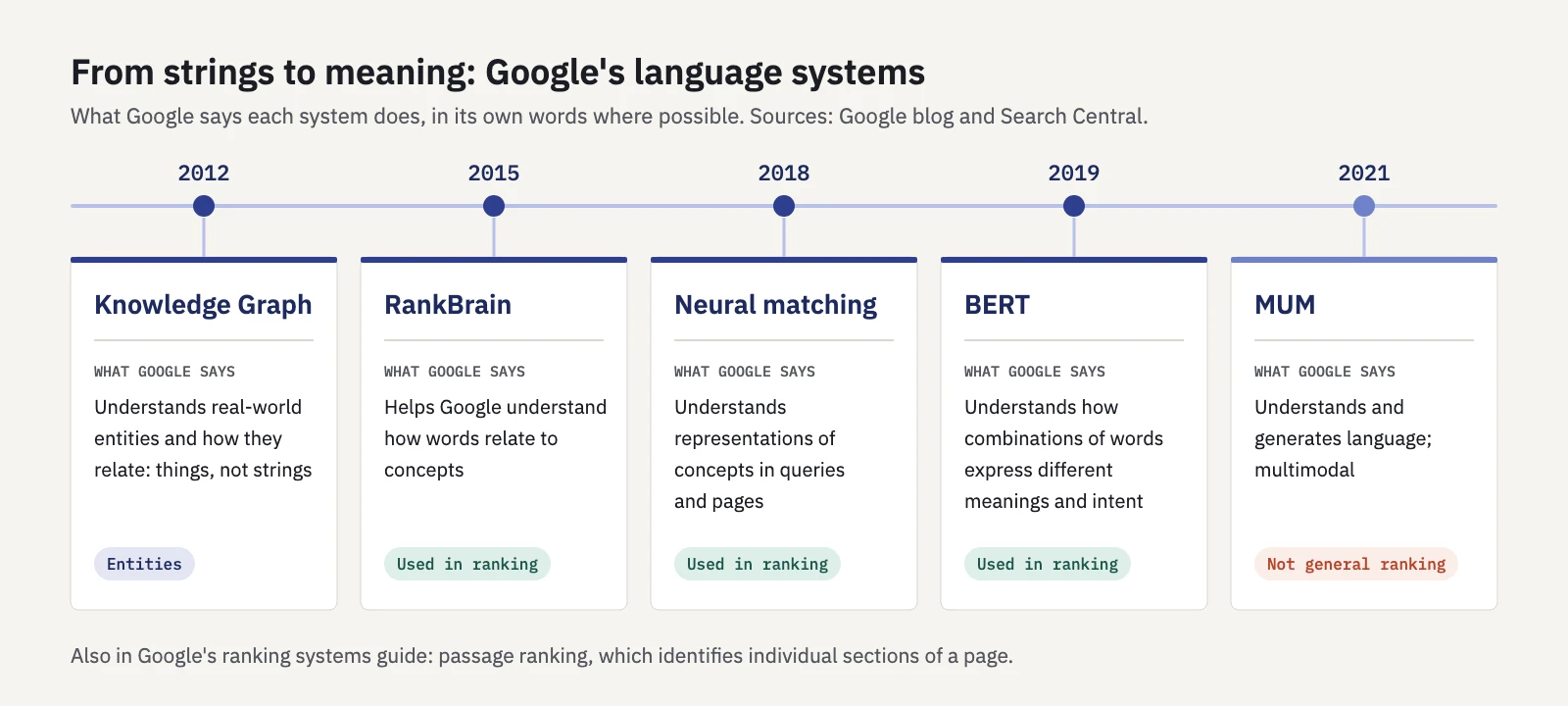
Diagram based on Google's own descriptions. Years from the Google blog posts linked below.
| System | When | What Google says it does |
|---|---|---|
| Knowledge Graph | 2012 | Understands real-world entities and how they relate: "things, not strings" |
| RankBrain | 2015 | Helps Google understand how words relate to concepts |
| Neural matching | 2018 | Understands representations of concepts in queries and pages |
| BERT | 2019 | Understands how combinations of words express different meanings and intent |
| MUM | 2021 | Understands and generates language; not used for general ranking |
The sources: the Knowledge Graph launch post describes a system that "understands real-world entities and their relationships to one another". How AI powers great search results (2022) dates RankBrain and neural matching and says MUM isn't currently used to rank results. The BERT launch post explains why small words such as "for" and "to" can change what a query means, and MUM's announcement describes a multitask, multimodal model.
Two more pieces complete the picture. Google's How Search works page describes a synonym system that finds relevant documents "even if they don't contain the exact words you used". The ranking systems guide also lists passage ranking, which identifies individual sections of a page. A section deep in a long page can be what matches a specific query.
What semantic SEO doesn't mean
Because the label is vague, a lot of advice under it has no support in Google's documentation. Some of it works against you.
- "LSI keywords." Nothing in Google's documentation mentions them. Lists of "semantically related keywords" to sprinkle into a page are keyword stuffing with extra steps.
- Repeating terms and variants. Google's SEO Starter Guide says excessive repetition, "even in variations", is tiring for users, and that keyword stuffing is against Google's spam policies.
- Writing to a word count. The helpful content guidance asks whether you're writing to a word count because you heard Google prefers one, and answers: "No, we don't." The Starter Guide adds that length alone doesn't matter for ranking.
- Covering every query variant. The Starter Guide says not to worry about anticipating every variation, because Google's "language matching systems are sophisticated and can understand how your page relates to many queries".
The How Search works page has the clearest example: if you search for "dogs", you likely don't want a page that says the word "dogs" hundreds of times. Google looks for other relevant content, such as pictures, videos or a list of breeds.
Keywords still matter. The same Google page calls a match between the query's keywords and a page's headings or body text "the most basic signal" of relevance. Semantic SEO doesn't replace that. It means you stop at the words people actually use and spend the rest of the effort on substance.
Topic coverage: the practical core
If Google matches meaning, the question for each page becomes: does it cover what people want to know about this topic? Google's helpful content guidance puts it as a self-assessment question: does the content provide "a substantial, complete, or comprehensive description of the topic"?
Complete doesn't mean long. It means the page answers the subtopics a reader expects. A guide to sourdough starters that never says how to fix a sluggish starter has a hole, whatever its length. A page that also explains bread machines, flour milling and kitchen scales has drifted off topic. Our post on how many keywords one page should target covers where one page ends and the next begins.
What about entities? Google says only this much, and it's enough to act on:
- Name things plainly. The Knowledge Graph works with real-world entities. Use the full, standard name of a product, person, place or concept at least once, and say what it is.
- Make relationships explicit. "X is a type of Y" and "X was made by Z" are easy for readers and for systems that model how things relate.
- Use structured data where it fits. Google's structured data introduction says Google uses it "to understand the content of the page" and to gather information about the web and the world. Our schema and rich results guide shows how to check it in Search Console.
Google doesn't publish a list of entities per topic or a coverage score. Your own query data is a better guide, because it shows how Google has actually matched your page.
Read topic coverage from the queries a page gets
Every page in Search Console has a record of how Google understood it: the queries it was shown for. An impression means Google judged the page relevant enough to show. The position says how well it matched compared with the other results. Google's metric definitions generally count an impression when the result appears on the current results page, whether or not it's scrolled into view.
That gives you a reading of each subtopic:
- High impressions, good position. Google connects the page with the subtopic and ranks it well. It's covered.
- Impressions at a weak position. Google associates the page with the subtopic but finds better matches elsewhere. Often the page mentions it in passing and doesn't answer it.
- No impressions for a subtopic you expected. Google doesn't connect the page with it at all, or no one searches that way.
To build the coverage map for one page:
- Open Performance > Search results and set the date range to the last 3 months, so less frequent queries have time to appear.
- Filter to the page. Use + Add filter > Page and enter the exact URL.
- Open the Queries tab and turn on Average position alongside clicks and impressions.
- Export the list and sort by impressions.
- Group the queries into subtopics. Label each query by what it asks, not by the words it contains: "fix a slow starter", "feeding ratio", "starter smells". Five to ten subtopics is usually enough for one page.
- Sum impressions and note the typical position per subtopic. Look at the position spread inside each group, not only the average, because average position hides mixed rankings.
- Check each subtopic against the page. Is there a section that answers it, a sentence that mentions it, or nothing?
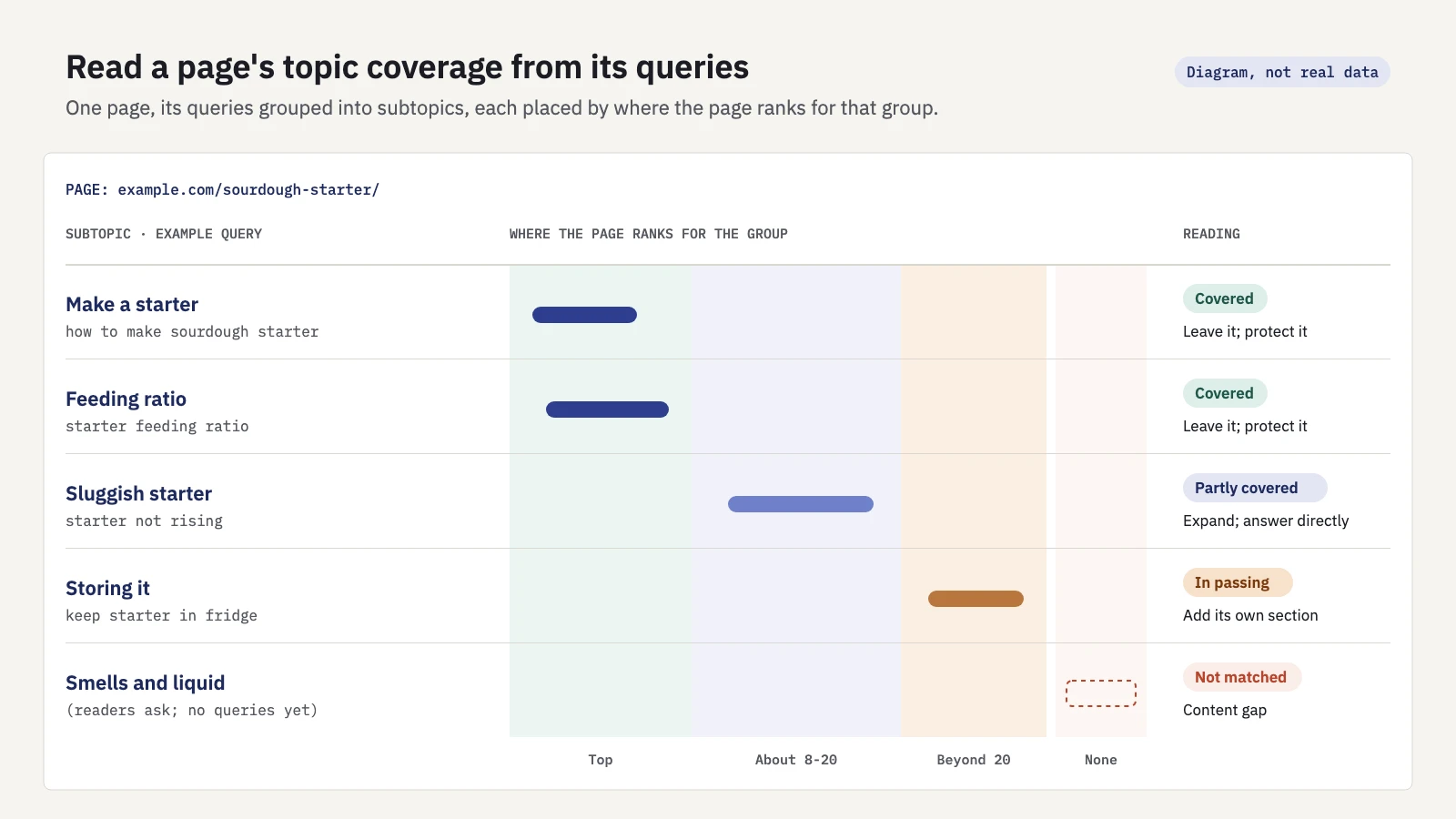
Diagram, not real data. Each subtopic lands in one band depending on where the page ranks for its queries.
| What you see for a subtopic | Likely reading | What to do |
|---|---|---|
| Many impressions, top positions | Covered | Leave it; protect it when you edit |
| Impressions, positions around 8–20 | Partly covered | Expand the section; answer the question directly |
| Impressions, positions beyond 20 | Mentioned in passing | Add a section with its own heading, or decide it belongs elsewhere |
| Queries with a different intent | Off topic for this page | Link to a better page or plan one |
| No queries, but readers expect it | Not matched | Treat it as a content gap |
The thresholds are a starting point, not a rule. What matters is the contrast between subtopics on the same page. If one group sits at the top and another hangs around page three, start with the weak one.
Two cautions. Search Console leaves out anonymized queries, so small subtopics may be under-counted or missing. And the interface shows up to 1,000 rows, so a page with a long query list needs the API for the full map.
In Serplyze, expand a page in the Pages tab of Traffic to see the queries that land on it, or open the page detail for its full query list with each query's CTR gap. The Query × page tab with the Striking distance quick view lists queries at an average position from 4, 8 or 11 up to 20 with an impressions floor you choose: the "partly covered" band, across the whole site at once.
This isn't keyword clustering across the site, or content gap analysis for topics no page covers. Here you start from one page and ask how completely it covers its own topic.
Queries without your words: a check on understanding
One more view shows semantic matching at work on your own site. Take the page's main term and filter its queries to those that don't contain it.
- Keep the Page filter on.
- Add a Query filter and choose Custom (regex) with Doesn't match regex.
- Enter the main term and its obvious variants, for example
starter|levain.
What remains are queries Google matched to the page without the exact phrase. Read them:
- They rank well. Google understands the page beyond its headline term. Good.
- They're there, but low. Google sees a connection, but the page uses different words from the ones searchers use. If those words are what your readers say, use them in a heading or in the answer itself.
- Almost nothing remains. The page may be matched mainly on its exact phrase. That's not a problem in itself, but it often means a narrow page.
Our Search Console regex guide has more patterns for this kind of filter. And if many of the remaining queries have a different goal from the page, read them through search intent before you add anything.
Turning coverage gaps into edits
Once you know which subtopics are weak, the fixes are ordinary editing:
- Answer the subtopic under its own heading. Passage ranking means a clear section can match a specific query. A heading that uses the words people search with helps both readers and Google.
- Lead with the answer. Put the direct answer in the first sentence or two, then the detail.
- Name the things involved. Use the standard names of tools, ingredients, products or concepts, and say what they are.
- Link to deeper pages. If a subtopic deserves its own page, give it a short summary and a link. Our guide to internal linking with Search Console covers choosing anchors from real queries.
- Cut what's off topic. Sections that attract queries with a different intent can pull the page away from its main job.
- Note the date of the change. You'll compare before and after.
For larger rewrites, a brief helps. The content brief template builds one from the queries you already have.
To measure the effect, keep the Page filter on and use Compare in the date picker for equal periods before and after the edit. Look at the subtopic's queries, not only the page total. Leave a few weeks for recrawling before you judge, and watch for seasonality.
If you track the subtopic's queries as a keyword group in Serplyze, the rank tracker shows the group's visibility, clicks and position over time. The Topic map view lays groups out as tiles sized by clicks or impressions and coloured by growth, position, position change or CTR gap, so a weak subtopic stands out next to its strong neighbours.
Key takeaways
- Semantic SEO is an industry label for writing to meaning; Google doesn't use the term, but it documents the systems behind it: Knowledge Graph, RankBrain, neural matching, BERT and passage ranking.
- Google's guidance rules out repeating variants, writing to a word count and keyword stuffing. Nothing in its documentation mentions "LSI keywords".
- Topic coverage means answering the subtopics readers expect, with things named plainly and structured data where it fits.
- A page's queries in Search Console show how Google matched it. Group them into subtopics; impressions at weak positions point to subtopics the page mentions but doesn't answer.
- Filtering out the main term shows which paraphrases Google already connects to the page.
- Edit with headings that answer each subtopic, then compare the subtopic's queries before and after.
Serplyze keeps the queries and pages from your own Search Console data, so you can see which subtopics a page wins and which it only touches. Start free and map your own pages.