A content brief tells a writer what a page is for, who it's for, what it must answer and how you'll judge it. This template fills every section from your own Search Console queries, so the brief describes real searches instead of guesses. It includes a copyable version and a worked example.
What a content brief is for
A content brief is a one-page agreement between the person who chose the topic and the person who writes it. It answers four questions before anyone opens a draft:
- Why this page exists. The job the searcher is trying to get done.
- Which searches it should win. One primary query, its variants and the questions people ask around it.
- What shape it takes. Page type, URL, outline, and where it sits in the site's internal links.
- How you'll know it worked. A baseline today and a number to check later.
A brief isn't a keyword list, and it isn't a word count. Google's own guidance on helpful content asks "Are you writing to a particular word count?" and answers no, it doesn't have a preferred length. A good brief sets scope by the questions the page must answer, and the length follows.
Briefs built from your own Search Console data have one advantage over briefs built from a keyword tool's volume estimates: every query in them is a search Google has already shown your site for, with measured impressions. You know people use those exact words, in your markets, and that Google already sees you as relevant to them. Finding which topics need a brief is a separate step, covered in our content gap analysis guide and keyword research from Search Console. This post starts once you've picked the topic.
The content brief template
Copy this into a doc, a ticket or a Markdown file. Replace the brackets. If a field has nothing honest to say, delete it rather than padding it.
# Content brief: [working title]
Owner: [name] · Writer: [name] · Due: [date]

## 1. Searcher's job
When [situation], they want to [task], so they can [outcome].
Who is searching: [audience, level of knowledge]

## 2. Queries (Search Console, last 3 months, Web)
Primary: [query] · [impressions] · position [x] · lands on [URL or "no page"]
Secondary: [query] · [impressions] · position [x]
Not for this page: [queries with a different intent]

## 3. Must-answer questions
- [question query] → [section that answers it]

## 4. Page type and URL
Type: [how-to / comparison / template / use case / glossary]
URL: [/path/] · New page or update: [new / update]

## 5. Outline
H1: [title]
- H2: [answer to the job, first]
- H2: [question 1]
- H2: [example, template or table]
Leave out: [topics that belong on another page]

## 6. Internal links
In: [existing URL] · anchor: [text from its queries]
Out: [next-step URL] · [why]

## 7. Success metric
Baseline: [cluster impressions, clicks, position, current landing page]
Check on [date + 90 days]: [position, clicks, landing page, key event]
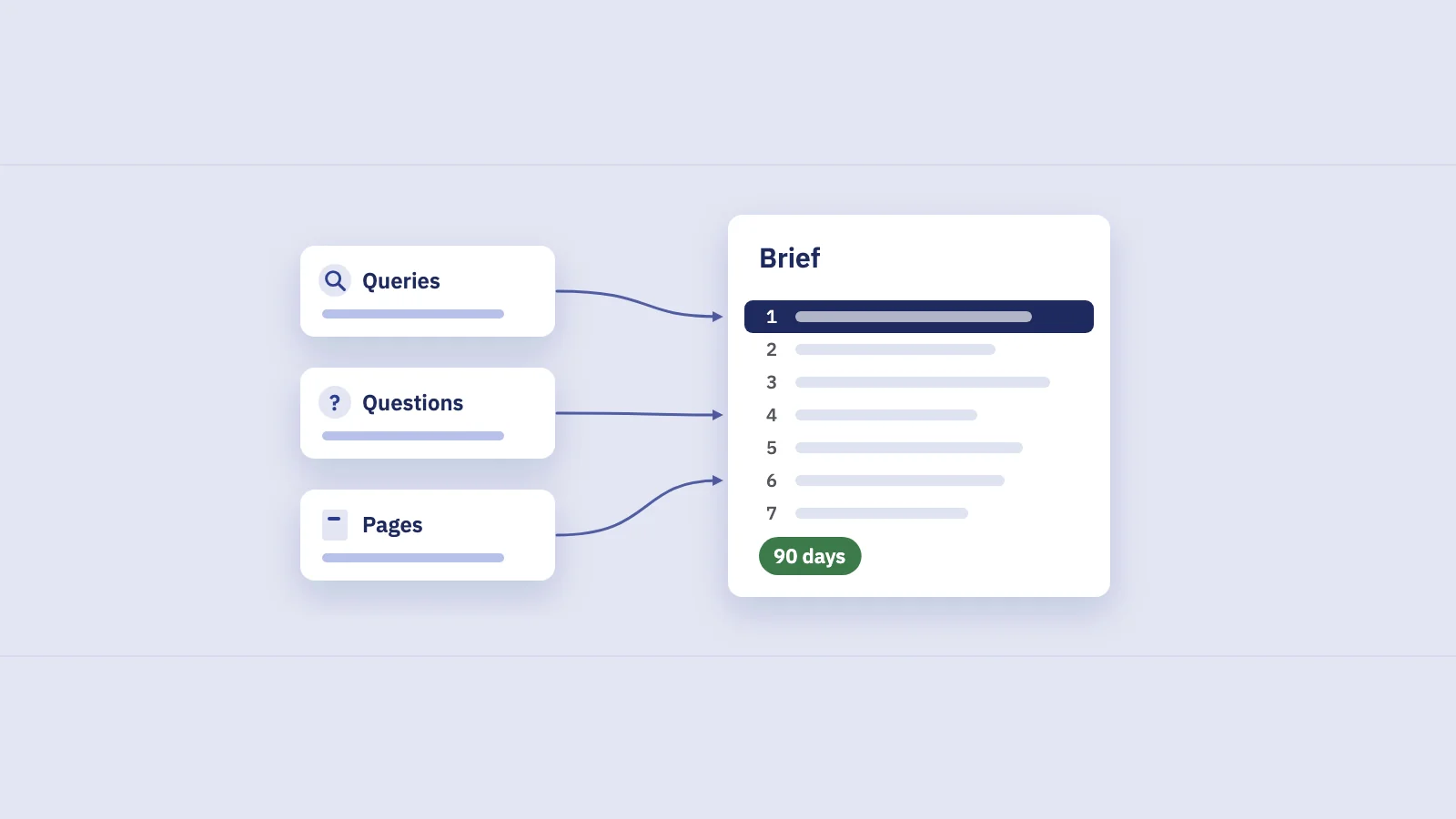
Each section has one source in your data and one job in the brief:
| Section | Where the data comes from | What it decides |
|---|---|---|
| Searcher's job | The full query list of the cluster | The angle and the first screen of the page |
| Primary and secondary queries | Performance > Search results, Queries tab | The title, headings and wording |
| Must-answer questions | Question queries (regex filter) | The H2s and FAQ answers |
| Page type | The current results page, query modifiers | Format: article, template, comparison, tool |
| Outline | Questions plus what ranking pages cover | Order and scope |
| Internal links | Pages with impressions for the cluster | Which pages link in, with which anchor |
| Success metric | Today's numbers for the cluster | The check you run in 90 days |
How to fill each section from your own data
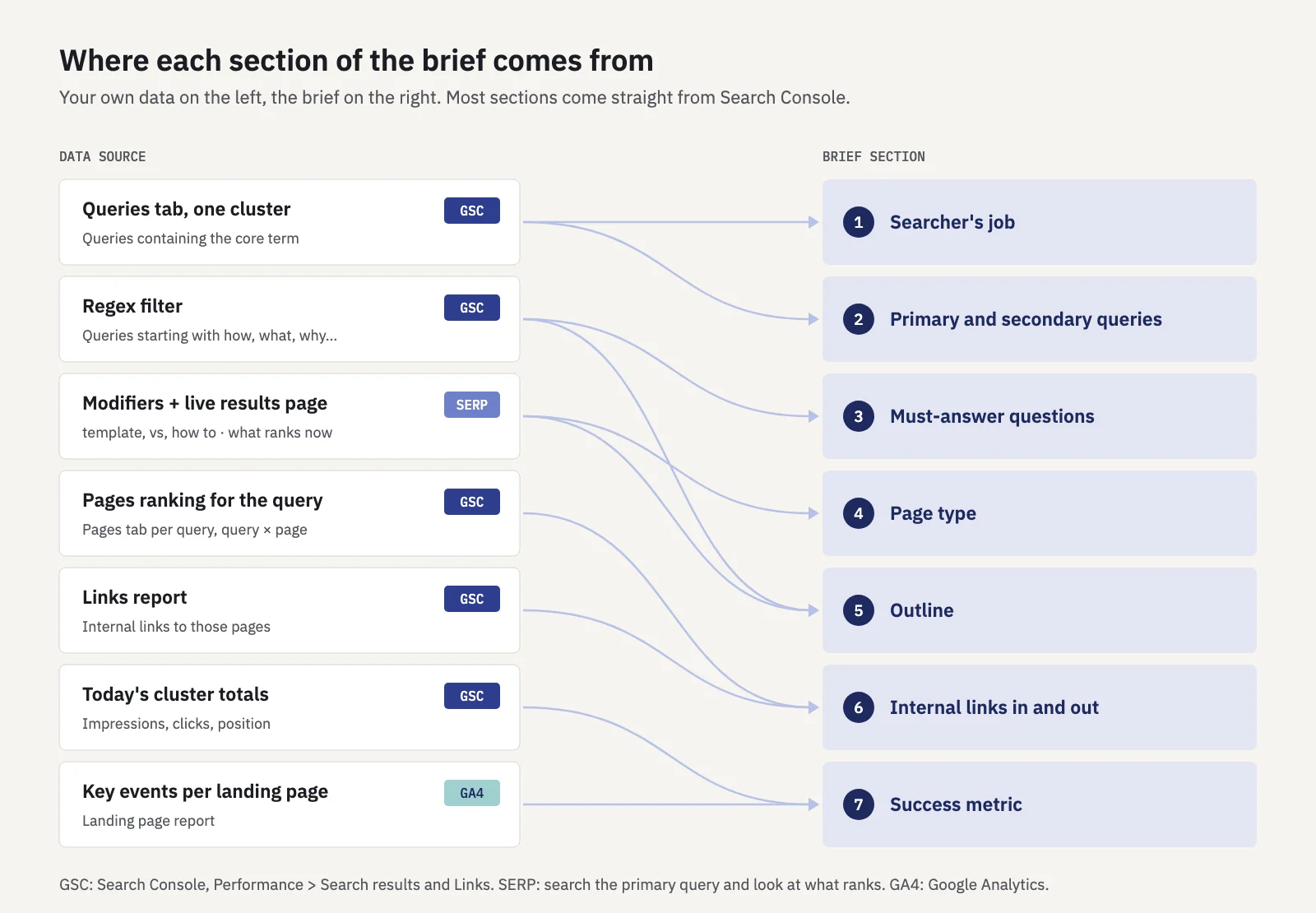 Every section of the brief points back to one source.
Searcher's job
Read the whole cluster before you write a word. Filter Performance > Search results with + Add filter > Query > Queries containing and the cluster's core term, set the last 3 months, and read every row, not just the top ten.
Write the job as one sentence: "When [situation], they want to [task], so they can [outcome]." The modifiers tell you the situation. "Template", "example" and "free" mean the person wants something to use now. "How to" and "what is" mean they want to understand something first. "vs" means they're choosing between options. If the cluster mixes two jobs, it's two briefs.
Primary and secondary queries
- Sort the cluster by impressions. The primary query is usually the highest-impression query that matches the job. Skip branded queries and ones with a different intent.
- Note its average position and landing page. Click the query and open the Pages tab. That's your baseline, and it tells you whether this is a new page or an update.
- List the variants as secondary queries. Keep the ones that share a results page with the primary. If you search both and the same URLs rank, they belong on one page.
- Write down what's out of scope. Queries that look related but want something else go under "Not for this page", so the writer doesn't try to cover them.
The UI table shows at most 1,000 rows, which is plenty for one cluster. Rare queries are left out as anonymized queries, so treat the list as the visible top of the demand, not all of it.
Must-answer questions
Questions in the query list are the clearest instructions a brief can give. Add a second filter: Query > Custom (regex) with ^(how|what|why|when|where|which|who|can|does|do|is|are|should)\s. Every question with impressions becomes either its own heading or one line in an FAQ section. Group near-duplicates ("how to write an invoice", "how do you write an invoice") under one answer. Our Search Console regex guide has more patterns for comparisons and modifiers.
Page type
Search the primary query in a private window and look at what ranks: articles, templates, tools, product pages or videos. The format that fills the first page is what searchers expect. Combine it with the modifiers. A cluster full of "template" and "download" wants a usable template above the fold, not 2,000 words about templates.
Outline
Build it from the job and the questions, in the order the searcher needs them. The answer to the job goes first, then the questions from most to least impressions, then examples, then the next step. Add a "Leave out" line for topics that belong on another page. That one line prevents most cannibalization before it starts.
Internal links in and out
Links in matter more for a new page, because nothing points to it yet. Look for pages that already get impressions for the cluster's queries: open the primary query in Performance and check the Pages tab. The page Google shows today is the first one that should link to the new URL, with an anchor taken from the queries it ranks for. The internal table of the Links report shows which pages your site already links to most, which makes them good hubs for one more link. Internal linking with Search Console data covers how to pick anchors. Links out are the next step after the job: the product page, the sign-up, the deeper guide.
Success metric
Record today's numbers before anything is published: the cluster's impressions and clicks over the last 3 months, the primary query's position, and the page that lands for it. Then write the check you'll run 90 days after publishing. Typical targets: the primary query in the top 5 on the new URL, a monthly click figure for the cluster, the new URL as the main landing page, and one key event in GA4.
A worked example
Say a bookkeeping app's site gets impressions for invoice queries, but they all land on its invoicing feature page. Here's how the brief comes together, with example numbers.
- Job. Reading the 60-odd queries containing "invoice", most are from freelancers who've finished a job: "When I've finished work for a client, I want to send a correct invoice quickly, so I get paid on time."
- Queries. "freelance invoice template" leads with 5,800 impressions over 3 months at position 13.8, landing on /features/invoicing/. Variants like "invoice template for freelancers" and "simple invoice template" share its results page. "Invoice vs receipt" doesn't: it's a definition search, so it goes under "Not for this page."
- Questions. The regex filter returns "what to include on an invoice", "how to write an invoice" and "how do I invoice as a freelancer". Each becomes an H2.
- Page type. The first page of results is mostly downloadable templates, so the page leads with the template and a filled-in example.
- Links. /features/invoicing/ ranks today, so it links to the new page with the anchor "freelance invoice template". The new page links back to the feature page for sending invoices from the app.
- Success. In 90 days: the primary query in the top 5 on /templates/freelance-invoice/, 400 clicks a month for the cluster, and template downloads tracked as a key event.
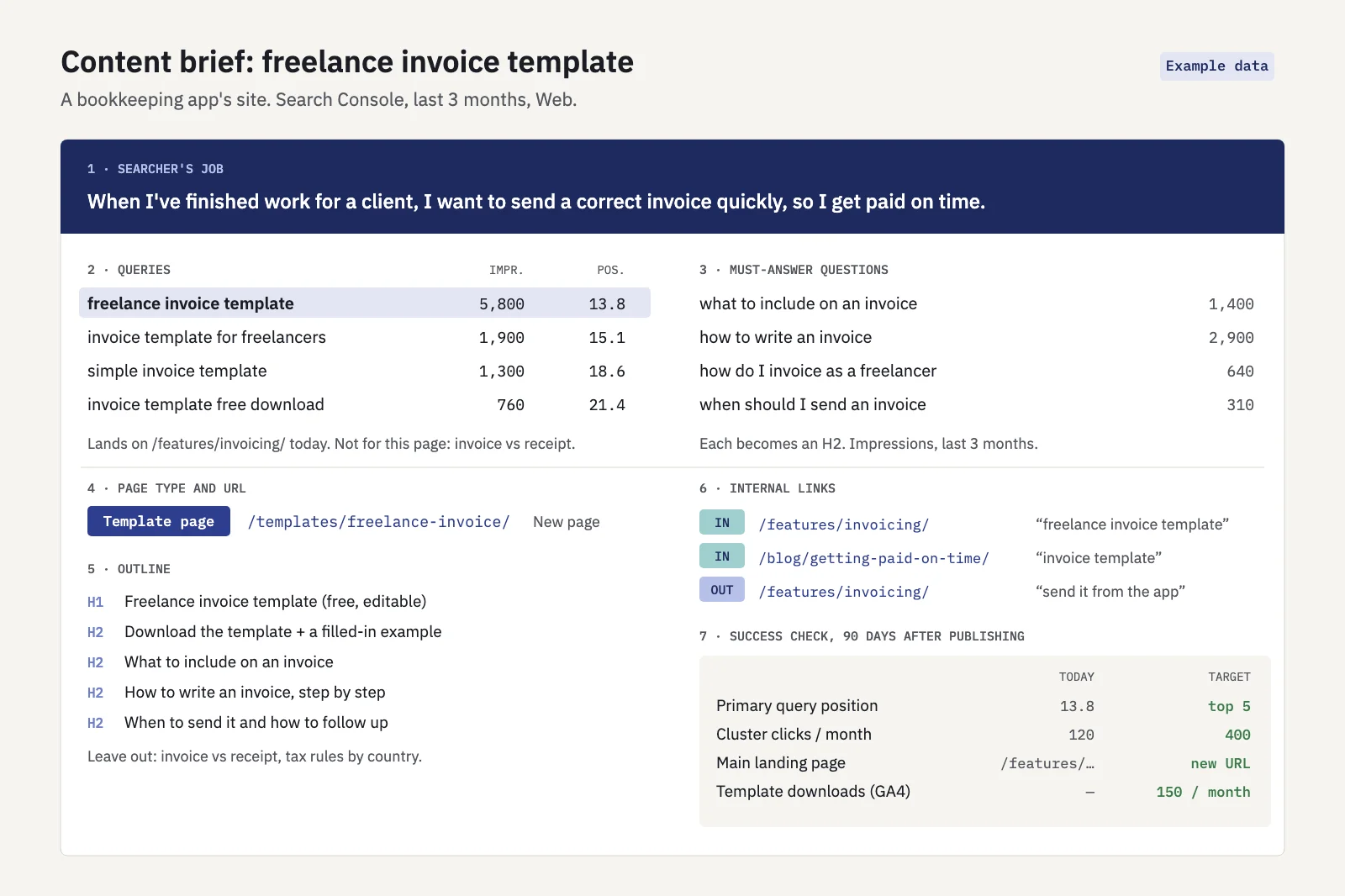 Example data. One card a writer can work from without a meeting.
Serplyze makes the query part faster. On its Traffic screen, the search box takes plain text or a regex across queries and URLs, and the Query × page tab shows which pages rank for each query, flagging queries where more than one page earns clicks. Once the brief is approved, add the cluster as a rule-based keyword group ("query contains invoice"). On paid plans, log the publish date as an Action of type "New page", and Serplyze compares the 28 days before with the 28 days after against the rest of the site.
Mistakes that make a brief useless
- A keyword list with no job. The writer can mention every query and still miss what the searcher wanted.
- One brief for two intents. If the queries want a template and a definition, write two briefs, or decide which one this page serves.
- A word count instead of questions. Length should follow the questions, not the other way round.
- Copying the top result's outline. Use the results page to learn the format, and your own query list to decide the content. Otherwise you've written the same page as everyone else.
- No baseline. Without today's numbers written down, "did it work?" turns into an argument.
Key takeaways
- A content brief is an agreement on the page's job, its queries, its shape and how it will be judged, not a keyword list or a word count.
- Fill it from your own Search Console data: the cluster's queries, its question queries and the pages that rank for it today.
- Write the searcher's job in one sentence. If the cluster has two jobs, write two briefs.
- Use the live results page for the format, and your own queries for the content and headings.
- Plan the links in from pages that already get impressions for the cluster, with anchors from their queries.
- Record a baseline and a 90-day check before publishing.
Serplyze shows your queries, the pages that rank for them and the clusters you track as groups, from your own Search Console data. Start free and write your next brief from the searches you already get.