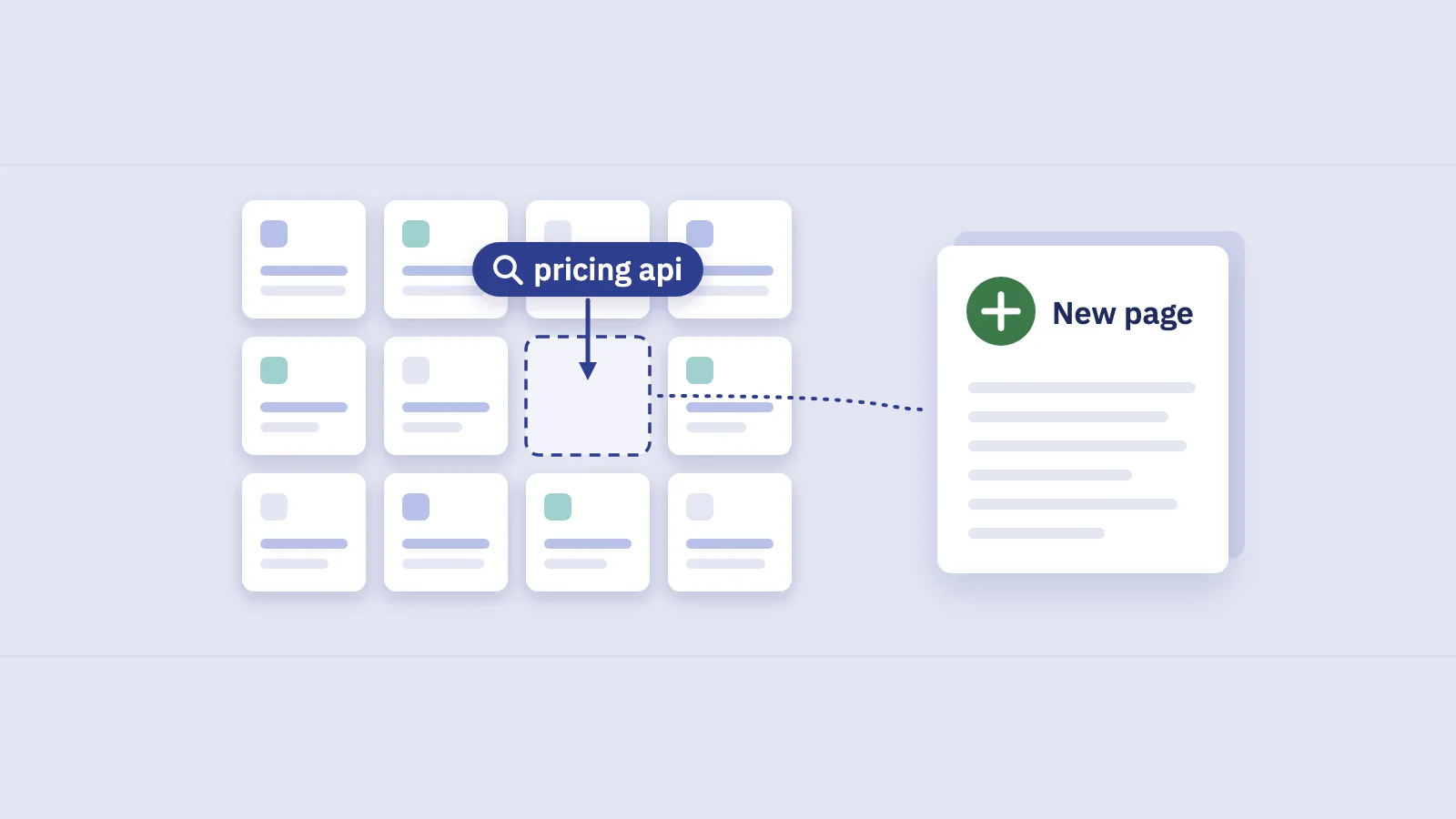
The best content gaps are already in your Search Console data: queries Google shows your site for, where no page of yours properly answers them. This guide shows how to find them, turn each one into a brief and decide which to write first.
What a content gap is (and where to look first)
A content gap is a search your audience makes that your site doesn't answer well. Most content gap analysis guides start from a competitor tool: enter three rival domains, export the keywords they rank for and you don't, and work through the list.
That list has two problems. The volumes and rankings are estimates from a third-party index. And it tells you nothing about how Google already sees your site.
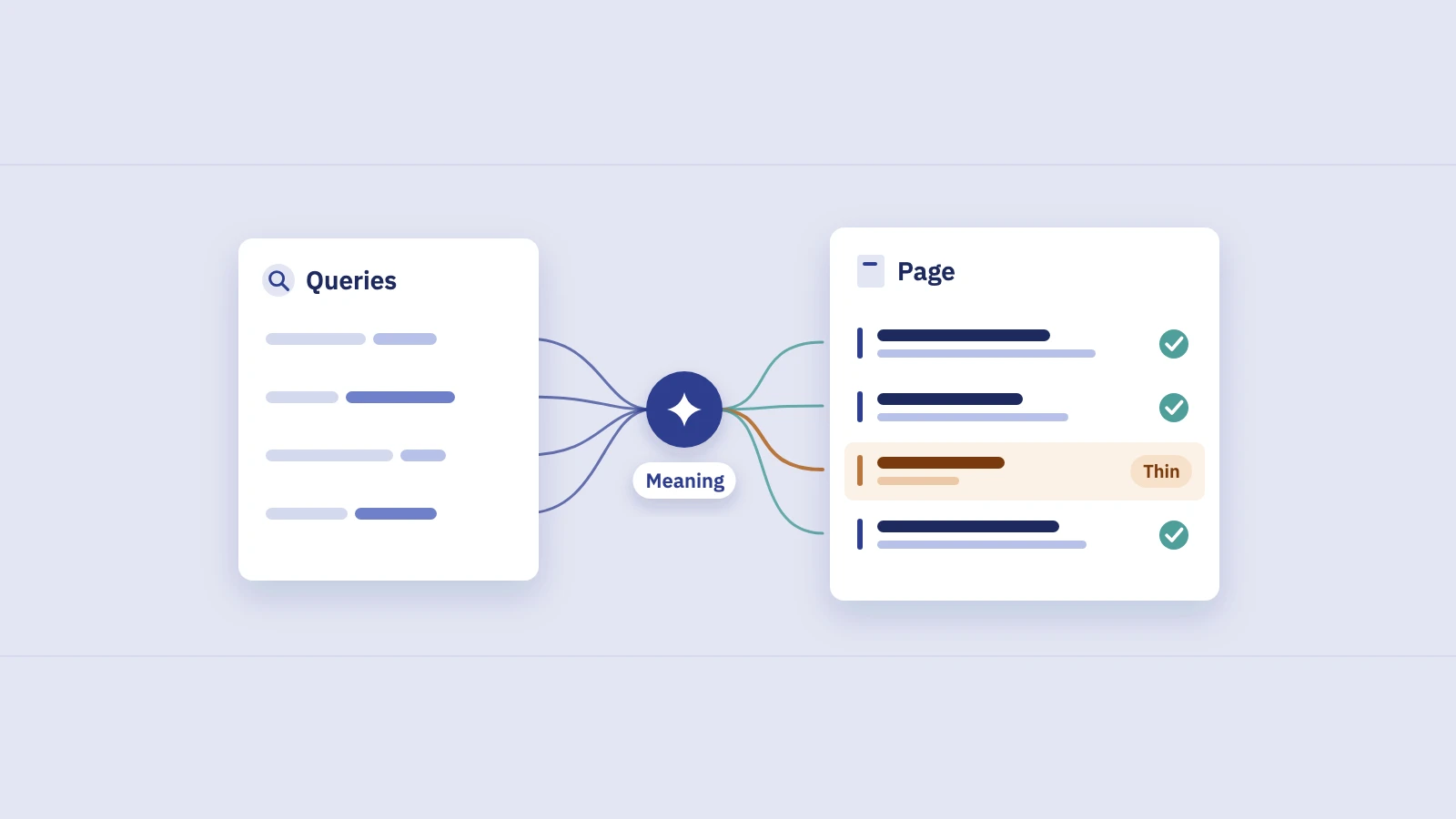
Search Console gives you a better starting point. Every query in the Performance report is one Google has already matched to your site, with real impressions, clicks and average position. When a query has plenty of impressions but the page shown for it is generic, off-topic or buried on page two, that is a content gap with evidence attached: the demand is measured, and Google has already decided you are relevant enough to show.
Five patterns that point to a gap
1. High impressions, low clicks
A query seen thousands of times and rarely clicked is the clearest signal. Plot your non-branded queries by impressions and CTR, and the bottom-right corner is your candidate list.
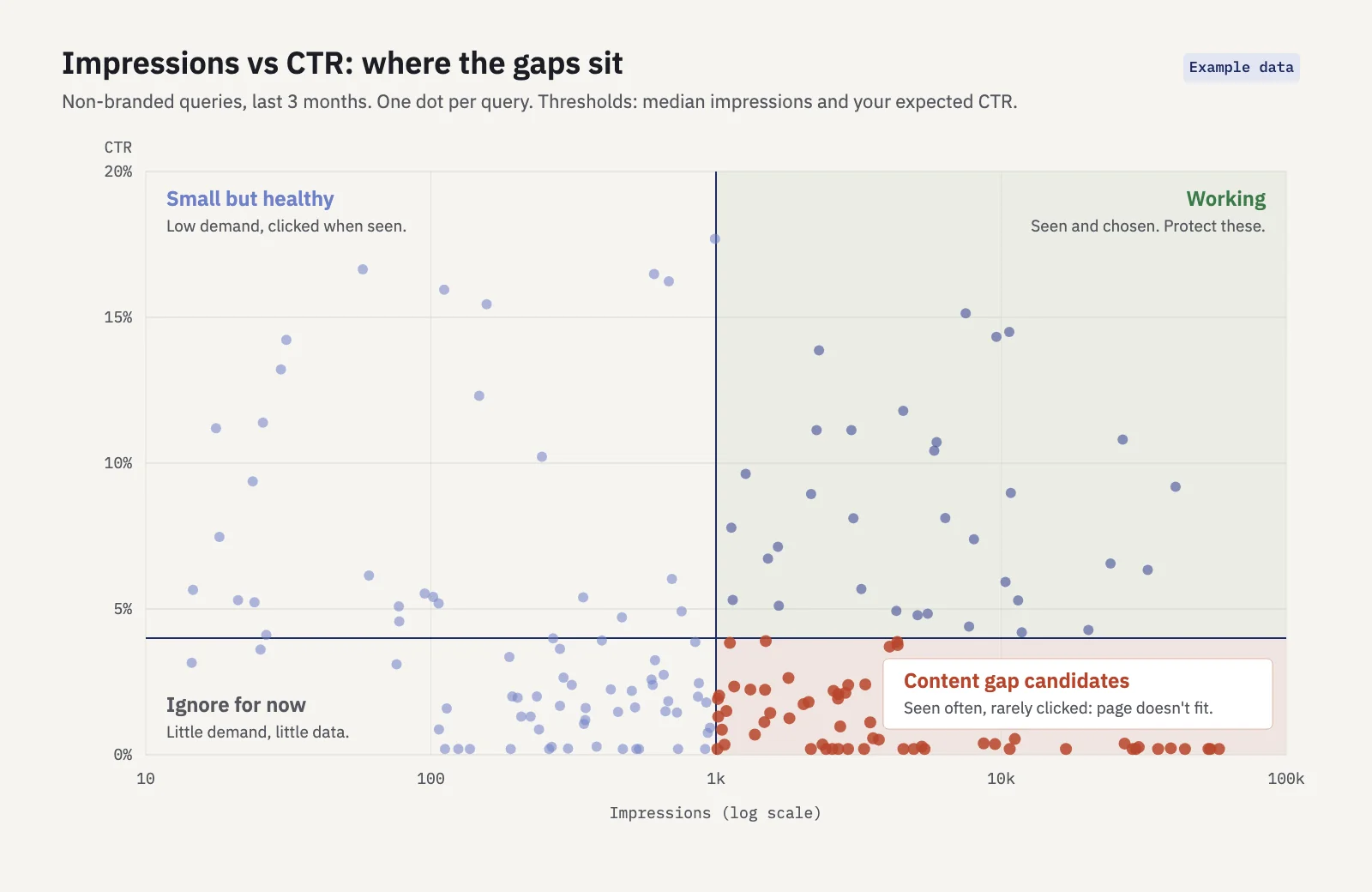
Not every dot there is a content gap. Low CTR at position 2 usually means a weak title or something on the results page taking the click (see zero-click searches). Low CTR at position 15 usually means the page isn't good enough to rank higher, and that is where content fixes help. Read CTR together with average position before you decide.
2. Rankings at 8–30 with no dedicated page
Queries sitting between the bottom of page one and page three are often there because a broad page ranks for them by default. Your home page ranks for "invoicing software pricing", or a general feature page ranks for "invoicing for contractors". Google sees some relevance, but nothing on the site is built for that exact need, so it never climbs.
The fix is rarely more work on the generic page. It's a page (or a clear section) made for that query.
3. Question queries
Queries that start with how, what, why, can or should tell you exactly what the searcher wants to know. If they land on a product page or a loosely related post, the page can't answer them and the ranking stays weak. Question queries are also the easiest gaps to brief, because the question is the outline.
4. Modifiers you don't cover
Look at the words around your core terms:
- Pricing and cost: "price", "pricing", "cost", "cheap", "free".
- Comparison: "vs", "versus", "alternative", "compare".
- Audience or use case: "for agencies", "for freelancers", "for ecommerce".
- Format: "template", "example", "checklist", "calculator".
Each modifier is a different intent. If every "for X" query lands on the same feature page, every audience segment is a potential gap.
5. Pages ranking for queries they don't answer
Sometimes Google picks a page that only mentions the topic in passing: a blog post about getting paid faster ranks for "how to write an invoice for consulting". The searcher arrives, doesn't find the answer and leaves. This shows up when you look at queries and landing pages together.
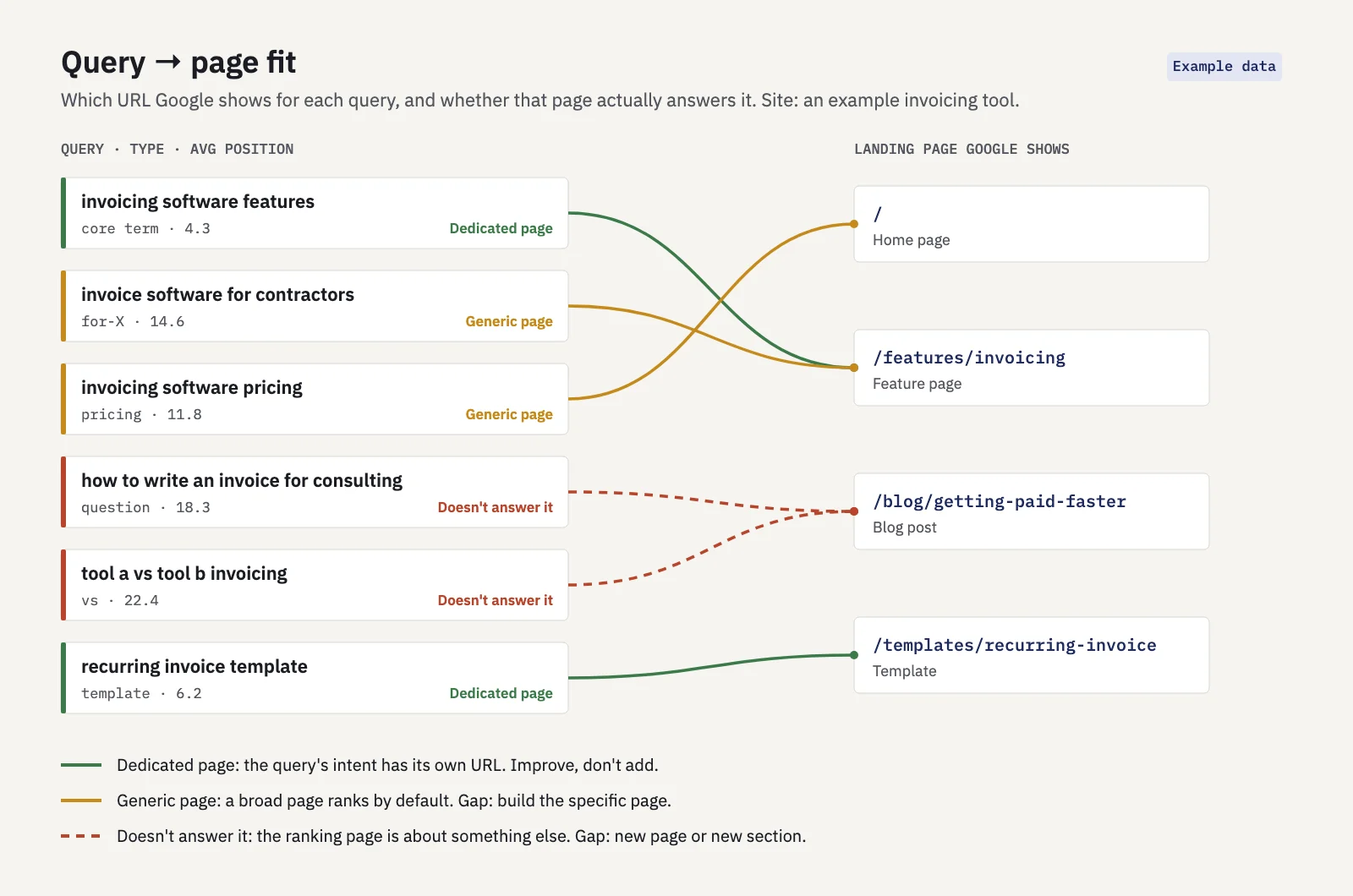
| Pattern | What you see in Search Console | Typical fix |
|---|---|---|
| High impressions, low clicks | Many impressions, CTR well below your norm for that position | New page if the landing page is off-topic; title and snippet work if it fits |
| Ranks 8–30, generic page | Average position 8–30, landing page is the home page or a broad hub | Dedicated page for the query group |
| Question queries | how/what/why queries on a commercial or unrelated page | Answer-first article or FAQ section |
| Uncovered modifiers | pricing, vs or "for X" queries on one shared page | Pricing, comparison or use-case pages |
| Off-topic landing page | Query and page title clearly don't match | New page, or a new section on the closest page |
A step-by-step method in Search Console
- Set the window. Open Performance > Search results, keep search type on Web and pick the last 3 months. Long enough to smooth out noise, recent enough to reflect your current pages.
- Remove branded queries. Click + Add filter, choose Query, switch to Custom (regex) and pick Doesn't match regex with your brand terms, e.g.
serplyze|serp lyze. Search Console uses RE2 syntax, partial matching and case-insensitive matching by default. - Pull the question queries. Add a second Query filter with Matches regex:
^(how|what|why|when|where|which|who|can|does|do|is|are|should). Export the result, then remove the filter. - Pull the modifier queries. Do the same with
pricing|price|cost|cheap|free|vs|versus|alternative|compare|template|example| for. Adjust the list to your market. - Export queries with their landing pages. This is the step the interface can't do in one view: the Queries tab doesn't show which URL each query lands on. Either filter the Pages tab by one URL at a time and read its Queries, or use the Search Analytics API with the dimensions
queryandpage(up to 25,000 rows per request, paged withstartRow). The interface export stops at 1,000 rows, so any site of real size needs the API, Looker Studio or the BigQuery bulk export here. - Group by landing page. In a spreadsheet, sort the query × page rows by page, then read each page's query list. Mark each query as fit, generic or off-topic, using the five patterns above.
- Cluster what's left. Gaps rarely come one query at a time. Group the generic and off-topic queries by topic and intent; the keyword clustering guide covers how. One cluster becomes one brief.
- Check for overlap before you write. If two of your URLs already split the cluster's impressions, you have a cannibalization problem, not a gap. Merging or clarifying those pages comes first.
In Serplyze, the Traffic screen's Query × page tab shows every query with its landing page and how many pages earn clicks for it, so step 5 doesn't need the API. The Striking distance quick view lists rows at an average position from 4, 8 or 11 up to 20 with an impressions floor you choose, and New lists queries that had no impressions in the comparison period. Both accept regex filters on the query text.
From gap to brief
A gap becomes useful when it turns into a brief a writer can act on. Everything a brief needs is already in the data you exported: the query group, the demand, the current landing page and the modifiers people use.
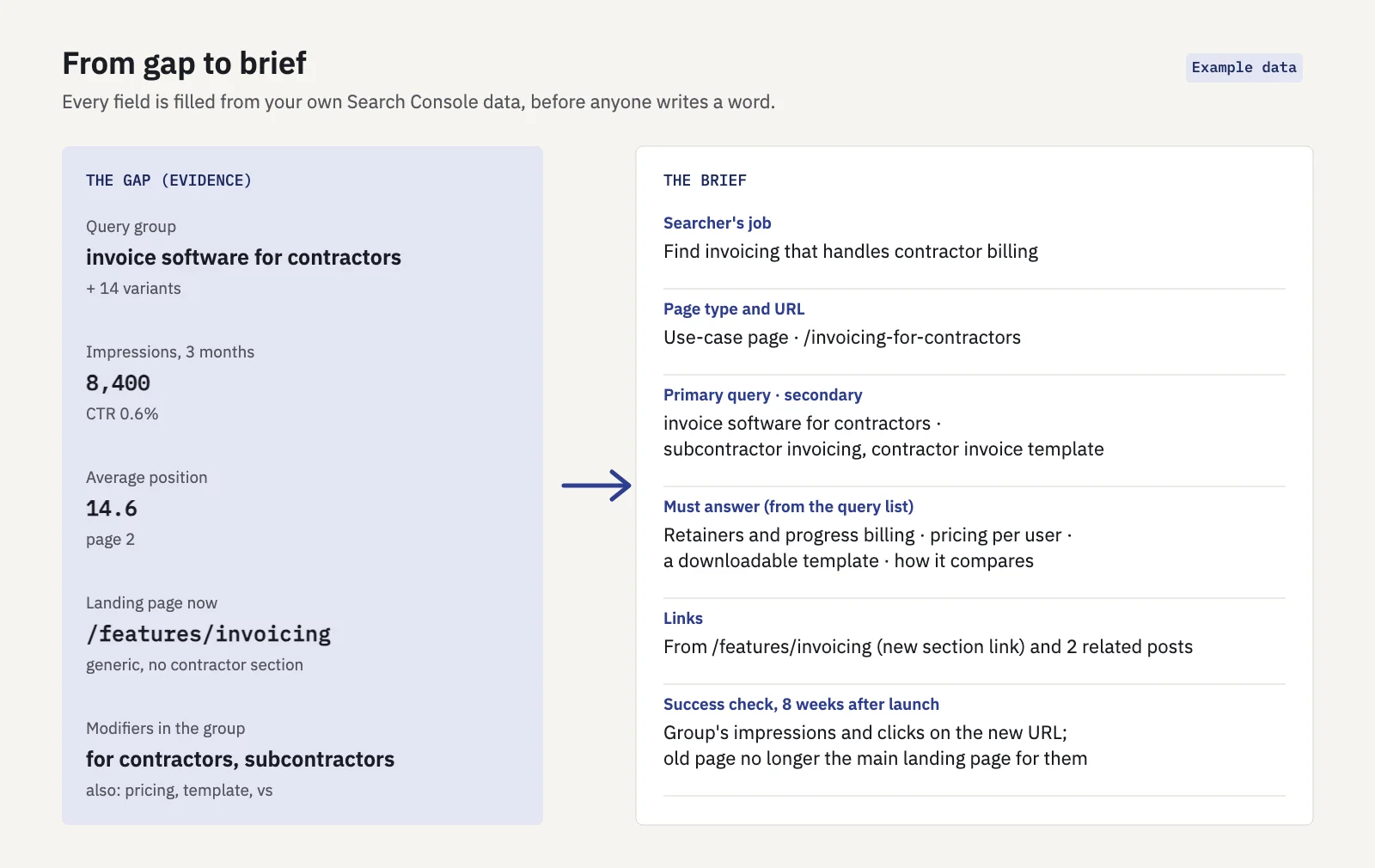
Fill in these fields for each gap:
- Searcher's job. One sentence on what the person is trying to do. Read the full query list, not just the top query.
- Page type and URL. Use-case page, comparison, pricing, how-to article or template. The modifiers tell you: "for X" points to a use-case page, "vs" to a comparison, a question to an article.
- Primary and secondary queries. The highest-impression query is the primary; the variants become headings and phrasing in the copy.
- What the page must answer. Turn the distinct questions and modifiers in the cluster into sections. If people search "pricing" and "template" alongside the core term, the page needs both.
- Internal links. Link from the generic page that ranks today, so Google has a clear path to the new, more specific URL.
- Success check. Decide up front what you'll look at and when: the group's impressions and clicks on the new URL, and whether the generic page stops being the main landing page for those queries.
Sometimes the right answer is a section, not a page. If a cluster is small and closely tied to an existing page, add a well-headed section there instead of creating a thin page that competes with it.
How to prioritise gaps
You will find more gaps than you can write. Rank them on three things.
Clicks at stake. Estimate what the cluster could earn if it ranked where your good pages rank. Take the cluster's impressions and multiply by the CTR your site gets at, say, position 3 for similar queries, then subtract current clicks. Say a cluster has 8,000 impressions over three months, earns 50 clicks, and your site typically gets 9% CTR at position 3: the estimate is about 670 extra clicks per quarter. It's a rough ceiling, not a forecast, but it puts gaps in a sensible order.
Business value. A pricing or "for X" gap close to a purchase decision is worth more than an informational question with the same clicks. Weight commercial and comparison intent higher if that's where your revenue comes from.
Effort. A new section on an existing page takes an afternoon. A comparison page that needs honest testing takes a week. Prefer cheap gaps with good demand first, then the larger bets.
A simple score of clicks at stake × value weight ÷ effort is enough to sort a list of thirty gaps into a first quarter's plan. Re-run the analysis every quarter: new queries appear, and some of your fixes will move queries out of the gap list.
To see whether a fix worked, track the cluster as a group rather than one keyword. Content groups in Serplyze let you define a group by query or URL rules and follow its clicks, visibility and rankings over time. Serplyze's Content screen also lists Page two keywords (tracked keywords at ranks 11–20) and CTR gap keywords (top 10, clicked well below what your similar keywords get), each with an estimate of clicks at stake.
When a competitor-based gap analysis still helps
Search Console only shows queries you already appear for. A competitor tool still earns its place when:
- The site is new. With little history there are few impressions to analyze, so third-party data is the only demand signal you have.
- You're entering a new topic. If you've never published about something, Google has no reason to show you for it, and your data is silent.
- You suspect whole topics are missing. Competitor keyword lists can reveal clusters you have zero impressions for, which no Search Console analysis can surface.
- You need a sense of the competition. Knowing who ranks and what their pages cover helps you scope the brief.
Use both: competitor lists to find topics you're missing entirely, your own data to find gaps where you're already close. The second list is usually shorter, cheaper to act on and faster to pay off, because Google has already shown you to the people searching.
Key takeaways
- Start content gap analysis from your own Search Console queries: the demand is measured and Google already finds you relevant.
- Five patterns point to gaps: high impressions with low CTR, positions 8–30 on a generic page, question queries, uncovered modifiers, and off-topic landing pages.
- Query × landing page data is the core of the method; you need the API, Looker Studio or BigQuery past 1,000 rows.
- Turn each query cluster into a brief with a job, page type, sections, links and a success check.
- Prioritise by clicks at stake, business value and effort; use competitor tools for topics where you have no impressions yet.
Serplyze shows your queries with their landing pages, striking-distance and new-query lists, and content groups to measure each fix, all from your own Search Console data. Start free and run your first gap analysis today.