Keyword cannibalization is when two of your URLs answer the same search intent and Google can't settle on one. You can see it directly in Search Console, if you know which tabs to read and which "problems" to ignore.
What keyword cannibalization is (and what it isn't)
The common definition says two pages targeting the same keyword. That's too loose. Plenty of pages share words. A guide called "how to choose running shoes" and a category page called "running shoes" both contain the phrase, but they serve different searchers, and Google usually knows that.
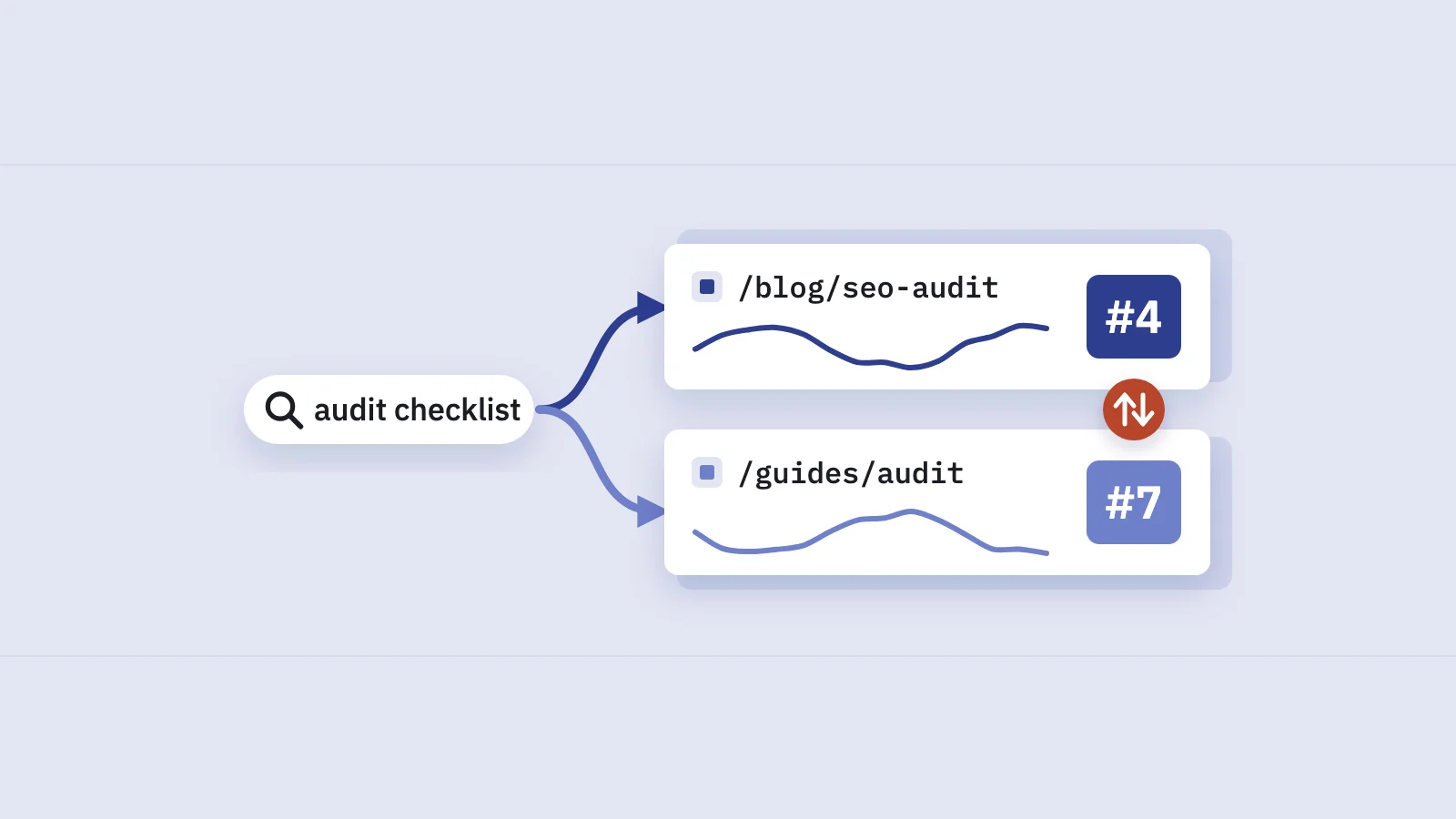
Cannibalization is about intent, not words. It happens when two URLs on your site are plausible answers to the same query for the same reason, so Google keeps testing one against the other. In the data it looks like this:
- one query, two (or more) of your URLs collecting impressions for it;
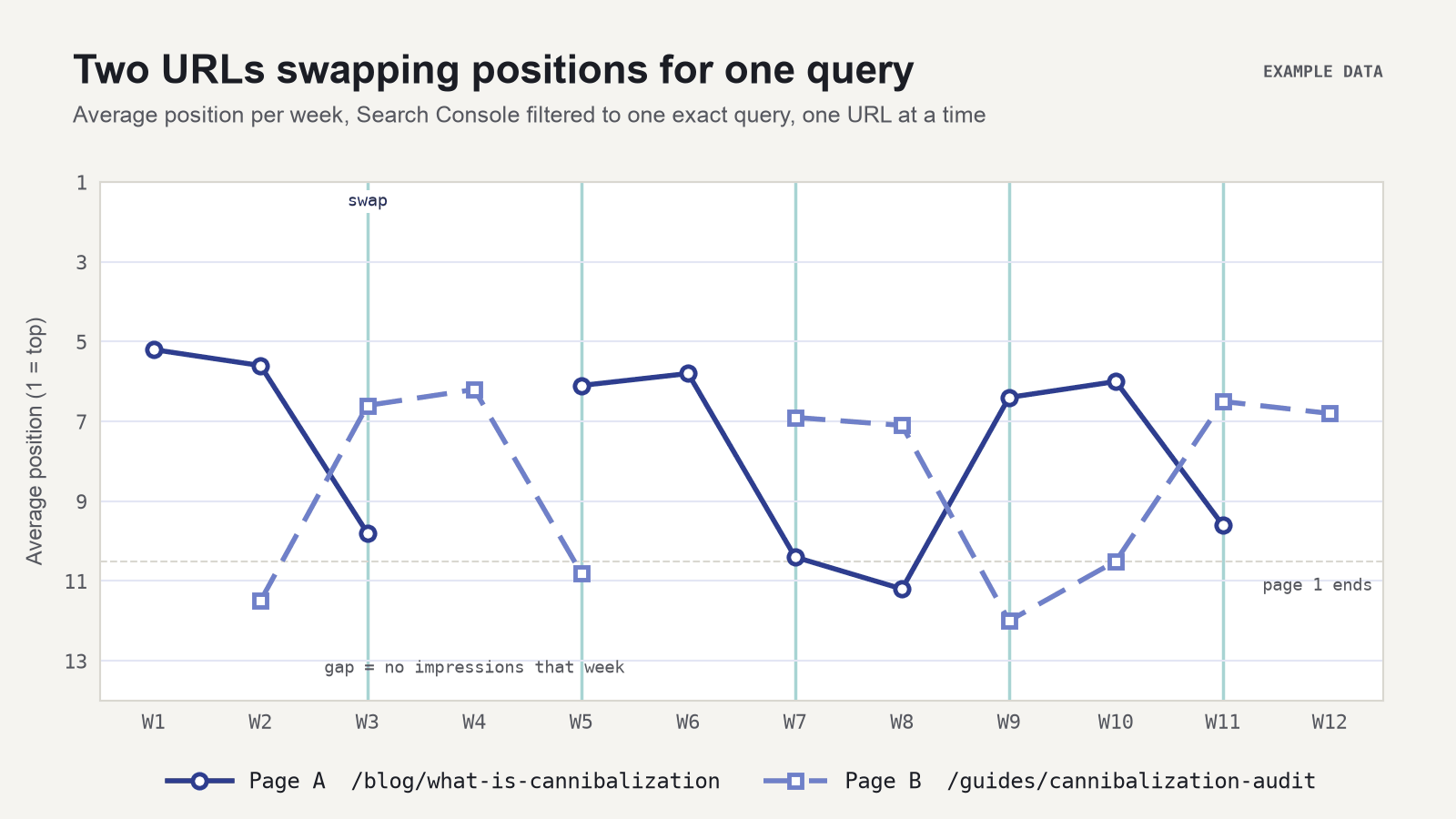
- the URLs taking turns: one gets the impressions for a few days, then the other does;
- an average position that jumps around instead of settling.
If one URL gets nearly all the impressions and the other shows up once in a while, that's not cannibalization. It's normal noise.
Why it costs you clicks
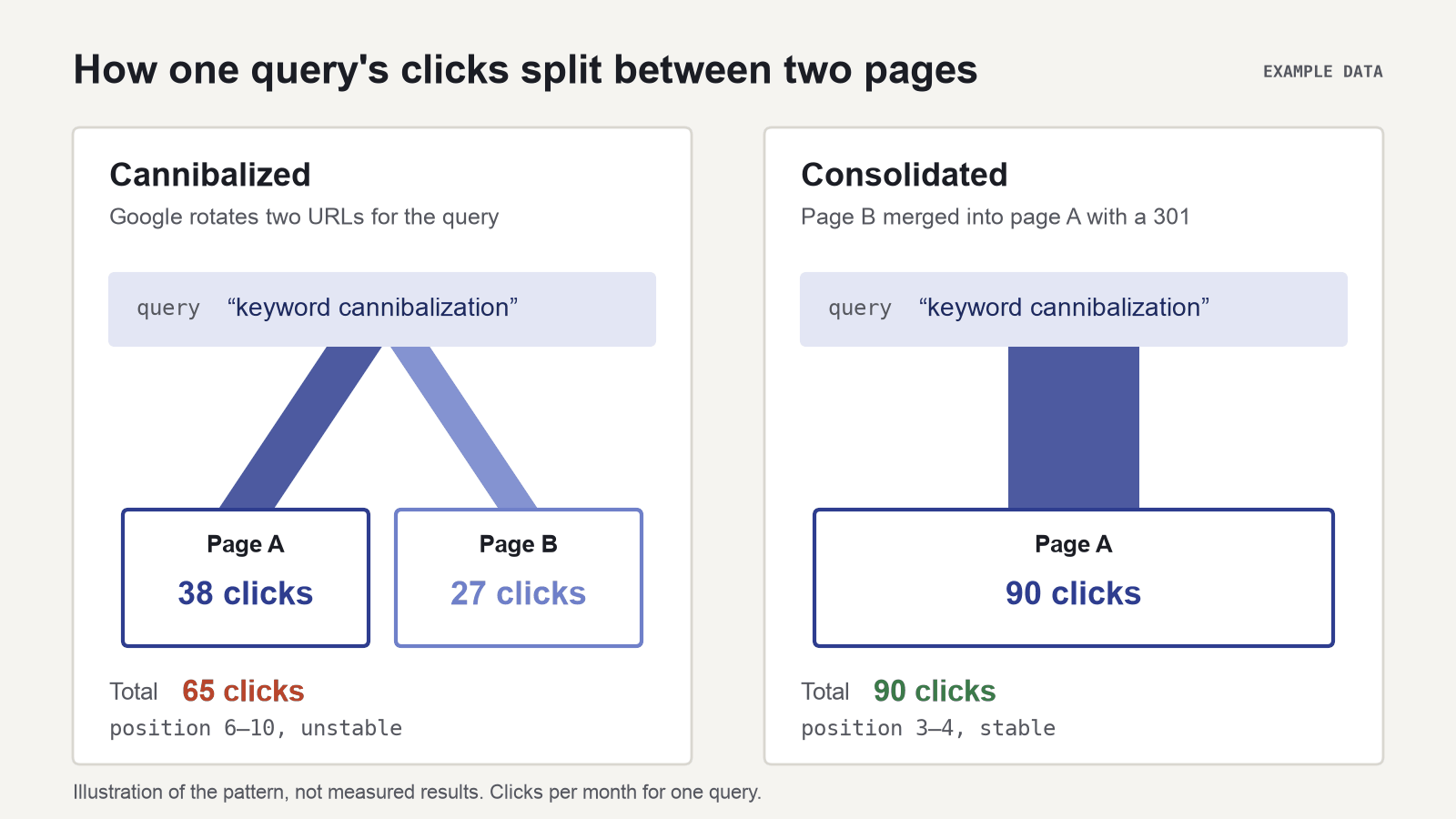
When Google can't decide, neither page builds up a stable position. Links, engagement and relevance signals are spread across two URLs instead of one, and the query swings between them. Each time Google switches URLs, the query starts again from a page with less of the history behind it, so swaps often show up as dips.
The clicks don't vanish into a third place. They split, and the total often ends up smaller than one strong page would earn on its own.
How to find keyword cannibalization in Search Console
You need the Performance report and about ten minutes per query. Start with the queries that matter: high impressions, commercial intent, or a position that has stalled on page one.
- Open Performance > Search results. Keep Search type on Web. Set the date range to the last 3 months, which is long enough to see swaps and short enough to reflect the current site.
- Filter to one query. Click + Add filter, choose Query, then Custom (regex) and enter the query anchored at both ends, for example
^keyword cannibalization$. Without the anchors you also pick up longer variants, which can hide the pattern. - Open the Pages tab. This lists every URL of yours that got impressions for that query. One URL with nearly all the impressions means there's no problem. Two URLs each with a meaningful share (say, more than 10–20% each) is a candidate.
- Compare the two URLs. Click + Add filter again, choose Page, switch the dialog to Compare, and enter the two URLs. The table now shows both side by side with a Difference column. Open the Queries tab to see which other queries they share, which tells you how wide the overlap is.
- Look at the swaps over time. Remove the comparison, keep the query filter, and add a Page filter for one URL at a time. Turn on Impressions and Average position in the chart, then do the same for the other URL. If URL A's impressions drop on the days URL B's rise, and the position line is jagged, Google is rotating them.
- Check a longer date range. Repeat with 6 or 12 months (the report goes back 16 months). A swap that started after a redesign, a new post or a migration points you straight at the cause.
Work the other way round too. Filter to a page that should rank for a topic, open the Queries tab, then click a query to filter on it and check the Pages tab. Pages that "should" own a query are often the ones losing it to an old blog post.
The signs to look for
| Signal in Search Console | What it usually means |
|---|---|
| Two URLs, each with a large share of impressions for one query | Google sees both as answers. Worth a closer look |
| Impressions alternate between the URLs week to week | Google is rotating them: the classic pattern |
| Position for the query jumps by several places with no site change | Often the swap itself, not a ranking loss |
| Both URLs appear on the same days with stable positions | A double listing. Usually fine |
| A second URL appears only after you published something new | The new page is cannibalizing the old one |
The limits of the Search Console UI
The Performance report shows the evidence, but it isn't built for finding cannibalization across a whole site.
- One query at a time. There's no view that lists "queries with two or more ranking URLs." You check candidates one by one.
- 1,000 rows. Tables and exports in the UI stop at 1,000 rows (Google: Exporting data). For a large site the API or bulk export is the way past it.
- Position counts differently by tab. In the chart and the Queries tab, data is aggregated by property and position is your topmost result. In the Pages tab, it's aggregated by page (Google: Performance report). So two URLs' numbers won't add up to the query total, and that's expected.
- Hidden queries. Search Console leaves out anonymized queries, and filtering by query or URL can change totals (Google: filtering and comparison). Rare queries can't be checked at all.
- One comparison at a time. Adding a new Compare replaces the previous one.
This is where a tool that reads the same data at query × page level helps. Serplyze's keyword cannibalization check runs after every sync over the keywords you track and flags any keyword where two or more of your URLs each get at least 10% of its impressions or clicks, with each URL's share next to it. It's a list for review, not an automatic verdict, for the reasons in the next section.
When it's not a problem
Two URLs for one query is not always something to fix. Leave these alone:
- Brand and navigational queries. Search for your brand and Google shows your homepage, sitelinks and maybe a login page. Several URLs collecting impressions is exactly what you want.
- Double listings. If both URLs appear on page one at the same time, you own more of the page. Check whether the position is stable and both get clicks before you touch anything.
- Different intents that share words. A "pricing" page and a "how pricing works" guide may both appear for a broad query while Google figures out what the searcher wants. If each URL owns its own set of more specific queries, they're doing different jobs.
- Tiny shares. A second URL with a few percent of impressions is noise, not a fight.
- Country or language versions. Localized pages with correct hreflang can show for the same query in different markets. Filter by Country before deciding.
- A short overlap after a change. Right after a redirect or a migration, the old and new URLs can both show for a few weeks. Check again later before acting.
How to fix it: choosing the right move
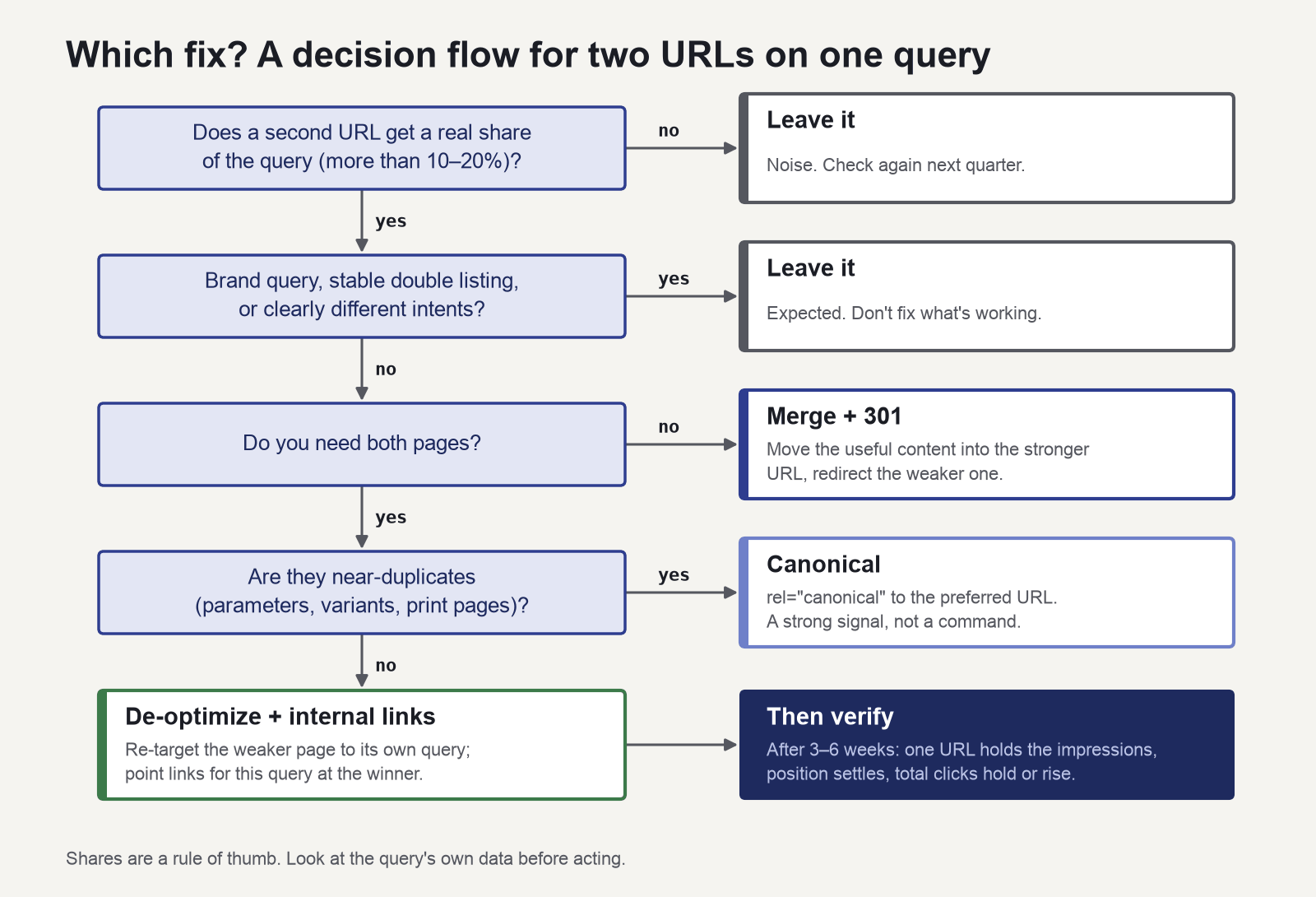
The fix depends on whether you need both pages and whether they're really about the same thing.
| Situation | Fix | Notes |
|---|---|---|
| Same intent, one page is weaker or outdated | Merge + 301 | Move the useful content into the stronger URL, then redirect the weaker one. Update internal links to point at the target directly |
| Both pages are needed, but one drifts into the other's topic | De-optimize | Change the weaker page's title, H1 and copy so it targets its own, more specific query |
| Near-duplicate URLs (parameters, print versions, near-identical variants) | Canonical | Google treats rel="canonical" as a strong signal, not a command (Google: consolidate duplicate URLs). Don't use it between pages with different content |
| Both pages are fine, but your links tell Google the wrong story | Internal links | Point links using the query's wording at the page you want to rank. Remove them from the other one |
| Brand query, double listing, different intents, tiny share | Leave it | Note it and check again next quarter |
A few practical rules:
- Merge only when the content really overlaps. Redirecting a page that serves a different intent just loses the queries it was winning.
- A redirect is the clearest signal. Google's documentation calls redirects "a strong signal" for which URL becomes canonical, the same weight it gives
rel="canonical". A redirect also sends visitors to the right page, which a canonical does not. - Fix one pair at a time. If you change ten pages in one week, you won't know which change helped. Topic planning helps prevent new overlaps. See keyword clustering in Search Console.
How to verify the fix
Give Google time to recrawl, then check the same views you used to find the problem.
- Note the date of the change. Write it down, or add an annotation in your reporting tool, so the before and after are clear.
- Wait 3–6 weeks. Recrawl and re-ranking take time, and short windows exaggerate noise.
- Compare equal date ranges. In the Date filter, open Compare and set the weeks after the change against the same number of weeks before it.
- Check the Pages tab for the query. One URL should now hold nearly all the impressions. If you redirected, the old URL should fade out.
- Look at the query's total clicks, not one page's. A merged page gains what the old page lost. Judge the query as a whole.
- Confirm Google's choice. Use URL Inspection on the old URL to check that the redirect is seen, or that the Google-selected canonical matches the one you declared.
A before/after comparison shows a correlation, not proof. A core update or a seasonal swing in the same weeks can move the numbers too. Keep the comparison windows the same length and check the site's overall trend next to the query.
If you track the keyword in Serplyze, you can log the merge or redirect as an action and the before/after impact on the targeted keywords is measured for you. The same cannibalization check can go into a scheduled SEO report, so you can see the issue go away without re-running the steps above. For the wider picture of what to report, see SEO KPIs and the SEO report template.
Key takeaways
- Cannibalization means two URLs serving the same intent for a query, with Google rotating between them. Shared words alone aren't a problem.
- In Search Console: filter to one exact query, open the Pages tab, compare the two URLs, and look for alternating impressions and a jagged position line over time.
- Ignore brand queries, stable double listings, different intents, tiny shares and short overlaps after a migration.
- Fix with merge + 301 when one page is redundant, de-optimize when both are needed, canonical for near-duplicates, internal links to point at the winner, or leave it alone.
- Verify with equal date ranges before and after, look at the query's total clicks, and confirm Google's choice with URL Inspection.
Serplyze checks every tracked keyword for split URLs after each sync, using your own Search Console data. Start free and connect Search Console in a few minutes.