The best keyword clusters for an existing site aren't in a keyword tool. They're in Search Console: the queries Google already shows you for, and the pages it already picked for each one. This guide walks through clustering that data, from getting past the 1,000-row export to naming clusters you can plan and report with.
Why cluster the queries you already rank for
Keyword clustering means grouping search queries that one page can satisfy. A keyword tool gives you a list of what people search. Search Console gives you something more useful for a live site: what people searched before they saw your pages, with clicks, impressions and position for each query.
Clustering that data has three advantages over clustering a tool export:
- Google has already voted. For every query, Search Console tells you which URL Google chose to rank. That is the strongest clustering signal there is, and it costs nothing.
- The numbers are yours. Impressions and clicks are measured on your site, not modelled from a panel, so a cluster's size is its real demand for you.
- It shows the long tail. Most sites get impressions for thousands of queries no tool lists, and they fall into place once you group them.
The output is a set of named clusters, each with one owner page, its queries and its totals. That set becomes the backbone of content planning, cannibalization checks and reporting.
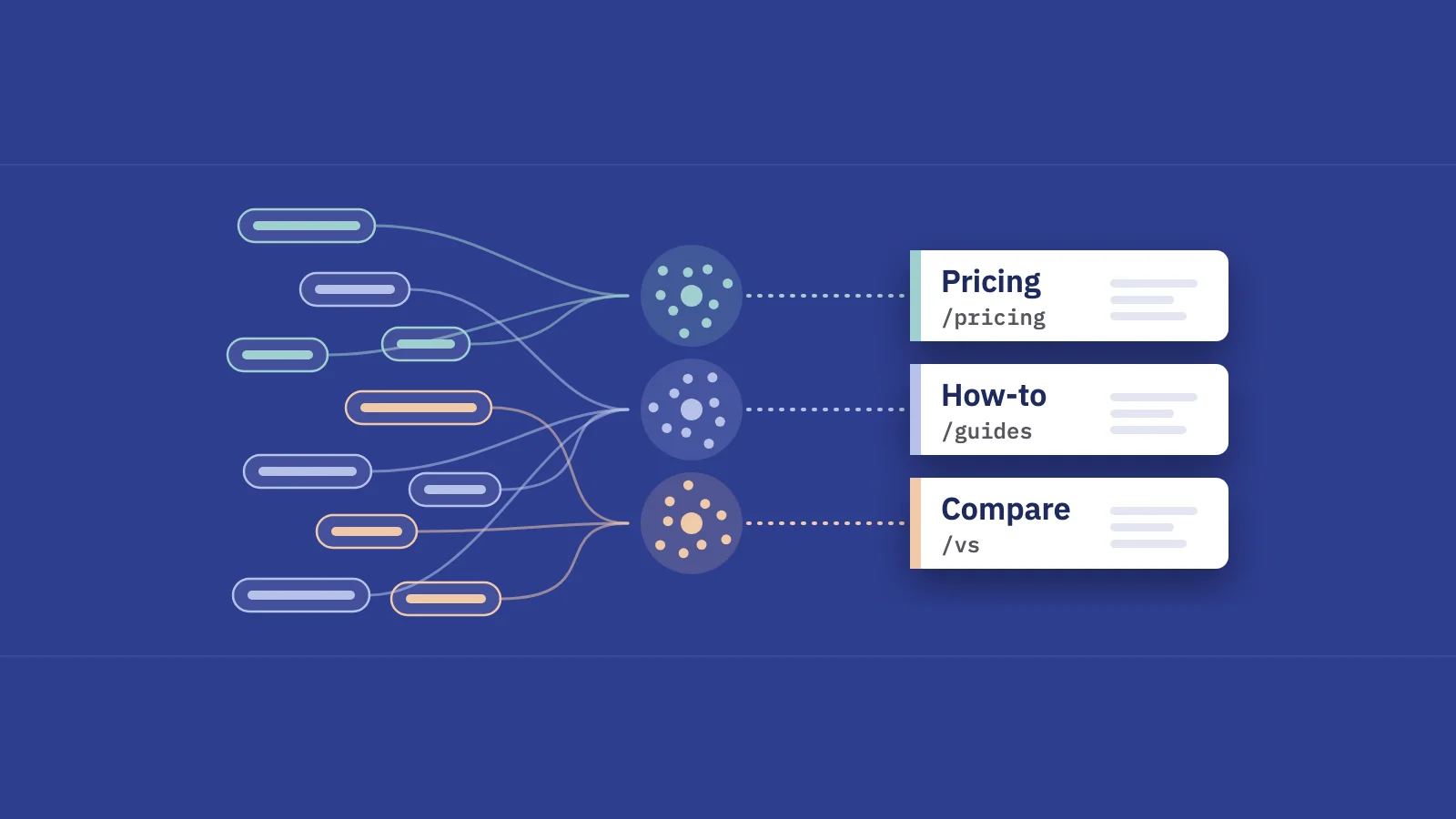
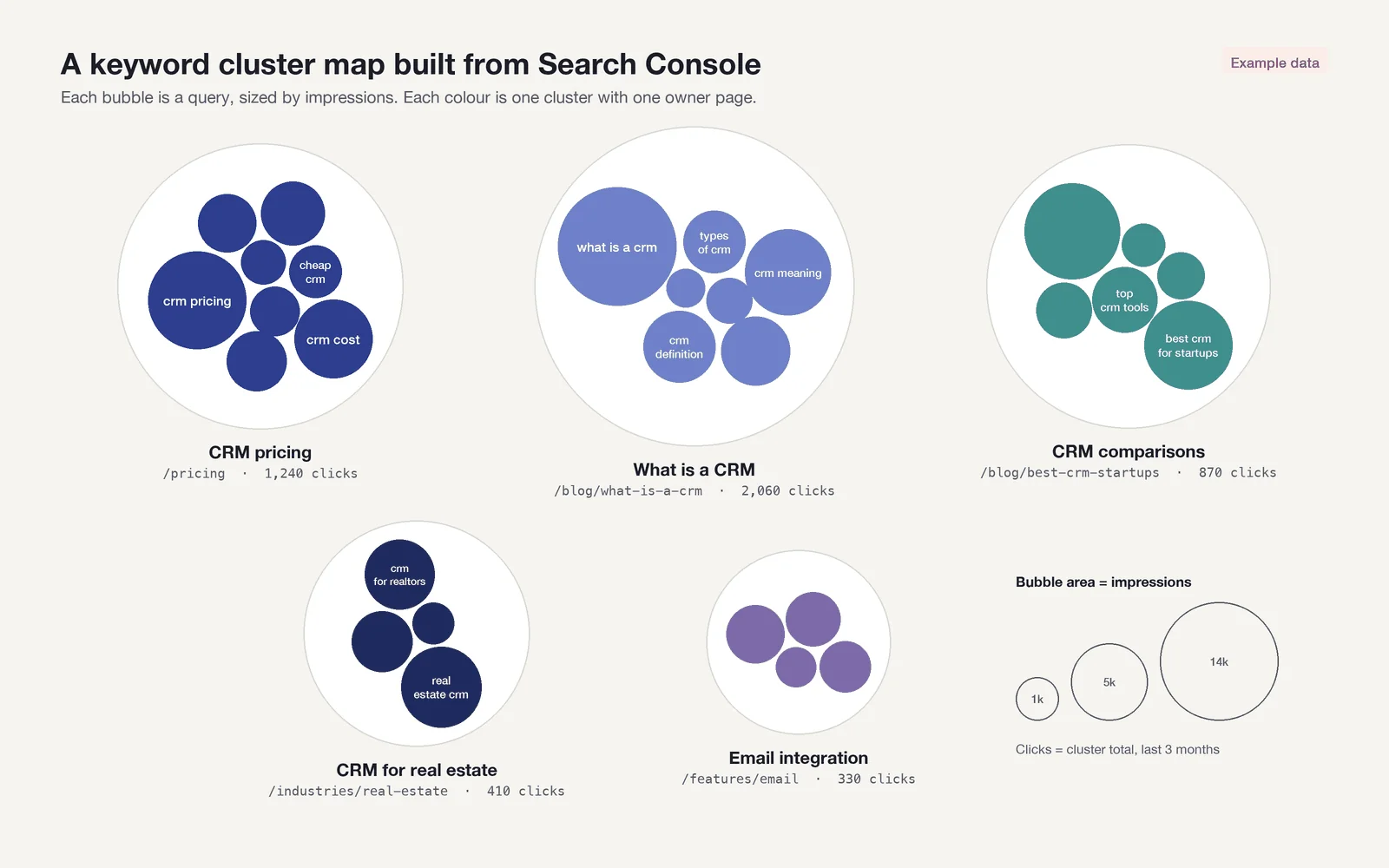 A cluster map: each bubble is a query, sized by impressions; each colour is one cluster with one owner page. Example data.
Four ways to cluster keywords
There are four common methods. They are not rivals; a good process uses the first two for structure and the last two to fill gaps.
| Method | Signal it uses | Good at | Weak at |
|---|---|---|---|
| SERP overlap / landing page | Which URL Google ranks for each query | Matches how Google already groups your content | Queries with no clear landing page, or two pages taking turns |
| Rule-based (modifiers, regex) | Words in the query: "price", "vs", "how to", brand names | Transparent, repeatable, updates itself as new queries arrive | Needs maintenance; misses synonyms you didn't write down |
| Topic and intent | A human's judgement of what the searcher wants | Separating "buy" from "learn" queries that share words | Slow and subjective at scale |
| Semantic (embeddings, AI) | Meaning similarity between query texts | Synonyms and phrasing you'd never write a rule for | Ignores what Google actually ranks; needs review |
SERP overlap is the classic definition: two keywords belong together if Google shows mostly the same results for both. Keyword tools check this by pulling the top 10 for every keyword and counting shared URLs. With Search Console you get a cheaper version of the same idea: if Google sends both queries to the same page of yours, it already treats them as one topic for your site.
Rule-based grouping catches what landing pages can't tell you. "crm pricing" and "crm cost" may land on the pricing page, but so might "is crm free". A rule like "query contains price, pricing or cost" gives you a commercial cluster you can track over time.
Topic and intent grouping is the editorial layer: deciding that "what is a crm" and "crm meaning" are informational, and that "best crm for startups" is a comparison query that deserves its own page.
Semantic grouping uses text similarity, usually embeddings or an AI model, to suggest groups. It's good for a first pass over thousands of queries. Treat its output as a draft, because similarity in wording is not the same as Google ranking one page for both.
How to cluster Search Console queries, step by step
The process below works in a spreadsheet for a few thousand queries and in SQL or Python for more.
- Export queries with their landing page. In Search Console, the Performance > Search results table shows and exports at most 1,000 rows, which is too few for most sites. Google's own deep dive on performance data lists the alternatives: the Search Analytics API and the Looker Studio connector go up to 50,000 rows per day per site per search type, and the API returns up to 25,000 rows per request, so you page with
startRow(Google's guide to getting all your data). The bulk data export to BigQuery is not affected by that daily row limit, but it only starts from the day you set it up and doesn't backfill (setup docs). Whatever the route, request the query and page dimensions together, for the last three to six months, web search only. - Normalize the queries. Lowercase, trim, collapse double spaces, and strip stray punctuation. Then aggregate: one row per query and page, with summed clicks and impressions and an impression-weighted average position. Don't merge singular and plural forms yet; Google sometimes ranks different pages for them, and that's worth seeing.
- Group by landing page. For each query, pick its primary page: the URL with the most clicks over the period (most impressions if it has no clicks). Queries that share a primary page form a seed cluster. Note any query where a second URL has more than about a fifth of the impressions; those are your cannibalization candidates for later.
- Refine with rules. Run modifier and regex rules across all queries to split or label the seed clusters: brand versus non-brand, pricing, comparisons, questions, locations. Where a rule and a landing page disagree, the rule usually reveals a missing page or a page answering the wrong intent.
- Name each cluster. Use the head term plus intent: "CRM pricing (commercial)", "What is a CRM (informational)". Give every cluster exactly one owner page, even if that page doesn't exist yet. A cluster without an owner is a content gap.
- Use the clusters for planning and reporting. Add the totals per cluster: queries, impressions, clicks, CTR, weighted position. Sort by impressions to see demand and by position to see opportunity. Then keep the clusters stable so you can report the same groups month after month.
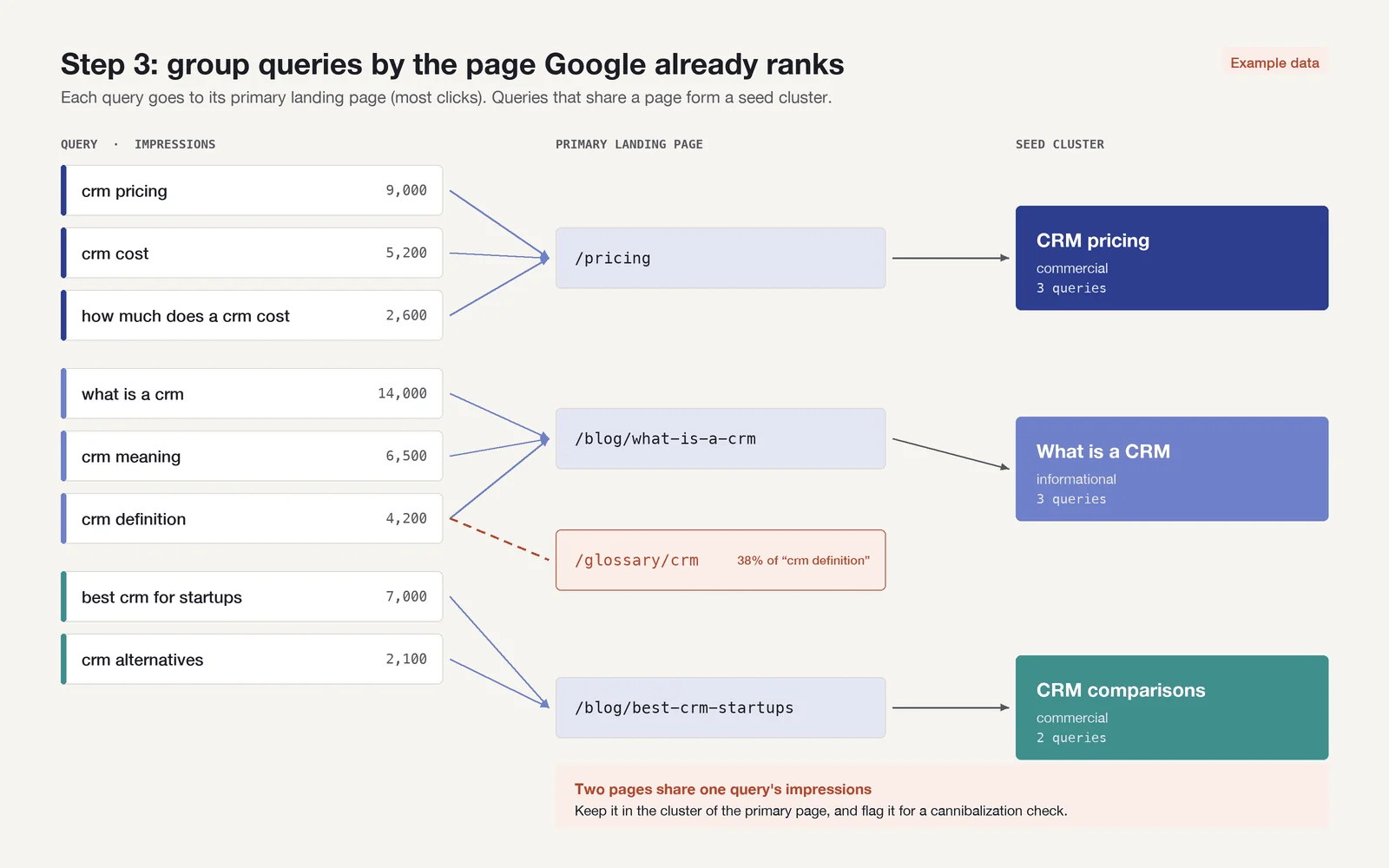 Step 3: the page Google already ranks for each query becomes the first draft of the cluster. Example data.
Pull the last three to six months, not sixteen. Old queries that pointed to since-redirected or deleted URLs will otherwise create clusters for pages that no longer exist.
Rules worth starting with
Search Console's own Query filter accepts regular expressions (Custom (regex)) in RE2 syntax, which means no lookaheads or backreferences; use "Doesn't match regex" instead of a negative lookahead. The same patterns work in BigQuery, Google Sheets' REGEXMATCH and most rank trackers.
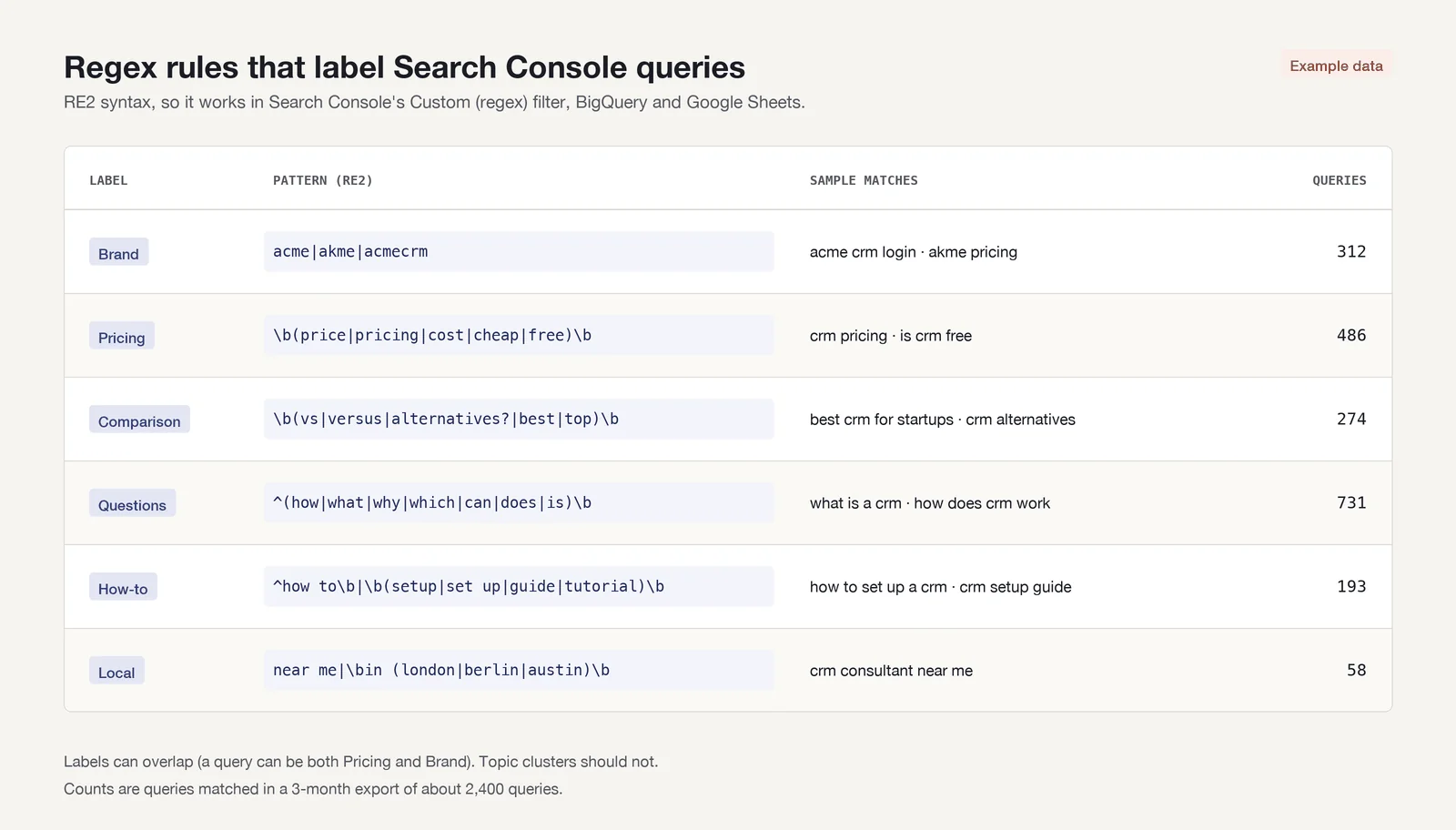 A starter rule set. Replace "acme" with your own brand terms and misspellings. Example data.
Keep the rules in a sheet with the pattern, the cluster name and the date you last checked it. When a new product line or competitor appears, you edit one row instead of re-clustering everything.
Pitfalls that skew your clusters
Anonymized queries. Search Console leaves out queries that weren't issued by more than a few dozen users over two to three months. They are missing from every table and every export, but included in chart totals unless you filter by query (Google explains it here). The bulk export marks them with an is_anonymized_query flag and an empty query (table reference). So the sum of your clusters will always be lower than the site total, and long-tail-heavy pages will look smaller than they are. Report cluster shares against the sum of named queries, and say so.
Brand terms. Brand queries tend to have high CTR and top positions, and they can swamp a cluster. "acme crm pricing" belongs to the pricing cluster, but its clicks come from people who already know you. Tag brand first with a rule that includes misspellings and product names, then report every cluster as brand and non-brand.
Tiny clusters. Splitting until every cluster is perfectly pure leaves you with dozens of groups of three queries and a dozen impressions. They are noise in reports and rarely deserve their own page. Set a floor (for example, a minimum number of queries or impressions per period) and fold anything smaller into its nearest parent cluster or a "long tail" group.
A query can belong to more than one rule-based label (say "pricing" and "brand"), but it should belong to only one topic cluster. Otherwise totals double count and the owner page is unclear.
How clusters feed cannibalization checks and content gaps
Once each cluster has one owner page, two analyses fall out of it almost for free.
Cannibalization. In a healthy cluster, nearly all impressions go to the owner page. When a second URL from your site takes a meaningful share of a cluster's impressions, or the ranking URL for its top queries keeps switching between two pages, you have keyword cannibalization. Checking at the cluster level is faster than checking query by query, because the overlap shows up as one number per cluster instead of thousands of rows.
Content gaps. Gaps show up in three forms:
- A rule-based cluster with no owner page: queries match "vs" or "alternative" but they land on your homepage or a product page.
- A cluster whose owner page ranks on page two for most of its queries: the page exists but doesn't satisfy the intent.
- A cluster with growing impressions and a CTR well below what its position suggests: the snippet or the page format is off.
Each of these becomes a planning item with a named cluster, an owner page and a measurable target: clicks, average position or share of impressions for that cluster. That's also how clusters belong in a report: a handful of named clusters with their trend is easier to read than a keyword table. See which SEO KPIs to track and the SEO report template for how to lay that out.
Keeping clusters up to date
A one-off spreadsheet goes stale the month new queries appear. Rules that run on every new export solve most of that, which is why the rule layer matters more than the first clustering pass.
In Serplyze, content groups work this way. Rule-based keyword groups match tracked keywords on query text (contains, starts with, equals or a regular expression), on the landing URL, on position, clicks, impressions or CTR, and on whether a query matches your brand terms; a keyword joins or leaves the group as soon as it matches or stops matching. Page groups do the same for URLs. On paid plans, AI grouping suggests a category tree from your keyword list for you to review before anything is applied. Each group then gets its own visibility, clicks and rank spread, and you can point alerts and reports at a group instead of a single keyword. For the page overlap side, see keyword cannibalization.
Key takeaways
- Cluster the queries you already rank for: Search Console tells you which page Google picked for each one, which is the best clustering signal available.
- The UI exports only 1,000 rows. Use the API (25,000 rows per request, 50,000 per day per search type) or the BigQuery bulk export for the full list, with query and page together.
- Seed clusters by landing page, refine them with regex rules, then name each cluster and give it exactly one owner page.
- Account for anonymized queries, separate brand terms and fold tiny clusters into their parents.
- Clusters turn cannibalization checks and content-gap analysis into one row per topic, and make reports readable.
Serplyze reads your Search Console data daily and keeps rule-based keyword and page groups up to date for you. Start free and connect a property in a few minutes.