An external link is a link from your page to another website. Google's own guidance treats linking out as normal and often useful, as long as paid and user-submitted links are labeled honestly. This guide covers how Google reads outbound links, which rel value to use when, how to audit the links you already have, and what Search Console can and can't show you about them.
External links, internal links and backlinks
Three kinds of links get mixed up in SEO conversations. The difference is only where each end of the link sits:
| Link type | From | To | Where Search Console shows it |
|---|---|---|---|
| Internal link | Your page | Another page on your site | Links report, Internal links |
| External link (outbound) | Your page | A page on another site | Nowhere: no report lists them |
| Backlink (inbound) | A page on another site | Your page | Links report, External links |
The naming trips people up in Search Console. In the Links report, the section called External links means links from other sites to you: your backlinks. It doesn't list the links your pages make to other sites. So when this post says "external links", it means outbound links, the ones you control.
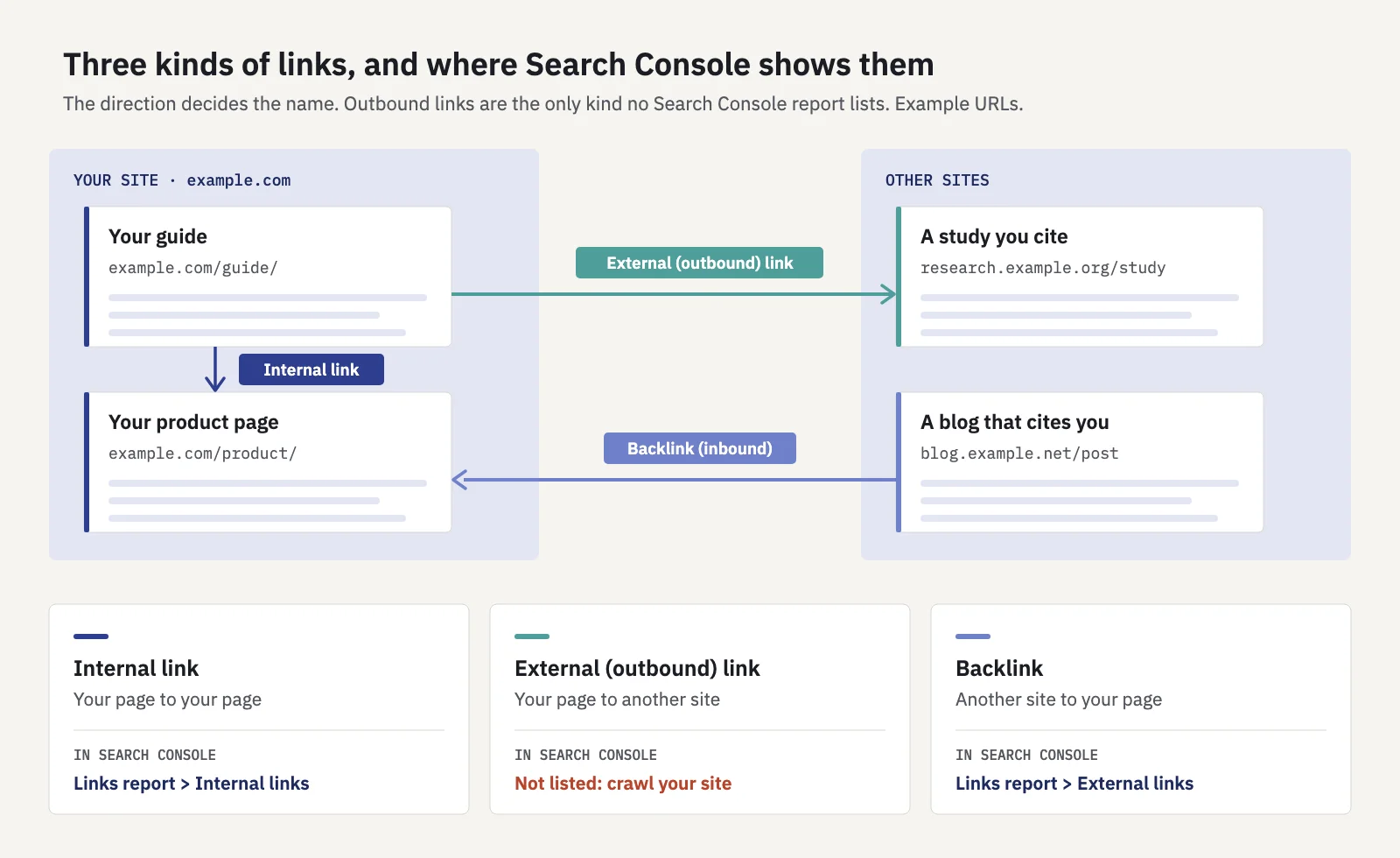
Your outbound links are the one kind of link no Search Console report lists.
Internal links have their own playbook, built on Search Console data. We cover it in internal linking with Search Console, so this post stays with links that leave your site.
How Google treats the links you make
Google discovers pages by following links, and it uses links to understand what pages are about. Its documentation on making links crawlable sets out the basics, and they apply to outbound links as much as internal ones:
- Use a real link. Google can reliably follow an
<a>element with anhrefattribute. Links made from other elements with click handlers may not be followed. - Write descriptive anchor text. The words of the link should say what the target is about, concisely, and make sense with the text around them.
- Linking out is fine. The same page says linking to other sites, for example when you cite your sources, can help build trust with readers. It tells you to use
nofollowonly when you don't trust the source, not on every external link.
Plenty of sites still put nofollow on every outbound link out of habit; Google doesn't ask for that. A plain link to a relevant source is what a careful writer does, and Google's guidance on helpful content lists "clear sourcing" among the things that make content trustworthy. Our post on E-E-A-T covers what that means for your pages.
Google doesn't publish how much an outbound link helps the page it sits on, so be wary of claims about an ideal number of external links. Link out when it helps the reader, and label it when it's not a plain editorial link.
rel="sponsored", "ugc" and "nofollow": which to use
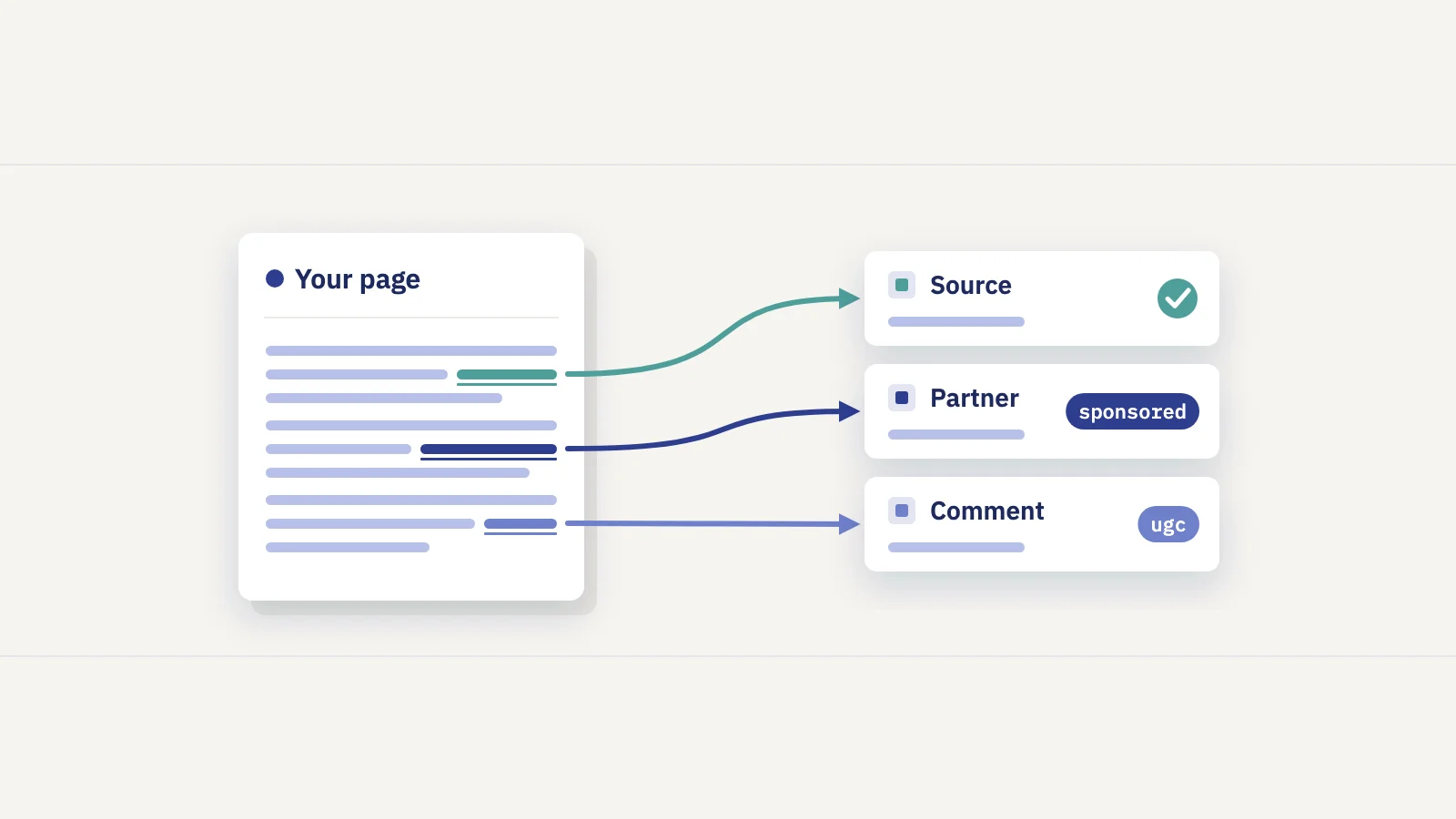
Google's guide to qualifying outbound links defines three rel values for links that aren't ordinary editorial links:
| Attribute | Use it for | Example |
|---|---|---|
rel="sponsored" |
Ads, paid placements, sponsorships and other links you were compensated for | A paid listing, a sponsored post, an affiliate link |
rel="ugc" |
Links inside user-generated content | Blog comments, forum posts, user reviews |
rel="nofollow" |
Any other link you don't want to vouch for, when the two above don't fit | A link you need to include but don't endorse |
| No attribute | Normal editorial links you're happy to stand behind | Citing a study, crediting a source |
In HTML it looks like this:
<a href="https://partner.example/offer" rel="sponsored">Partner offer</a>
<a href="https://forum-user.example/" rel="ugc nofollow">Their site</a>
A few rules from Google's documentation and its 2019 announcement of the new values:
- Values can be combined, separated by spaces or commas, such as
rel="ugc nofollow". - They are hints, not commands. Google treats all three as hints about which links to consider or exclude, and since March 1, 2020,
nofollowhas also been a hint for crawling and indexing. A nofollowed URL can still be crawled if Google finds it another way. - Paid links are the one case that must be marked. Google says there's no "wrong" attribute except on sponsored links: a paid or ad link needs
sponsoredornofollow. Google preferssponsored, but either works for this purpose. - You don't need to change old
nofollowlinks. Existingnofollowon ads still counts. nofollowis not a way to keep a page out of the index. To keep one of your own pages out of search, usenoindex; to stop crawling, use robots.txt. Our guide to robots.txt and noindex explains the difference.
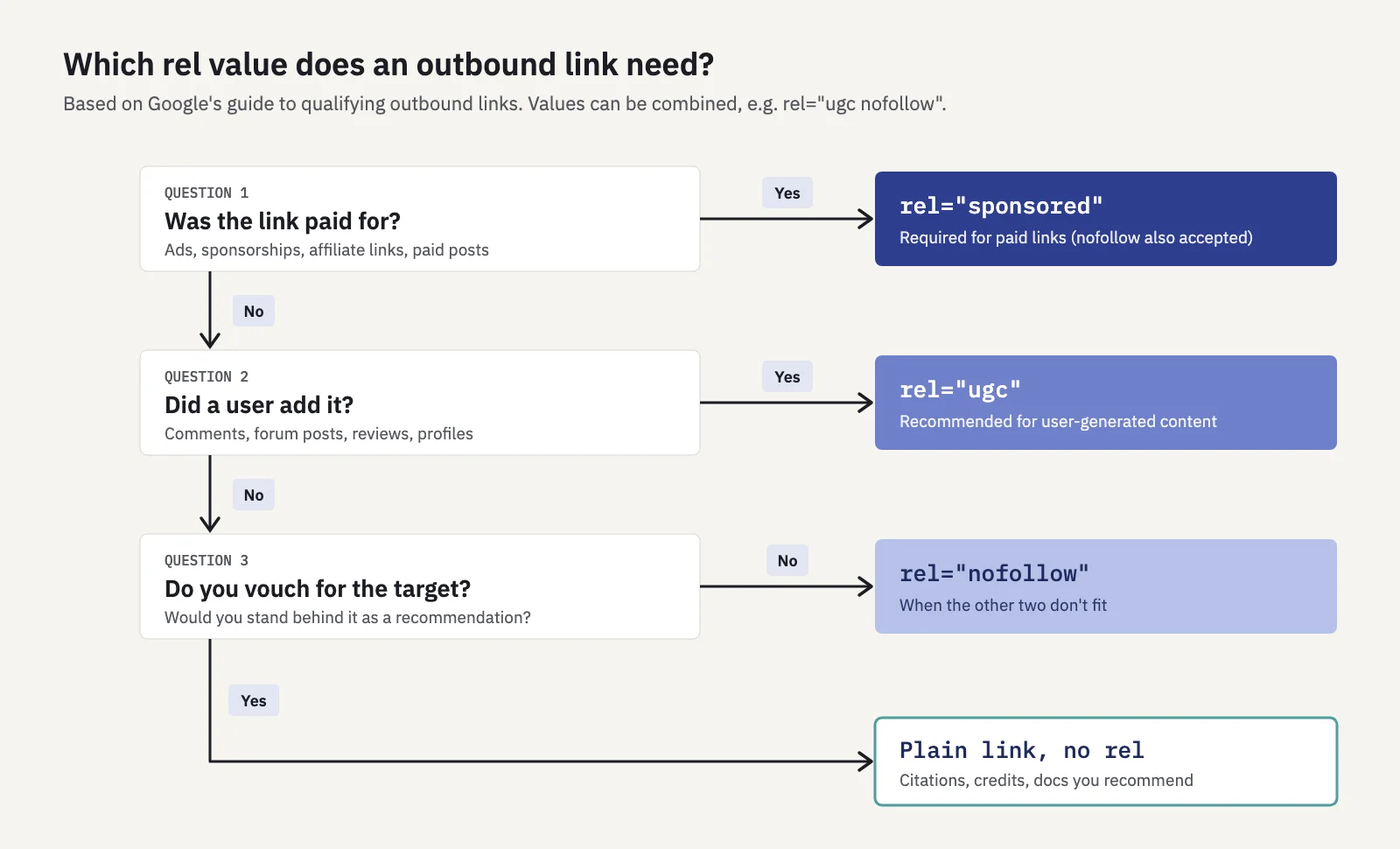
Ask the questions in this order. Only the paid-link case is a policy requirement.
When to link out, and when not to
The question to ask of every outbound link is the reader's: would they want to go there next? Some cases where the answer is usually yes:
- Citing a source. A statistic, a quote, a definition or a policy should link to where it comes from. Prefer the primary source over a page that repeats it.
- Giving credit. If an idea, image or dataset came from someone else, link to them.
- Pointing to official documentation. Product docs, laws, standards and specifications are what readers need to check details.
- Recommending a resource. If you say a tool or guide is useful, link to it. If you were paid to say so, mark it
sponsored.
And cases that call for care:
- Affiliate links are compensated links, so they take
rel="sponsored". Google's spam policies say affiliate links are fine when they're treated appropriately. - Advertorials, guest posts and press releases. Google lists paid articles whose links pass ranking credit, and links with optimized anchor text in guest posts or press releases, as link spam. If a link in a post you publish was part of a deal, qualify it.
- Footer and template links. A partner link in your footer appears on every page. If it's part of a deal, especially one placed on many sites, it fits the policy's "widely distributed links in the footers or templates of various sites". Mark commercial ones
sponsoredor drop them. - Link exchanges. "Link to me and I'll link to you" deals done mainly for ranking are listed as link spam when they're excessive.
Linking to a page that competes with you for a query is a judgment call, not a penalty. If it's the best source for a fact, citing it helps your reader.
Anchor text for external links
Anchor text works the same way on outbound links as on internal ones. Google's link best practices ask for text that is descriptive, reasonably concise and relevant to both pages, and they warn that generic text like "click here" gives little context.
- Name the target. "Google's guide to qualifying outbound links" beats "this page".
- Keep it short. A few words, with the surrounding sentence carrying the rest.
- Don't stuff keywords. Google calls keyword stuffing a violation of its spam policies, and optimized anchor text in paid links is one of the link spam examples.
Link spam: what puts a site at risk
Google defines link spam as creating links to or from a site primarily to manipulate rankings. Note the "from": outbound links count. The link spam section lists, among other things:
- Buying or selling links for ranking, including exchanging goods, services or free products for a link
- Excessive link exchanges and partner pages made only to cross-link
- Requiring a link in a contract or terms of service without letting the site owner qualify it
- Text ads and advertorials whose links pass ranking credit
- Widely distributed links in widgets, footers or templates across many sites
- Low-quality directory or bookmark links, and optimized links in forum posts or signatures
Google also says buying and selling links is a normal part of advertising, and that paid links don't violate the policy when they're qualified with rel="sponsored" or rel="nofollow".
If Google finds a pattern of manipulative outbound links on your site, it can apply a manual action. Search Console's Manual Actions report names it Unnatural links from your site. Google's fix: find paid links and other links that break the policy, remove them or mark them so they don't pass ranking credit, then click Request Review with examples of what you changed. A separate action, Unnatural links to your site, is about your backlinks.
Outbound links you didn't add can also be a problem. Hacked sites often get hidden spam links injected into their pages. If you find links you don't recognize, check the Security issues report in Search Console and your CMS for compromised plugins or accounts.
Broken and redirected external links
Links rot: the page you cited moves or the domain lapses. Google doesn't publish a rule that broken outbound links lower rankings, so treat this as a quality problem for readers rather than a ranking one: a citation that leads to an error page doesn't support the claim it sits next to.
What we recommend checking:
- 4xx errors. The page is gone. Find its new location, link to an archived copy if the original mattered, or remove the link and rewrite the sentence.
- Redirects. A link that redirects still works, but update it to the final URL so readers skip the hop. A redirect to an unrelated page, such as a domain's home page, usually means the content is gone.
- Expired domains. A domain that changed hands can serve something very different from what you cited. Open the page, not just the status code.
For a quick check of a single link, our free redirect checker follows each hop and shows its status code. For a whole site you need a crawler (see the next section).
How to audit your outbound links
Search Console doesn't list your outbound links, so the audit starts outside it. Any site crawler that records outgoing links, with their status codes and rel values, will give you the raw list. Then:
- Crawl the site and export external links. You want the source page, target URL, anchor text,
relvalue and the target's status code. - Rank the source pages by search traffic. In Search Console's Performance > Search results, open the Pages tab for the last 3 months and export it. Start with the pages that get the most clicks and impressions: that's where readers actually meet the links.
- Fix broken targets first. Filter for 4xx and 5xx status codes and for redirects to unrelated pages. Replace, update or remove each link.
- Check every commercial link. Filter for affiliate parameters, partner domains and sponsored posts. Each one needs
rel="sponsored"(ornofollow). - Check user-generated sections. Make sure comment, forum and review templates add
ugcornofollowautomatically. - Look for links you didn't add. Unknown domains, hidden links and links in templates you don't remember point to old deals or a hack.
- Review blanket nofollow. If your CMS adds
nofollowto every outbound link, decide whether that's what you want for your editorial citations. - Check Manual Actions and Security issues in Search Console, and repeat the audit on a schedule. Our SEO audit checklist fits it into a regular routine.
In Serplyze, the Pages tab of the Traffic screen lists every page from your Search Console data with clicks and impressions, so step 2 is a sort rather than an export. If you clean up links on important pages, log it under Actions with the type Content update to see how those pages' keywords moved afterwards, next to the site's trend.
What the Links report does show
The Links report is still useful here, just from the other direction. Under External links it shows:
- Top linked pages: your pages with the most links from other sites
- Top linking sites: the domains linking to you most
- Top linking text: the anchor text other sites use for you
Google's documentation notes the limits: it's a sample, not every link; tables stop at 1,000 rows; it doesn't say whether a link is nofollow; and it groups sites by root domain. Export external links downloads up to 100,000 rows as "Latest links" or "More sample links".
Use it to spot unknown or spammy linking sites, and to check whether other sites point to a page before you delete or merge it. Our content audit guide covers that check.
Key takeaways
- External links go from your pages to other sites. Search Console's "External links" section is the opposite: links to you.
- Google says linking out to sources can build trust. Use
nofollowonly for links you don't vouch for, not on every outbound link. - Paid and affiliate links must be marked
rel="sponsored"(ornofollow); useugcfor user-generated links. All three are hints to Google. - Link spam covers links from your site too, and a pattern can lead to an "Unnatural links from your site" manual action.
- No Search Console report lists outbound links: crawl your site, start with your highest-traffic pages, and fix broken targets and unmarked commercial links.
Serplyze tracks your rankings, pages and clicks from your own Search Console data, and measures the changes you log against the rest of the site. Start free and see which pages your readers actually reach.