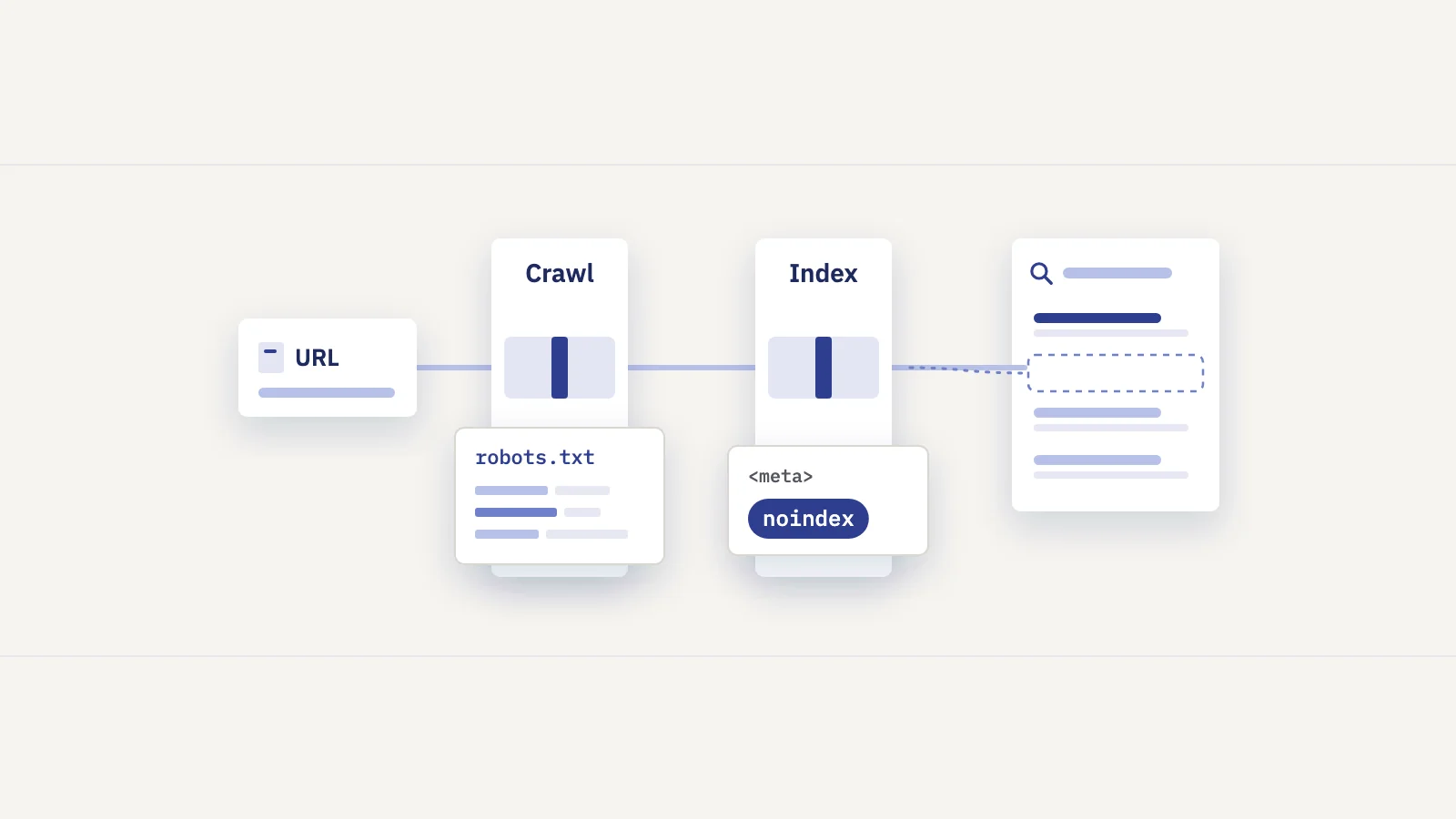
robots.txt controls whether Googlebot may fetch a URL. A noindex rule controls whether Google may show the page in search. People mix up the two all the time, and the most common combination, blocking a URL in robots.txt and adding noindex to it, makes sure the noindex is never read.
Crawling and indexing are different controls
Google crawls, indexes and then serves pages. Our guide to indexing in SEO covers that pipeline and the Page indexing report in depth. For this post, one point matters: each directive works at one stage only.
- robots.txt works at crawling. A
Disallowrule tells crawlers not to request a URL. Google's robots.txt introduction is blunt about it: robots.txt is "not a mechanism for keeping a web page out of Google." If other pages link to a blocked URL, Google can still index the URL without visiting it. The result then shows without a description. - noindex works at indexing. A
noindexrule in a robots meta tag or anX-Robots-Tagheader tells Google not to show the page in results. Google has to fetch the page to find the rule.
That second point is the whole trap. Google's block-indexing documentation says that for noindex to work, the page "must not be blocked by a robots.txt file". Otherwise the crawler never sees the rule, and the page can still appear in results if other pages link to it.
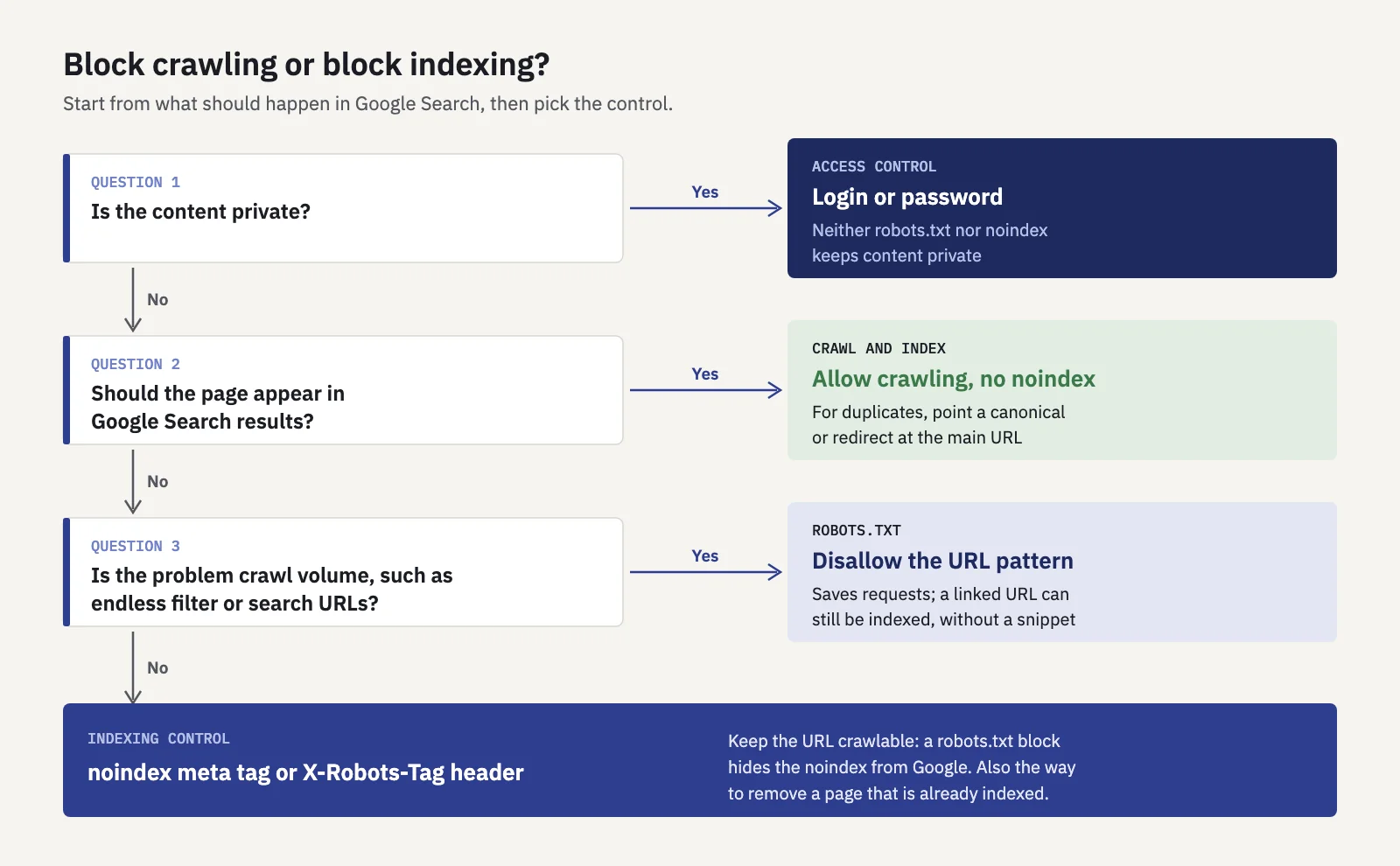
Start with what you want to happen in search, not with the tool.
robots.txt basics
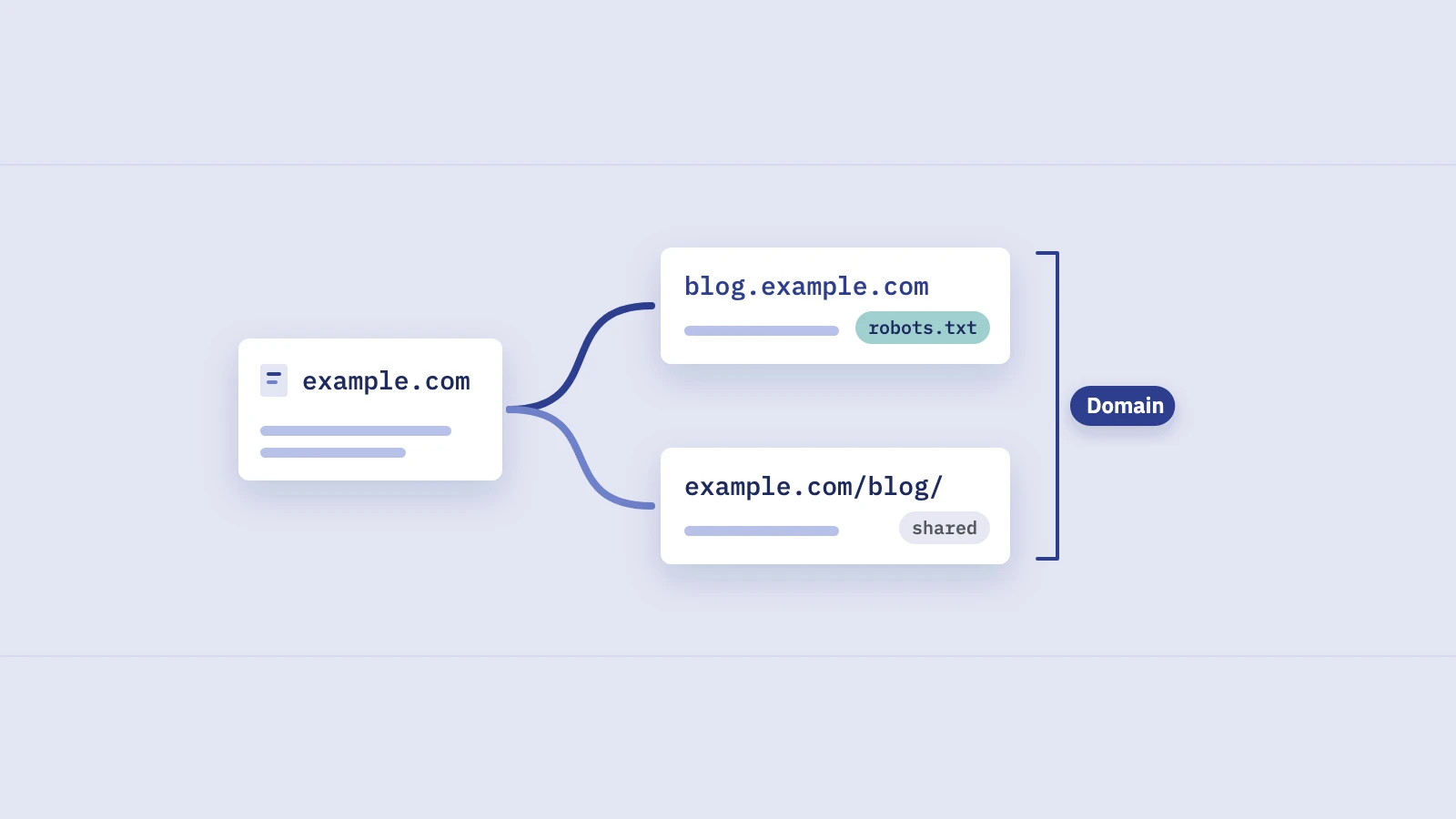
robots.txt is a plain text file at the root of a host, such as https://www.example.com/robots.txt. Google's guide to creating one requires the exact name robots.txt, UTF-8 encoding and one file per site. Its rules apply only to the host, protocol and port the file is served from, so shop.example.com and http:// versions need their own file.
The format was standardized in 2022 as RFC 9309, the Robots Exclusion Protocol. A file is a set of groups. Each group names one or more crawlers and lists the paths they may or may not fetch:
User-agent: *
Disallow: /cart/
Disallow: /search
Allow: /search/help

User-agent: Googlebot-Image
Disallow: /drafts/images/

Sitemap: https://www.example.com/sitemap.xml
The rules worth knowing, from Google's robots.txt specification and the RFC:
- Four fields. Google supports
user-agent,allow,disallowandsitemap. Fields such ascrawl-delayare ignored by Google. - One group per crawler. A crawler follows the most specific group that names it and ignores the others. Googlebot doesn't combine the
*group with aGooglebotgroup. - Paths are case-sensitive.
Disallow: /Searchdoesn't block/search. - Two wildcards.
*matches any sequence of characters, and$marks the end of the URL.Disallow: /*.pdf$blocks URLs ending in.pdf. - The longest match wins. When an
allowand adisallowrule both match, the rule with the longer path applies. If they are equally long, Google uses the less restrictive one. - Size and caching. Google reads the first 500 KiB of the file and usually caches it for up to 24 hours, so a change can take a day to apply.
- Status codes matter. A 4xx response (except 429) is treated as having no robots.txt, so everything may be crawled. A 5xx response makes Google stop crawling the site for the first 12 hours and then fall back on the last good copy.
The RFC also says plainly that these rules "are not a form of access authorization". The file is public, any crawler can ignore it, and listing a secret path in it advertises that path.
The meta robots tag and the X-Robots-Tag header
Indexing rules live on the page itself, or in the HTTP response that delivers it. Both forms are described in Google's robots meta tag documentation.
The meta tag goes in the <head> of an HTML page:
<meta name="robots" content="noindex">
Use name="googlebot" instead of robots to address only Google. The same rules can be sent as a response header, which is the only option for files that have no <head>, such as PDFs and images:
X-Robots-Tag: noindex
Besides noindex, the rules you'll meet most are nofollow (don't follow the links on this page), none (noindex plus nofollow), nosnippet, max-snippet, max-image-preview, noimageindex and unavailable_after. When rules conflict, Google applies the more restrictive one.
Two details catch people out. First, nofollow doesn't keep a page out of the index; it only concerns the links on it. Second, noindex in robots.txt doesn't work. Google retired support for it on September 1, 2019, along with other unpublished rules, and recommends noindex on the page or in the header instead.
Which one to use: a decision table
Pick the tool by the outcome you want. Our recommendations, built on Google's documentation:
| What you want | Use | Keep in mind |
|---|---|---|
| A page stays out of search results | noindex meta tag or X-Robots-Tag |
The URL must stay crawlable, or the rule is never read |
| A PDF or image stays out of results | X-Robots-Tag: noindex header |
Set it in the server or CDN config |
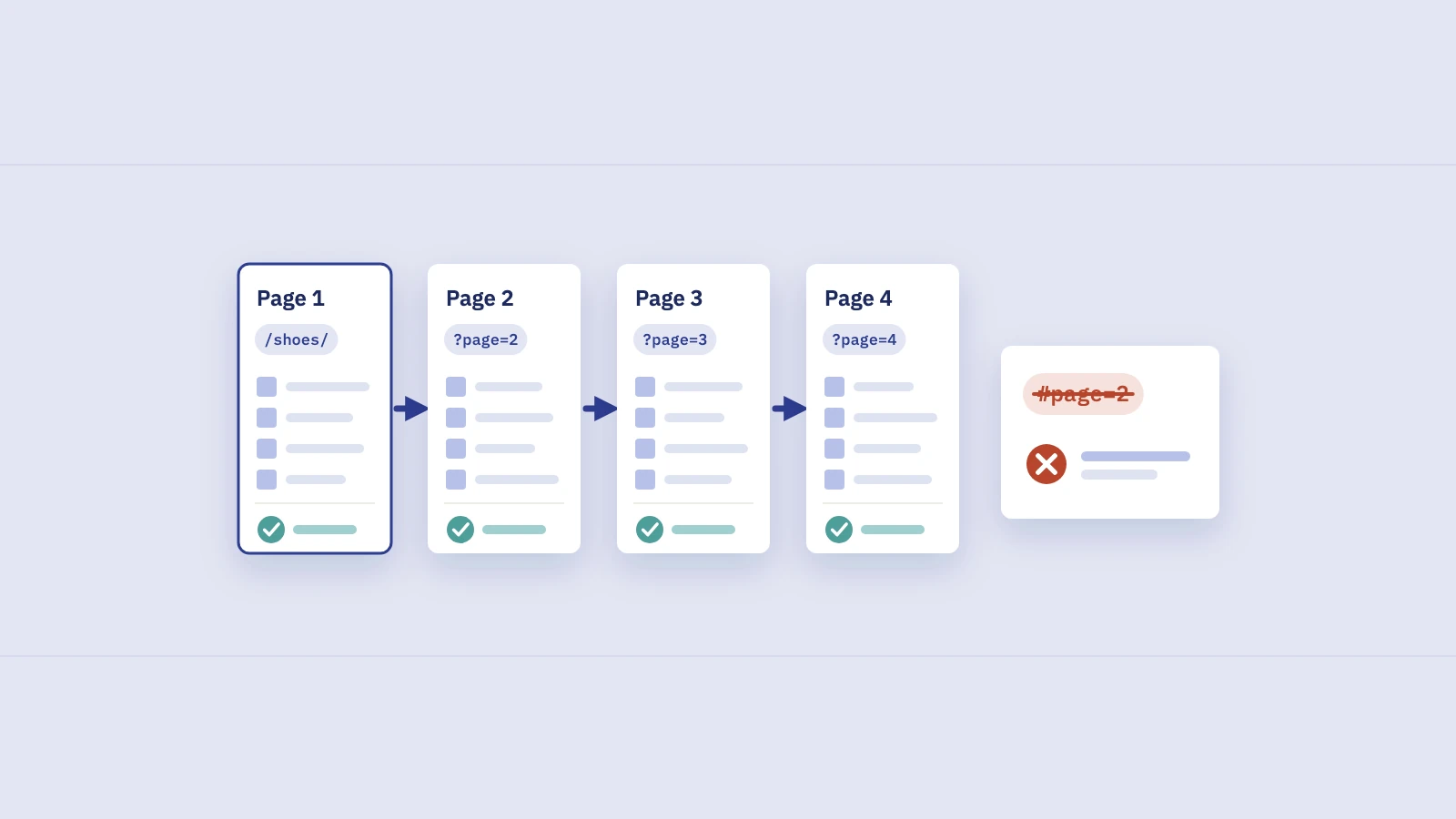
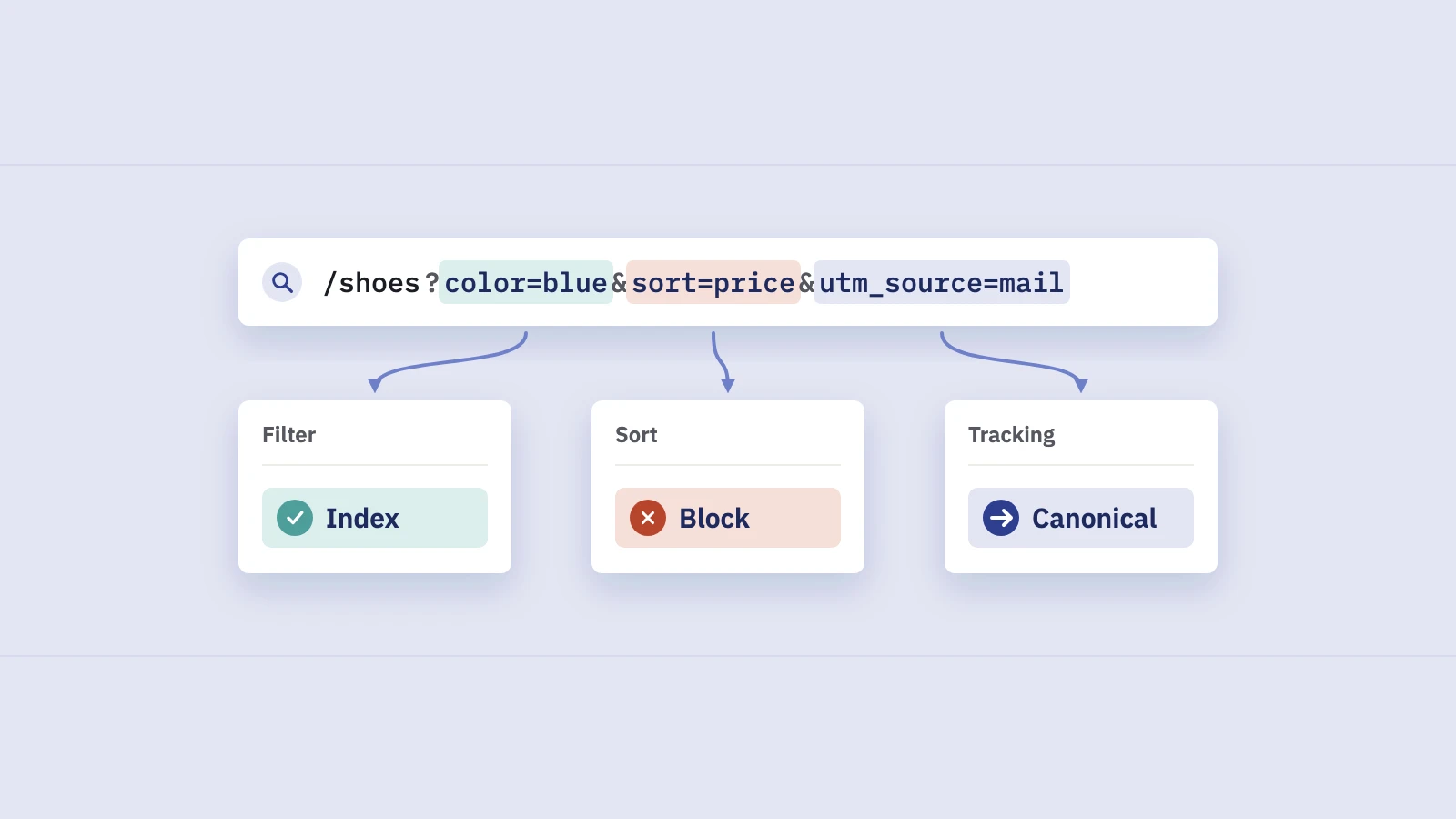
| Googlebot stops spending requests on endless filter, sort or internal search URLs | robots.txt Disallow |
Blocked URLs can still be indexed, without a description, if linked |
| A page already in the index disappears | noindex, wait for the recrawl, and only then block if you must |
Blocking first freezes the indexed version |
| Private content stays private | Login or password protection | Neither robots.txt nor noindex is access control |
| A duplicate URL consolidates into the main one | rel="canonical" or a redirect |
See our guide to canonical tags |
| A removed page drops out | A 404 or 410 status | Google drops it after crawling the error |
| A page is hidden from results today, temporarily | Search Console's Removals tool, plus noindex or deletion | A removal request is temporary |
The pattern is simple. If the problem is what shows up in Google, use an indexing control and let Google crawl. If the problem is what Google spends its requests on, use robots.txt and accept that blocked URLs may still be listed.
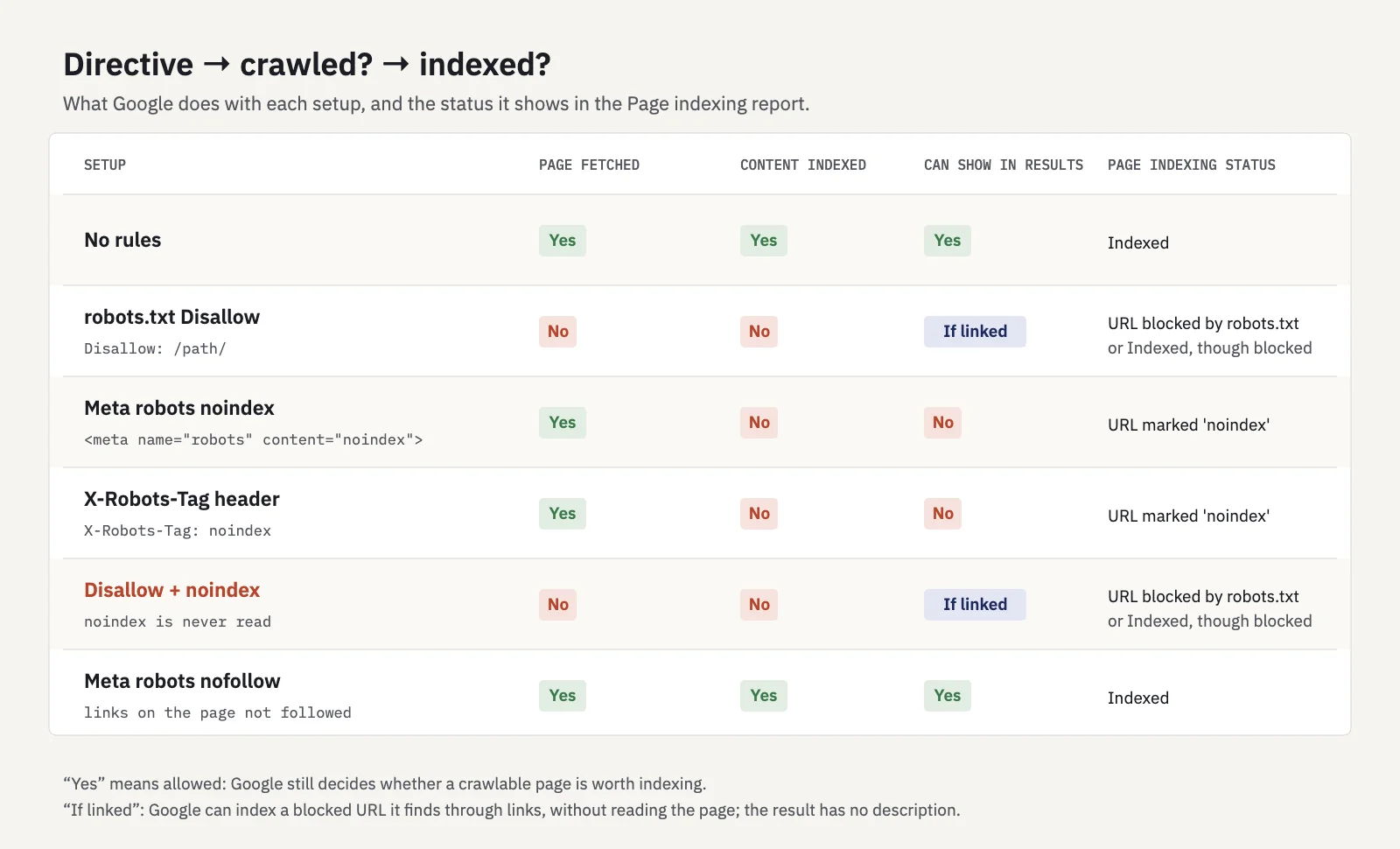
Disallow plus noindex looks like double protection; in practice the noindex is invisible.
Checking it in Search Console
Search Console has three places that show how Google reads your rules.
The robots.txt report. Under Settings, the robots.txt report lists the robots.txt files Google found for the top 20 hosts of a property, when each was last crawled, and any warnings or errors in parsing them. It's available only for domain-level properties. Each file's fetch status is Fetched, Not Fetched - Not found (404) or Not Fetched - Any other reason. The report keeps the versions fetched in the last 30 days. After an urgent fix, such as removing a rule that blocked important pages, use Request a recrawl from the file's menu instead of waiting up to a day.
The Page indexing report. Under Indexing > Pages, the Page indexing report uses these exact names for the statuses this post is about:
- URL blocked by robots.txt. Not indexed: the page was blocked by your robots.txt file. Fine when intended.
- URL marked 'noindex'. Not indexed: when Google tried to index the page, it found a noindex rule.
- Indexed, though blocked by robots.txt. A warning: the page is in the index even though robots.txt blocks it, usually because other pages link to it. Google's advice: if you want it out of the index, remove the robots.txt block and use noindex.
Older guides use names from the retired Coverage report, such as "Excluded by 'noindex' tag" or "Blocked by robots.txt". The current report uses the names above.
URL Inspection. For one URL, the inspection result shows Crawl allowed? and Indexing allowed? Google's URL Inspection help adds a detail that sums up this whole post: when a page is blocked by robots.txt, "Indexing allowed?" always shows "Yes", because Google can't see any noindex on it.
To check a rule before you publish it, test the URL against the file. Our free robots.txt tester shows which rule matches a URL, so you can catch a pattern that blocks more than you meant.
Removing a page from Google the right way
When a page is in the index and needs to leave it, order matters.
- Leave the URL crawlable. Remove any robots.txt rule that matches it, or the next step can't work.
- Add noindex. Put the meta tag in the page or send the
X-Robots-Tagheader. Check with URL Inspection's live test that Indexing allowed? now says No. - Wait for the recrawl. The page drops out after Google crawls it again. For an urgent case, a removal request in Search Console hides it for now while the noindex takes effect.
- Confirm in the reports. The URL should move to URL marked 'noindex' in the Page indexing report, and its impressions should stop in the Performance report.
- Block crawling only if you must. Once the page is out of the index, a robots.txt rule is fine if crawling it wastes resources. Most sites never need this step.
For a page that's gone for good, a 404 or 410 does the same job without a noindex.
Common mistakes
- Disallow plus noindex. The most common one. The block hides the noindex, and the page can stay indexed. Choose one: usually noindex.
- Using robots.txt to remove indexed pages. Blocking an indexed URL doesn't remove it. It stops Google from seeing any change you make, including a noindex.
- Shipping staging rules to production. A
Disallow: /or a site-wide noindex from a staging setup is a classic release bug. After a launch or migration, check the live robots.txt and a few key URLs with URL Inspection the same day. - Blocking CSS, JavaScript or images the page needs. Google's robots.txt introduction warns against blocking resources if that makes pages harder for Google to understand.
- Treating robots.txt as security. The file is public. Use authentication for anything private.
- Writing rules for the wrong host. A rule in
www.example.com/robots.txtdoesn't apply toblog.example.com. Each host needs its own file. - Case and slash mistakes.
Disallow: /Admindoesn't match/admin, andDisallow: /blogalso blocks/blog-archive/. Use/blog/if you mean the folder. - A failing robots.txt. A server error on the file makes Google stop crawling the site for a while. Watch for "Not Fetched" in the robots.txt report.
A robots.txt or noindex mistake shows up in search traffic before most people open the Page indexing report: pages lose impressions. In Serplyze, the Lost quick view on Traffic > Pages lists pages that had impressions in the comparison period and none now, and a Technical note on the chart marks the day a robots.txt or template change went live. Serplyze reads performance data, not crawl rules, so confirm the cause with URL Inspection.
Key takeaways
- robots.txt decides whether Googlebot may fetch a URL; noindex decides whether Google may show it. They work at different stages.
- A noindex on a URL blocked by robots.txt is never read, and the URL can still be indexed if other pages link to it.
- To keep a page out of results, use a noindex meta tag or
X-Robots-Tagheader and keep the URL crawlable. - Use robots.txt for crawl waste such as endless filter and internal search URLs, not for removal or privacy.
- In Search Console, check the robots.txt report, the statuses "URL blocked by robots.txt", "URL marked 'noindex'" and "Indexed, though blocked by robots.txt", and URL Inspection's "Crawl allowed?" and "Indexing allowed?"
Serplyze tracks every page's clicks and impressions from your own Search Console data, so a page that falls out of search after a rule change stands out within days. Start free.