URL parameters are the part of a URL after the ?. They let one page sort, filter, paginate and track campaigns, and every combination is a new URL to Google. Search Console no longer has a tool to tell Google what each parameter does, so the work moved to your site: links, canonicals and robots.txt. Here's how to handle each type of parameter, and how to find the ones Google is crawling and indexing.
What URL parameters are
A parameter is a key and a value after a question mark. More parameters are joined with an ampersand:
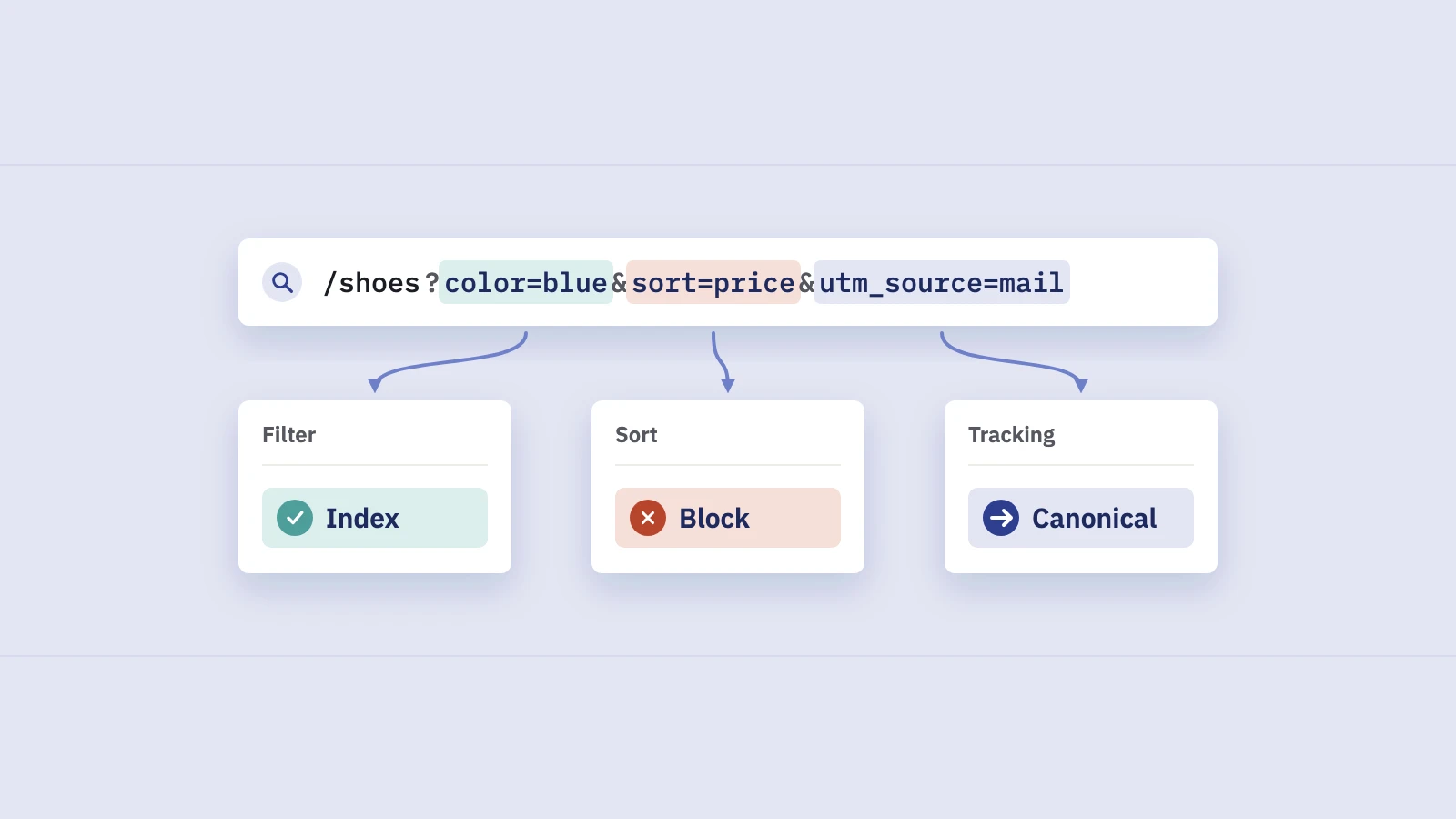
https://www.example.com/shoes?color=blue&sort=price&page=2
Google's URL structure guidelines recommend exactly this format: an equals sign between key and value, and & between parameters. Other separators, such as commas or semicolons between parameters, may not be recognized.
To a crawler, /shoes, /shoes?color=blue and /shoes?color=blue&sort=price are three different URLs. Whether they're three different pages depends on what the parameter does. That's the question to ask about every parameter on your site:
| Type | Example | What it does to the content |
|---|---|---|
| Tracking | ?utm_source=newsletter, ?ref=partner |
Nothing; the page is identical |
| Session ID | ?sessionid=8f3a2c |
Nothing; it identifies a visitor |
| Sorting | ?sort=price_asc |
Same items, different order |
| Filtering (facets) | ?color=blue&size=42 |
A subset of the items |
| Pagination | ?page=3 |
The next slice of a list |
| Internal search | ?q=trail+shoes |
A results page built on the fly |
| Language or region | ?lang=de |
A translated or localized version |
Tracking and session parameters never change the content, and sorting only rearranges it. For the rest, you decide whether Google should see the result at all.
Why parameters cause SEO problems
The problem isn't one parameter. It's the combinations. Say a category page has five colors, eight sizes and four sort orders: picking one of each already gives 160 URLs for one page, before pagination. Google's URL structure page calls this kind of problem "infinite spaces" and lists sorting, filtering, calendars, session IDs and referral parameters among the causes.
That leads to three practical problems:
- Crawl waste. Googlebot spends requests on URLs that add nothing. Google's December 2024 post Crawling December: Faceted navigation says faceted navigation is "by far the most common source of overcrawl issues" site owners report, and that it slows down the discovery of new content.
- Duplicates. Many parameter URLs show the same content as a clean URL. Google groups them into a duplicate cluster and picks one as the canonical. Usually it picks well; sometimes it picks
?sort=new. - Split signals and split reports. Links, internal and external, can point at several versions of one page, and your reports show URLs you never meant to publish.
How much this matters depends on size. Google's crawl budget guide is written for sites with roughly a million or more pages, or 10,000 or more pages that change daily, and for sites with many URLs in Discovered - currently not indexed. On a small blog, parameters are mostly reporting noise. On a shop with layered filters, they can decide how quickly new products get crawled.
Google retired the URL Parameters tool
Search Console used to have a URL Parameters tool, launched in 2009 in Webmaster Tools, where you told Google what each parameter did.
On March 28, 2022, Google announced it would remove the tool a month later, in Spring cleaning: the URL Parameters tool. The reasons it gave:
- Google had become much better at guessing which parameters are useful and which aren't.
- Only about 1% of the parameter configurations set in the tool were useful for crawling.
- Going forward, site owners don't need to do anything to specify what their parameters do. Google's crawlers learn it automatically.
For more control, the post points to two things: robots.txt rules, and hreflang for language variations. There's no replacement setting in Search Console, so old guides that tell you to "configure your parameters in Search Console" are out of date.
"Google figures it out" doesn't mean nothing can go wrong. Google still has to crawl a URL to learn what it is, so the aim is clear signals and less guessing.
What to do instead, parameter by parameter
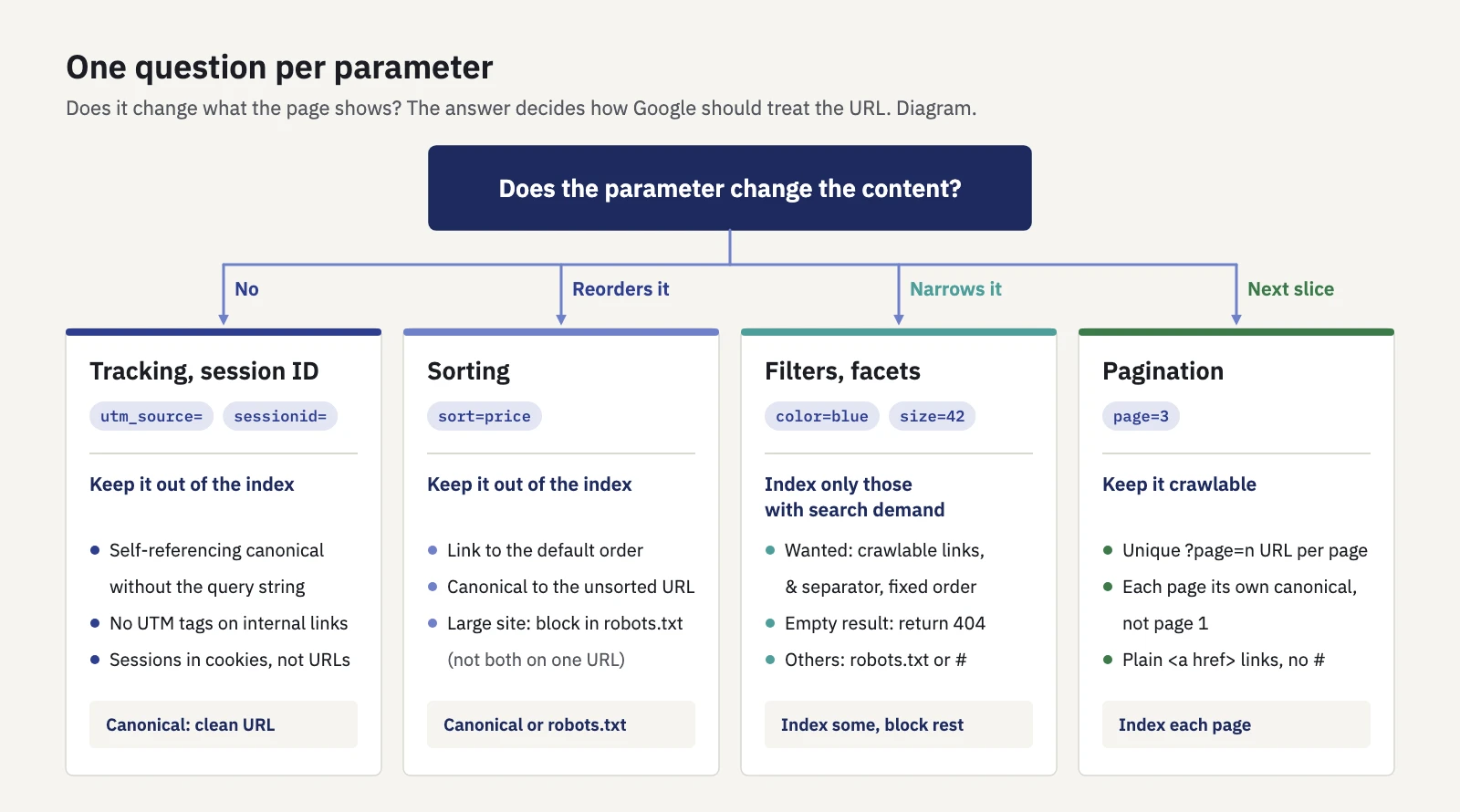
One question per parameter decides the treatment. The rules are our summary of Google's guidance.
| Parameter | Should Google index it? | What to do |
|---|---|---|
Tracking (utm_, ref) |
No | Self-referencing canonical on the clean URL; never use them on internal links |
| Session ID | No | Move sessions to cookies |
| Sorting | No | Link to the default order; canonical to the unsorted URL, or block in robots.txt on large sites |
| Filters with search demand | Yes, selected ones | Crawlable links, & separators, a fixed order, 404 for empty results |
| Other filters | No | Block in robots.txt, or use fragments |
| Pagination | Yes | ?page=n in plain links, each page its own canonical |
| Internal search | No | Block in robots.txt |
| Language | Yes | Separate URLs per language with hreflang (our guide) |
Tracking parameters
UTM parameters exist so Google Analytics can attribute visits to a campaign; Google's URL builder help covers how they're built. They belong on links from emails, ads and social posts, not on links between your own pages. An internal link with ?utm_source=footer creates a new URL for Google to crawl, and it credits the visit to a made-up campaign in your analytics.
The protection is a self-referencing canonical on every page. Because the page at /shoes?utm_source=newsletter serves the same HTML as /shoes, its canonical tag already names /shoes. If your canonicals are built from the requested URL, including the query string, fix that template first. Our canonical tags guide covers how Google weighs the tag against other signals.
Session IDs
Google's URL guidelines are direct: avoid session IDs in URLs and use cookies instead. A session ID gives every visit, Googlebot's included, a fresh set of URLs, which is an infinite space by definition. A canonical tag limits the duplicates in the index, but not the crawling.
Sorting
Sort orders show the same items in a different order, so they're rarely worth indexing. Google's pagination and incremental loading guide uses ?order=price as its example and suggests a noindex robots meta tag or a robots.txt rule to keep these variations out of the index. On a small catalog, a canonical to the default order is usually enough; on a large one, robots.txt also saves the crawling.
Filters and faceted navigation
Faceted navigation is where parameters get expensive. Google's guide to managing crawling of faceted navigation URLs, published in December 2024, offers two approaches.
If you don't need the filtered URLs in search, block crawling of the filter parameters in robots.txt, and keep the item pages and the unfiltered listing crawlable. Or apply filters with URL fragments (#color=blue): Google generally doesn't use fragments in crawling and indexing, so fragment-based filters don't create new URLs for it.
If some filtered pages should rank, say "blue trail running shoes" has real demand, make those URLs crawl-friendly:
- Use
&as the separator. Commas, semicolons and brackets are often not recognized as parameter separators. - Keep filters in a consistent order, so
color=blue&size=42andsize=42&color=bluedon't both exist. Prevent duplicate filters. - Return a 404 for empty or nonsensical combinations, including filters with no results and page numbers past the end. Don't redirect them to a generic "not found" page.
The guide calls rel="canonical" to the unfiltered page and rel="nofollow" on filter links weaker options: a canonical reduces crawling only gradually, and nofollow only works if every link to those URLs, internal and external, carries it.
In practice, most shops do both: a short list of indexable filter pages with real titles and copy, and everything else blocked.
Pagination
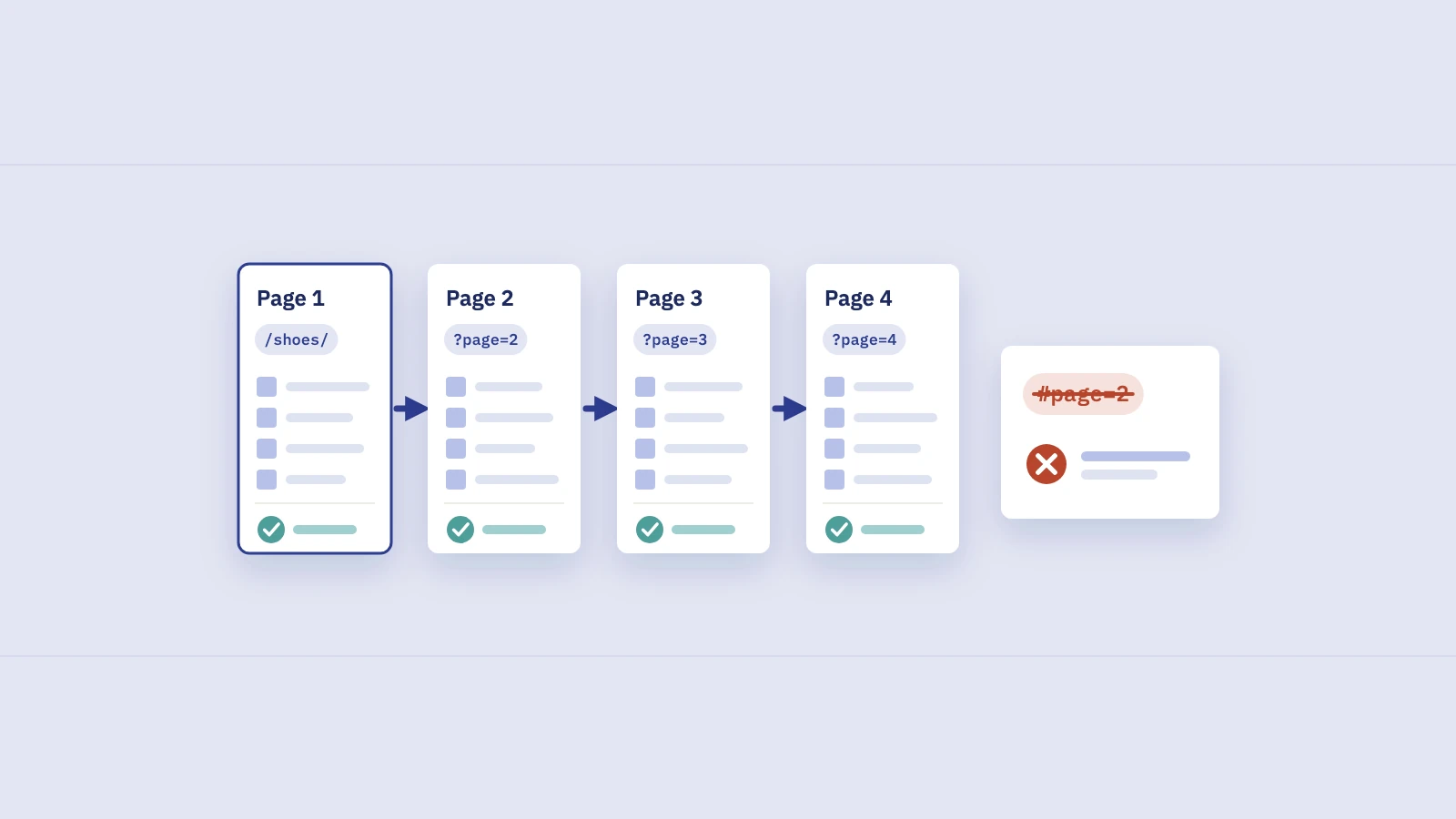
Paginated pages aren't duplicates. Page 3 lists different products from page 1. Google's pagination guide says to give each page a unique URL, such as ?page=n, and to link pages in sequence with normal <a href> links. Also:
- Don't use page 1 as the canonical for the other pages. Give each page its own canonical.
- Don't use fragments for page numbers. Google ignores what follows the
#, so it may never fetch page 2. rel="next"andrel="prev"aren't needed. Google says it no longer uses them.
Internal search results
Site search can produce a URL for every string anyone types. Google's URL structure page lists search results among the URLs to block with robots.txt.
Using robots.txt for parameter crawl traps
Robots.txt is the main control Google left you for parameters. Google's robots.txt rules support * as a wildcard and $ for the end of the URL, so you can target a parameter wherever it appears:
User-agent: *
Disallow: /*?sort=
Disallow: /*&sort=
Disallow: /*?sessionid=
Disallow: /*&sessionid=
Disallow: /search
The ? and & versions catch the parameter in first or later position without matching other parameters that end in the same letters.
Robots.txt controls crawling, not indexing, and that has consequences for parameters:
- Google can't see a canonical or
noindexon a blocked URL. Block crawling, or rely on the tag. Not both for the same URL. - A blocked URL can still be indexed without its content if links point to it. It's rare for parameter URLs, but it happens.
noindexdoesn't save crawl budget. The crawl budget guide says Google still has to request a page to see thenoindex.
Our post on robots.txt vs noindex explains the difference in detail. Before you deploy new rules, run your most important URLs, and a few parameter URLs, through our free robots.txt tester to see which rule decides each one.
Our advice: don't block parameter URLs in robots.txt if Google has already indexed them and you want them consolidated. Google has to crawl a duplicate to see its canonical. Let the canonical work first, then block crawling if crawl volume is still a problem.
How to find parameter URLs in Search Console
No single report lists "your parameters", but four places show how Google treats them.
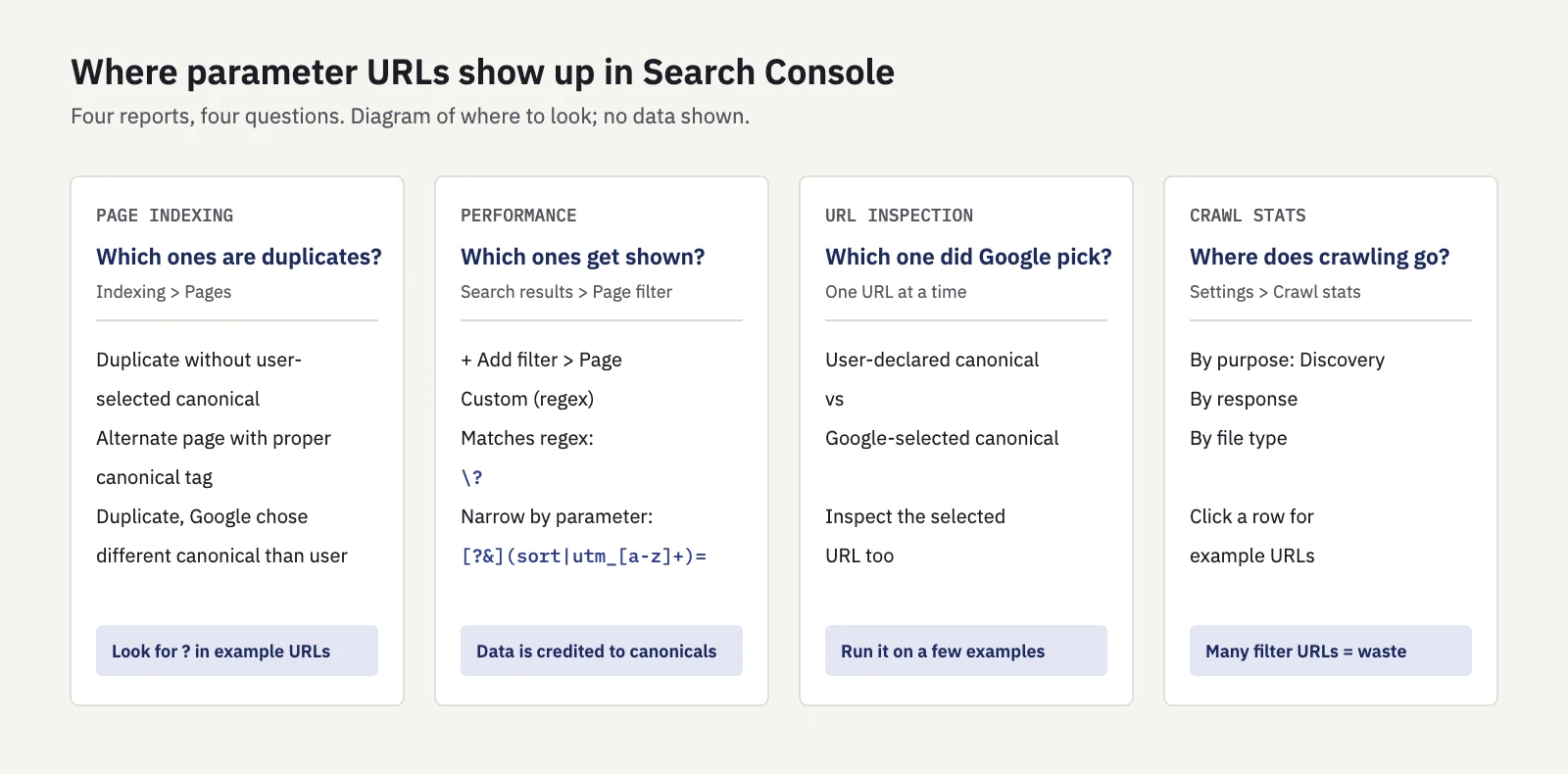
Four views of the same question: which parameter URLs Google crawls, indexes and shows.
- Open Indexing > Pages and look at the duplicate reasons in the Page indexing report: Duplicate without user-selected canonical, Alternate page with proper canonical tag and Duplicate, Google chose different canonical than user. Example URLs with a
?show which parameters Google finds. Large counts are normal for shops; the third reason is the one to investigate. On a large site, many parameter URLs under Crawled or Discovered - currently not indexed point at crawl waste. - Filter Performance for parameter URLs. In Performance > Search results, click + Add filter, choose Page, then Custom (regex) and Matches regex, and enter
\?. The Pages tab now lists URLs with a query string that got impressions. - Narrow it by parameter. A pattern such as
[?&](sort|order|sessionid|utm_[a-z]+)=shows the parameters that shouldn't be there at all. Test patterns first in our Search Console regex tester; our Search Console regex post has more patterns. - Inspect a few of those URLs. In URL Inspection, compare User-declared canonical with Google-selected canonical.
- Look at Crawl stats under Settings > Crawl stats. The Crawl stats report lists example URLs for each response, file type and purpose. If the examples under Discovery are mostly filter and sort combinations, that's where your crawling goes.
Step 2 needs one piece of context. Search Console assigns most performance data to the canonical URL, not to the duplicate, according to its Performance report dimensions documentation. So a parameter URL in the Performance report usually means Google chose it as the canonical and showed it. For filter pages you want indexed, that's the goal. For ?sort= or ?utm_ URLs, your canonical signals are losing.
In Serplyze, the search box on Traffic > Pages takes a regular expression and matches the URL, so \? lists every parameter URL with impressions, on paid plans beyond the 1,000-row limit of the Search Console interface. The New and Lost quick views help after a fix: a clean URL in New and its parameter twin in Lost is the canonical moving where you wanted. See Traffic.
Common mistakes with URL parameters
- Canonicals that copy the requested URL. A template that prints the full URL, query string included, as the canonical turns every parameter URL into its own canonical.
- UTM tags on internal links. Banners, footers and "related posts" widgets are the usual culprits.
- Soft "no results" pages. An empty filter combination that returns 200 with "0 products" invites more crawling. Return a 404.
Key takeaways
- Every parameter combination is a new URL to Google. Sort them into parameters that change the content (filters, pagination, language) and parameters that don't (tracking, sessions, sorting).
- Google retired the Search Console URL Parameters tool in 2022, saying only about 1% of configurations were useful; robots.txt, canonicals and consistent links are the controls left.
- Keep tracking parameters off internal links, move session IDs to cookies, and give every page a self-referencing canonical without the query string.
- For faceted navigation, block filters you don't need in search, and make the ones you do crawl-friendly:
&separators, a fixed order, 404 for empty results. - Find parameter URLs in Search Console with the Page indexing duplicate reasons, a
\?regex on the Page filter, URL Inspection and Crawl stats.
Serplyze reads your own Search Console data, so you can see which parameter URLs get impressions and watch them fade after a fix. Start free.