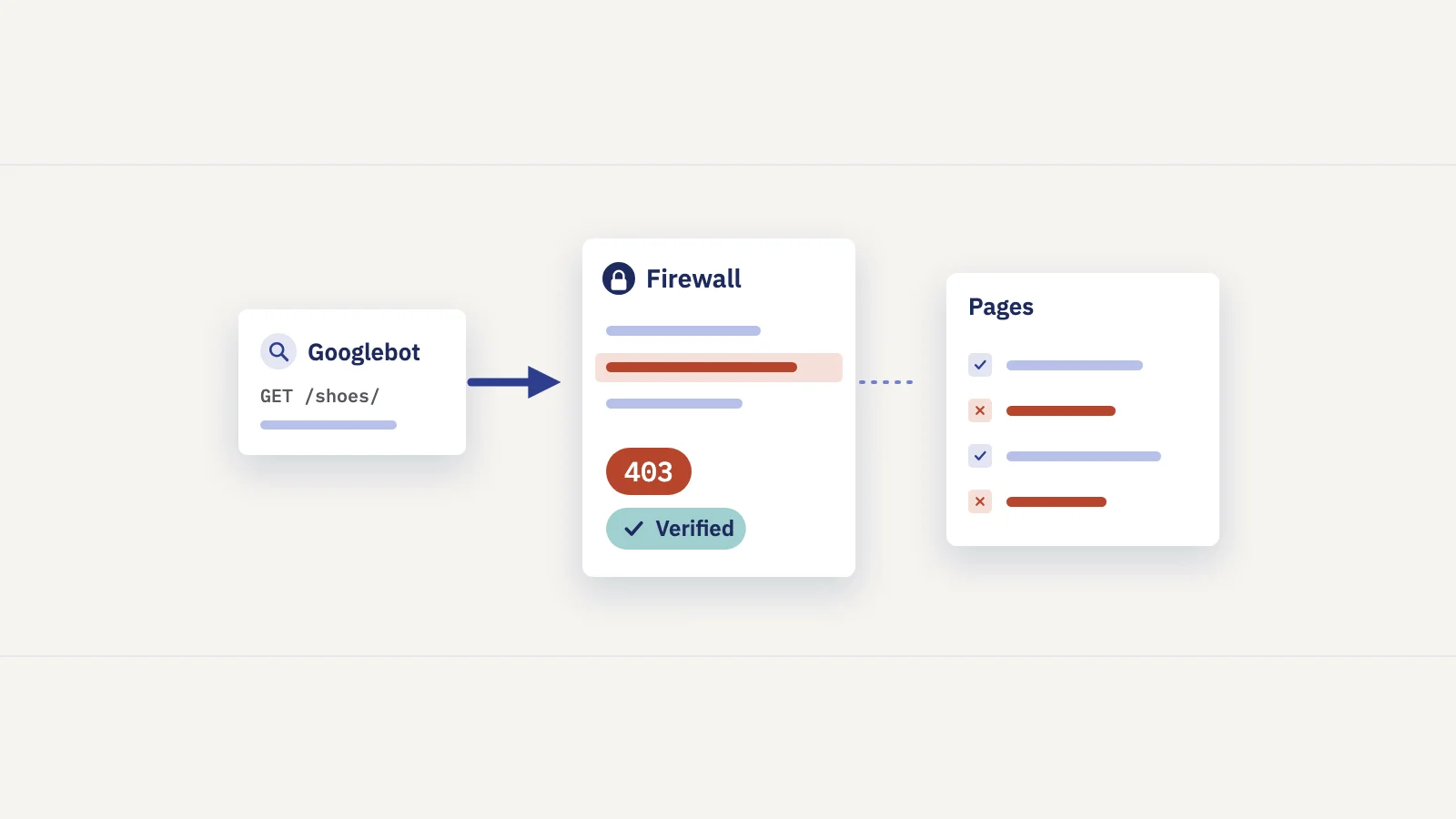
A 401 or 403 tells Googlebot it isn't allowed to see a page, and Google won't index a page it can't see. On a login area that's what you want. On a product page or a blog post it usually means a firewall, CDN rule or server setting is turning Google away. Here's what each status means, how Search Console reports it, and how to fix it without opening your site to fake bots.
401 vs 403: what each status means
Both are client errors, defined in the HTTP standard, RFC 9110:
- 401 Unauthorized means the request lacks valid authentication credentials. The server has to send a
WWW-Authenticateheader that says how to authenticate. Password-protected staging sites and HTTP basic auth return 401. - 403 Forbidden means the server understood the request and refuses it. Sending other credentials may not help. Firewalls, bot protection, IP rules and file permission problems usually answer with 403.
For Google Search the difference is small, because Googlebot never logs in. Google's Page indexing report documentation puts it plainly for 403: Googlebot never provides credentials, so a server that returns 403 to it is returning the error incorrectly.
Here is how those codes compare with the neighbors you'll see in the same reports, based on Google's documentation on HTTP status codes and network errors:
| Status | What it says | What Google does |
|---|---|---|
| 200 OK | Here's the page | Can crawl, render and index it |
| 401 Unauthorized | Log in first | Doesn't index it; an indexed URL is removed |
| 403 Forbidden | You may not have this | Doesn't index it; an indexed URL is removed |
| 404 / 410 | It isn't here | Doesn't index it; an indexed URL is removed |
| 429 Too many requests | Slow down | Treated as a server error: crawling slows down |
| 5xx | Server problem | Crawling slows; indexed URLs are kept for a while, then dropped |
How Google treats a 401 or 403
Google's documentation groups every 4xx code except 429 together. Three rules matter here:
- No indexing. Google doesn't use the content of a URL that returns a 4xx code. New URLs aren't indexed, and URLs that are already indexed are removed.
- No effect on crawl rate. Google says 4xx codes other than 429 don't change how fast it crawls. A 403 isn't a "slow down" signal.
- Don't use them to limit crawling. Google's documentation says not to use 401 and 403 to limit the crawl rate. A 2023 Search Central post, Don't use 403s or 404s for rate limiting, was written because some site owners and CDNs had started doing exactly that. The right signals are 500, 503 or 429, and Google's guide to reducing the crawl rate advises against keeping that up for more than a day or two.
The same post warns about one more case: a robots.txt file served with a 4xx code is treated as if it didn't exist. A firewall that returns 403 for /robots.txt doesn't block Google from your site. It removes your crawl rules. Our guide to robots.txt and noindex covers how robots.txt status codes work.
Why Googlebot gets a 403 on public pages
When a page works in your browser but Google reports 403, something treats Google's request differently from yours. These are the usual suspects. The fixes are our recommendations.
| Cause | Typical sign | Fix |
|---|---|---|
| Bot protection or WAF rule | 403s start on a date with no code release; often site-wide | Allow verified Google crawlers in the WAF or CDN; check its bot settings |
| Rate limiting that answers 403 | 403s come in bursts when crawling is busy | Return 429 or 503 instead, or raise the limit for verified crawlers |
| Country or IP blocking | Pages fail only for traffic from some countries | Exempt verified crawlers; Googlebot's IPs are mostly in the US |
| User-agent blocklist | Rules match "bot" or empty user agents | Remove the broad match; allow by verification, not by name |
| Hotlink protection | Images return 403 to direct requests without your site as Referer | Exempt verified crawlers, or apply the rule only to other sites' Referers |
| Staging or basic auth left on | 401 across a whole host after a launch | Remove the auth on production; keep it on staging |
| File or folder permissions | 403 on one folder, file type or template | Fix the server permissions or the deny rule in the config |
| Login wall on public content | Pages that should rank redirect to a login or return 401 | Make the content public, or accept it won't be indexed |
The first three cover most site-wide cases: bot protection exists to stop automated traffic, and Googlebot is automated traffic. Google's locale-adaptive pages documentation notes that Googlebot's default IP addresses appear to be in the USA, so a rule that blocks US traffic, or allows only your home country, can block Google's main crawler.
Where Search Console shows 401 and 403
Search Console reports the same problem in three places. Each answers a different question.
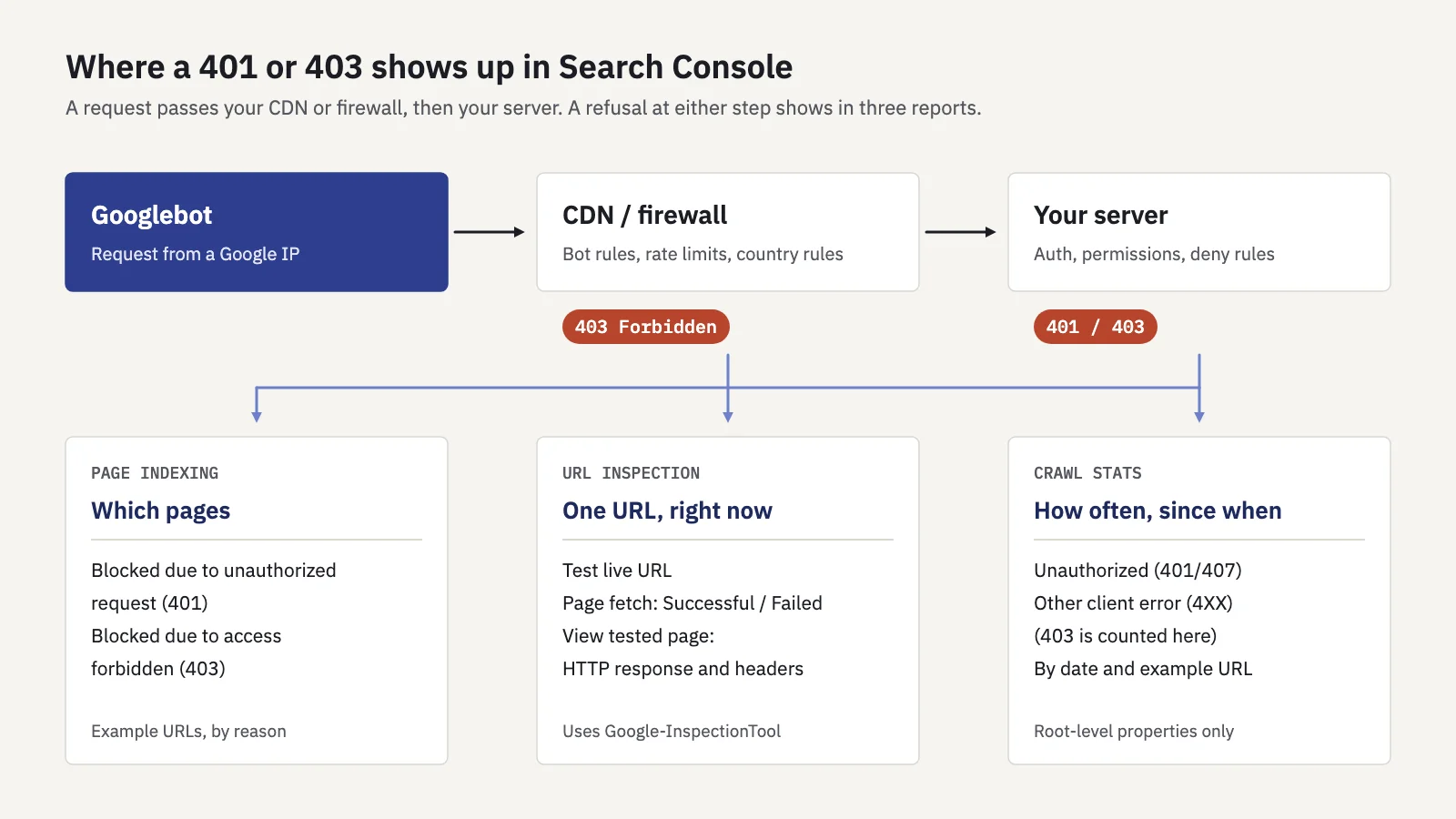
Same error, three views: which pages, which URL right now, and how often.
Page indexing: which pages are affected. Under Indexing > Pages, the reasons a page isn't indexed include, in Google's exact wording:
- Blocked due to unauthorized request (401): the page asked Googlebot for authorization.
- Blocked due to access forbidden (403): the server refused Googlebot's request.
- Blocked due to other 4xx issue: any other 4xx code, such as 405 or 451.
Open a reason to see example URLs. Group them by section or template: a firewall problem usually shows across the site, a permission problem in one folder. Use the All submitted pages filter to see whether URLs from your sitemap are affected, because those are pages you asked Google to index.
URL Inspection: what happens now. The indexed result shows Google's last crawl. Test live URL fetches the page now, and its Page fetch field shows whether Google could get the page from your server. Open View tested page to see the HTTP response and headers Google received. A 403 page from a CDN or firewall often names the vendor or shows a request ID in the response body.
One detail matters for firewall rules. Google's list of common crawlers says the live test uses the Google-InspectionTool user agent, not the Googlebot user agent. A rule that matches the exact Googlebot string can treat the two differently. Allow Google's crawlers by verified IP, as below, and the live test reflects what Googlebot gets.
Crawl stats: how often. Under Settings > Crawl stats (root-level properties only), the Crawl stats report breaks requests down by response. Unauthorized (401/407) has its own row. A 403 doesn't: it's counted under Other client error (4XX). Both are in Google's "bad" group. Click a row to see example URLs with their crawl times, and use the chart to find the day the count rose. Then check what changed on your CDN or firewall that day.
Verify it's really Googlebot before you allow it
The tempting fix is to allow any request whose user agent says Googlebot. Don't: anyone can send that header, and Google's own crawler documentation warns that the user agent string can be spoofed. Allowing it opens your site to every scraper that pretends to be Google.
Google's guide to verifying Googlebot gives two methods.
Reverse and forward DNS. For an IP address from your logs:
- Run a reverse DNS lookup on the IP with the
hostcommand. - Check the domain name is
googlebot.com,google.comorgoogleusercontent.com. - Run a forward DNS lookup on that host name.
- Check it resolves to the same IP you started with.
host 66.249.66.1
host crawl-66-249-66-1.googlebot.com
The first should return a host name under googlebot.com, the second the original IP. If either check fails, the request isn't from Google.
Published IP ranges. For firewall rules, match the IP against the JSON files Google publishes, such as common-crawlers.json for Googlebot and the other common crawlers, plus the special-case and user-triggered fetcher files. Many CDN and firewall services have a setting for verified search engine crawlers that does this for you; check it's on and that no custom rule runs before it.
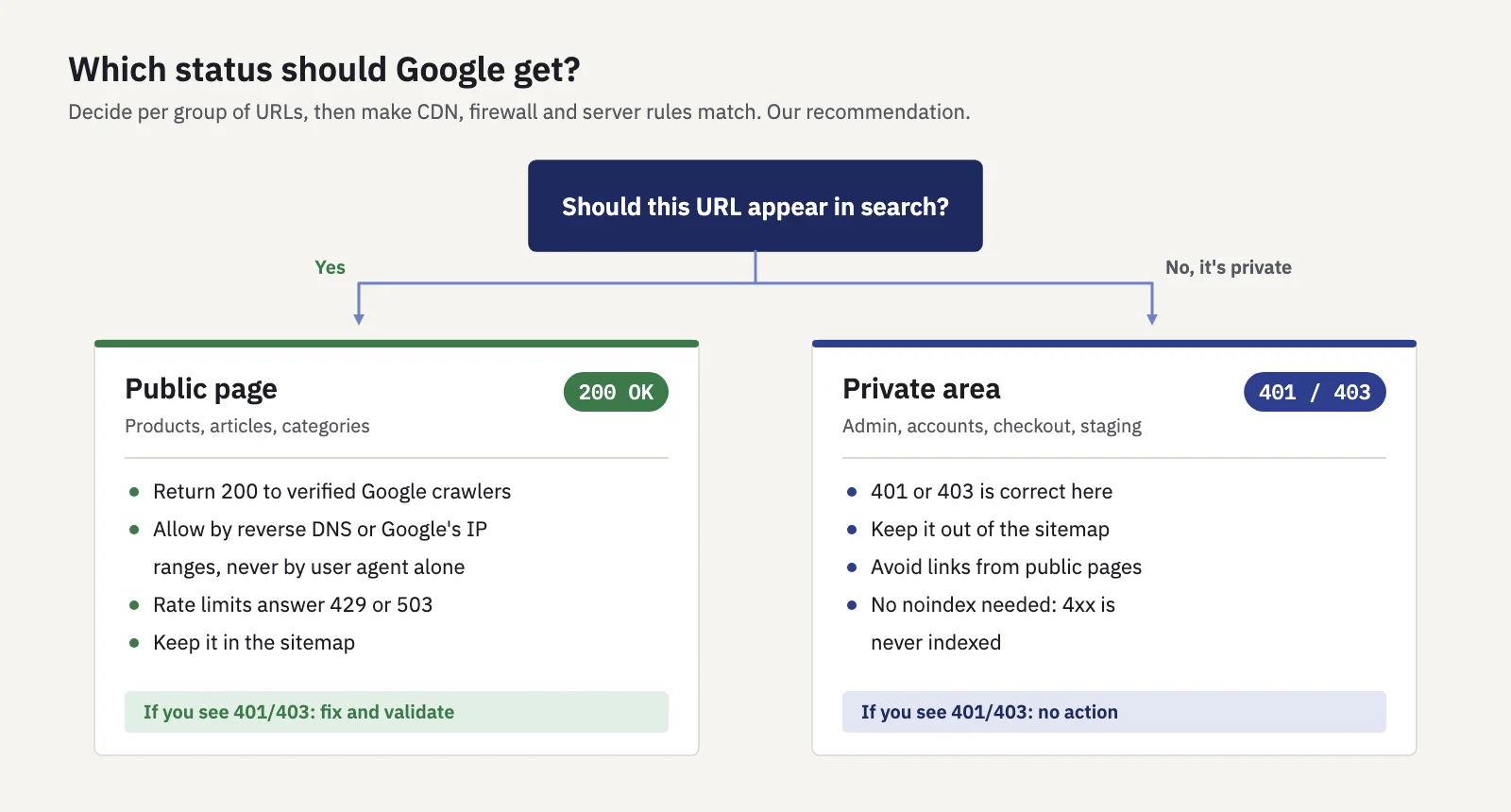
Decide per URL group which status Google should get, then make the rules match.
How to fix 401 and 403 errors, step by step
- Size the problem. In Page indexing, open the 401 or 403 reason and note when it started and which sections the example URLs come from.
- Decide which URLs should be public. A 403 on
/account/is fine. A 403 on/products/isn't. Only fix the pages that should rank. - Reproduce it. Run Test live URL on a few affected URLs and check the HTTP response under View tested page.
- Find the rule. Search your CDN, firewall and server logs for Google's requests to those URLs. Look for the rule ID or action that returned the 403, or the auth setting that returned the 401.
- Fix the rule, not the symptom. Allow verified Google crawlers, change rate limits to answer 429 or 503, remove leftover basic auth, or correct the file permissions. Don't allow by user agent alone.
- Test live again. The page fetch should now succeed with a 200 response. Request indexing for a few important URLs; the quota is limited, so leave the rest to recrawling.
- Validate the fix. Click Validate fix on the reason in Page indexing. Google says validation typically takes up to about two weeks and can take longer.
- Watch your search data. Removed pages should regain impressions as they're recrawled.
A 403 that started on a specific day is rarely a Google issue. Check what changed that day: a bot-protection setting, a CDN move, a security plugin or a country rule. Our website migration checklist includes these checks for launch day.
When a 401 or 403 is the right answer
Not every 401 or 403 in Search Console needs fixing. Admin areas, customer accounts, checkout steps, staging hosts and internal tools should be closed to Google and everyone else. Google's guide to blocking indexing points to password protection for private content, and a 401 or 403 also keeps the page out of the index, because Google doesn't index 4xx responses.
For those URLs:
- Keep them out of your sitemap. A private URL in the sitemap tells Google you want it indexed, and it shows up under All submitted pages as an error.
- Don't link to them from public pages where you can avoid it. Fewer links mean fewer crawl attempts and a cleaner report.
- Don't count on noindex behind a login. Google can't read a noindex on a page it can't fetch. You don't need one: the 4xx already keeps it out.
- Leave the report entries alone. 403s on
/admin/URLs are the system working.
The question isn't whether there are 403s, but whether any are on pages you want found. The indexing in SEO guide covers the other Page indexing reasons.
Spotting the damage in your traffic
A 403 problem can cost clicks before anyone opens Page indexing: removed pages lose impressions, and that shows in performance data first. If the drop is broad, our organic traffic drop checklist helps you rule out other causes.
In Serplyze, the Lost quick view on Traffic > Pages lists pages that had impressions in the comparison period and none now, and the built-in Traffic drop alert flags a week-over-week fall in clicks (see Alerts). Add a Technical note on the day you changed a firewall or CDN rule, so the chart shows the cause next to the dip. Serplyze reads Search Console performance data, not status codes, so confirm with URL Inspection.
To see the status code a URL returns, our free redirect checker shows each hop's status code and the final one. It requests the URL from our server, not as Googlebot, so a 200 there doesn't prove Google gets a 200. The live test does.
Key takeaways
- 401 asks for credentials and 403 refuses the request; Googlebot never logs in, so either one keeps a page out of Google's index and removes it if it was indexed.
- Don't use 401 or 403 to slow crawling. Google says to use 429, 500 or 503 for that, and only for a day or two.
- Search Console shows the problem in Page indexing ("Blocked due to unauthorized request (401)", "Blocked due to access forbidden (403)"), in URL Inspection's live test and in Crawl stats.
- Most 403s on public pages come from bot protection, rate limits, country rules or hotlink protection. Allow verified Google crawlers by reverse DNS or Google's IP ranges, never by user agent alone.
- 401 and 403 are right for private areas. Keep those URLs out of your sitemap and leave them be.
Serplyze tracks every page's clicks and impressions from your own Search Console data, so pages that drop out of search after a firewall change stand out quickly. Start free.