Should the blog live at blog.example.com or example.com/blog/? Google doesn't publish a rule that one ranks better than the other, but it does treat a subdomain as its own host in several concrete ways. Here's what Google's documentation actually says, when a subdomain is the right call, how to move between the two, and how to measure one subdomain on its own in Search Console.
Subdomain vs subfolder: what actually differs
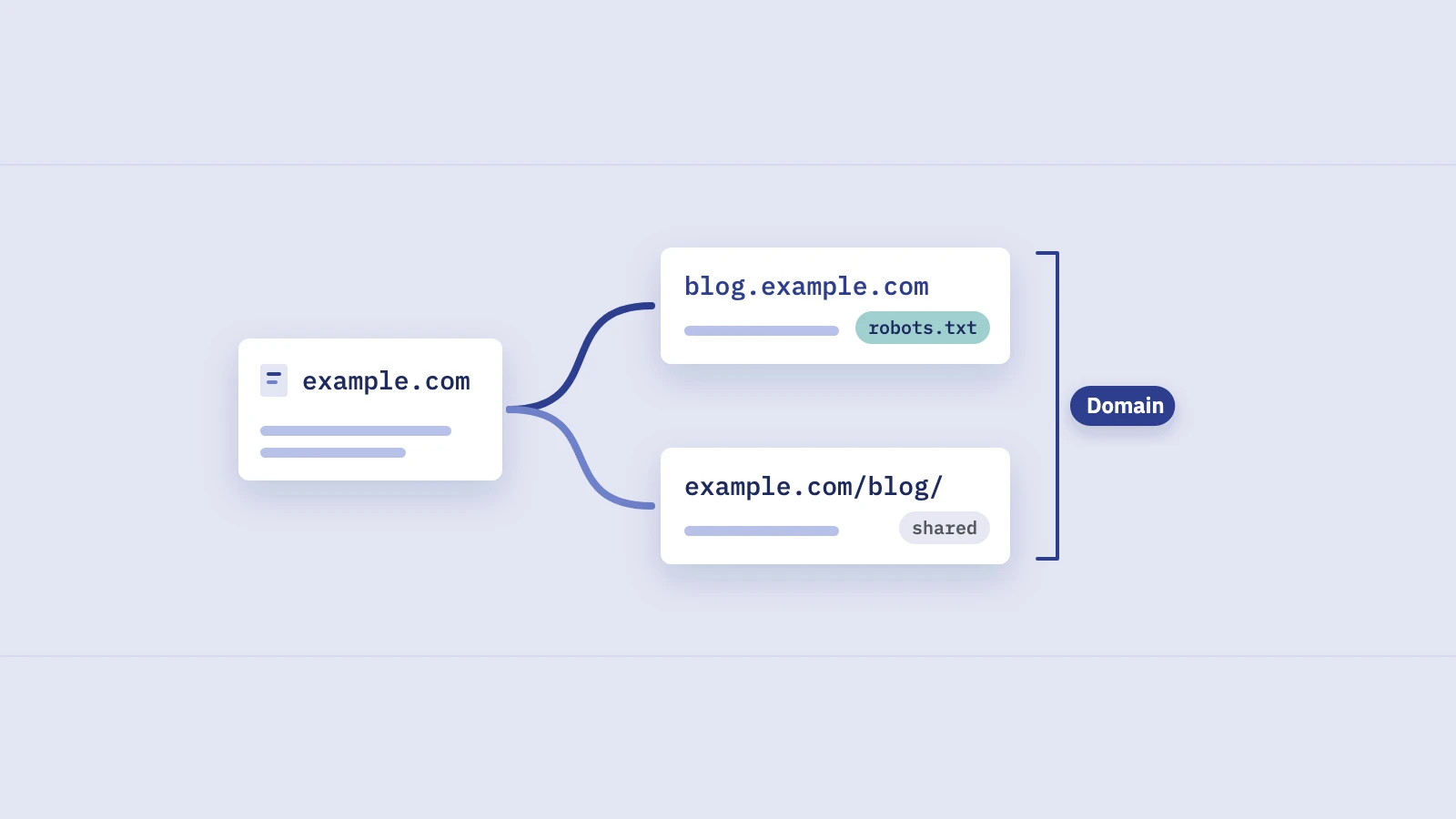
A subdomain is a separate host name: blog.example.com, shop.example.com, help.example.com. A subfolder (or subdirectory) is a path on the same host: example.com/blog/. To a visitor the difference is cosmetic. To crawlers and to Search Console, a host is a unit, and a lot of settings are scoped to it.
Here is what changes, based on Google's own documentation:
| What | Subdomain (blog.example.com) |
Subfolder (example.com/blog/) |
|---|---|---|
| robots.txt | Needs its own file at blog.example.com/robots.txt |
Uses the main host's file |
| Search Console | Covered by a Domain property; can also have its own URL-prefix property | Covered by both; can have a path-level URL-prefix property |
| Site name and favicon in results | Can have its own | Inherits the host's |
| Crawl stats and robots.txt reports | Available for it as a root-level host | Only at the host level, not per folder |
| Change of Address tool | Can be used when the subdomain moves | Not for moves between folders of one site |
| Site diversity in results | Generally counted with the root domain | Part of the same site |
The robots.txt rule comes from Google's robots.txt specification: a file applies only to the host, protocol and port it's served from, and a robots.txt on a subdomain is only valid for that subdomain. The site name and favicon rules come from Google's site names and favicon documentation, which support domain-level and subdomain-level home pages but not subdirectory-level ones.
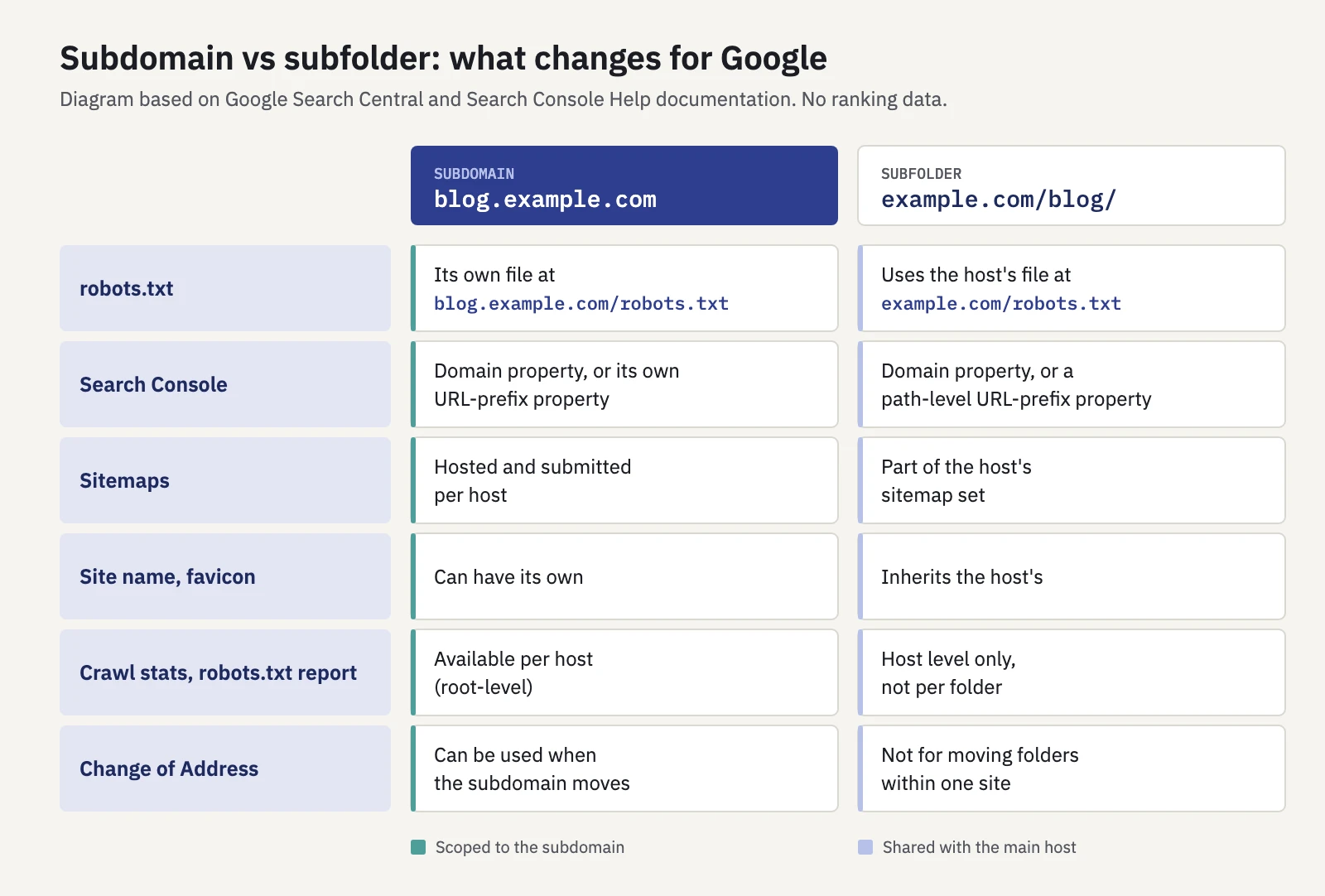
A subdomain is a separate host to Google's crawlers and to Search Console. A folder shares everything with its host.
What Google says about subdomains and rankings
We couldn't find a page in Google's Search Central documentation that says subfolders rank better than subdomains, or the other way round. Claims either way come from third-party case studies, not from Google. What the documentation does say is narrower, and more useful.
URL structure isn't how Google learns your site's structure. Google's guide to ecommerce site structure says Google generally doesn't look at URL structure to work out how a site is organized. Navigation and links between pages do that, and pages with more internal links pointing to them are treated as relatively more important. A subdomain that the main site barely links to is a poorly linked section, whatever its URL looks like. Our guide to internal linking with Search Console data covers how to find those gaps.
Site diversity usually counts them together. Google's ranking systems guide describes a site diversity system that generally shows no more than two listings from the same site in the top results. It says site diversity generally treats subdomains as part of the root domain, though sometimes they're treated as separate sites when that's relevant. So a subdomain isn't a reliable way to get extra listings for the same query.
A subdomain doesn't sidestep spam policies. Google's spam policies list using existing or new subdomains or subdirectories to keep violating the policies as policy circumvention. Moving questionable third-party content to a subdomain doesn't change how the site reputation abuse policy looks at it.
For international sites, Google lists both as valid. Google's guide to managing multi-regional sites compares country domains, subdomains and subdirectories. Subdomains are easy to set up, can sit on different servers and are easy to separate. Subdirectories are easy to set up and cheap to maintain on one host, but all content shares one server and is harder to separate. Neither is called better for ranking. Our hreflang guide covers how to read country versions once they're live.
The decision is mostly operational. Pick the setup your team can keep for years, because changing it later is a site move with redirects and a settling period.
When a subdomain makes sense
A subdomain earns its keep when the content really is run separately. The cases below are our recommendations, based on the differences above.
| Situation | Lean towards | Why |
|---|---|---|
| Blog or guides on the same CMS as the main site | Subfolder | One host, one robots.txt, one sitemap setup, internal links come naturally |
| Help center or shop on a hosted platform you can't put under a path | Subdomain | The platform runs on its own host; a reverse proxy to a folder may not be possible |
| Separate product, brand or audience with its own team | Subdomain | Its own robots.txt, site name, favicon and Search Console property |
| Country or language versions on different servers | Subdomain | Google lists separate hosting as an advantage of subdomains |
| Country or language versions on one platform | Subfolder | Google lists low maintenance on one host as an advantage of subdirectories |
Web app, logins and dashboards (app.) |
Subdomain, kept out of search | Private areas should require login; see below |
| Staging or test copies | Subdomain behind authentication | A public staging host can be crawled and indexed |
Two hosts need extra care.
App and account hosts. Logged-in areas don't belong in search. Protect them with a login, keep their URLs out of sitemaps and don't rely on robots.txt alone, because a URL blocked by robots.txt can still be indexed without its content. Our post on robots.txt vs noindex explains the difference, and 401 and 403 errors covers how Google treats pages behind a login.
Staging hosts. A forgotten staging. or dev. subdomain is a common source of duplicate pages in Google. A Domain property in Search Console shows it, because it covers every subdomain. So does a site: search, which includes subdomains, as our search operators guide explains.
Moving between a subdomain and a subfolder
Moving blog.example.com to example.com/blog/ (or back) changes every URL, so Google treats it as a site move with URL changes. Our website migration checklist covers the full process. These are the points specific to subdomain moves, from Google's site move guide and Change of Address documentation:
- Map every old URL to one new URL. Same content, one to one. Don't send everything to the new folder's home page.
- Check the destination host's robots.txt. Content that moves into a folder falls under the main host's robots.txt. A
Disallowmeant for something else can block the new/blog/path. Content that moves out to a new subdomain needs a new robots.txt there. - Redirect with server-side permanent redirects. Google recommends server-side permanent redirects and keeping them generally at least a year. Our guide to 301 redirects shows how to check each one.
- Update internal links, canonicals and hreflang to the new URLs, so every signal points the same way. Our canonical tags guide explains why mixed signals cause trouble.
- Submit sitemaps for the old and new URLs. Google says redirect warnings in the old sitemap are normal during a move. Remove the old one once the new URLs are being picked up.
- Consider Change of Address. The tool works only from domain-level properties, and a subdomain such as
blog.example.comcounts as one. Google's help page says it can also move a site to a path within another domain. Moving folders around within one site isn't a use case for it. If the tool's checks don't accept your move, redirects and sitemaps do the job without it. - Expect a settling period. Google says rankings can fluctuate during a move and that a small to medium site can take a few weeks for most pages to move. Larger sites take longer.
Before the move, export a baseline of the old subdomain's pages and queries from Search Console. After the move, you compare the same pages under their new URLs against it.
How to measure a subdomain in Search Console
Search Console can show a subdomain on its own or as part of the whole site. Which view you get depends on the property type. Google's property documentation defines the two:
- A Domain property (
example.com) covers all subdomains, protocols and paths. It requires DNS verification. - A URL-prefix property (
https://blog.example.com/) covers only URLs that start with that exact prefix, protocol and host included.
You usually want both: the Domain property for the whole picture, and a URL-prefix property for each subdomain you manage separately. Our Search Console guide covers adding and verifying them.
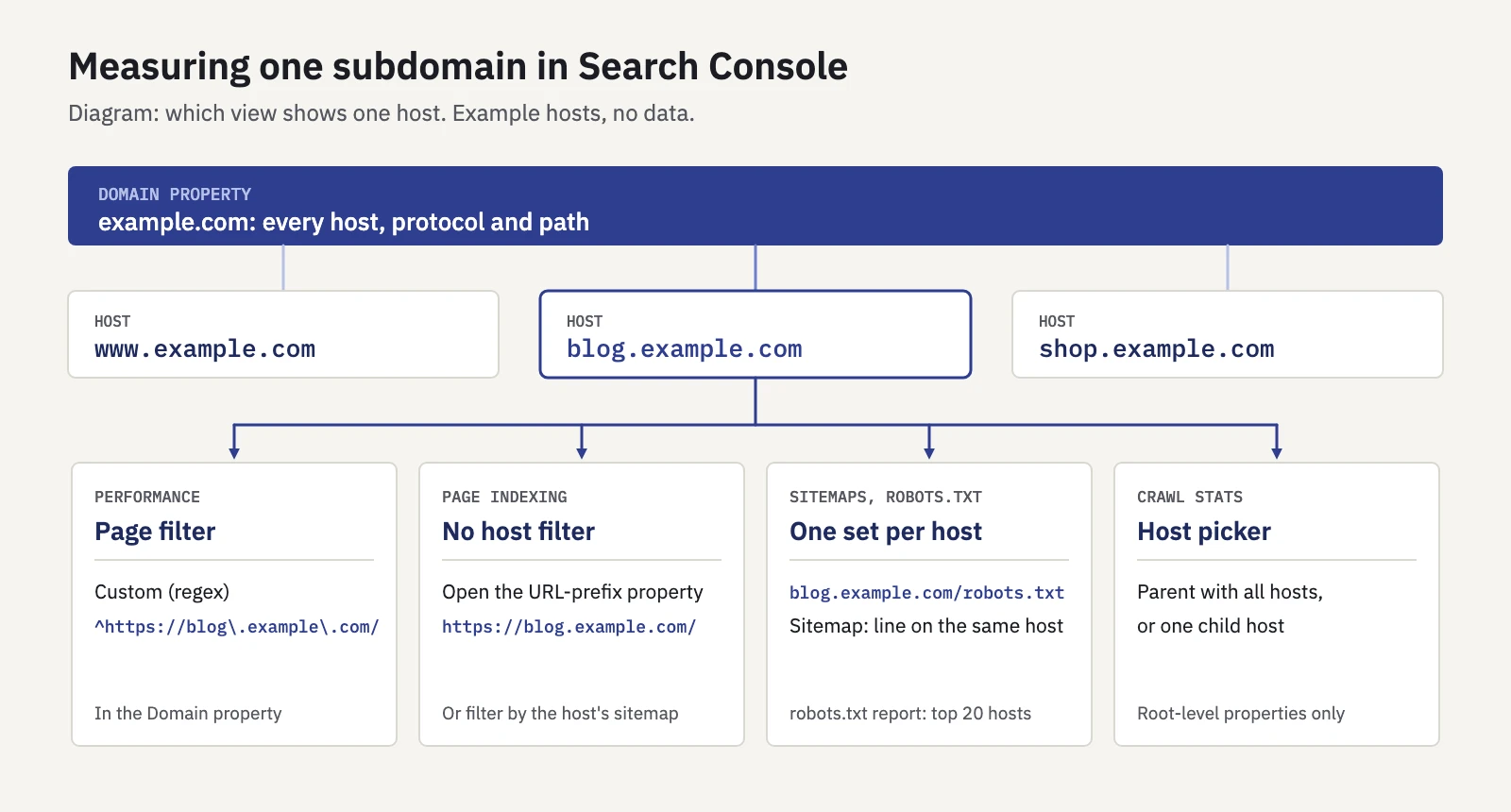
The Domain property gives the total. Per-host views come from a regex filter, a host picker or a URL-prefix property.
Here's how to read one subdomain, report by report:
- Performance: filter by page with regex. In the Domain property, open Performance > Search results, click + Add filter, choose Page and switch the match type to Custom (regex). Enter
^https://blog\.example\.com/. Search Console matches the regex against the full URL, so include the protocol and escape the dots. Use Doesn't match regex to see everything except that host. Our Search Console regex guide has more patterns, and you can test one in the free regex tester. - Page indexing: use the host's own property. The Page indexing report has no filter by host. Open it in the subdomain's URL-prefix property to see only that host's pages, or filter by a sitemap that lists only that host's URLs.
- Sitemaps: one set per host. The Sitemaps report expects the URLs in a sitemap to begin with the same host as the sitemap's location, and sitemaps submitted in one property aren't visible in another. Host each subdomain's sitemap on that subdomain and list it in that host's robots.txt with a
Sitemap:line. - robots.txt: check every host. The robots.txt report in a Domain property lists the files Google found for the top 20 hosts, with fetch status and parsing issues. Check that each subdomain you care about has a file that loads. Our robots.txt tester fetches the file from the URL's own host, so testing a subdomain URL tests that subdomain's rules.
- Crawl stats: pick the child host. The Crawl stats report is available only for root-level properties. In a Domain property with several hosts, you can view the parent with all children or one child host at a time. That's where you see whether Google has trouble reaching one subdomain.
- URL Inspection: any covering property. Inspect a URL in any property that contains it. The Domain property works for every subdomain.
Search Console credits performance data to the canonical URL. If Google picks a canonical on another host, for example a leftover copy on an old subdomain, the clicks are counted under that host, not the one you filtered for.
Tracking a subdomain in Serplyze
Each Serplyze project is one Search Console property. Connect the Domain property for the whole site, and add a subdomain's URL-prefix property as a separate project when another team owns it or reports on it (Projects and workspaces). Each project has its own keywords, alerts, notes and reports.
On the Traffic screen, the search box takes a regular expression and matches the full URL, so ^https://blog\.example\.com/ narrows the Pages list to one host inside a Domain property project (Traffic). After a subdomain move, the Lost and New quick views on Pages show old URLs dropping out and new ones picking up. Add a Migration note on launch day so the chart shows the move next to any dip (Google updates and notes).
Serplyze reads Search Console's performance data, not robots.txt, sitemaps or index status. Check those in Search Console with the steps above.
Key takeaways
- Google's documentation doesn't say subfolders or subdomains rank better. Navigation and internal links tell Google how a site is organized, not the URL format.
- A subdomain is its own host: it needs its own robots.txt and can have its own site name, favicon and Search Console property. A subfolder shares all of that with its host.
- Site diversity generally counts subdomains as part of the root domain, and spam policies treat new subdomains used to keep violating them as circumvention.
- Choose a subdomain when content runs on a separate platform, server or team; otherwise a subfolder is simpler to maintain.
- Moving between the two is a site move: map URLs one to one, use permanent redirects, check the destination host's robots.txt and expect a few weeks of settling.
- Measure a subdomain with a Domain property plus a Page filter in Custom (regex), and use a URL-prefix property, the robots.txt report and Crawl stats for per-host checks.
Serplyze tracks clicks, impressions and rankings from your own Search Console data, for a whole domain or one subdomain at a time. Start free.