Hreflang tells Google which version of a page to show to which language or region. Getting the tags right is half the job; the other half is reading your Search Console data by country to confirm searchers in each market actually land on their own version.
What hreflang does
If you have the same page in several languages, or in one language for several regions, hreflang annotations tell Google these pages are alternates of each other. Google's documentation on localized versions of your pages puts it simply: hreflang helps Search point users to the most appropriate version of your page by language or region.
A few things it does not do, per the same docs:
- It doesn't tell Google what language a page is in. Google detects language from the content and doesn't use hreflang or the HTML
langattribute for that. - It doesn't make translations duplicates. Localized versions only count as duplicates when the main content stays untranslated. That's worth remembering for en-US and en-GB pages that differ only in spelling and prices.
- It doesn't replace country targeting settings, because there aren't any now. Search Console's International Targeting report is deprecated and its country targeting setting is no longer supported. Google still uses hreflang.
Each annotation pairs a URL with a code. The language comes first in ISO 639-1 format (en, de), optionally followed by a region in ISO 3166-1 Alpha 2 format (en-GB, de-AT). A region on its own isn't valid.
Return links and x-default
Hreflang works in clusters: every page in the set lists itself and every other version, and the set is identical on every page. Google is blunt about what happens otherwise: if two pages don't both point to each other, the tags will be ignored. These reciprocal annotations are usually called return links.
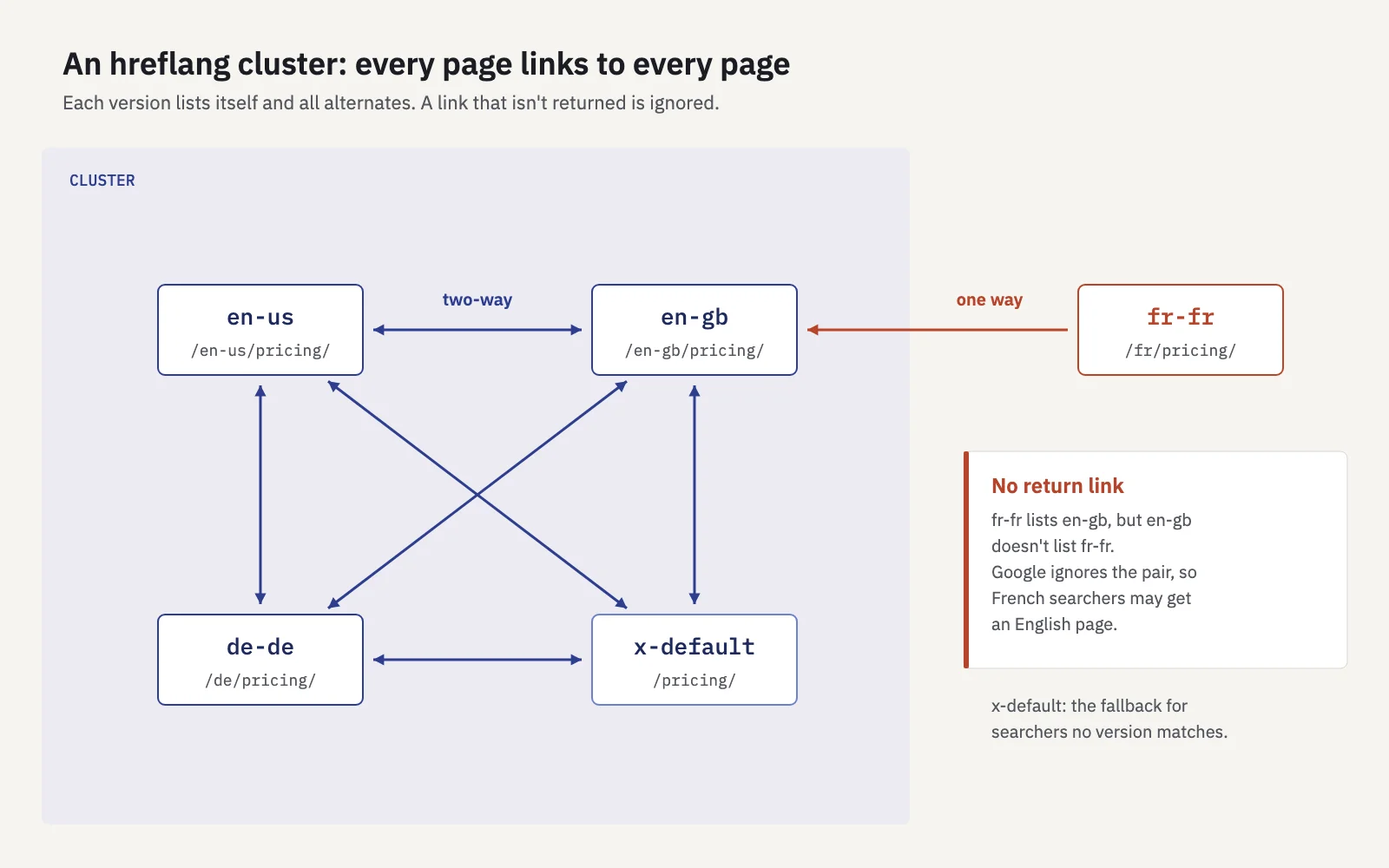
For a page in three locales plus a fallback, every version carries the same four lines:
<link rel="alternate" hreflang="en-us" href="https://example.com/en-us/pricing/" />
<link rel="alternate" hreflang="en-gb" href="https://example.com/en-gb/pricing/" />
<link rel="alternate" hreflang="de-de" href="https://example.com/de/pricing/" />
<link rel="alternate" hreflang="x-default" href="https://example.com/pricing/" />
x-default is the fallback for searchers whose language and region match none of your versions. Google recommends it for a language selector page or a home page that redirects by locale, but any sensible default works, often your main English page.
Three ways to implement hreflang
Google treats the three methods as equivalent. Pick the one your stack can keep correct, and use only one so they can't contradict each other.
| Method | Where it goes | Best for |
|---|---|---|
HTML <link> elements |
In the <head> of every version |
Most sites; easy to inspect page by page |
HTTP Link: header |
In the response headers | Non-HTML files such as PDFs |
| XML sitemap | <xhtml:link> entries under each <url> |
Large sites; keeps markup out of templates |
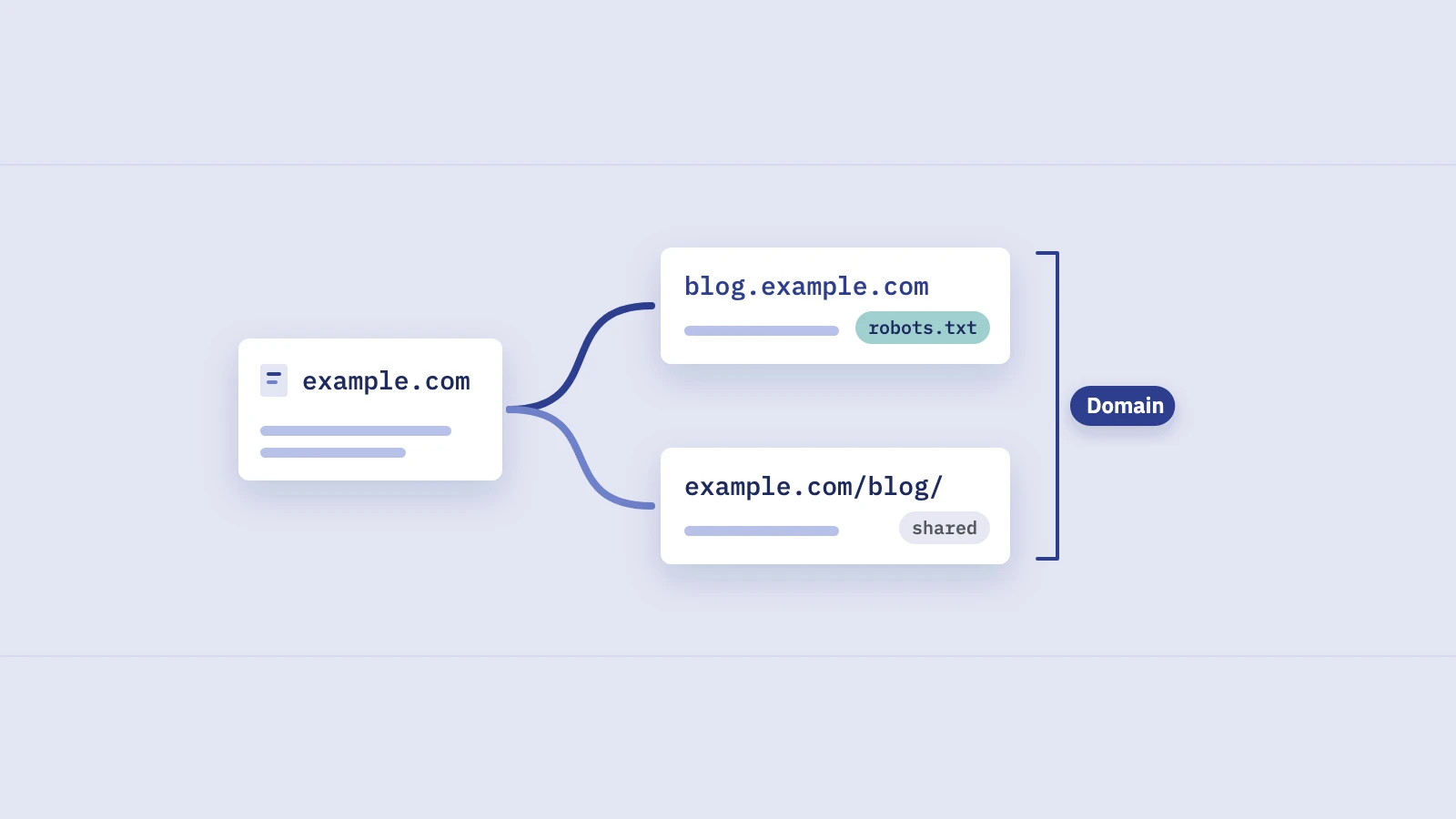
In every method, alternate URLs must be fully qualified, including https://. Alternates can be on different domains, which is how ccTLD setups such as example.de and example.fr are linked. In a sitemap, each <url> entry lists all variants including itself, and the file must declare the xhtml namespace.
Common hreflang errors
Google lists the first three in its own docs. The rest follow from Google's canonical and redirect guidance.
- Missing return links. Page A lists B, B doesn't list A. Usually caused by a page that exists in one locale only, or by a CMS that writes tags per language without knowing the others.
- Wrong language codes. Region-only values, or invented ones like
en-uk. The ISO code for the United Kingdom isGB. - Wrong or reserved region codes. Google says
EU,UNandUKhave no effect. - Relative URLs such as
/de/pricing/instead of the full address. - Hreflang pointing at URLs that aren't canonical: redirects, noindexed pages, parameter variants. Annotate the URL you want indexed.
- Canonicals that cross languages. If the German page has a canonical pointing to the English page, you've told Google they're the same. Google's duplicate URL guidance says to specify a canonical page in the same language, or the best possible substitute language.
- Automatic redirects by IP or browser language. Google advises against them in its multi-regional sites guide, because Googlebot crawls mostly from the US and may never see the other versions. Link to the other versions instead.
Since the International Targeting report is gone, Search Console no longer lists hreflang errors for you. Check the tags in your templates or sitemap, crawl the site with a tool that validates clusters, and use URL Inspection's live test (View tested page) to see the HTML Google receives. Then confirm the outcome in the data, which is the part most guides skip.
Measuring international performance in Search Console
Search Console can't show you hreflang errors anymore, but it shows their symptoms: searchers in one country landing on another country's pages.
By country. In Performance > Search results, open the Countries tab to see clicks, impressions, CTR and position per country, meaning where the search came from. Use + Add filter > Country to scope the whole report to one market. You can select several countries to see them as one combined total, which is handy for a DACH or Nordics view.
By URL folder. Add a Page filter: URLs containing /de/ for one folder, or Custom (regex) for several. The regex is RE2 and case-insensitive by default. Some patterns:
| Site structure | Page filter |
|---|---|
| Subfolders | URLs containing /en-gb/ |
| Several subfolders | Custom (regex) on the folder names, as below |
| Subdomains | Custom (regex) ^https://de\.example\.com/ |
| ccTLDs | Separate properties, or one Domain property with a regex on the host |
For all German-language folders at once, the regex /(de|de-at|de-ch)/ matches any URL containing one of them. Our Search Console regex guide has more patterns and the RE2 gotchas.
Combine the two and you have a market report: country filter for the audience, page filter for the content. Use Compare on dates to see the same market before and after a hreflang release.
Spotting the wrong page in the wrong country
This is the check that tells you whether hreflang is working. For each market, look at which locale folder gets its clicks.
- Filter to one country, for example United Kingdom, and pick the last 3 months.
- Open the Pages tab. Sort by clicks and scan the top URLs. In a healthy setup they're almost all in
/en-gb/. - Add a Page filter for the other locales, such as Custom (regex)
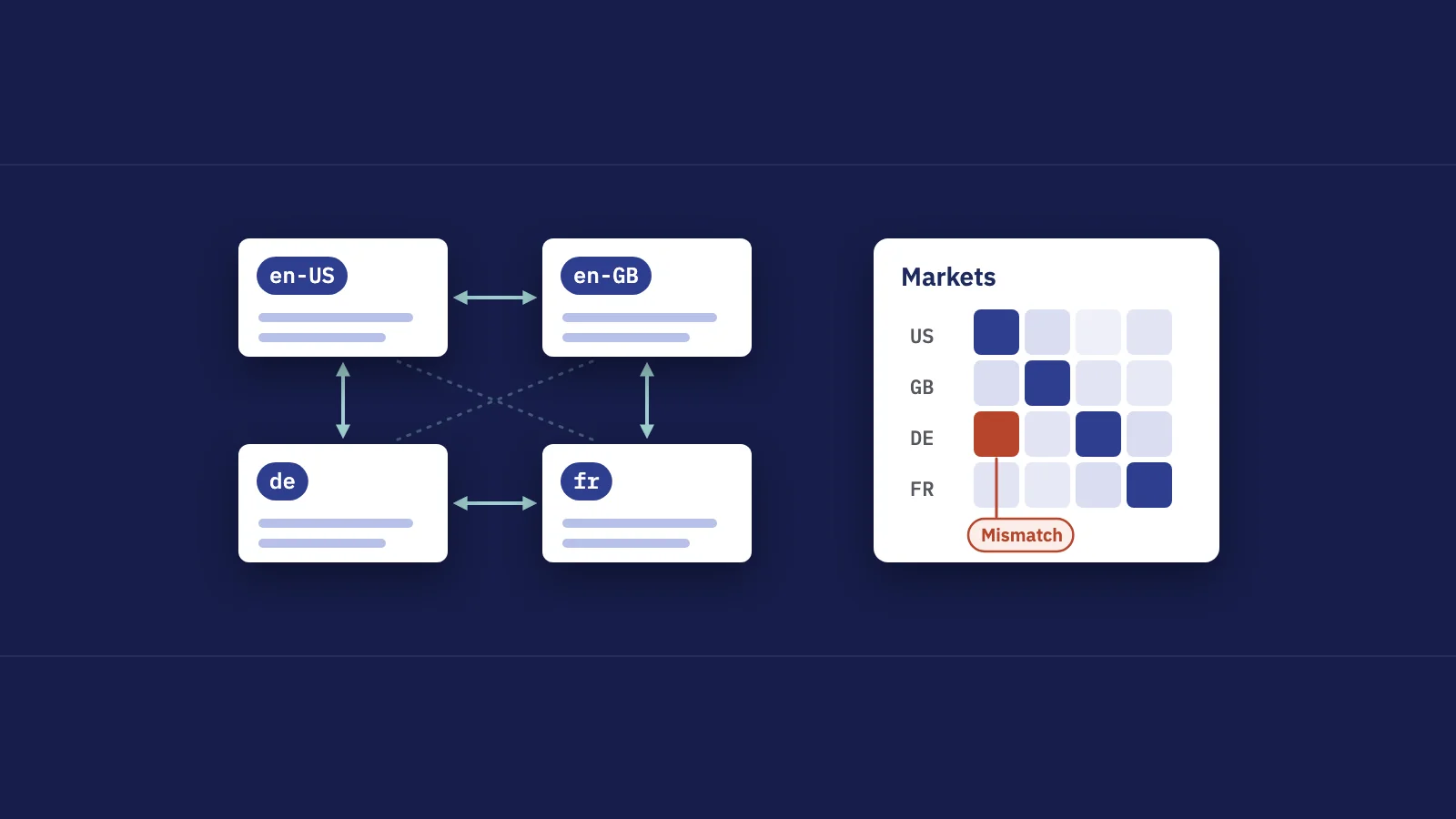
/en-us/, to measure how many UK clicks go to US pages. - Repeat for each country and write the share into a grid: countries as rows, locale folders as columns.
- Investigate any cell off the diagonal that holds a meaningful share. Open the top URLs and run them through URL Inspection.
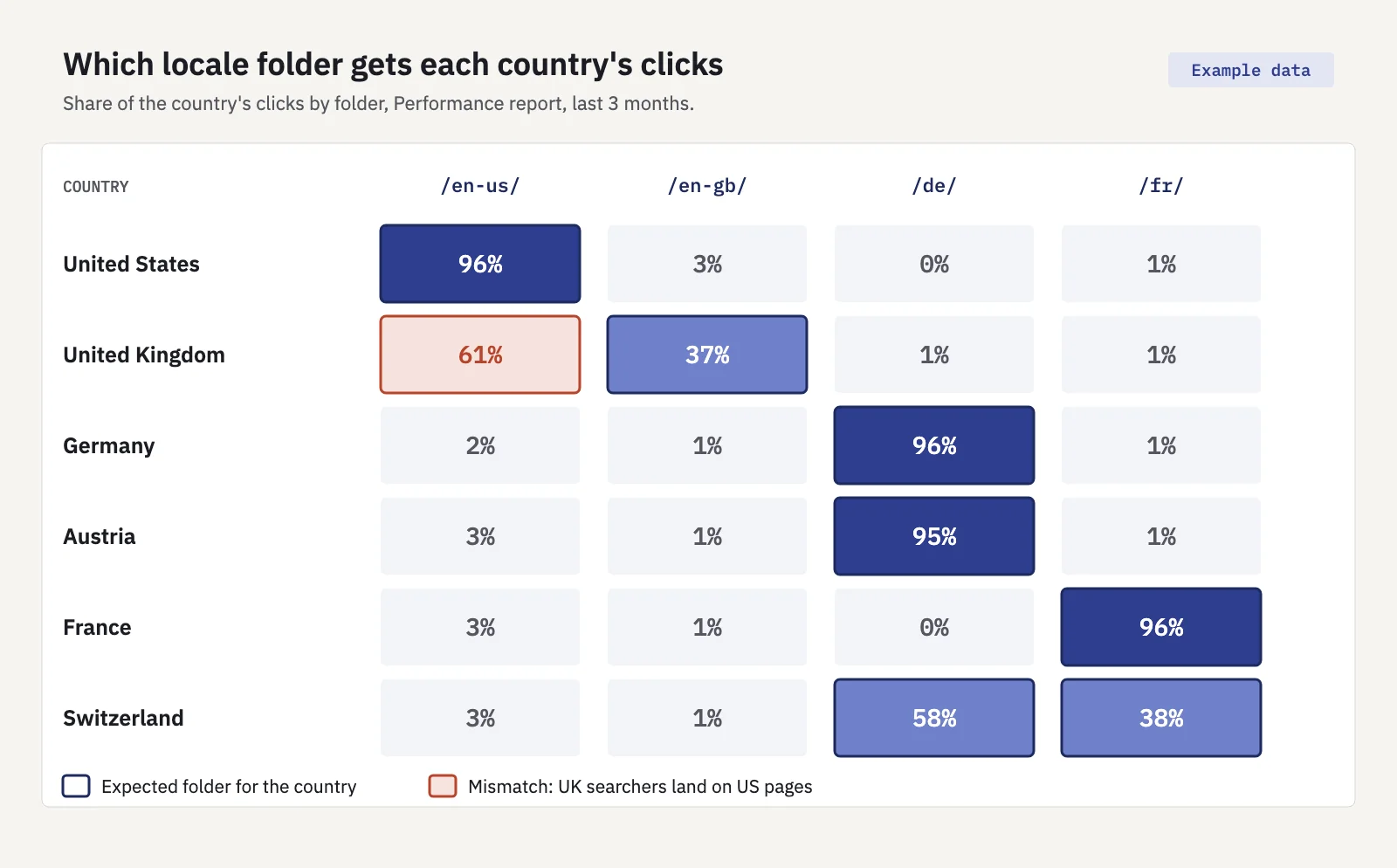
In the example grid (illustrative numbers), German, Austrian and French searchers land where they should. The United Kingdom row doesn't: 61% of UK clicks go to /en-us/ pages. Swiss clicks split between /de/ and /fr/, which is expected for a multilingual country.
Typical causes of a mismatch, and what to check:
| Symptom | Likely cause | Check |
|---|---|---|
| UK clicks land on US pages | Missing return links, or no en-GB page for those URLs | The hreflang set on the US page and its en-GB counterpart |
| Google shows one English version everywhere | en-US and en-GB nearly identical, treated as duplicates | Google-selected canonical in URL Inspection |
| A locale gets no impressions at all | Canonical points to another language, or the pages aren't indexed | Canonical tag and Page indexing status |
| Mismatch on some queries only | Hreflang missing on one template | Tags on that template's pages |
The query view helps too. Filter to a country, open Queries, click a high-impression query, then switch to Pages to see which URLs rank for it there. Two locales ranking for the same query in the same country looks a lot like keyword cannibalization and is usually fixed the same way: make the signals agree.
Serplyze does this read in fewer clicks. On Traffic, the Country card lists clicks by country; click a country to filter the whole screen, including the Pages, Folders and Groups lists. Create one page group per locale folder (Start from your top folders suggests them) and the Groups tab shows each locale's clicks from that country side by side. On paid plans, a tracked keyword's page also has a Countries section with its clicks, impressions and position per country. See the Traffic docs.
For markets that matter, put this grid in your monthly SEO report next to clicks per country. A misrouted market is easy to miss in site totals, because the traffic still arrives, just on the wrong page.
Key takeaways
- Hreflang tells Google which language or regional version to show. It doesn't set the page's language; Google detects that from the content.
- Every version lists itself and all alternates; one-way annotations are ignored. Add x-default for everyone else.
- HTML tags, HTTP headers and sitemaps are equivalent. Use one, with full URLs and valid ISO codes (
en-GB, noten-UK). - Search Console no longer reports hreflang errors, so measure the outcome: filter by country and see which locale folders get the clicks.
- A country sending most clicks to another country's pages points to missing return links, cross-language canonicals or near-duplicate versions.
Serplyze breaks your Search Console clicks down by country and by page group, so you can see each market land on its own pages. Start free and connect your property in a couple of minutes.