Pagination splits a long list (products, articles, search results) across several URLs. Done right, Google can follow the series to every item in it. Done wrong, items on page 4 are never found, or page 2 onward quietly drops out of the index. Here's what Google's current guidance says, what changed, and how to check your paginated URLs in Search Console.
What is pagination?
Pagination is the "1, 2, 3 … Next" navigation under a list that's too long for one page. Category pages in a shop, blog archives, forum threads and internal search results all use it. Each page shows a slice of the list, and each slice has its own URL, such as /shoes/?page=2 or /blog/page/2/.
For SEO, pagination matters for one reason: it's often the only path to the items deep in a list. A product that's only linked from page 7 of a category is only found if Google gets to page 7.
Google's guide to pagination and incremental page loading describes three ways to show a long list. They differ mainly in whether Google can reach the content:
| Pattern | How users get more items | What Google needs |
|---|---|---|
| Pagination | Click "Next" or a page number; a new page loads | Page links as <a href> with unique URLs |
| Load more | Click a button; items are added to the same page | A crawlable link to a paginated URL behind the button |
| Infinite scroll | Scroll; items load automatically | A unique URL per chunk, linked in sequence |
The key line in that guide is that Google's crawlers don't click buttons or trigger JavaScript that needs a user action. Whatever the visible pattern, the content has to be reachable through plain links.
What Google's guidance says now
The current rules, from the same guide:
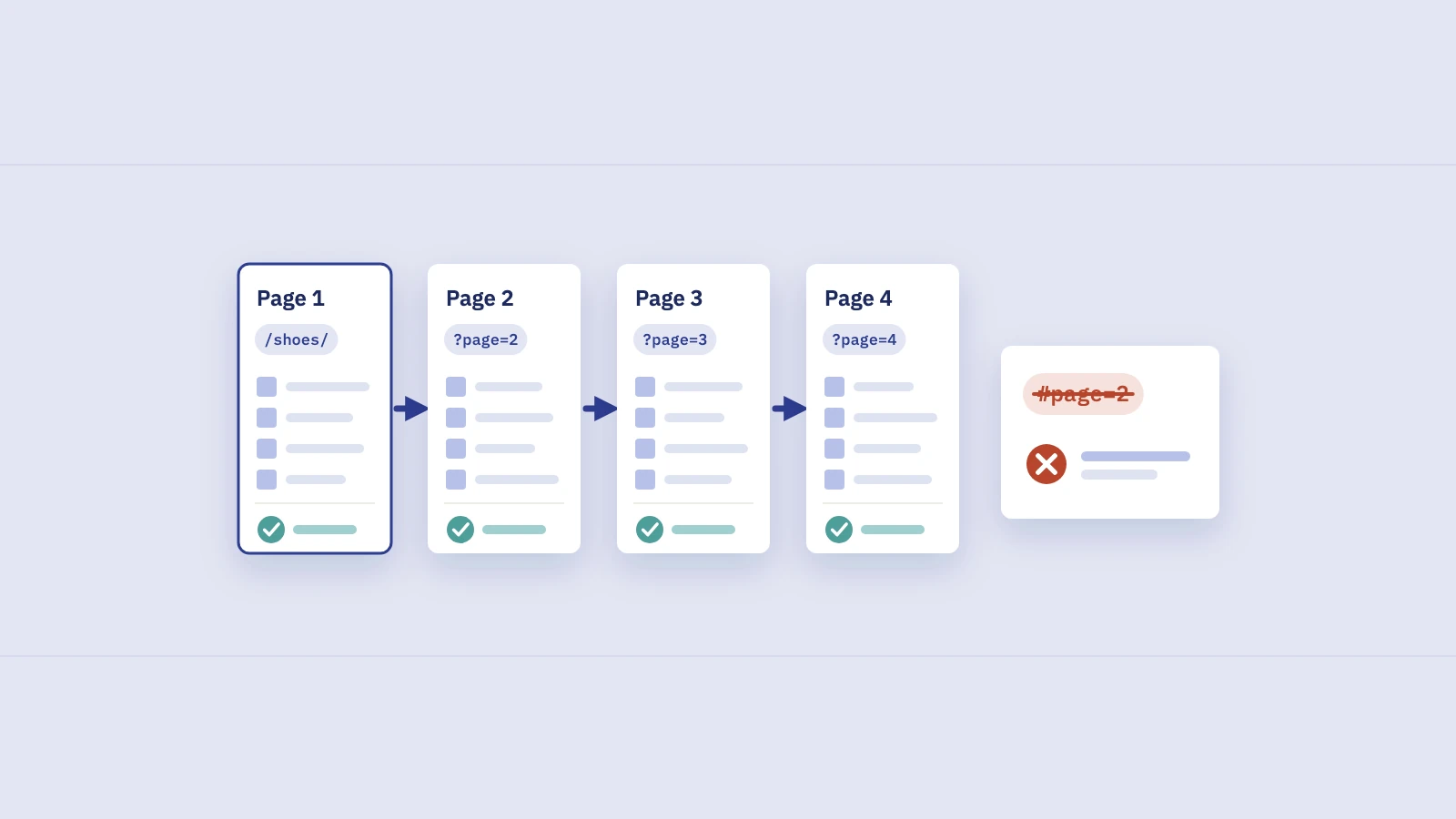
- Link pages in sequence. Each page links to the next one with an
<a href>tag. Google also suggests linking every page back to the first page, as a hint that page 1 is the best landing page for the collection. - Give each page a unique URL. A
?page=nparameter works. Google treats each paginated URL as a separate page. - Give each page its own canonical. Don't set page 1 as the canonical for the whole series.
- Don't put page numbers in a fragment. Google ignores what comes after
#, so/shoes/#page=2looks like page 1 and the link may be skipped. - Titles and descriptions can repeat. Google says paginated pages don't need distinct titles and descriptions; it tries to recognize sequences and index them accordingly.
- Keep filtered and sorted versions out of the index if you don't need them, with
noindexor robots.txt rules. More on that below.
Google's guide on crawlable links sets the bar for "link": Google can reliably extract URLs from <a> elements with an href attribute. A <span> with a click handler, or a button that fetches the next page with JavaScript, isn't a link Google can follow.
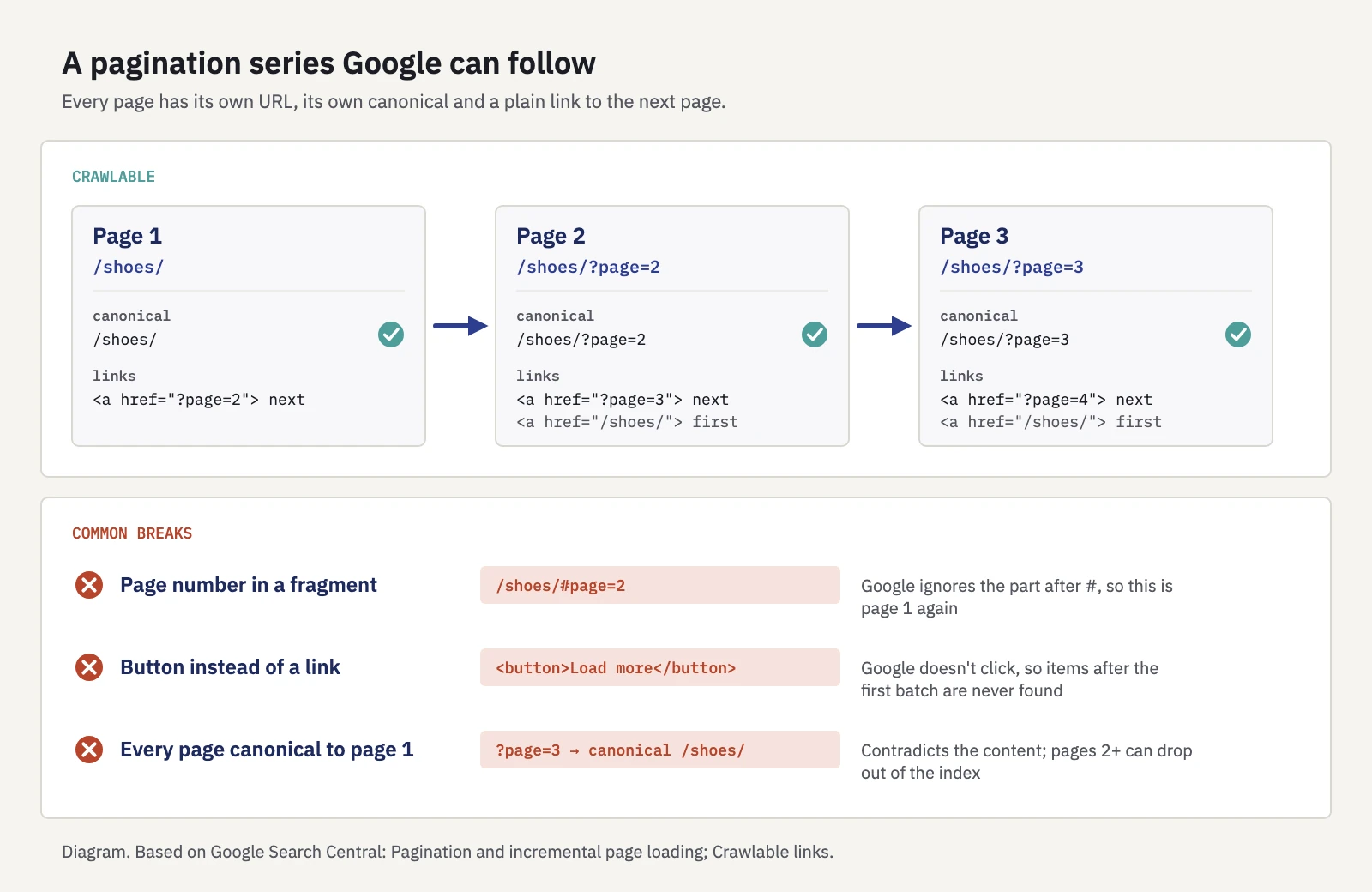
What a crawlable series looks like, and the three most common ways it breaks.
What happened to rel="next" and rel="prev"
For years, the standard advice was to mark up a series with <link rel="next"> and <link rel="prev">. Google's pagination guide now states that Google no longer uses these attributes, while noting other search engines may still use them. Leaving them in place does no harm, and you don't need to remove them. But they don't replace real links: if pages 2 onward are only reachable through rel="next", Google has no link to follow.
Canonical tags on paginated pages
The most common pagination mistake is canonicalizing every page in a series to page 1. It looks tidy, but pages 2, 3 and 4 aren't duplicates of page 1: they list different items. Google's guidance is direct: each page gets its own canonical URL.
What that looks like on page 2:
<link rel="canonical" href="https://www.example.com/shoes/?page=2">
If page 2 points its canonical at page 1, Google may ignore the tag because the pages aren't similar ("Duplicate, Google chose different canonical than user" in Search Console), or follow it and leave page 2 out of the index. Either way the signal contradicts your content. Our post on canonical tags covers how Google weighs canonical signals and how to read the duplicate statuses.
One related case: page 1 often exists at two URLs, /shoes/ and /shoes/?page=1. Link to /shoes/ from the pagination, and canonicalize or redirect the ?page=1 version to it.
Noindex, robots.txt and page 2 onward
A common instinct is to noindex every page after the first, to keep "thin" archive pages out of search. Google's pagination guide doesn't recommend that. It tells you to give each page its own URL and canonical, and to keep only filtered or sorted variations out of the index.
Before you add a rule to page 2 onward, decide what you want each type of URL to do:
| URL type | Example | Indexable? | Crawlable? |
|---|---|---|---|
| Page 1 of a category | /shoes/ |
Yes | Yes |
| Page 2 onward | /shoes/?page=2 |
Yes, with a self-referencing canonical | Yes, linked in sequence |
| Sorted version | /shoes/?sort=price |
Usually no | Your choice |
| Filtered version you don't want ranking | /shoes/?color=red&size=9 |
No | Often blocked |
| Page number past the end | /shoes/?page=999 |
No: return 404 | n/a |
The table's choices are our recommendations, based on Google's guidance. Three points behind them:
- Noindex is intentional or it's a mistake. A
noindexon page 2 onward keeps those pages out of results. If that's your decision, fine, but Google still has to crawl them to find the items they link to. Our guide to robots.txt vs noindex explains why the two shouldn't be combined on the same URL: a page blocked in robots.txt can't show Google its noindex. - Don't block pagination in robots.txt. Disallowing
?page=stops Google from crawling the series, which means it can't follow the links to items listed there. Robots.txt is the right tool for sort and filter variations you don't need crawled, not for the series itself. - Noindex doesn't save crawling. Google's crawl budget guide says not to use it for that, because Google still requests the page.
Google's guide to faceted navigation recommends returning a 404 for filter combinations with no results and for nonexistent pagination. A ?page=999 that returns 200 with an empty list, or redirects to page 1, invites crawling of URLs that hold nothing.
Infinite scroll and "load more" without losing content
Infinite scroll and load-more buttons are fine for users. The problem is that the items they load have no URL of their own, and Googlebot doesn't scroll or click. Google's guide to lazy-loaded content describes how to make them crawlable. In practice:
- Build the paginated version first. Every chunk of the list gets a persistent, unique URL such as
?page=3that shows the same items on every load. Google notes that absolute page numbers work, while relative values like?date=yesterdaydon't. - Link the chunks in sequence. Each chunk URL links to the next with an
<a href>. A load-more button can be that link, enhanced with JavaScript, so clicks load items in place while crawlers follow thehref. - Update the address bar. When a new chunk becomes the main visible content, update the URL with the History API, so users can share, bookmark or reload that position.
- Make each URL work on its own. Opening
?page=3directly should load page 3's items, not page 1 followed by an empty space. - Test it as Google sees it. Run URL Inspection on a chunk URL and check the rendered HTML for the items and their links.
Filters, sorting and pagination together
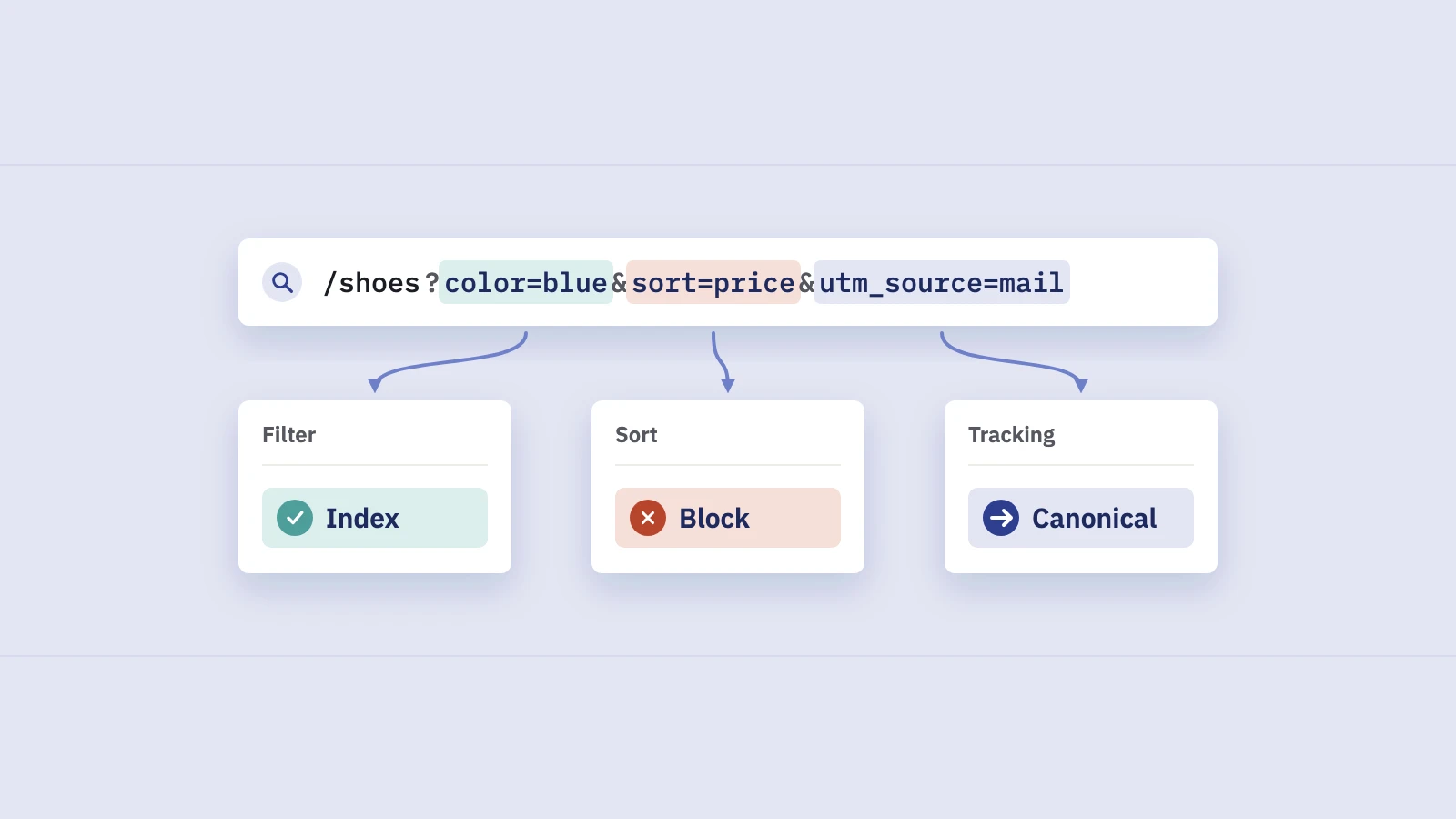
On shops and directories, pagination multiplies with filters and sort orders: every combination can have its own page 2, 3 and 4. Google's faceted navigation guide describes the cost: crawlers can spend a lot of time on these URLs before deciding they're useless, which slows the discovery of new, useful pages.
What helps:
- Paginate the canonical listing, not every variation. The unfiltered category, in its default order, is the series Google should crawl in full.
- Keep parameters consistent. Google recommends
&as the separator and a fixed order for filters, so the same list doesn't appear under several URLs. - Link to clean URLs. Your pagination links should never carry tracking parameters or session IDs.
If you're not sure how many paginated URLs your site produces, our page counter reads your sitemap and counts the URLs in it. Compare that with what you see in Search Console's indexing report; our post on finding every page on your website walks through that comparison.
How to check paginated URLs in Search Console
Search Console has no pagination report, but three tools answer the questions that matter.
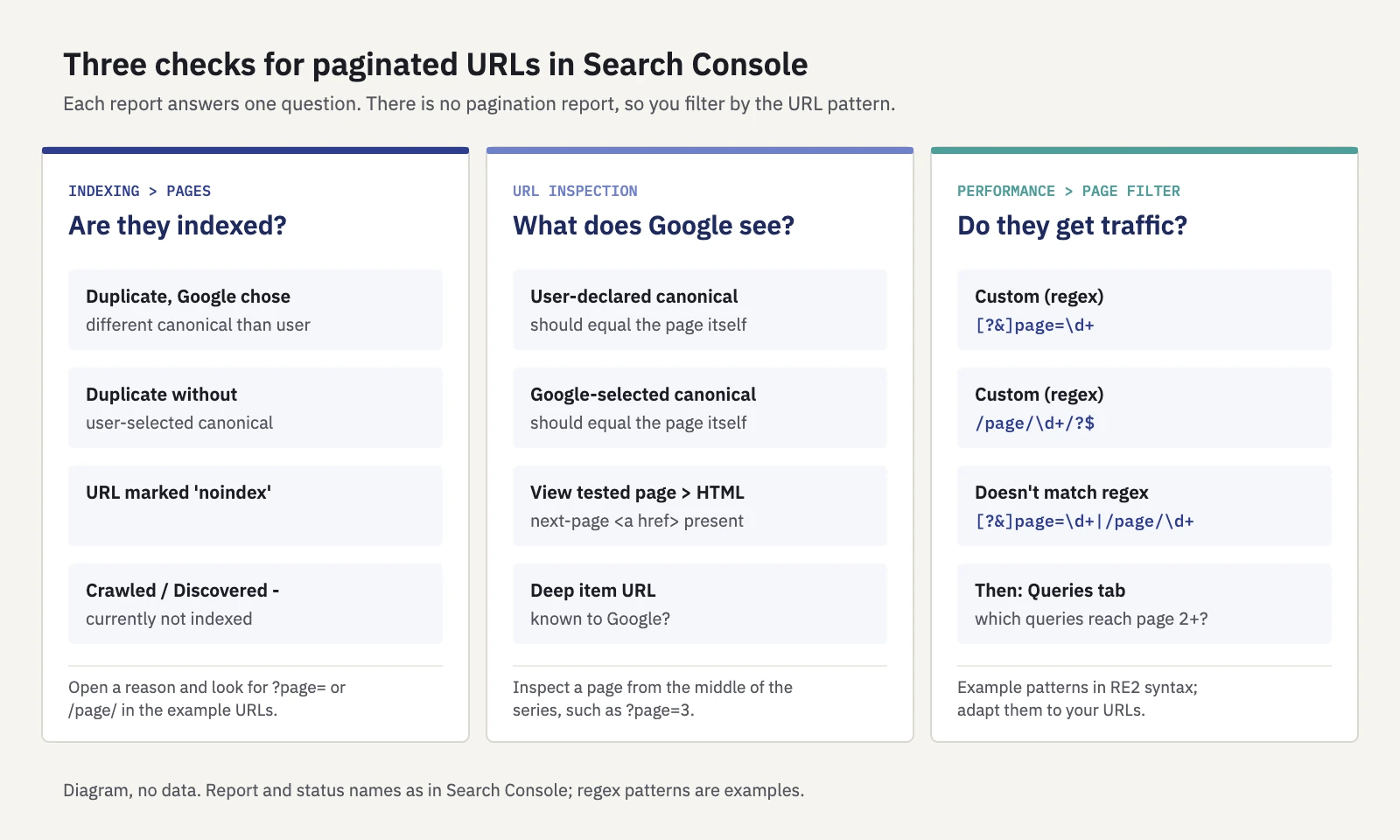
Diagram: which check answers which question. The regex patterns are examples to adapt to your URLs.
Page indexing: which paginated URLs are excluded
Open Indexing > Pages and look at the reasons pages aren't indexed. Click a reason to see example URLs (up to 1,000), and look for the ?page= or /page/ pattern. The reasons that point to a pagination problem, with their names as in Google's Page indexing report documentation:
- Duplicate, Google chose different canonical than user: often a series canonicalized to page 1, where Google disagreed.
- Duplicate without user-selected canonical: paginated pages with no canonical tag, which Google grouped with another URL.
- URL marked 'noindex': expected if you noindex page 2 onward on purpose; a bug if you didn't.
- Crawled - currently not indexed and Discovered - currently not indexed: deep pages Google knows about but hasn't indexed. Check how many clicks from page 1 they are and whether they're linked at all.
Our post on indexing in SEO covers the rest of this report.
URL Inspection: what Google sees on one page
Paste a page from the middle of a series, such as ?page=3, into the inspection bar. Check:
- Page indexing. Is the URL indexed? Compare User-declared canonical with Google-selected canonical: on a working series, both are the page itself.
- Test live URL. Run the live test and open View tested page. In the HTML, look for the next-page
<a href>and the items you expect on page 3. Anything that only appears after a scroll or click won't be there. - Inspect an item. Pick a product or post listed only on a deep page and inspect it too. If it's "URL is unknown to Google", the series isn't getting crawled that deep.
Performance: do paginated pages get search traffic?
In Performance > Search results, add a Page filter and choose Custom (regex). Search Console uses RE2 syntax, and a pattern matches anywhere in the URL. Example patterns:
| Goal | Filter | Pattern |
|---|---|---|
All ?page= URLs |
Matches regex | [?&]page=\d+ |
All /page/N/ URLs |
Matches regex | /page/\d+/?$ |
| Page 2 onward only (parameter) | Matches regex | [?&]page=([2-9]|\d{2,}) |
| Everything except paginated URLs | Doesn't match regex | [?&]page=\d+|/page/\d+ |
Then open the Queries tab. Paginated pages usually earn few impressions, and that's expected: page 1 and the item pages should be the ones ranking. If page 3 gets impressions for the category's main query, check page 1 and the internal links pointing to it.
Our Search Console regex guide has more filters worth saving, and you can try a pattern against your own URLs in the regex tester before you use it.
In Serplyze, the Traffic screen's Pages tab takes the same kind of regex in its filter bar and matches it against the full URL, so you can list every ?page= URL with its clicks, impressions and top query beyond Search Console's 1,000-row table on paid plans. For /page/N/ paths, a page group with a "matches regex" condition keeps the series together across periods; page groups match the URL path only, so they don't see ?page= parameters. See Traffic.
Don't rely on pagination alone
Pagination is one path to deep items, and often the longest. Make important items reachable some other way too: subcategories, related links and your sitemap. Our post on internal linking with Search Console data shows how to find pages with too few links.
Key takeaways
- Google crawls
<a href>links and doesn't click buttons or scroll, so every page of a series needs a unique URL and a plain link from the page before it. - Google no longer uses rel="next" and rel="prev". They do no harm, but they don't replace links.
- Give each paginated page its own canonical. Pointing page 2 onward at page 1 contradicts the content and can keep those pages out of the index.
- Don't use URL fragments for page numbers, don't block the series in robots.txt, and only noindex page 2 onward if you mean to.
- Check the series with Page indexing reasons, URL Inspection on a deep page, and a Performance page filter with a regex such as
[?&]page=\d+.
Serplyze tracks every page's clicks, impressions and rankings from your own Search Console data, so you can see whether page 1 or page 4 is the one that ranks. Start free.