A 301 redirect tells browsers and search engines that a URL has moved for good and where it went. It's the default choice whenever a page's address changes, but it isn't the only redirect type, and picking the wrong one, or stacking several in a chain, can keep the old URL in Google longer than you meant to.
What is a 301 redirect?
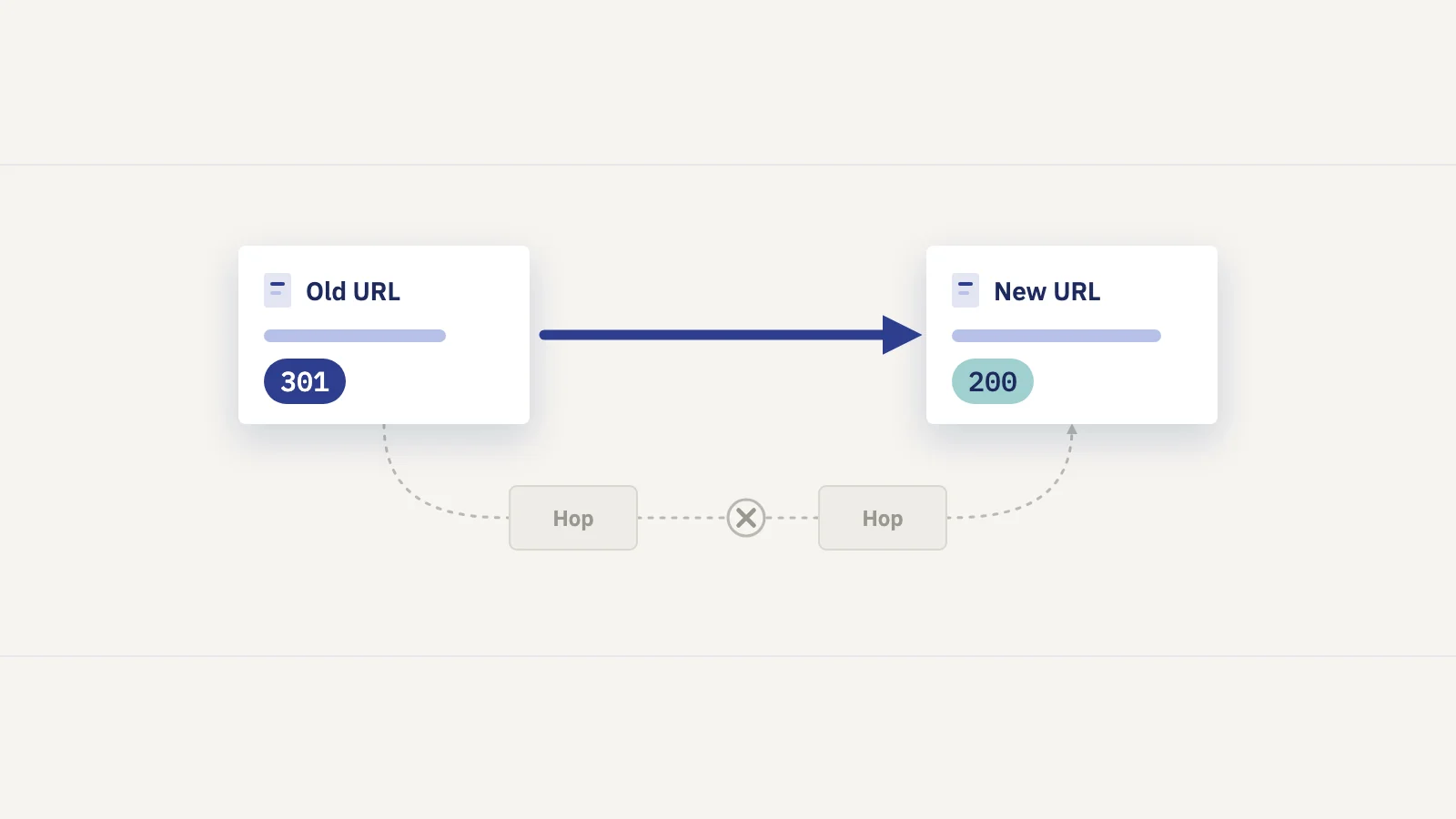
When a browser or Googlebot requests a URL, the server can answer with a 3xx status code and a Location header pointing at another URL. The status code says what kind of move it is. A 301 Moved Permanently says the old URL is retired and the new one replaces it.
Google treats that as a signal about which URL to show. Its redirects documentation says permanent redirects are a strong signal that the target should become the canonical URL, so the new URL is the one that appears in search results. A temporary redirect such as a 302 is not a canonicalization signal, so Google usually keeps showing the old URL.
Google is also clear that a permanent redirect doesn't cost you ranking signals: its site move guide states that "301 and other permanent redirects don't cause a loss in PageRank."
Redirect types and how Google treats each
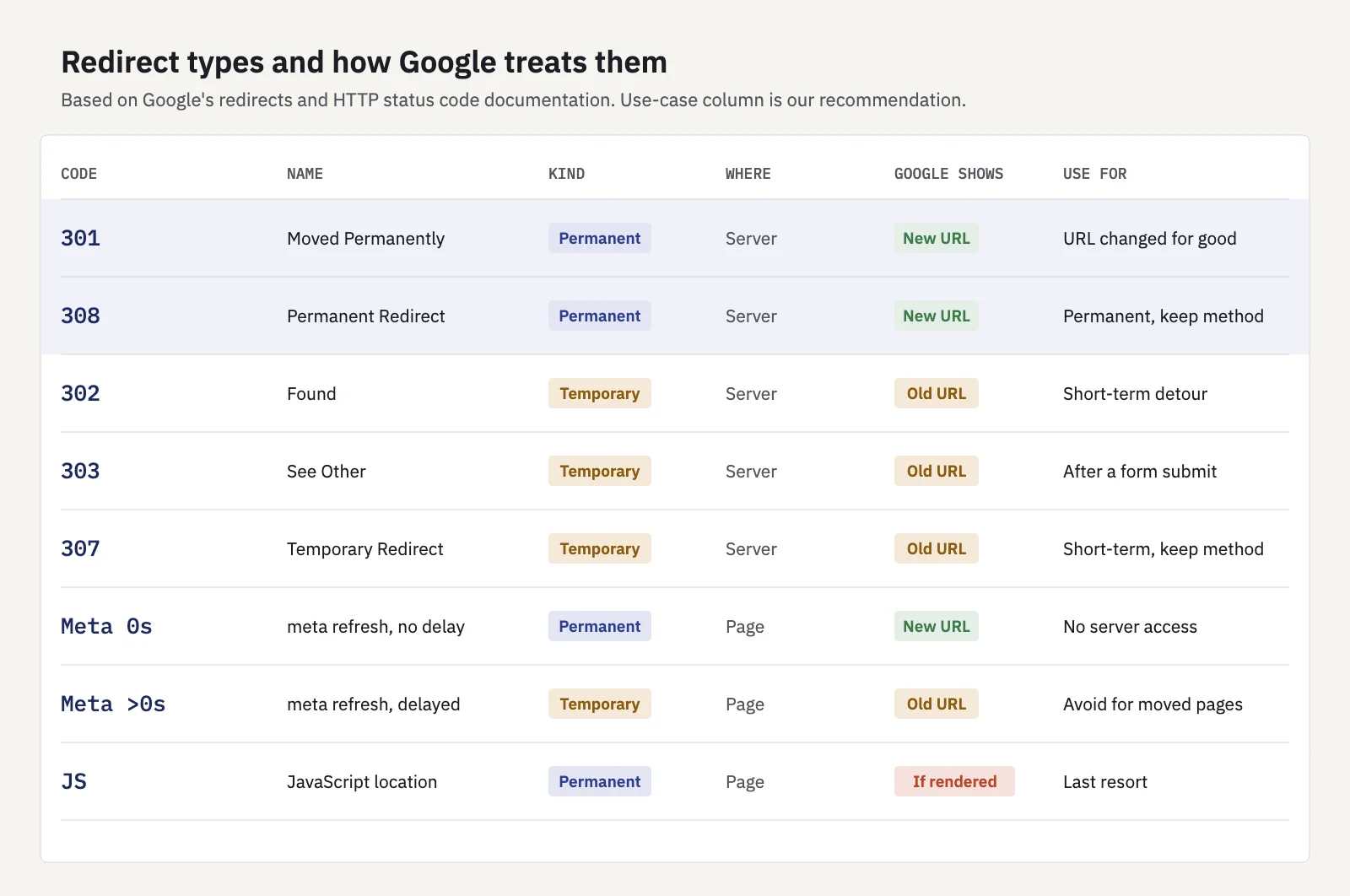
Google groups redirects into permanent and temporary, and server-side redirects into five HTTP status codes. Its HTTP status code reference describes how Google's crawlers handle each.
| Redirect | Kind | How Google treats it | Use it for |
|---|---|---|---|
| 301 Moved Permanently | Permanent, server-side | Strong signal that the target is canonical | A URL that has changed for good |
| 308 Permanent Redirect | Permanent, server-side | Same as 301 | A permanent move where the request method must be kept |
| 302 Found | Temporary, server-side | Weak signal; the source URL usually stays in results | A short-term detour |
| 303 See Other | Temporary, server-side | Same as 302 | Sending a user to a result page after a form submit |
| 307 Temporary Redirect | Temporary, server-side | Same as 302 | A short-term detour where the request method must be kept |
| Meta refresh, 0 seconds | Permanent, in the page | Treated as permanent | Only when you can't set server-side redirects |
| Meta refresh, delayed | Temporary, in the page | Treated as temporary | Rarely a good idea for SEO |
JavaScript location |
Permanent, in the page | Followed only if rendering works | A last resort |
301 vs 308, and 302 vs 307
For Google Search the pairs are equivalent: a 308 is handled like a 301, and a 307 like a 302. The difference is for other clients. Under the HTTP specification, a 301 or 302 lets a client change a POST request to a GET when it follows the redirect, while 307 and 308 require the same method. Google notes the codes are "semantically different" even though it treats them alike, so use the one that describes what's actually happening. For ordinary page moves, 301 is the safe and widely supported default.
Meta refresh and JavaScript redirects
Both run in the page rather than on the server. Google's guidance is to use a meta refresh only when your platform doesn't allow server-side redirects, and JavaScript redirects only when neither of the others is possible. The risk with JavaScript is rendering: Google has to render the page to see the redirect, and it "might never see it if rendering of the content failed." A meta refresh with a delay is treated as temporary, which is rarely what you want for a moved page.
When to use which redirect
- The URL changed for good (renamed slug, merged pages, new folder, new domain, HTTP to HTTPS): use a server-side 301, or a 308 if your server or framework emits it by default. Google recommends a permanent server-side redirect for URL changes whenever possible.
- Two pages are merged into one: 301 both old URLs to the combined page. That's a like-for-like move, not a redirect to something unrelated.
- The page is temporarily elsewhere (maintenance, a short-lived campaign page, a product briefly unavailable): use a 302 or 307. The original URL keeps its place in search, which is the point.
- The page is gone with no replacement: don't redirect. Return a 404 or 410. Redirecting removed pages to the homepage can be treated as a soft 404 anyway, and it confuses visitors.
- You can't touch the server: a 0-second meta refresh, then JavaScript as a last resort.
Only use a permanent redirect when you're sure it won't be reversed. Google advises temporary redirects for short-term situations precisely because a permanent one starts moving the old URL's place in search to the new URL.
Moving a whole site is more than redirects: it needs a URL inventory, a redirect map and weeks of monitoring. See website migration SEO for the full checklist.
Redirect chains and loops
A chain is a redirect that leads to another redirect: /old to /new, which then redirects to /newer. Chains build up over time, typically when a site is migrated twice or when protocol, www and trailing-slash rules each add a hop.
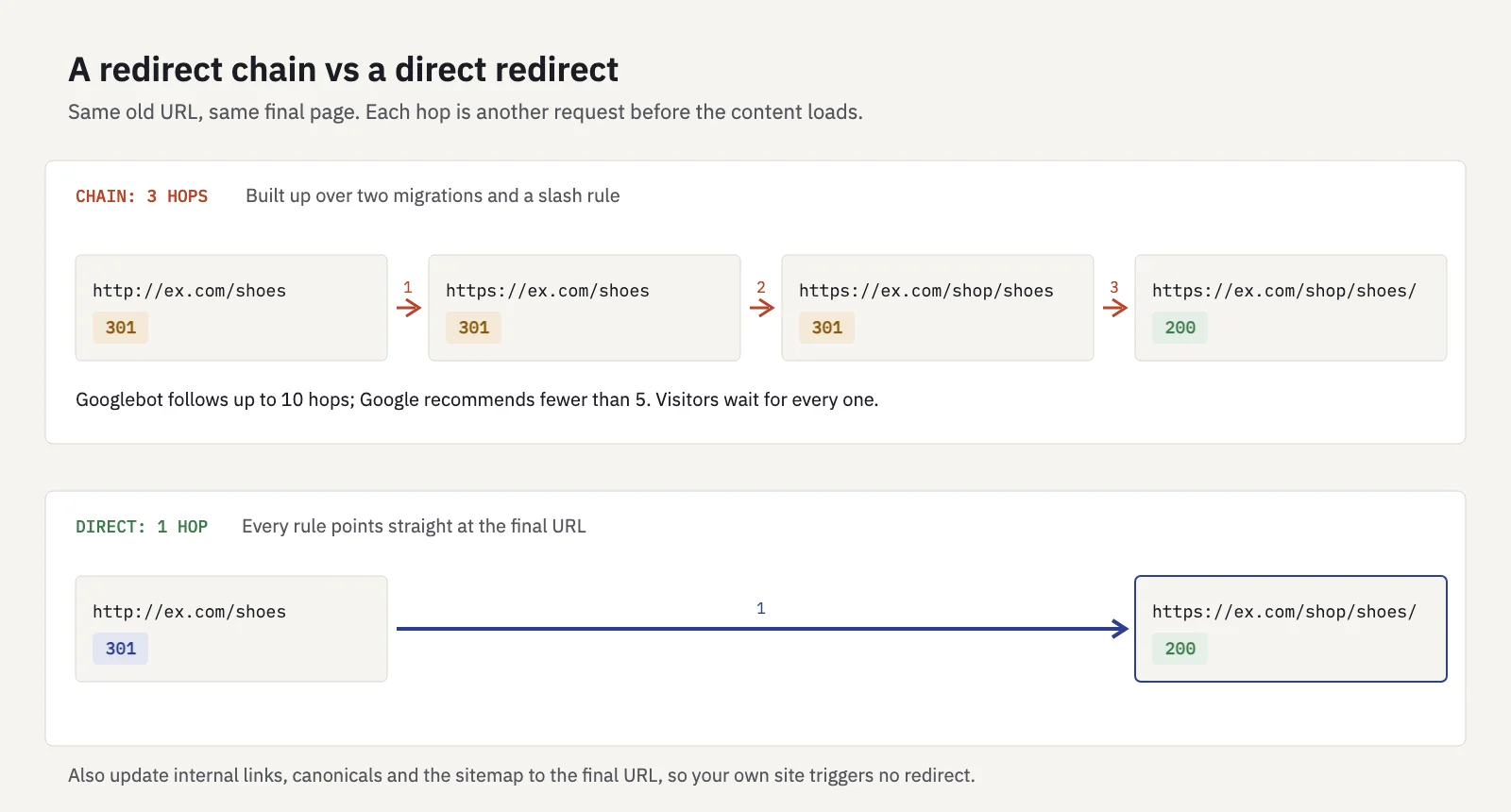
Google's crawlers follow up to 10 redirect hops by default. Google's own recommendation is lower: keep chains short, "ideally no more than 3 and fewer than 5" hops. Each hop adds a round trip for visitors, and a chain past the limit stops Googlebot before it reaches the content.
A loop is a chain that never ends: /a redirects to /b, and /b redirects back to /a, often because two rules (a CMS setting and a server rule, say) disagree about the canonical form of a URL. Browsers give up with an error, and Google can't reach the content either.
Search Console reports both. In Indexing > Pages, the Redirect error reason covers a redirect chain that was too long, a redirect loop, a redirect URL that exceeded the maximum URL length, and a bad or empty URL in the chain.
To fix chains, update each rule so the original URL points straight at the final destination, then change internal links, canonicals and sitemap entries to the final URL so nothing on your own site triggers a redirect at all.
How to check a redirect worked
A redirect working in the browser is only the first check. You also want Google to have processed it.
1. Check the response
Run a header check from a terminal:
curl -sIL https://example.com/old-page
The output lists every hop. You want exactly one 301 (or 308) with a Location header pointing at the final URL, followed by a 200 on that URL. Two or more 3xx lines mean a chain; a 302 where you meant 301 means the wrong type. Some servers answer HEAD requests differently from GET, so if the result looks odd, test the URL in a browser's network panel too.
2. Inspect the old and new URLs
In Search Console, paste the old URL into the URL Inspection bar. Once Google has recrawled it, the indexed result should say the URL isn't on Google, with the reason in the Page indexing section. Then inspect the new URL: it should be indexed, and the Google-selected canonical should be the new URL itself.
Two details from Google's URL Inspection documentation matter here. The indexed result reflects the URL you entered, not the redirect target. And Test live URL follows redirects before testing, without telling you it did, so a passing live test of an old URL describes the target page, not the redirect.
3. Look for "Page with redirect" in Page indexing
In Indexing > Pages, Page with redirect is Google's label for a non-canonical URL that redirects to another page, which it won't index. Old URLs should end up here; that's success, not an error. Two filters make the report useful:
- Switch the sitemap filter to All submitted pages. Any URL with "Page with redirect" there is a redirected URL still in your sitemap. Replace it with the final URL.
- Check that Redirect error has no rows, or that its count is falling after a fix.
For what the other statuses mean, see indexing in SEO.
4. Watch Performance data move to the new URL
In Performance > Search results, add a Page filter for the old URL, then for the new one, over the weeks after the change. Impressions and clicks should shift from the first to the second, usually within days for popular pages and longer for pages Google crawls rarely. Check the Queries tab for the new URL too: the old page's main queries should now land there.
Don't be alarmed if the old URL still shows up now and then. Google explains that after a redirect it may keep the old URL as an alternate name and occasionally show it, and that this fades over time without any action.
In Serplyze, every tracked keyword records its ranking URL each day, the page with the most clicks for the query from your own Search Console data. Set the keyword's Target URL to the new page, and the URL mismatch tab lists keywords still ranking with another URL. A Ranking URL ≠ target alert can notify you if that lasts more than a few days. See Keyword detail.
Common redirect mistakes
- Using 302 for a permanent move. Google keeps showing the old URL. Switch it to 301.
- Redirecting everything to the homepage. Visitors lose the page they wanted, and Google may treat it as a soft 404.
- Leaving internal links on old URLs. Every internal click costs a hop, and Google keeps crawling the redirects.
- Removing redirects too soon. Google's site move guide says to keep them "generally at least 1 year"; for URLs with backlinks, longer is safer.
- Redirecting URLs blocked in robots.txt. If Googlebot can't crawl the old URL, it can't see the redirect.
Key takeaways
- Use a server-side 301 (or 308) for any URL that has moved for good; it's a strong canonical signal and doesn't lose PageRank.
- Use 302 or 307 only for short-term moves; Google keeps showing the original URL.
- Meta refresh and JavaScript redirects are fallbacks for when you can't redirect on the server.
- Point every old URL straight at its final destination; Googlebot follows up to 10 hops, Google recommends fewer than 5, and one is best.
- Confirm with a header check, URL Inspection, "Page with redirect" in Page indexing, and clicks moving to the new URL in Performance.
Serplyze tracks which URL each keyword ranks with, from your own Search Console data, and flags when it isn't the page you expect. Start free and see redirects land in your rankings.