Programmatic SEO means building many pages from one template and a dataset: one page per city, per integration, per product and use case. Done well, each page answers a real search better than a generic page could. Done badly, it's what Google's spam policies call scaled content abuse. Here's how to tell the difference before you publish, how to roll template pages out safely, and how to measure each template in Search Console.
What programmatic SEO is (and what it isn't)
A programmatic page has three parts:
- A query pattern. People search a repeating phrase with one part that changes: "{tool} integration", "{product} in {size}", "flights from {city} to {city}", "{term} meaning".
- A dataset. One row per page, with the facts that make each page different: prices, specs, opening hours, availability, reviews, compatibility, local details.
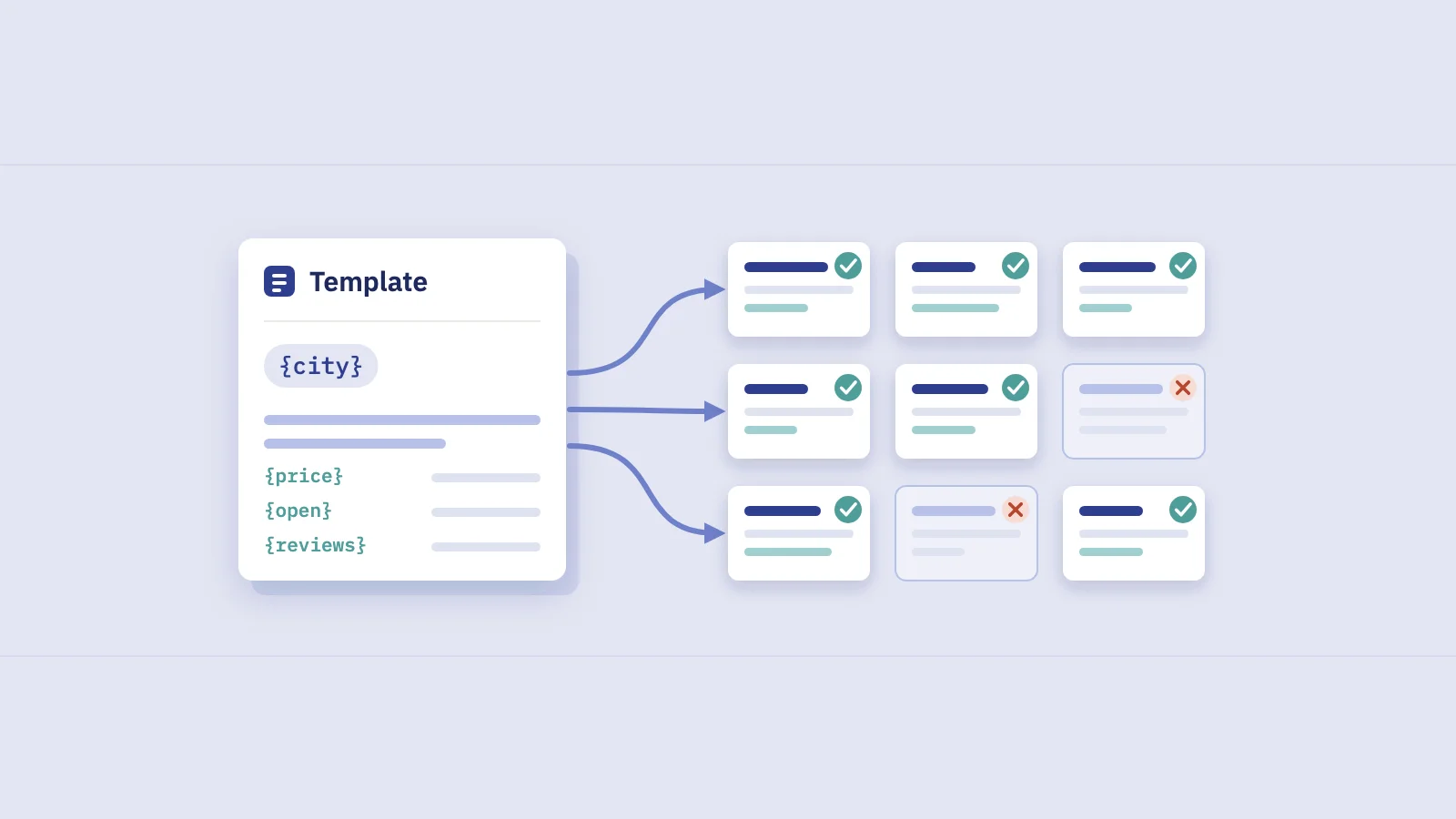
- A template. The layout that turns a row into a page, plus the rules for its title, headings, internal links and structured data.
What it isn't: swapping one word into the same paragraph a thousand times. If only the city name in the H1 changes, you've built one page with a thousand URLs.
A quick way to check is what we call the swap test. Take two pages from the same template, hide the variable (the city, the tool, the product), and compare what's left. If a reader couldn't tell the pages apart, neither page has a reason to exist on its own.
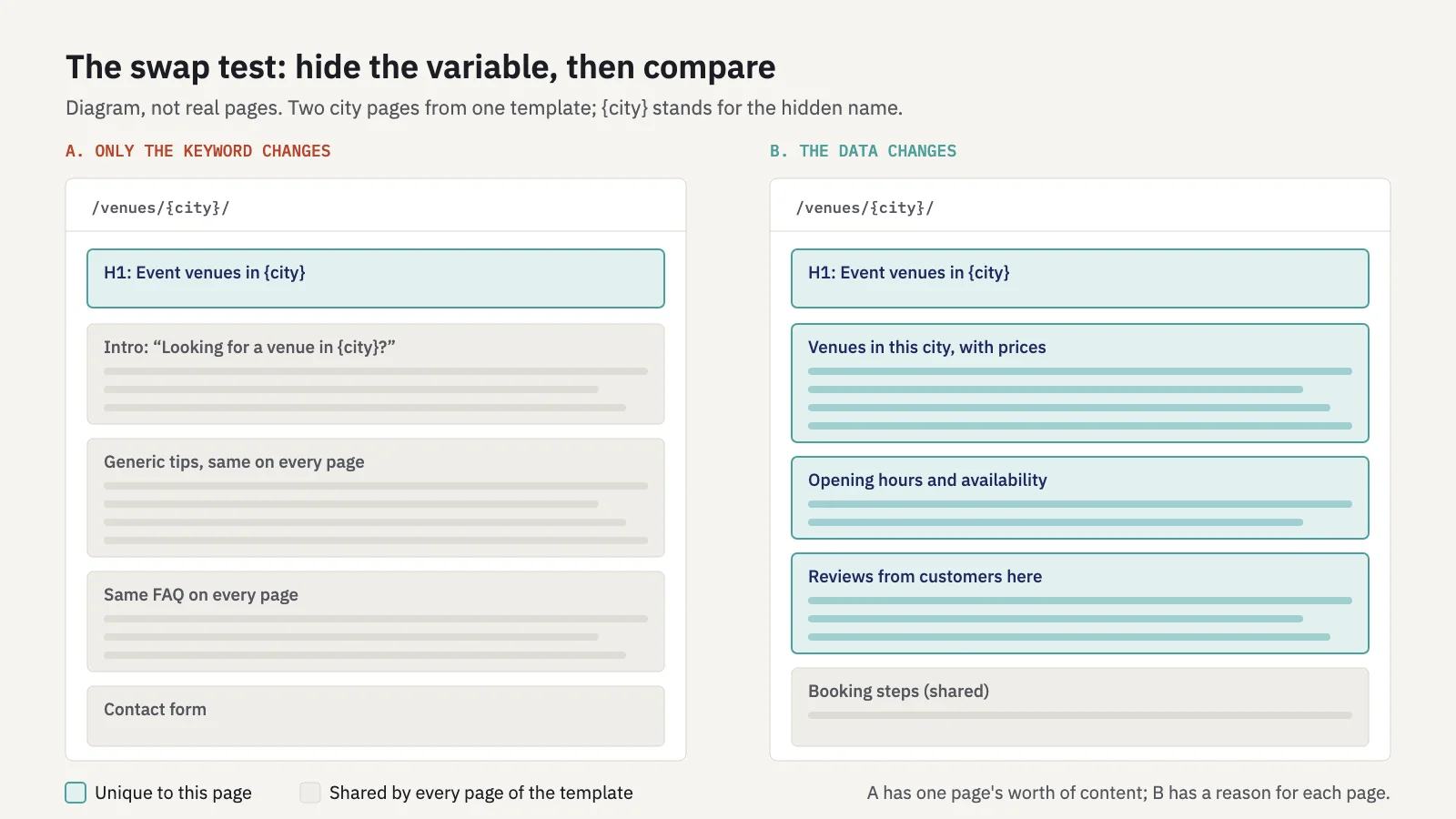
Same template, two outcomes: the swap test asks what's left once you hide the variable.
When template pages help users
Template pages work when the search pattern is real and the answer differs from row to row. They don't work when the pattern exists but the answer doesn't change.
| Usually a good fit | Usually a warning sign |
|---|---|
| Each page shows data a reader can't get from a sibling page (stock, prices, schedules, specs, compatibility) | The only difference between pages is the keyword in the title and H1 |
| People search the pattern, and your Search Console already shows some of those queries | You found the pattern in a keyword list but have no data to fill it |
| The data comes from your own product, inventory, or research | The data is scraped, spun or stitched from other sites |
| A reader can browse the pages from a hub, like a directory | Pages are only reachable through the sitemap |
| Some combinations are left out because there's nothing to say | Every possible combination gets a page |
What Google's spam policies say
Two of Google's spam policies are written for exactly this kind of project.
Scaled content abuse. Google added it on March 5, 2024, announced in What web creators should know about our March 2024 core update and new spam policies. It defines the practice as generating many pages "for the primary purpose of manipulating search rankings and not helping users." The examples in the policy include using generative AI or similar tools to create many pages without adding value, scraping feeds or search results to generate pages, stitching content from other pages together, and pages that make little sense to a reader but contain search keywords.
The 2024 post adds that it applies "no matter whether content is produced through automation, human efforts, or some combination." A template isn't the problem; adding nothing is. Google's guidance on generative AI content makes the same point about AI-written pages.
Doorway abuse. The policy describes "sites or pages created to rank for specific, similar search queries" that lead users to pages less useful than the final destination. Two of its examples describe programmatic SEO gone wrong: pages "targeted at specific regions or cities that funnel users to one page", and "substantially similar pages that are closer to search results than a clearly defined, browseable hierarchy."
Google's guide to helpful, people-first content lists two warning signs that apply directly: producing "lots of content on many different topics in hopes that some of it might perform well," and "using extensive automation to produce content on many topics."
Sites that violate the spam policies may rank lower or not appear at all, and a manual action shows up in Search Console's Manual actions report. For pages you've already published that fail these tests, the scaled content policy is direct: exclude them from Search, or improve them.
Making each page worth indexing
Most of the work is in the dataset, not the template. Before you write template code, decide what each page will show that its siblings don't.
- Unique data per row. Prices, counts, dates, ratings, availability, specs, distances, compatibility. Data you own or collected yourself is the strongest kind.
- A minimum to publish. Set a rule, per template, for the data a row needs before it gets a page: for example, at least one listing, a filled spec table, or real reviews. Rows below it don't get a URL, or get one with
noindexuntil the data arrives. - Fewer combinations. Not every city × service or product × colour pair deserves a page. Publish the combinations people search and you can serve; leave the rest as filters on a parent page.
- Copy that depends on the data. Write template text that changes with the row: "3 venues open on Sundays" is information; "We have great venues in {city}" isn't.
- Clear canonicals for near-duplicates. Sorting, paging and filter parameters on a template create extra URLs. Our canonical tags guide covers how to point them at one version, and Google's guide to faceted navigation says to prevent crawling of filter URLs you don't need indexed.
Run the swap test on your thinnest rows, not your best ones. The page for your biggest city will always look rich. The page for the 400th city, with one listing and no reviews, is the one Google will judge the template by in reports like Page indexing.
Internal linking and sitemaps by template
Template pages need two kinds of discovery: links for readers and crawlers, and sitemaps for tracking.
Link them like a directory. A hub page per template (all cities, all integrations), with category pages beneath it where the list is long, gives every page a path from the home page. That's the "clearly defined, browseable hierarchy" the doorway policy contrasts with doorways. Link related pages where it helps a reader: nearby cities, similar products. Our guide to internal linking with Search Console data shows how to find which pages need links most.
One sitemap per template. Google's sitemap documentation limits a single sitemap to 50MB uncompressed or 50,000 URLs. Split larger templates into several files and list them in a sitemap index. Google notes that submitting several sitemaps is useful when you want to track each one separately in Search Console, and that's the point here: a sitemap per template (or per batch) lets you filter the Page indexing report to that template alone.
Two sitemap details matter at scale:
- Only list pages that pass your publish rule. A sitemap is a request to index. Leave out rows with
noindex, redirects and filter URLs. - Keep
lastmodhonest. Google uses<lastmod>only when it's "consistently and verifiably" accurate. Set it when a page's data or content changes, not on every rebuild.
To check what each sitemap actually lists, our free website page counter reads a site's XML sitemaps and counts URLs per sitemap and per folder.
Rolling out in batches
Publishing every row on day one tells you nothing until it's too late to change the template. Release in batches:
- Pick a first batch. Choose rows that pass your publish rule and that you can review by hand, including some thin ones.
- Give the batch its own sitemap. Submit it in Indexing > Sitemaps so you can filter reports to it.
- Note the release date and the template version, so you can read the charts later.
- Wait for crawling. Check Page indexing for the batch's sitemap over the following weeks. Don't request indexing URL by URL: Google's guide to asking for a recrawl notes a quota for individual URLs and points large sets of URLs to sitemaps.
- Read the results per template. Use the checks in the next section: indexing, not-indexed reasons, impressions and queries.
- Fix the template, not single pages. If thin rows aren't indexed, raise the publish rule or add data. If pages are indexed but show no impressions, check the query pattern and the titles.
- Release the next batch. Only when the first one behaves as you expected.
Measuring each template in Search Console
Site totals hide what a template is doing. Measure each template on its own, with four checks.
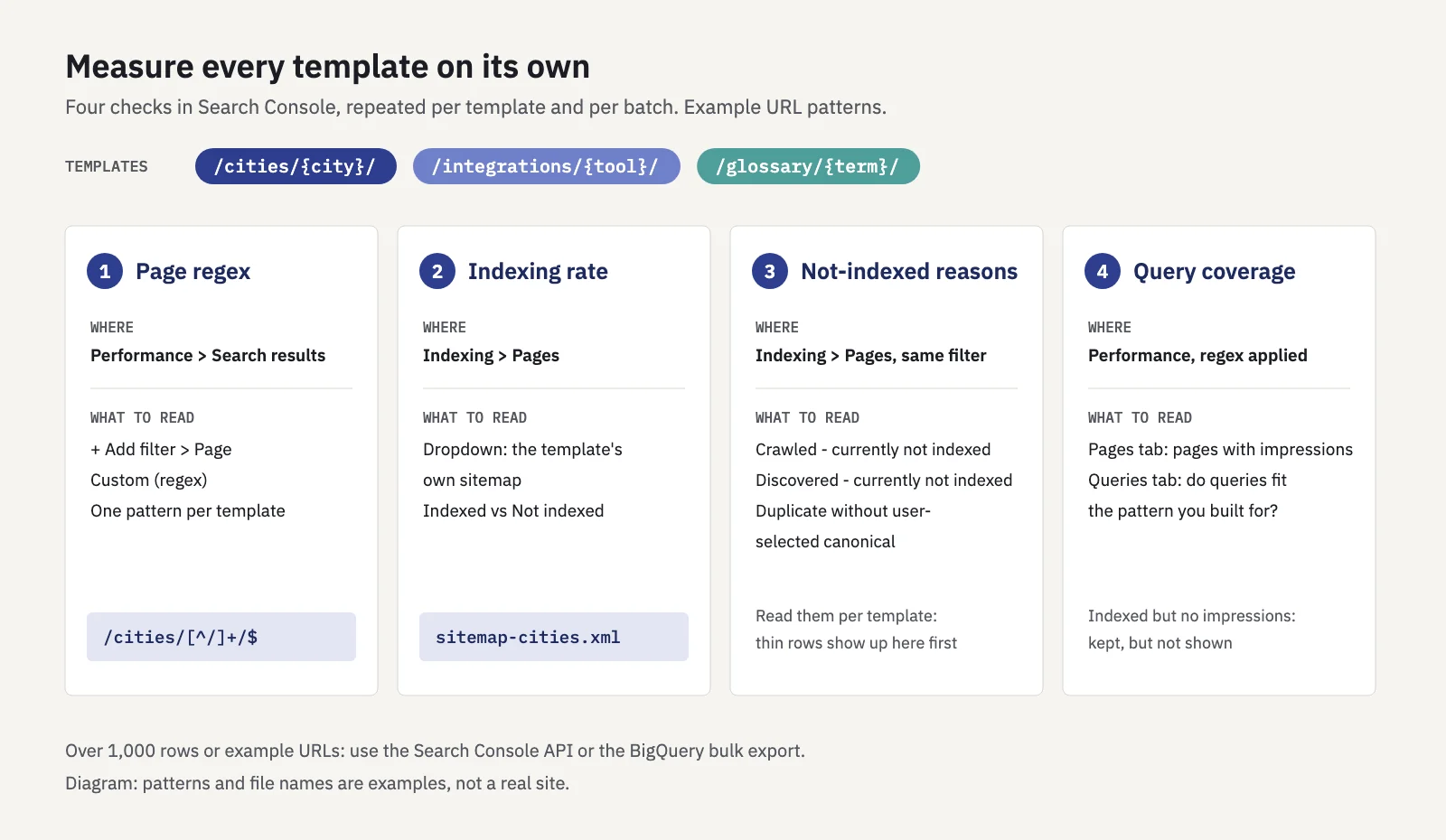
Each template gets its own regex, its own sitemap and its own row in your report.
1. A page regex per template. In Performance > Search results, click + Add filter, choose Page, then Custom (regex). Write one pattern per template, such as /cities/[^/]+/$ or /integrations/. The Page filter matches against the full URL, so either include the host or don't anchor the start. Save the patterns somewhere shared; our Search Console regex guide covers the syntax, and the regex tester checks a pattern against sample URLs first.
2. Indexing rate per template. Open Indexing > Pages and use the dropdown at the top to switch from All known pages to the template's sitemap. Google's Page indexing report documentation describes this filter: it shows only URLs listed in that sitemap or sitemap index. The indexed share of that sitemap is your template's indexing rate. Compare templates with each other and batches with earlier batches.
3. The not-indexed reasons. Two reasons say the most about a template:
| Reason | What Google says | What it tends to mean for a template |
|---|---|---|
| Crawled - currently not indexed | The page was crawled but not indexed; it "may or may not be indexed in the future" and needs no resubmitting | Google fetched pages and didn't index them. Check those rows with the swap test and your publish rule |
| Discovered - currently not indexed | Found but not crawled yet; typically rescheduled because crawling was "expected to overload the site" | Google knows the URLs and hasn't fetched them. Check server speed, crawl waste and how well the pages are linked |
| Duplicate without user-selected canonical | Google treats the page as a duplicate of another URL and chose that one | Pages are too similar, or parameters create copies |
Our guide to indexing in SEO covers each reason in depth. For large templates, Google's crawl budget guide is written for sites with "a large portion" of URLs in Discovered - currently not indexed, and it reminds you that not every page that's crawled will be indexed.
4. Query coverage per template. With the template's page regex applied, open the Pages tab and count the pages with impressions. Compare that with the number indexed: indexed pages without impressions are kept but not shown. Then open the Queries tab and check the queries match the pattern you built for. If a city template mostly gets impressions for one big city, the long tail you designed it for isn't there. Our posts on long-tail keywords and search intent help you read that list.
The Search Console interface shows at most 1,000 rows per table, and the Page indexing examples list is limited to 1,000 URLs as well. For templates with more pages, use the Search Console API or the bulk data export to BigQuery. Very rare queries are also anonymized and left out of the Queries tab; see anonymized queries.
Tracking templates in Serplyze
Serplyze reads the same Search Console data and can keep each template as its own segment. Under Traffic, a page group matches rules on the URL path, including matches regex, so a group per template fills itself as new pages get impressions. The Groups tab then lists each group's clicks, impressions, CTR and position, with the change against the comparison period.
When you release a batch, log it under Actions (paid plans) with the type New page and the template's page group as the target. Serplyze compares the group before and after the release and sets the result against the whole site's trend. Serplyze doesn't read indexing statuses, so the Page indexing checks above stay in Search Console.
Key takeaways
- Programmatic SEO is a query pattern, a dataset and a template. The dataset decides whether it works.
- Google's scaled content abuse policy (March 2024) targets many pages made to manipulate rankings with little value, "no matter whether content is produced through automation, human efforts, or some combination."
- Run the swap test: hide the variable and compare two pages. If they're the same, don't publish them as separate pages.
- Set a publish rule per template, link pages from hub pages like a directory, and give each template its own sitemap.
- Release in batches and measure each template on its own: a page regex in Performance, the sitemap filter in Page indexing, the not-indexed reasons, and query coverage.
Serplyze tracks clicks, impressions and positions for every page group from your own Search Console data, so you can see which templates earn their place. Start free.