Long-tail keywords are the specific searches behind your broad topics, and your Search Console report already lists hundreds of them. This guide explains what makes a keyword long-tail, why that matters, and how to find, sort and group the long-tail queries you already appear for.
What a long-tail keyword is
A long-tail keyword is a specific search with a narrow intent and modest demand on its own. "Running shoes" is a head term: huge demand, and the searcher could want almost anything. "Trail running shoes for wide feet" is long-tail: fewer people search it, but you know exactly what they need.
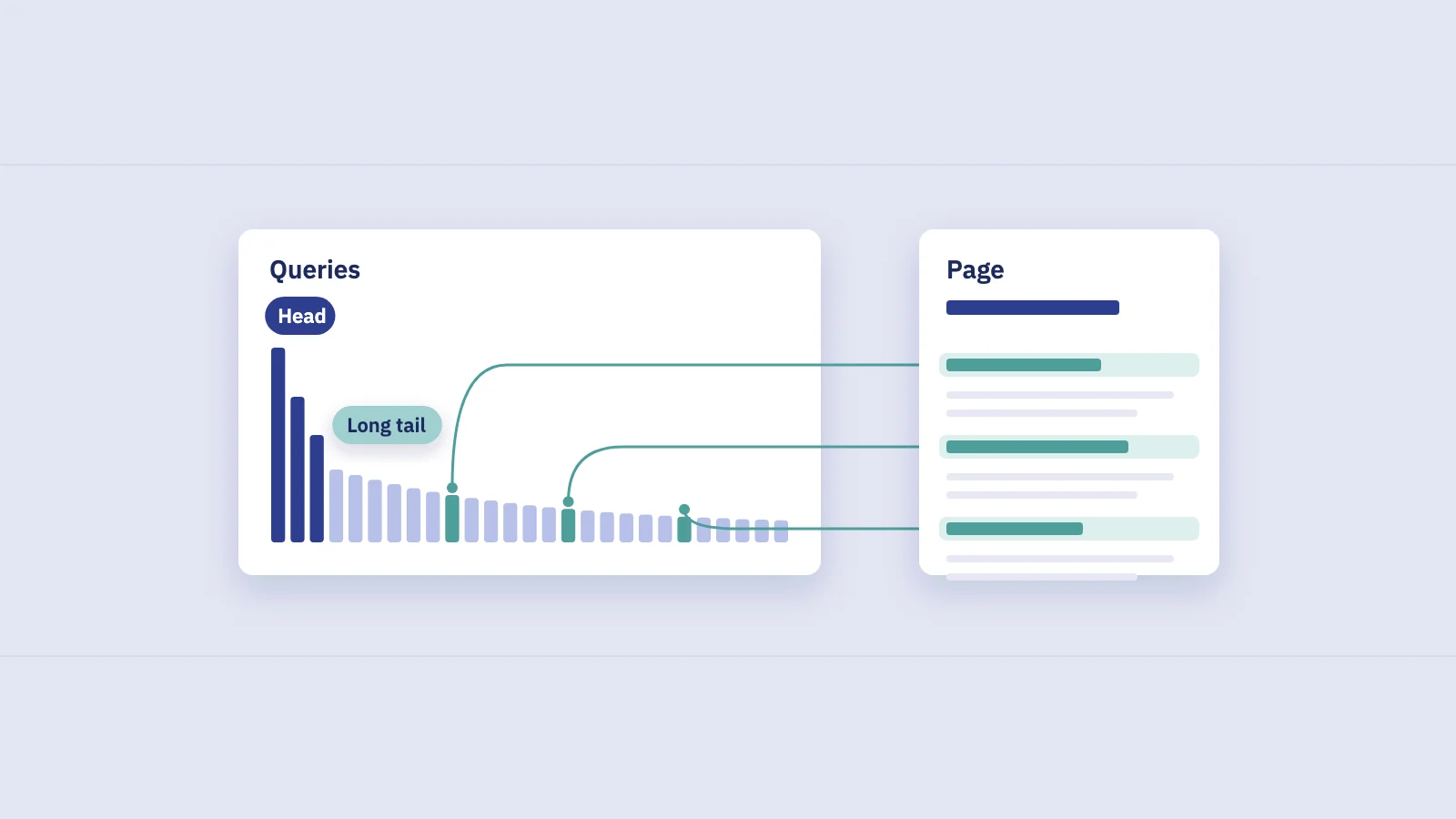
The name comes from the shape of the demand curve. Sort every query that leads people to a topic by how often it's searched, and a handful of broad terms sit at the top. Behind them stretches a long, thin tail of specific variants, each small, but together often larger than the head.
Long-tail is about specificity, not word count. Word count is a useful proxy, because adding a detail usually adds a word, but it breaks both ways:
- Short but long-tail. "Zero drop sandals" is three words, yet it's a niche product with a precise intent. In a narrow industry, a two-word part number can be as long-tail as a query gets.
- Long but head. "How to tie a tie" is five words, yet it's searched constantly and the intent is broad and shared by millions.
A better test: could one page fully satisfy everyone who types this query? If yes, it's specific enough to treat as long-tail. If the searchers want different things, it's a head term, whatever its length.
Long tail vs short tail keywords
| Short tail (head) | Long tail | |
|---|---|---|
| Example | running shoes | trail running shoes for wide feet |
| Demand per query | High | Low, often a handful of searches |
| Intent | Broad, mixed | Narrow, clear |
| Pages built for it | Many strong ones | Often few or none |
| Clicks when you rank | Spread across many result types and pages | Concentrated on the page that matches best |
| What it needs | A strong hub page and authority | A specific page or a specific section |
Why long-tail keywords matter
There are a lot of them. Google said in 2017 that "15 percent of searches we see every day are new", searches it had never seen before. Most of those are specific, oddly phrased long-tail queries. No keyword list can anticipate them, but your Search Console data records the ones you appear for.
The intent is clear. Someone searching "trail running shoes for wide feet" has already narrowed the problem. A page that answers that exact need tends to earn the click and the conversion, because there's less guesswork about what the searcher wants.
Fewer pages are built for them. Head terms attract the strongest pages on the web. A specific variant is often answered by a broad page that mentions it in passing. A page or section made for that exact need has a better chance of ranking than it would for the head term.
They add up. One long-tail query might bring three clicks a month. Two hundred related ones can outweigh the head term you've been fighting for.
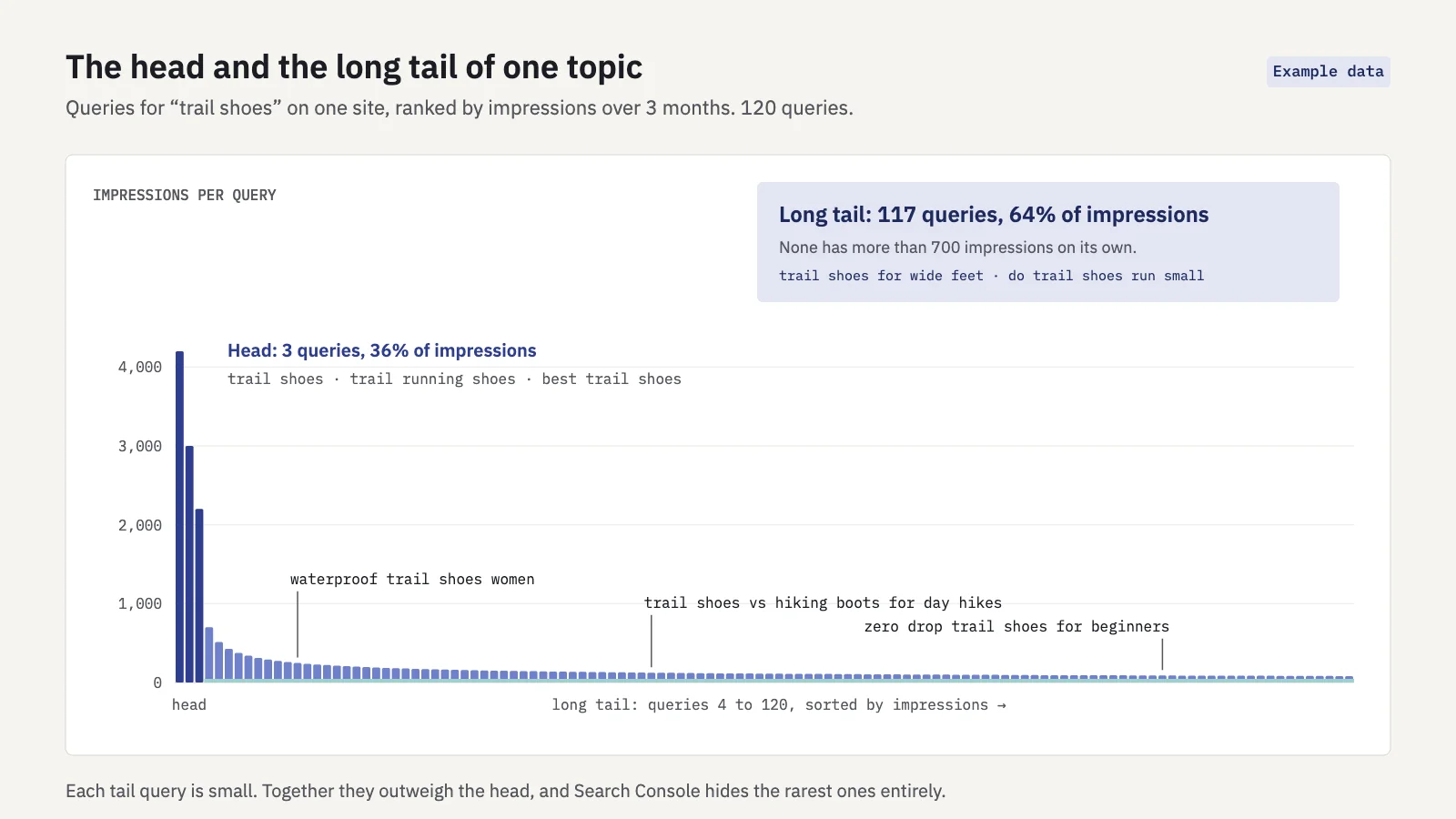 Example data. The head is three queries; the tail is everything after them, and together it is larger.
The catch is that long-tail demand is easy to underestimate. Volume tools round small queries to zero, and Search Console hides the rarest ones entirely (more on that below).
Finding long-tail queries in Search Console
Open Performance > Search results, set the search type to Web and choose the last 3 months. Three views surface most of the long tail. Our general guide to keyword research with Search Console covers new, rising and question queries; here the focus is the specific, low-volume end of the list.
1. Filter by word count
Word count isn't the definition, but it's the fastest way to pull the tail out of a list that the head terms dominate.
- Click + Add filter, then Query. Switch the match type to Custom (regex) and choose Matches regex.
- Paste a word-count pattern. Our Search Console regex guide has a ready-made pattern for queries of six or more words, how to change the threshold, and its opposite for one- and two-word head terms.
- Apply it and open the Queries tab. Sort by impressions. These are your longest queries, most visible first.
- Lower the threshold to four or five words and compare. On most sites the long tail starts somewhere in that range.
- Read the list, don't just count it. Remove queries that are long but broad, and keep an eye out for short queries that are clearly specific.
Running the filter at a few thresholds also gives you a quick distribution: how much of your search visibility comes from short queries versus long ones.
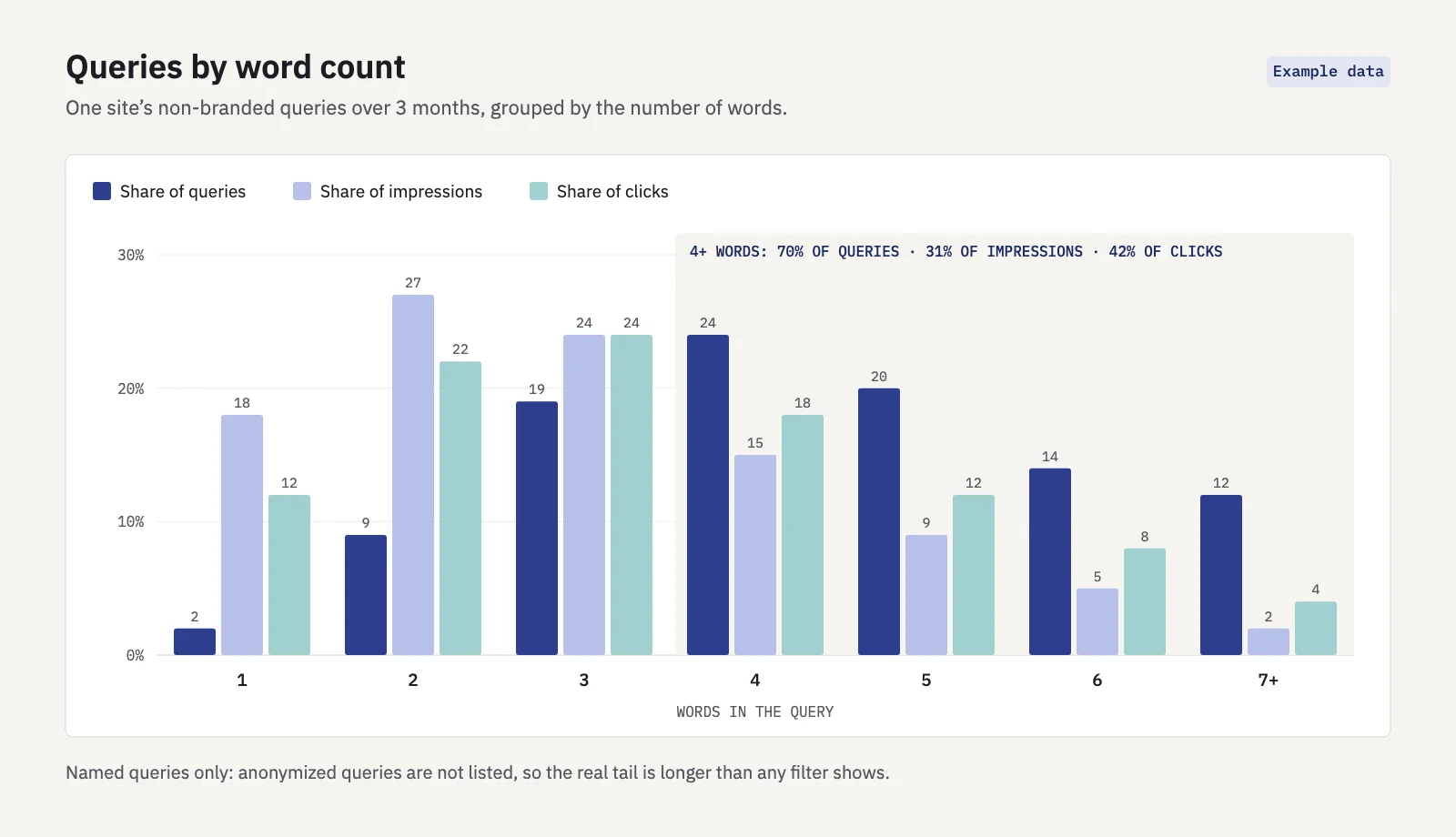 Example data. Long queries are most of the list and a large share of clicks, but a smaller share of impressions.
A pattern like the one in the figure is common: queries of four or more words are the majority of rows, take a smaller share of impressions than their count suggests, and often earn a better click-through rate than the short ones. Your site will differ, so measure it before you plan around it.
2. Queries with impressions but few clicks
Long-tail queries rarely have big numbers, so sorting by clicks hides them. Sort by impressions instead and look for specific queries that are shown but rarely clicked.
There are usually two reasons:
- You rank, but too low. At position 15 almost nobody scrolls to you. The query is specific, and the page Google shows is a broad one that only mentions it. A focused page or section usually fixes this.
- You rank well, but the snippet doesn't match. At position 3 with a weak CTR, the title promises the broad topic, not the specific need. Rewrite the title and description before you build anything new.
Always read CTR together with average position. A low CTR at position 18 is normal; a low CTR at position 3 isn't.
3. Modifiers
Most long-tail queries are a head term plus one or two modifiers. Filter the Queries tab for your core term with a Query contains filter, then scan the extra words. They fall into a few families:
| Modifier type | Examples | What it usually needs |
|---|---|---|
| Audience | for beginners, for agencies, for wide feet | A use-case page or section |
| Attribute | waterproof, cheap, lightweight, 2026 | A filtered category or comparison section |
| Problem | not working, hurts, too small | A troubleshooting answer |
| Format | template, checklist, example | A downloadable or worked example |
| Comparison | vs, alternative, or | A comparison page |
| Location | near me, in Boston | A local or regional page |
Each family is a different intent. When dozens of queries share a modifier family but all land on the same broad page, that's your long-tail opportunity in one line.
Grouping long-tail queries into pages and sections
The mistake with long-tail keywords is writing one page per query. Twenty pages on near-identical variants split your signals, compete with each other and read as thin. The goal is one page per intent, with the variants as its vocabulary and headings.
Decide each group with three questions:
- Do the queries want the same answer? "Waterproof trail shoes" and "trail shoes for rain" do; "trail shoes for wide feet" doesn't. If Google already shows the same URLs for two queries, they belong together. Keyword clustering covers this step in detail.
- Is the group big enough to stand alone? A group with several distinct sub-questions and steady impressions can carry its own page. A group of three small variants usually can't.
- Does an existing page already rank for it? If a page ranks in the top 20 for most of the group, extend it. A new page would compete with it; see keyword cannibalization for what that looks like.
| Situation | Decision |
|---|---|
| Distinct intent, several sub-questions, no page fits | New page |
| Same intent as a page that already ranks, small group | New section on that page, with a heading in the searchers' words |
| One-off variant, tiny demand | Answer it in a sentence or an FAQ entry on the closest page |
| Specific query on the wrong page entirely | Link to the right page from the one that ranks, and fix the right page |
A useful habit: write the section headings from the queries themselves. If people search "trail shoes for wide feet" and "do trail shoes run small", those are two headings on the same page, phrased the way searchers phrase them.
The anonymized-queries caveat
Search Console doesn't list every query. Searches made by very few people over a couple of months are anonymized for privacy: they count toward the chart total but never appear in the table, and they drop out of the totals as soon as you add a query filter.
That hits long-tail analysis harder than anything else, because the rarest queries are by definition long-tail. Two practical consequences:
- Your word-count totals undercount the tail. The filtered impressions for six-word queries are a floor, not the full number.
- The tail you see is the visible part. For each specific query in your table there are usually more variants you'll never see listed. A page that answers the visible ones well tends to pick up the hidden ones too.
To estimate how much is missing on your site, follow the steps in anonymized queries. The UI's 1,000-row limit adds a second gap on larger sites: the table shows only the top rows, so the tail beyond them needs the export through the API, Looker Studio or BigQuery, as Google's performance data deep dive explains.
Tracking long-tail groups over time
Long-tail work is measured in groups, not single keywords. One query moving from position 14 to 6 is noise; forty related queries moving together is a result.
In Serplyze, the Traffic screen's search box and filter bar take the same kind of regex as Search Console, so you can pull up long queries for a period, compare them with the previous one and add the ones worth watching to the rank tracker with Track. Rule-based keyword groups can then match on query text with a regex, so a group like "trail shoes for a specific need" fills itself as you track new variants. Content groups let you follow the same set by page, to see whether the new section or page took the queries over.
Key takeaways
- Long-tail means specific: one page could satisfy everyone who types the query. Word count is a proxy, not the definition.
- Individually small, long-tail queries are often larger than the head term in total, and their intent is clearer.
- Find them in Search Console with a word-count regex, an impressions-first sort for specific queries with few clicks, and a scan of modifiers around your core terms.
- Group variants by intent: one page per intent, sections for smaller groups, FAQ lines for one-offs. Never one page per query.
- Anonymized queries and the 1,000-row limit hide the rarest part of the tail, so treat long-tail totals as a floor.
Serplyze tracks your keywords from your own Search Console data, with regex filters and rule-based groups that keep a long-tail cluster together as it grows. Start free and see how much of your traffic sits in the tail.