A zero-click search ends on the results page: the answer is already there, so nobody visits a site. You can't stop that, but you can measure what it costs your own site in Search Console and decide where your effort still pays.
What counts as a zero-click search
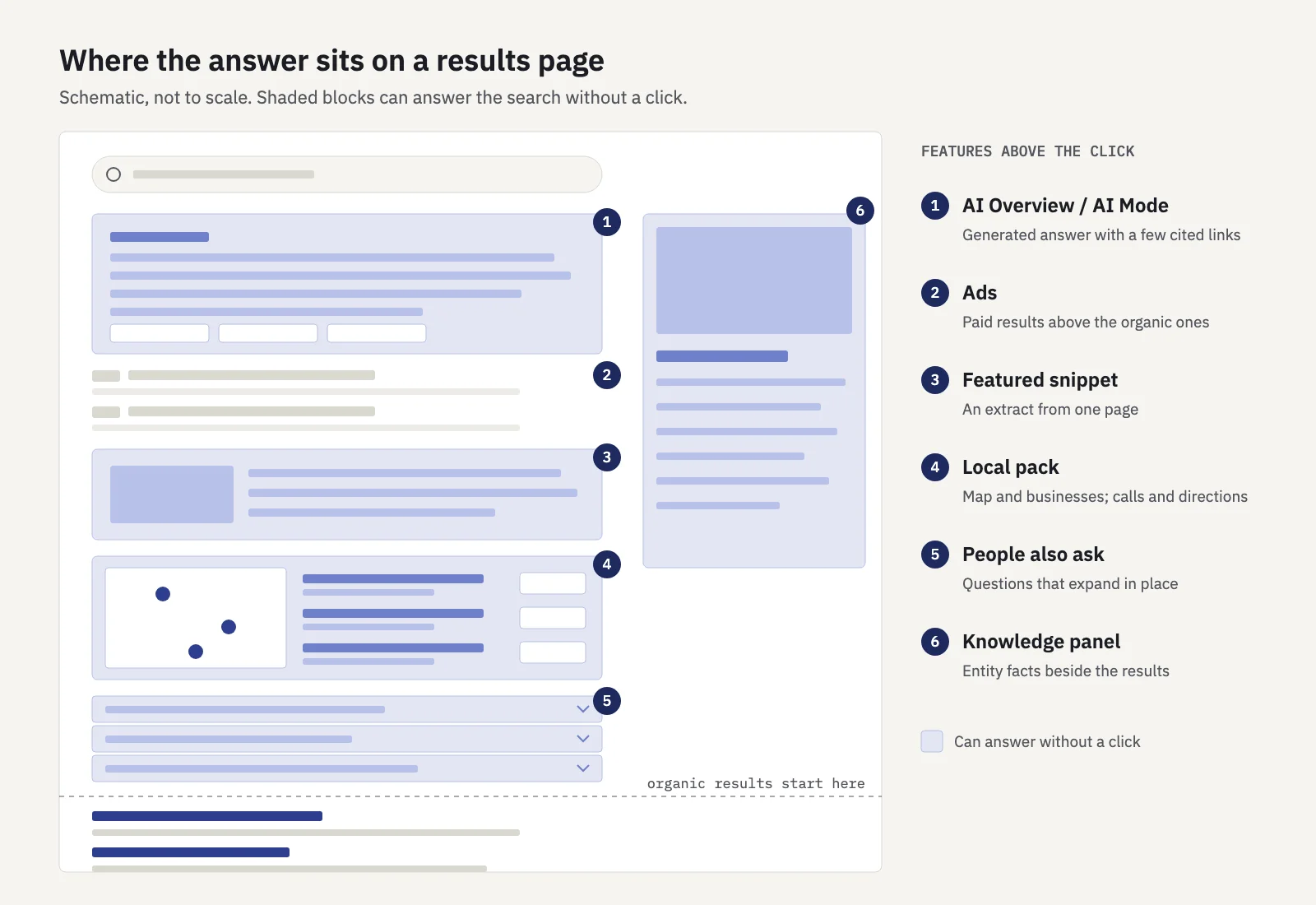
Any search where the person gets what they need without clicking a result. Most of them happen because a feature on the results page answers the question in place:
- AI Overviews and AI Mode. A generated answer with a handful of cited links. The answer often covers the question well enough that the links are optional.
- Featured snippets. An extract from one page, shown above the regular results. The source gets credit, but the extract may be all the searcher reads.
- Knowledge panels. Facts about a person, place, company or thing, pulled from Google's sources and shown beside the results.
- Direct answers. Weather, time, unit conversions, calculations, sports scores, flight status. There is rarely a reason to click.
- Local packs. A map with a few businesses. Many people call or ask for directions from the pack, and a call is not a click to your website.
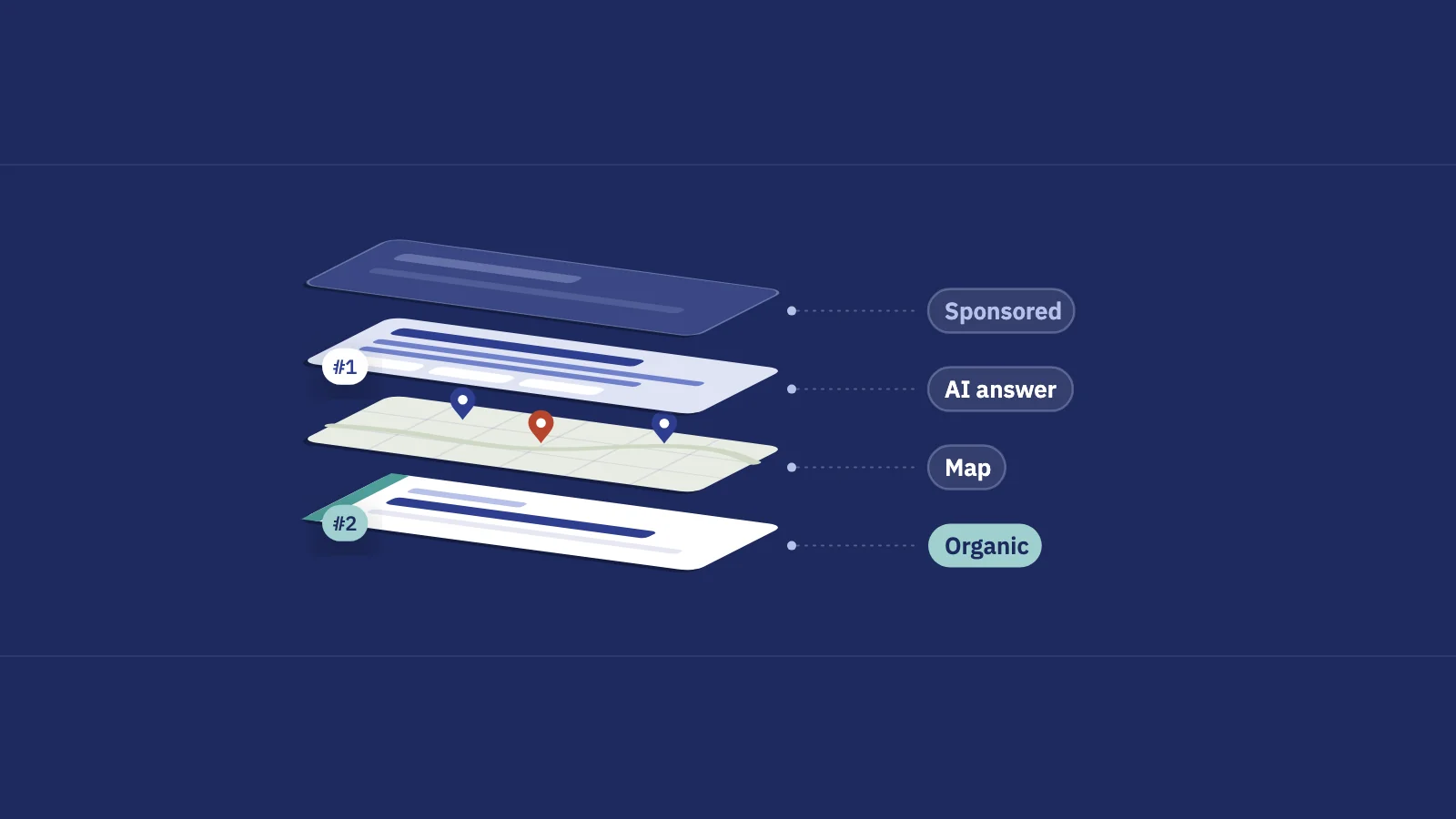
- People also ask and other modules. Expandable questions, image and video blocks, shopping units and ads all take space and attention above or between the organic results.
How big is the effect? The most recent SparkToro study found that 68.01% of US Google searches ended without a click in January to April 2026, based on Similarweb clickstream data (the author lists methodology caveats, including that the mobile data covers browsers, not the Google app). Pew Research found that US adults who saw an AI summary clicked a traditional result in 8% of visits, against 15% when no summary appeared (browsing data from March 2025). Ahrefs, comparing 300,000 keywords in desktop Search Console data, found that an AI Overview correlated with a 58% lower average CTR for the top-ranking page in December 2025 (published February 2026; the market isn't specified).
Treat these as context, not as your number. What zero-click costs you depends on which queries you rank for, and that is what Search Console can show.
What Search Console can and can't tell you
Before reading the signals, know what the data includes:
- AI features are inside your normal numbers. Google counts clicks and impressions from AI Overviews and AI Mode in the Web search type of the Performance report. An AI Overview takes one position on the page, and every link in it gets that position. A follow-up question in AI Mode counts as a new query.
- A separate report shows AI impressions, not clicks. The Generative AI performance report, rolled out to all sites on August 31, 2026, shows how often your pages appeared in AI Overviews and AI Mode, by page, country, device and date. It has no clicks, no CTR and no queries, and it doesn't appear for sites with too few AI impressions.
- Search appearance is about your rich results. The Search appearance dimension groups data by result types your own pages earned. Google's documentation doesn't list AI Overviews or AI Mode there; it reports them in the separate report above.
- Searches where you didn't appear leave no trace. If your page never got an impression, the zero-click search isn't in your data at all.
So no report says "this many clicks were lost to answers". You infer it from how clicks, impressions, CTR and position move together.
Four signals that zero-click is costing you
1. Impressions rise while clicks stay flat
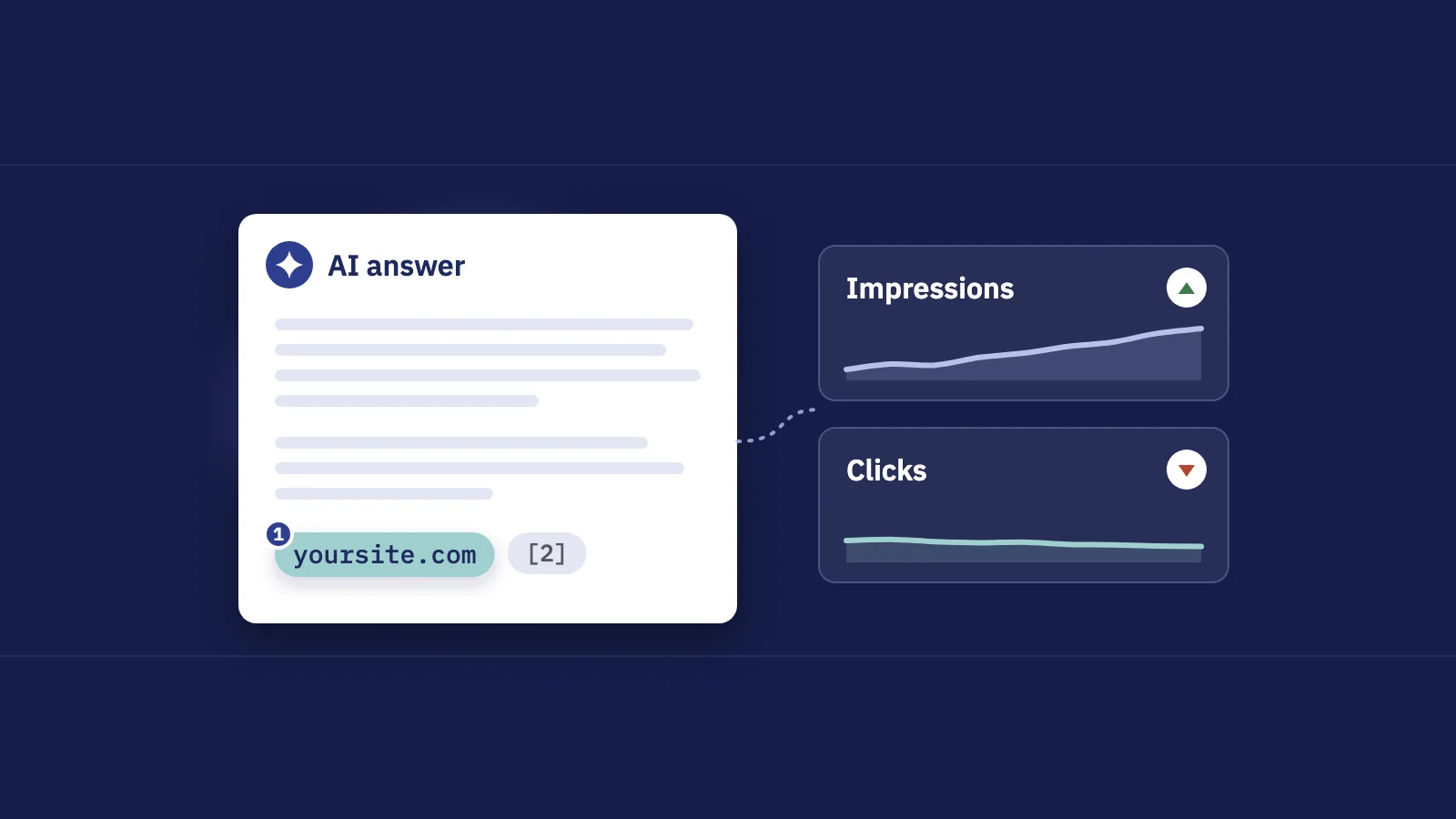
The classic pattern: the site is seen more and clicked the same or less. Every link inside an AI Overview earns an impression at the Overview's position, so a site cited in more answers can gain impressions without gaining visits.
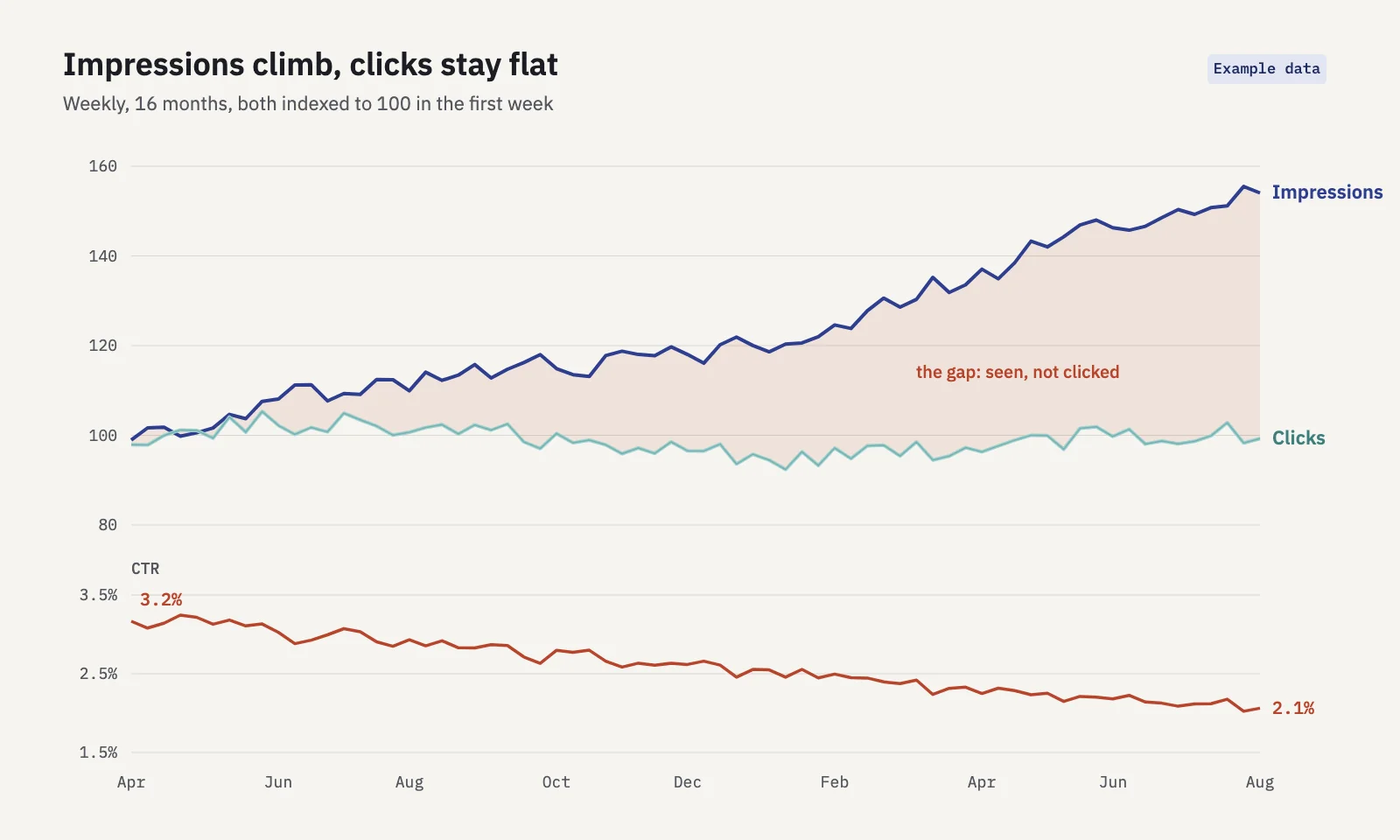
Impressions also rise for harmless reasons, such as new rankings on page two that nobody clicks. Before blaming answers, open the Queries tab with a date comparison and check where the new impressions come from: queries at position 1 to 3 point to features absorbing clicks; queries at position 15 point to new, weak rankings.
2. CTR falls at a stable position
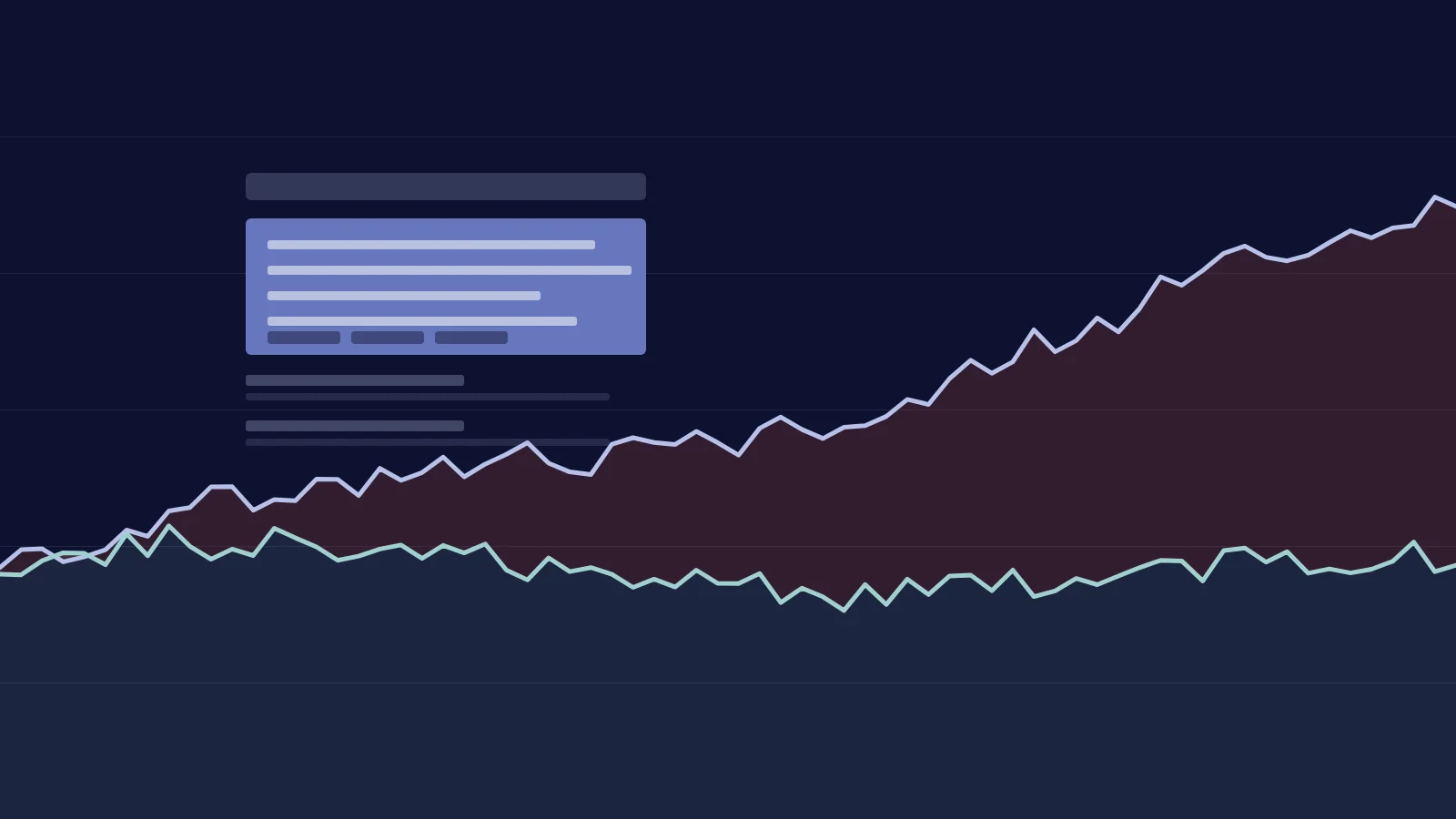
The sharpest signal. If a query held position 2 for a year and its CTR dropped by a third, something on the page above you is taking the clicks: an AI Overview, a new snippet, more ads, a shopping unit. Look at single queries, not the site average: the average position of a whole site moves for too many reasons to read anything into it. Split by device as well, because results pages differ between mobile and desktop.
Search Console can't tell you which feature took the clicks. It can tell you that the clicks went somewhere while your rank didn't change.
3. CTR by position, against your own baseline
Industry CTR curves are averages over other sites and other queries. Your own history is a better yardstick. Build a CTR-by-position curve from a period before the change (say, the same quarter last year), then compare the current period against it.
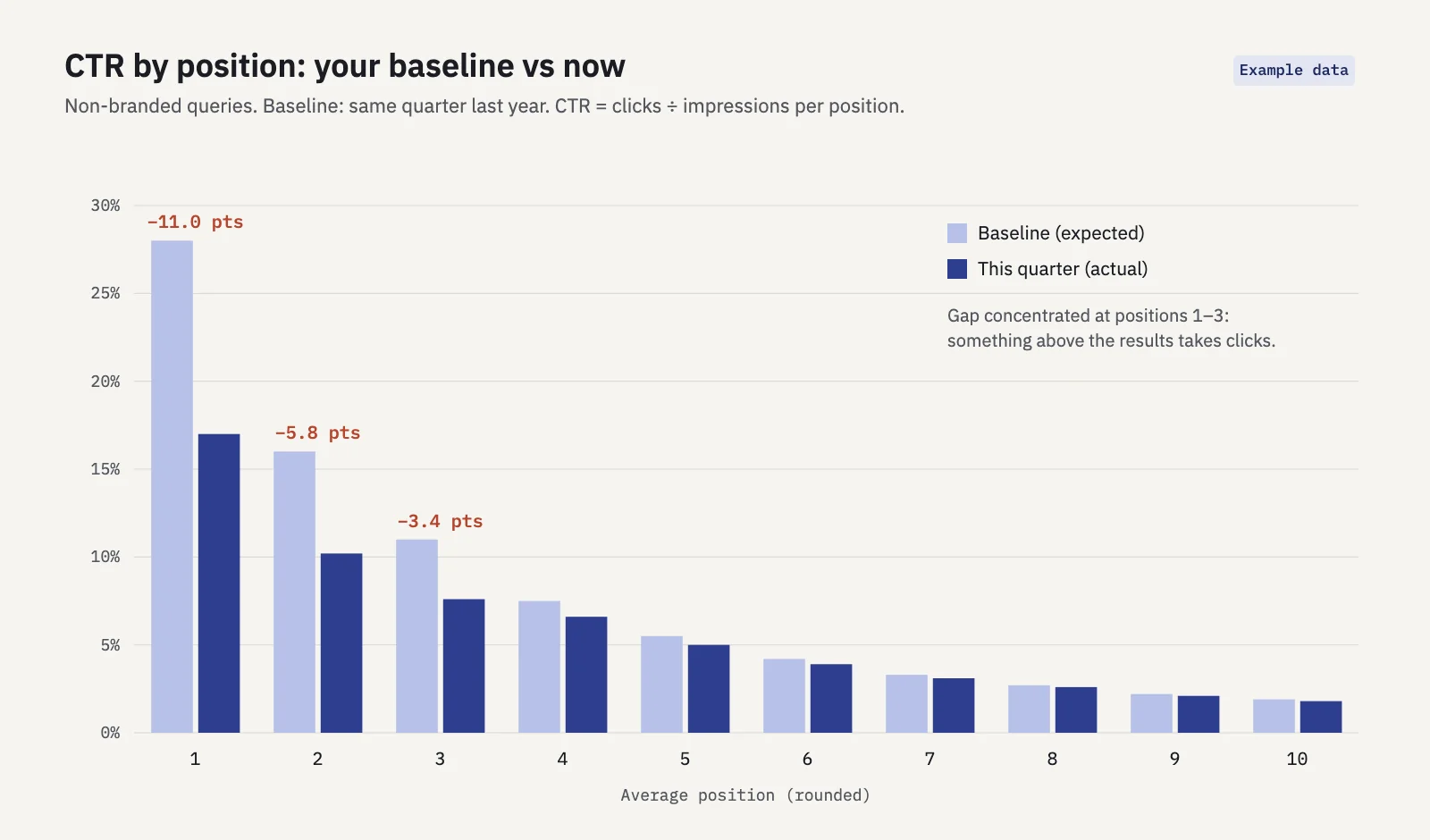
Two rules keep the curve honest. Calculate CTR per position bucket as total clicks divided by total impressions, not as an average of query CTRs. And leave branded queries out: they are clicked far more at the same position and would flatten the whole curve. If the gap concentrates at the top positions, as in the example, answers above the results are the likely cause.
4. Which pages show up in AI answers
The Generative AI performance report tells you which pages are being shown in AI Overviews and AI Mode. Take the pages with the most AI impressions and look them up in the Pages tab of the Performance report. A page whose AI impressions grow while its clicks fall is a page whose content is being used in the answer rather than visited.
A 20-minute check in Search Console
- Open Performance > Search results with search type Web. In the Date filter, choose Compare and pick the last 3 months against the same period last year, so seasonality cancels out.
- Remove branded queries. Use the branded queries filter if your property has it (it's limited to top-level properties with enough traffic). Otherwise add a Query filter with a custom regex that excludes your brand terms.
- Sort the Queries tab by impressions and look for queries where position moved by less than one place but CTR fell clearly. These are your stable-position CTR drops.
- Repeat on the Devices dimension or with a Device filter. Results pages differ between mobile and desktop, so a drop can show on one and not the other.
- Export and build your CTR curve. The UI exports up to 1,000 rows; for larger sites, use the API, Looker Studio or the bulk export to BigQuery.
- Open the Generative AI performance report, note the pages with the most AI impressions, and compare their clicks in the Pages tab.
Serplyze runs step 3 for you. Its CTR drop at top list shows queries that held position 3 or better in both periods, moved by at most one place, had 100+ impressions in each and lost a quarter or more of their CTR. The AI search screen labels these as estimates, because Search Console can't say which feature took the clicks.
Which queries are most exposed
Exposure depends on the intent of the query, not just on its volume. A rough guide:
| Query type | What tends to answer it | Exposure | What can still earn the click |
|---|---|---|---|
| Quick facts, definitions, conversions | Direct answers, featured snippets, AI Overviews | Very high | Depth the answer can't fit: examples, tools, data |
| How-to and "why" questions | AI Overviews, People also ask, snippets | High | Step-by-step detail, visuals, downloadable templates |
| Local ("near me", "in [city]") | Local pack, map | High for website clicks | A complete Business Profile; calls and directions count elsewhere |
| Comparisons and "best X" | AI Overviews, shopping units | Medium | Original testing, clear verdicts, pricing detail |
| Product and transactional | Shopping units, ads | Medium | Product pages people need to buy from |
| Branded and navigational | Sitelinks, knowledge panel | Low | They are already looking for you |
| Tools, calculators, accounts | Little; the task needs the site | Low | The tool itself |
To size your own exposure, group your queries by these types and see how much of your clicks each group brings. Serplyze's AI search screen does a version of this automatically: it labels long and question-style queries as AI-style from their text and tracks their share of your impressions over 16 months, again marked as an estimate. A keyword clustering pass over your Search Console queries does the same by hand.
What to do about it
Put effort into queries that still click
Shift new content and updates toward query types further down the table: comparisons with real testing, tools, templates, product pages, problems that need more than a paragraph. For queries already lost to answers, lower the priority of rewrites unless the page also serves queries that click.
Be the source that gets cited
Being shown in an answer is better than being absent. Google says there are no additional requirements or special optimizations for AI Overviews and AI Mode beyond being indexed and eligible for a snippet. In practice, the pages that get quoted answer the question clearly near the top, use headings that match the questions people ask, and add something others don't have: first-hand examples, original data, specifics. The same habits win featured snippets.
Measure brand lift
If answers show your name more often, more people may search for you later. Watch branded queries over time with Search Console's branded queries filter or a regex on your brand terms. Google classifies brands with an AI-assisted system and notes it can misidentify queries, so spot-check the list. Rising branded impressions while non-branded clicks fall is the trade you're hoping for.
Change what you report
Clicks alone now undercount the value of informational content. Split your KPIs by query type: impressions and appearances in AI answers for informational topics, clicks and conversions for commercial ones, branded demand as a lagging signal. Our guide to SEO KPIs covers how to pick them, and the SEO report template shows how to present the split to a client or a boss.
When zero-click is fine
Not every lost click is a loss:
- The answer was all anyone needed. Someone checking a store's opening hours was never going to read your blog. The impression did its job.
- Local actions. A call or a directions request from the local pack is often worth more than a website visit.
- Clicks that never converted. If the queries losing clicks led to pages with no signups or sales, the business cost may be close to zero. Check conversions per landing page before reacting.
- Brand exposure on topics you own. Being the cited source for your category's core questions builds recognition that shows up later in branded search.
The question to ask is not "how many clicks did we lose" but "did we lose clicks that mattered". Answer that per query group, and zero-click turns from a headline into a planning input.
Key takeaways
- Zero-click searches end on the results page, through AI Overviews, snippets, knowledge panels, direct answers and local packs.
- Search Console counts AI feature clicks and impressions inside Web; the Generative AI report adds AI impressions by page, without clicks or queries.
- The clearest signal is CTR falling while position holds; compare against your own CTR-by-position baseline, without branded queries.
- Exposure depends on query type: quick facts and how-to questions are most exposed, tools and product pages least.
- Respond by targeting queries that still click, writing to be cited, tracking branded demand and reporting KPIs by query type.
Serplyze tracks your keywords from your own Search Console data and flags top-ranking queries that lose click-through, with every estimate labelled as one. Start free and see which of your queries are losing clicks.