Target one primary topic per page, and let it rank for as many related queries as it earns. The useful question isn't how many keywords a page should have, but whether all the queries it gets want the same thing, and Search Console answers that for every page you already have.
Why one page ranks for hundreds of queries
Open any established page in Search Console and you'll find far more queries than anyone planned for. A guide to making a sourdough starter doesn't just get "sourdough starter". It gets "how to make sourdough starter", "sourdough starter recipe", "starter not bubbling", "flour to water ratio for starter" and a long tail of phrasings used by a handful of people each.
There are three reasons.
- People phrase the same need many ways. Questions, word orders, misspellings, added words like "easy" or "for beginners". Search Console counts each distinct string as its own query.
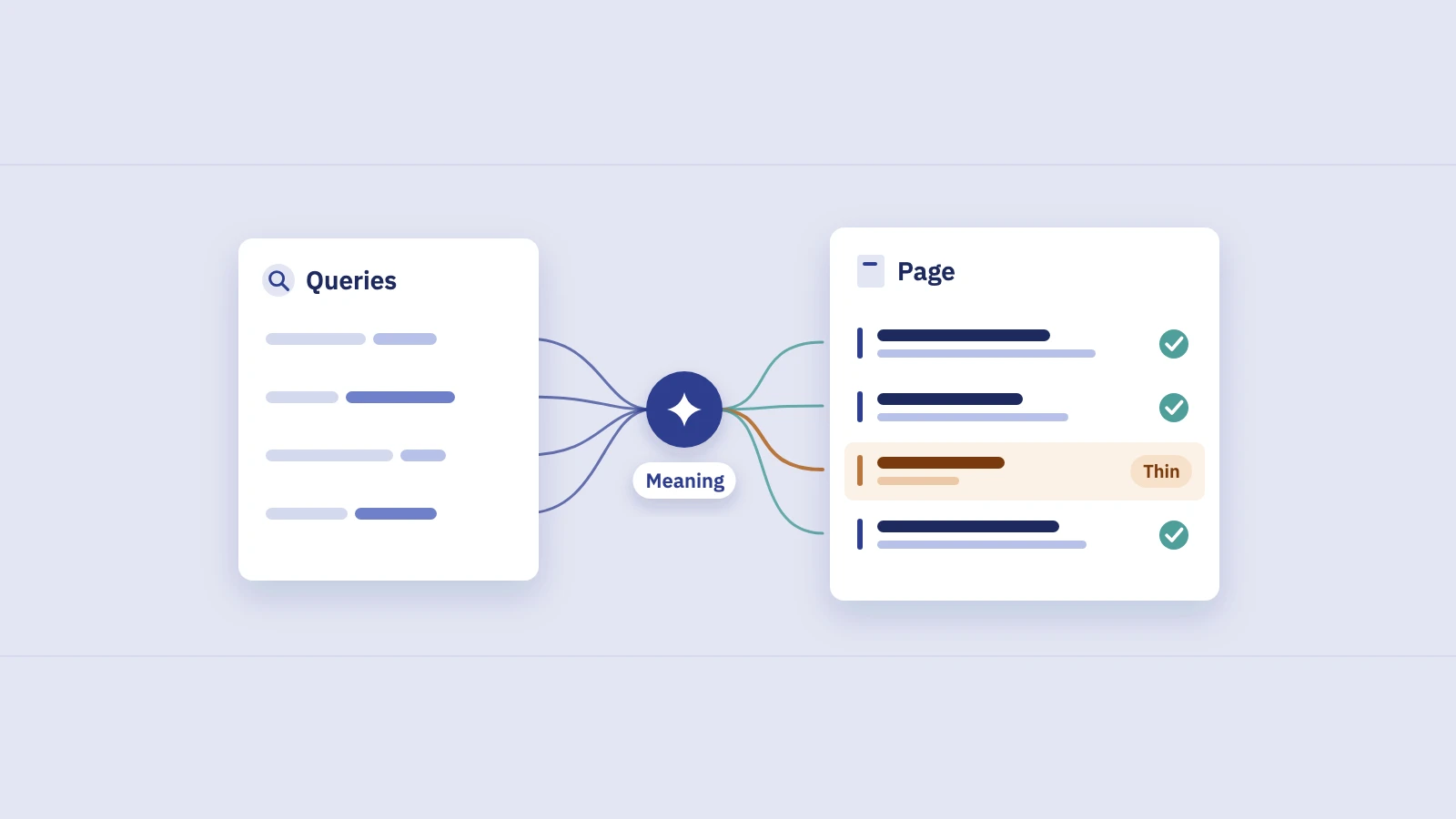
- Google matches meaning, not only exact words. Google's description of how ranking works says it works out the intent behind a query, and its synonym system finds relevant pages even when they don't contain the exact words searched. A page about one topic can be relevant to every query that means roughly the same thing.
- A thorough page answers the next questions too. Each section that covers a follow-up (feeding, storing, fixing a sluggish starter) brings in the queries for it.
So the count of queries a page ranks for is mostly an outcome, not a target. A page with one keyword is either very narrow or new. A page with 300 isn't over-optimized; it's covering a topic people search for in many ways.
Primary topic vs supporting queries
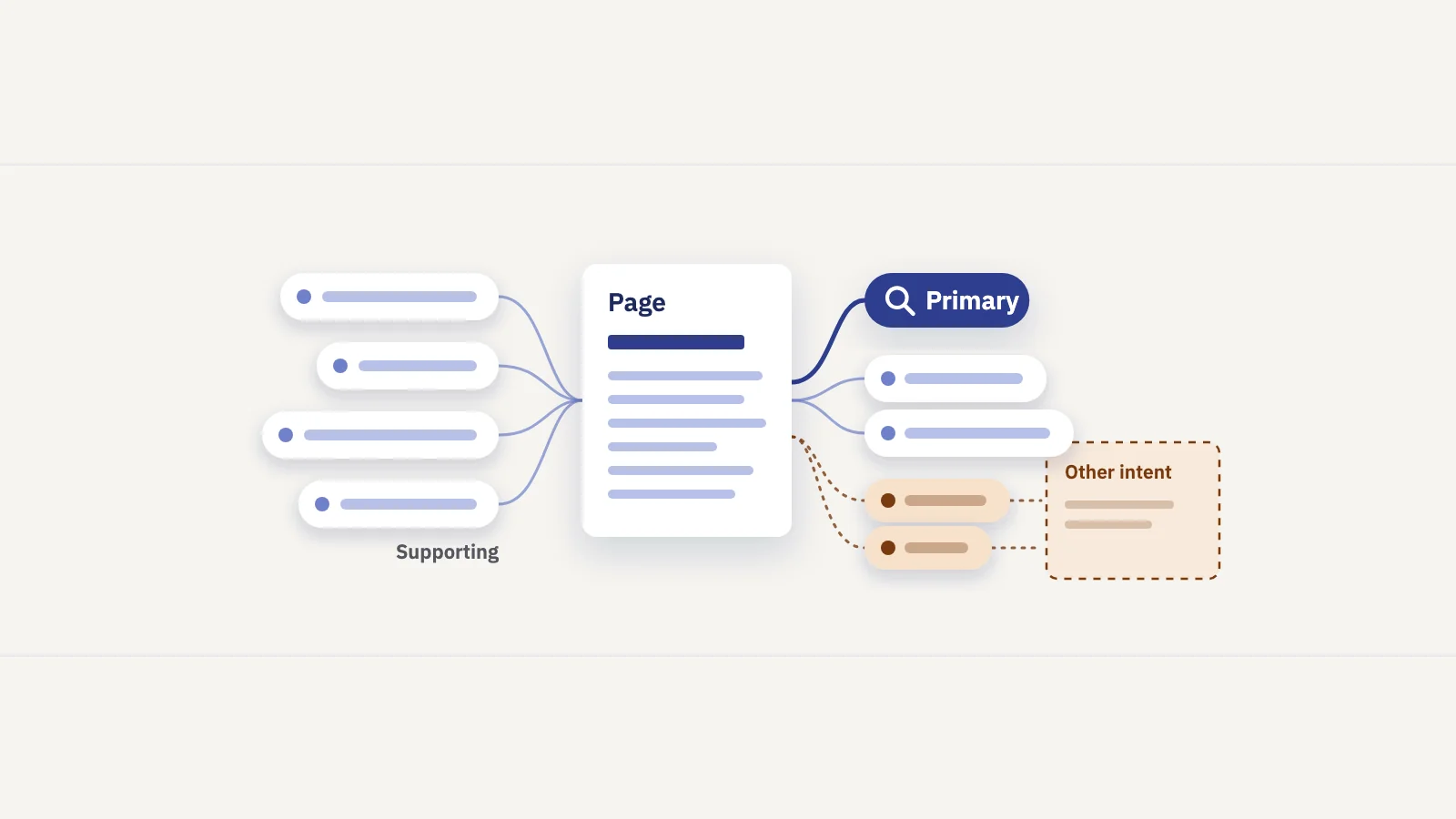
What you do decide is the page's job. That gives you two kinds of queries:
| Primary topic | Supporting queries | |
|---|---|---|
| What it is | The main thing the searcher wants, in their most common phrasing | Narrower questions with the same underlying need |
| Example | sourdough starter, how to make sourdough starter | feeding schedule, starter not bubbling, how to store it |
| How many | One topic, often several phrasings of it | As many as the page genuinely answers |
| Where it goes | Title, main heading, URL, opening paragraph | Subheadings, sections, FAQs, image alt text where it fits |
| What decides it | The group of queries with the most impressions for the intent you want | Recurring questions in the page's queries and on the results page |
The test for whether a query is supporting or a separate topic is simple: would the same searcher be happy to land on this page for it? Someone asking why their starter isn't bubbling is mid-way through making one; the guide serves them. Someone searching "buy sourdough starter" wants a product, and a how-to guide doesn't.
There's no fixed number of supporting queries. Write sections for the questions people ask and stop when you're padding. Repeating phrasings to cover more variants doesn't help: Google's spam policies name keyword stuffing, filling a page with keywords to manipulate rankings, as a violation.
How to see it in Search Console
Every page you have already shows its own query mix. To read it:
- Open Performance > Search results and set the date to the last 3 months, so seasonal and rare queries have time to show up.
- Open the Pages tab and find the page.
- Filter to it. Click the URL in the table, or use + Add filter > Page and enter the exact URL.
- Open the Queries tab with the filter still on, and sort by Impressions.
- Read the top 20 to 50 queries. Mark each one as primary phrasing, supporting question, or something else.
- Note position and CTR per group. A group where the page sits on page two, or where CTR is low at a good position, is where the page under-serves the query.
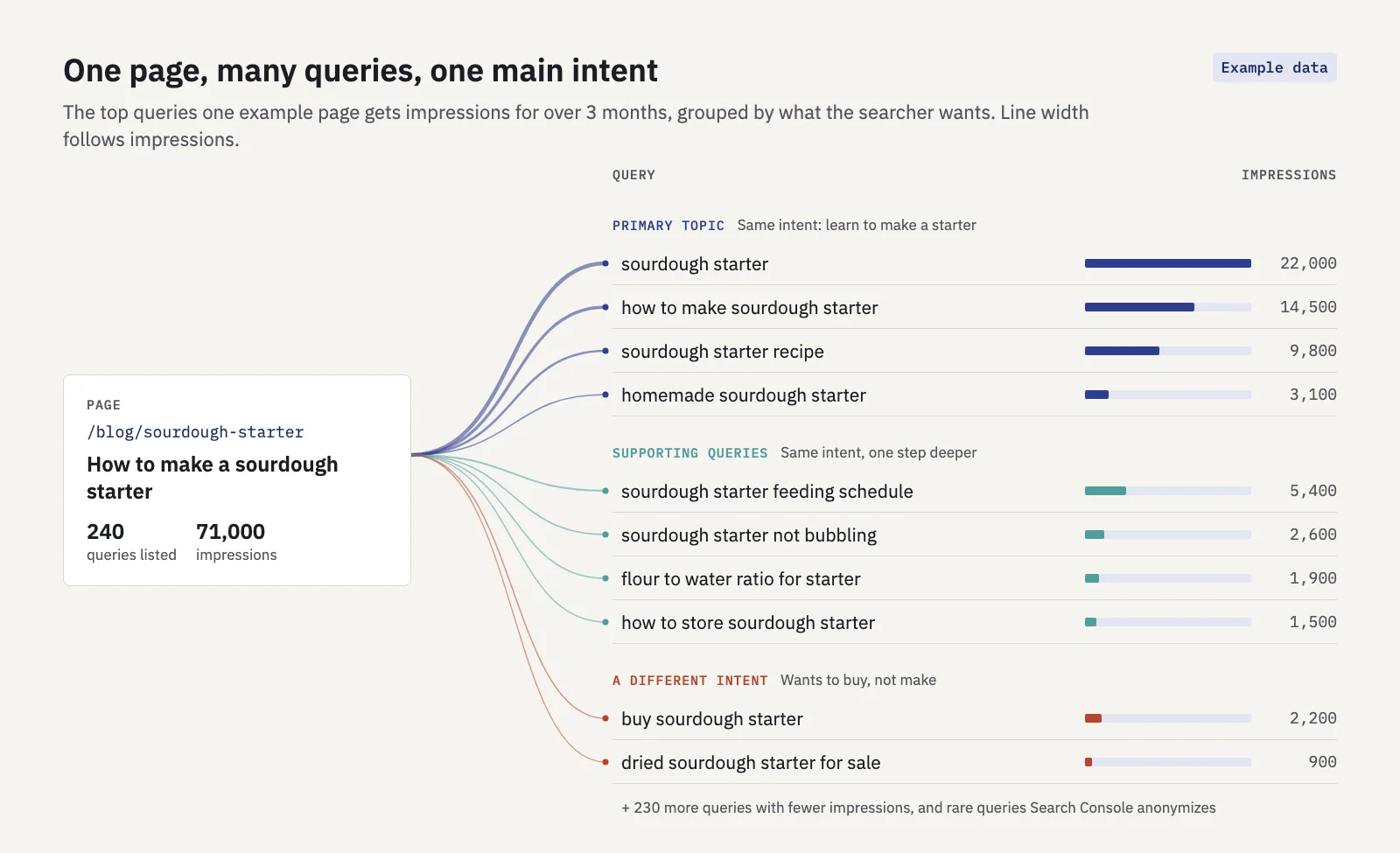 Example data. Eight of the top ten queries share one intent. The two "buy" queries don't, and that's the signal to look at.
The interface lists up to 1,000 queries, and very rare queries are anonymized and never shown, so the long tail will always be incomplete. The top of the list is what matters here.
In Serplyze's Traffic screen you can expand a row in the Pages tab to see the queries that land on that page, or click it to open the page detail with its daily chart and the same query list. The Query × page tab lists every query against the URL that earns it, and flags queries where more than one of your pages gets clicks, which is the starting point for the merge decision below.
When one page is stretched across two intents
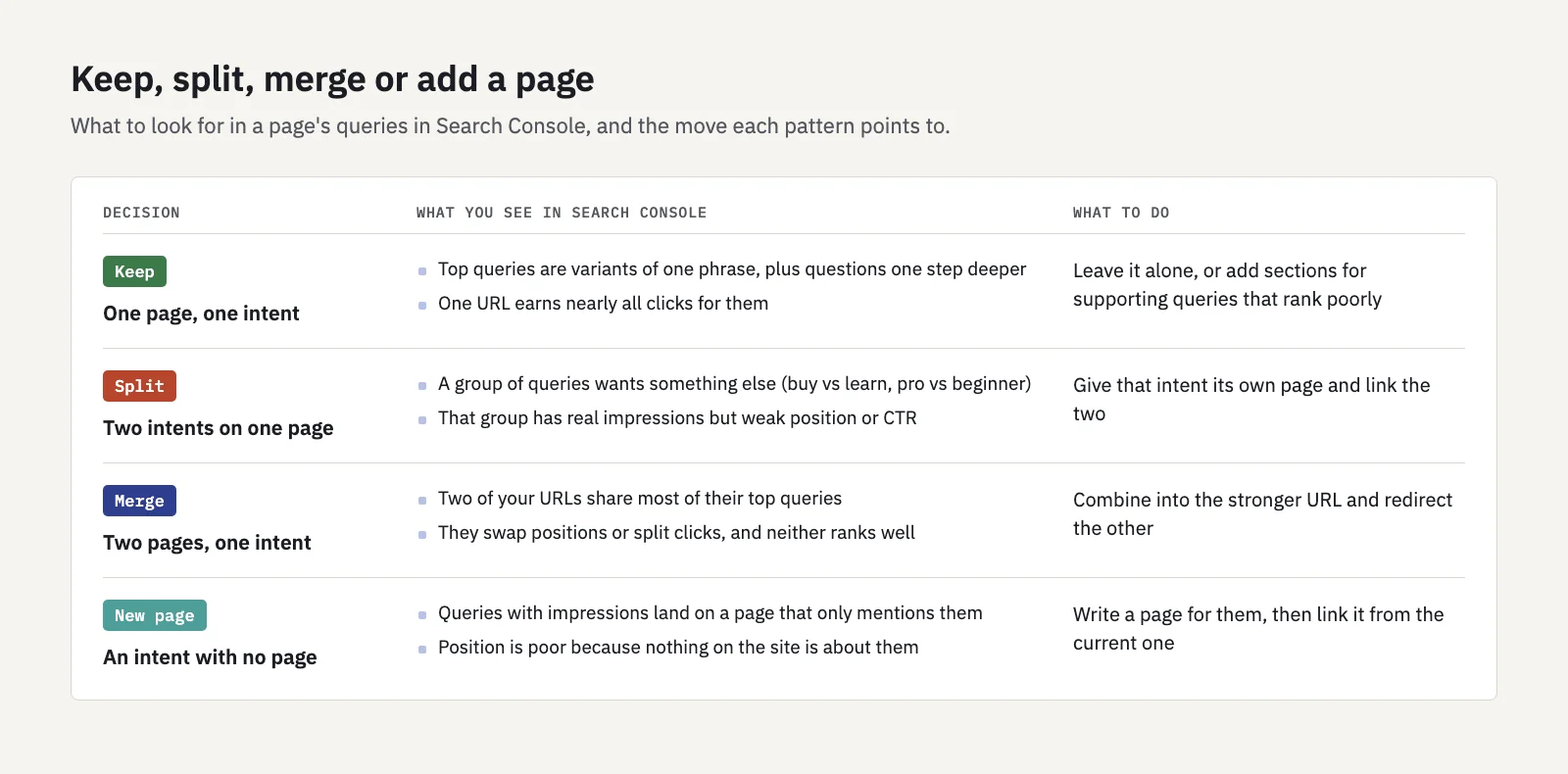
A page needs splitting when its queries fall into two groups that want different things and the page serves one of them badly. The common splits:
- Learn vs buy. "How to make sourdough starter" and "buy sourdough starter". One wants instructions, the other a product page.
- Beginner vs expert. "What is a canonical tag" and "canonical tag on paginated pages with parameters". One page rarely serves both well.
- Different audiences or locations. Pricing for freelancers vs enterprise; a service in two cities.
- A tool vs an explanation. "Mortgage calculator" and "how mortgages work" can share a page, but often the calculator deserves its own.
The signal in Search Console is a group of queries with real impressions where the page ranks poorly or gets few clicks at a decent position, because Google shows it but searchers see it doesn't match. Before you split, look at the results page for those queries. If Google ranks product pages for them and you have a guide, a new page is the right move. If it ranks guides like yours, the page may just need a better section.
Split carefully. Moving a strong section out can weaken the original page, and two thin pages are worse than one good one. Only split off a group that has enough demand to deserve a page of its own, and link the two pages to each other.
When two pages should merge
The opposite case: two of your pages get the same top queries. In Search Console, filter each URL and compare their query lists. If most of the top queries appear on both, and the pages swap positions or split the clicks, Google can't tell which one is the answer.
That's keyword cannibalization, and we cover finding and fixing it in our cannibalization guide. The short version: not every overlap is a problem, but when two pages serve one intent, combine them into the stronger URL and redirect the other with a permanent redirect. Serplyze's keyword cannibalization finding does this check for your tracked keywords, flagging those where several of your URLs share the impressions.
If you want to make these calls across a whole site rather than page by page, group the queries first. Keyword clustering with Search Console shows how to cluster the queries you already rank for and check which page Google picked for each cluster.
A practical rule set
Put together, the answer to "how many keywords per page" is a short set of rules:
- One primary topic per page. Write it as the phrasing with the most impressions (or, for a new page, the one people use most), and put it in the title, main heading and opening.
- Supporting queries get sections, not repetitions. If a question recurs in the page's queries, answer it under its own subheading. Don't add variant phrasings to cover more strings.
- Group by intent, not by words. Two queries that share no words can belong on one page; two that share most of their words ("sourdough starter" and "buy sourdough starter") may not.
- Check the results page before you split or merge. The kinds of pages Google ranks for a query tell you which intent it has settled on.
- Split when a second intent has real demand and the page serves it badly. Otherwise add a section.
- Merge when two pages share their top queries and neither wins.
- Re-read the page's queries every few months. New queries show what to add; queries you lost show what to fix. Our content gap analysis covers the queries with no good page yet.
For a new page with no data, pick the primary topic from your keyword research, write for the questions around it, and come back to Search Console after a few months to see which queries Google actually matched it with.
Key takeaways
- Give each page one primary topic; how many queries it ranks for is an outcome, not a target.
- Supporting queries share the primary topic's intent and get their own sections, not repeated phrasings.
- In Search Console, filter Performance to one page and read its Queries tab by impressions to see its real query mix.
- Split a page when a second intent has real demand and the page serves it badly; merge two pages when they share their top queries and neither wins.
- Check what Google ranks for a query before you split or merge.
Serplyze lists the queries every page earns and flags the ones your pages compete for, from your own Search Console data. Start free and see which pages are doing two jobs.