Schema markup can make a page eligible for rich results: review stars, prices, recipe cards, breadcrumbs. It doesn't guarantee them, and Google has retired several types since 2023. This guide covers which ones still show as of October 2026, how to test your markup, and how to measure rich result clicks in Search Console.
What structured data does, and what it doesn't
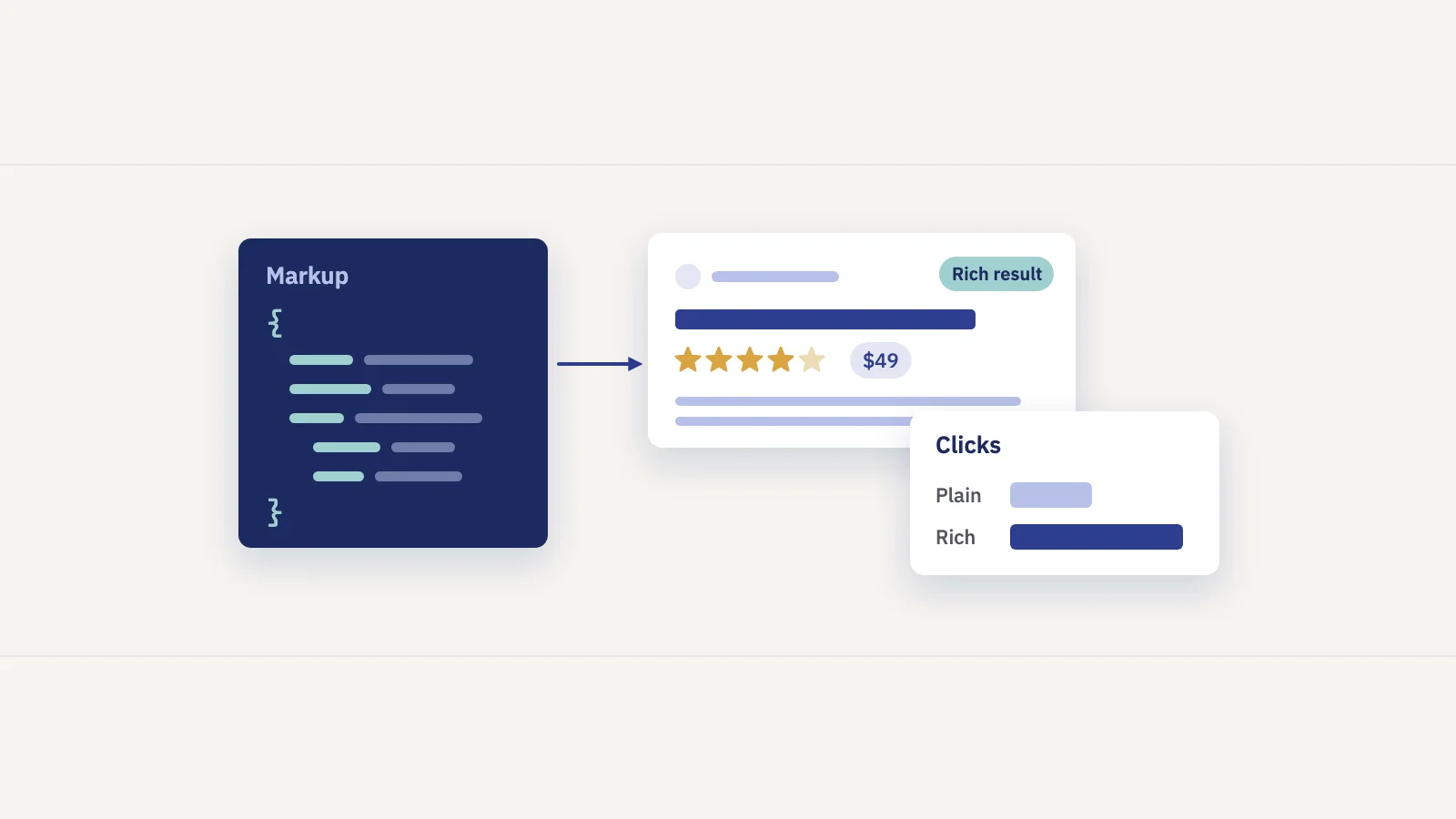
Structured data is, in Google's words, "a standardized format for providing information about a page and classifying the page content". In practice it's a block of JSON-LD (or Microdata or RDFa) that uses the schema.org vocabulary to say what's on the page: this is a product, this is its price, this is its rating. Google's introduction to structured data says it recommends JSON-LD where your setup allows it.
What it does:
- Helps Google understand the page. Google says it "uses structured data to understand the content on the page", as stated on the search gallery page.
- Makes the page eligible for rich results, the result formats with extra visual elements that Google lists in the search gallery.
What it doesn't:
- It doesn't guarantee a rich result. Google's general structured data guidelines say Google "does not guarantee that your structured data will show up in search results", even when the markup is correct. Results also vary with the searcher's history, location and device.
- It doesn't work for content people can't see. The markup has to be "a true representation of the page content". Marking up hidden content, or content that isn't the page's main content, is a reason for Google not to show the rich result.
- It isn't a ranking shortcut. Google's docs present structured data as a way to understand and display a page. When Google retired types in 2025, it said the change won't affect how pages are ranked. A manual action for spammy markup removes rich result eligibility. According to the same guidelines, it doesn't affect web search ranking.
So think of schema markup as the first step in a chain. Each step is a separate check, and a page can drop out at any of them.
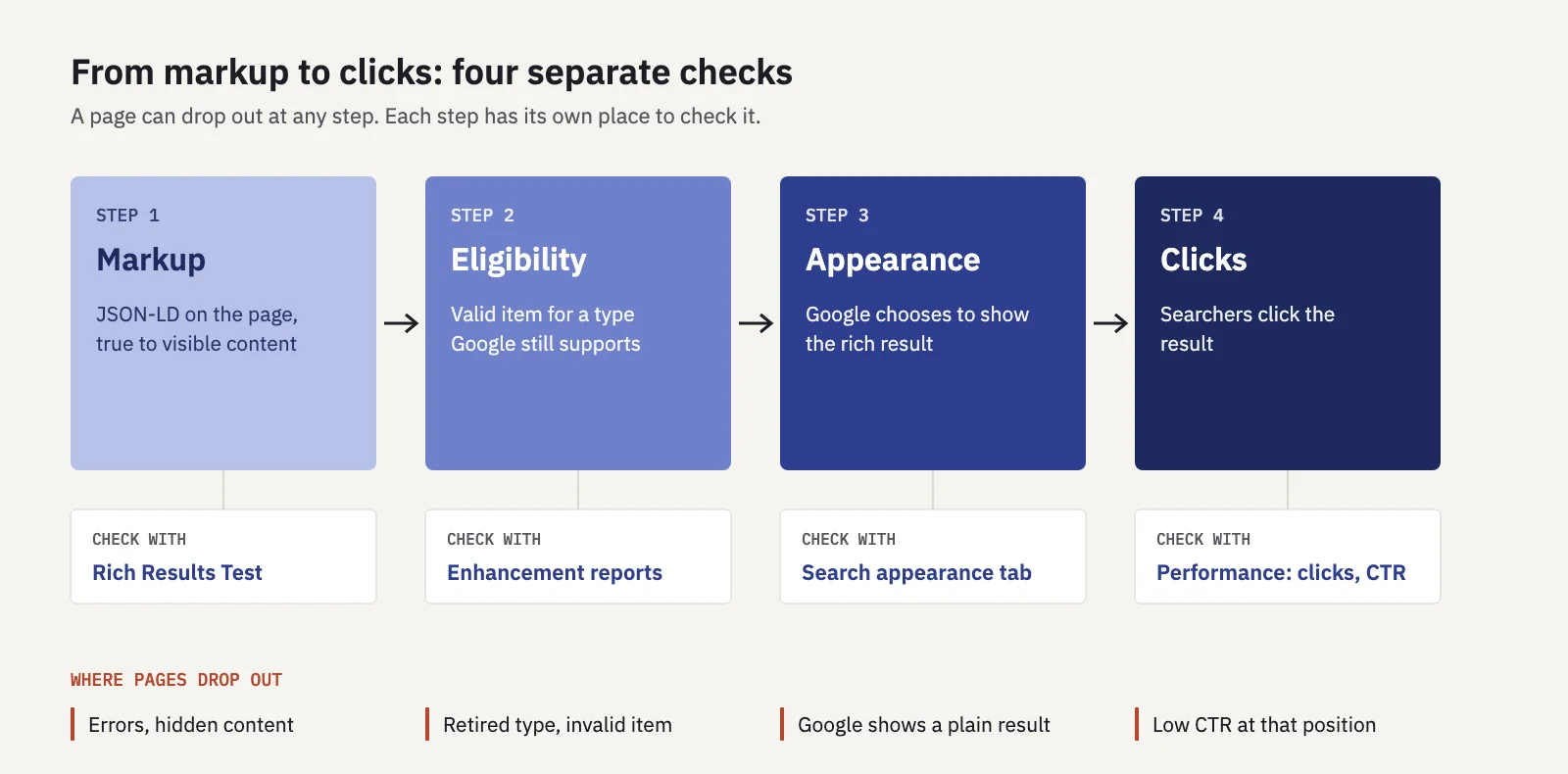
Which rich results still show (October 2026)
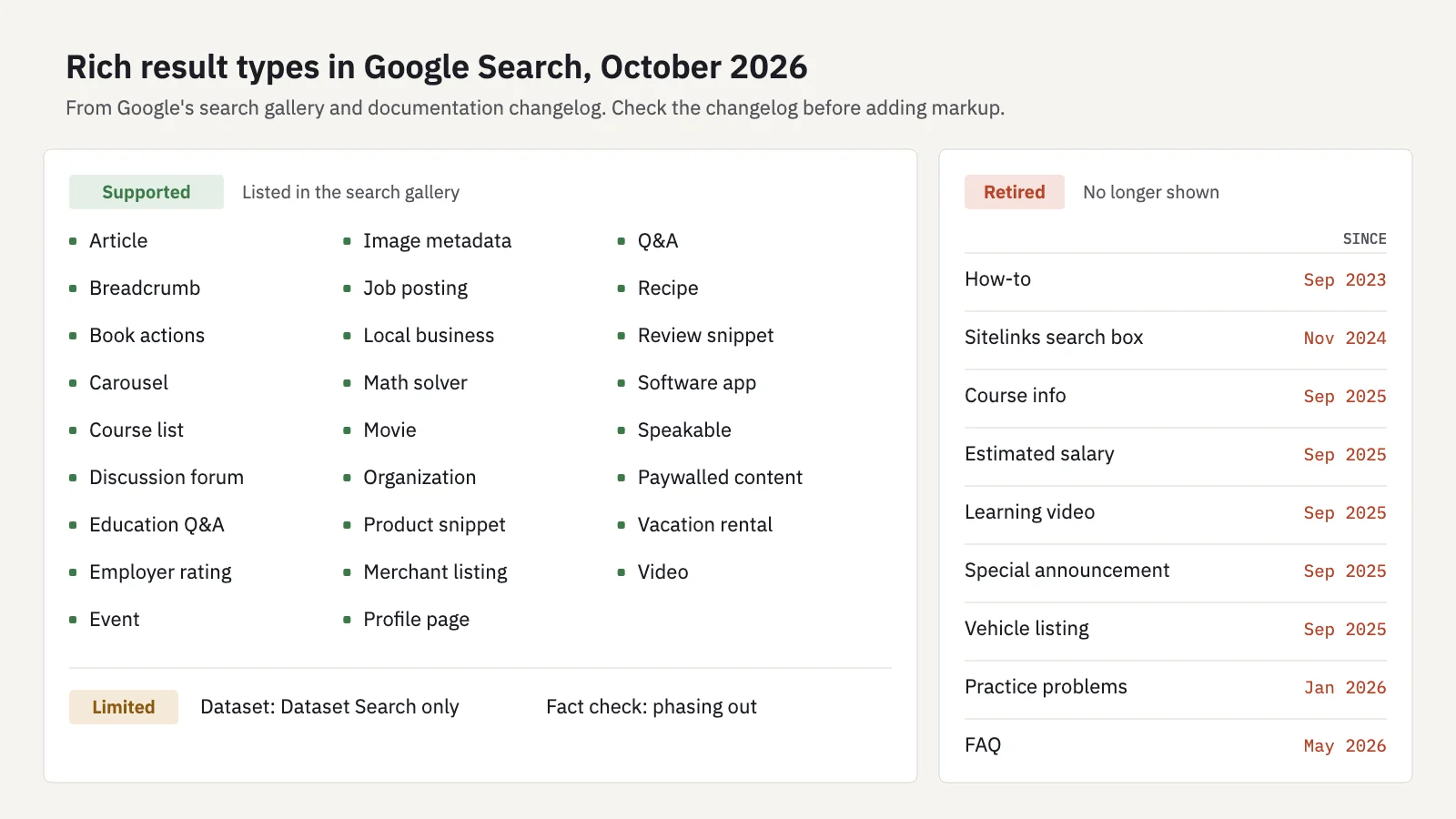
Google has been trimming rich result types to simplify the results page. If a guide you're reading recommends FAQ or How-to markup for rich results, it's out of date. Here's the timeline from Google's own announcements and documentation changelog:
| Type | Status | Since |
|---|---|---|
| How-to | Retired | September 2023 (announcement) |
| Sitelinks search box | Retired | November 21, 2024 (announcement) |
| Course info, Estimated salary, Learning video, Special announcement, Vehicle listing | Retired | Removed from Search Console and docs September 2025 |
| ClaimReview (fact check) | Phased out of Search | Removed from Search Console September 2025; still used by Google's Fact Check Explorer |
| Practice problems | Retired | Documentation removed January 2026 |
| Dataset | Dataset Search only | Clarified November 2025; not used in Google Search results |
| FAQ | Retired | No longer shown from May 7, 2026; documentation removed June 2026 |
| Book actions | Still supported | Phase-out notice withdrawn November 2025 |
Since August 2023, FAQ rich results had only been shown for well-known government and health sites. The May 2026 change ended them for everyone.
What's still in Google's search gallery, as of its October 16, 2026 update: Article, Book actions, Breadcrumb, Carousel (combined with Recipe, Course list, Restaurant or Movie), Course list, Discussion forum, Education Q&A, Employer aggregate rating, Event, Image metadata, Job posting, Local business, Math solver, Movie, Organization, Product (product snippets and merchant listings), Profile page, Q&A, Recipe, Review snippet, Software app, Speakable, Subscription and paywalled content, Vacation rental and Video. Fact check and Dataset pages are still listed too, with the caveats above.
What about old markup for a retired type? Google's posts on the How-to, FAQ and sitelinks search box changes all say the same thing: you can remove it, but you don't have to. Unused structured data doesn't cause problems in Search. Remove it when you next touch the template, not as an emergency.
Testing markup with the Rich Results Test
The Rich Results Test checks whether a page's markup qualifies for a Google rich result. Use it before you ship and after every template change.
- Enter a URL or paste code. A URL tests the public page as Google's inspection crawler sees it. Code mode tests a snippet, which helps before a page is live. Anything the page loads has to be reachable without a login.
- Keep the smartphone user agent (the default) unless you have a reason to test desktop.
- Read the detected items. The test lists each rich result type it found, marked valid, valid with warnings, or invalid.
- Fix errors first. An error (a critical issue) makes that item ineligible. Warnings concern missing recommended properties. The item can still show, just with less detail.
- Check the preview where one is offered. Google notes the real result may look different.
- Retest the live URL after deploying, then use URL Inspection in Search Console to see the structured data Google found in its indexed version.
Two limits to know. The test only covers types Google supports, so valid schema.org markup for anything else shows nothing. And a pass means "eligible", not "will be shown".
Test one URL per template, not every page. Rich result problems almost always come from a template or plugin: if one product page fails, they all fail.
Search Console enhancement reports
Once the markup is live, Search Console tracks it across the site. The rich result reports are under Enhancements in the left menu. Product snippets and merchant listings are under Shopping. A report appears only once Google has found valid markup for that type on your site.
How to read them:
- They count items, not pages. One product page can hold one item; a listing page can hold many.
- Items are valid or invalid. Invalid items have at least one critical issue and can't show as rich results. They're listed under "Why items are invalid".
- Non-critical issues appear under "Improve item appearance". These are worth fixing, but they don't block the result.
- Open an issue to see example URLs. Fix the template, then click Validate fix.
- Impressions over time appear on reports that have the overlay. A sudden drop in valid items after a release almost always means a template change broke the markup.
A report that disappears, or a type that drops out of your Search appearance filter, can also mean Google retired the type. Check the changelog before debugging your code.
Measuring rich result clicks with Search appearance
Valid markup is only worth the effort if it brings clicks. The Performance report's Search appearance dimension measures that. Google's dimensions documentation says it "groups data by the specific Search result type or feature displayed".
- Open Performance > Search results and set the date range, for example the last 3 months.
- Click the Search appearance tab above the table. You'll see each appearance type with clicks, impressions, CTR and position. Turn on all four metrics in the chart cards first.
- Filter to one type: + Add filter > Search appearance, then pick a type such as Review snippet or Product snippets. Only types with impressions on your site are offered.
- Switch to the Pages tab to see which URLs earn that appearance and which don't.
- Use Compare to set a period before and after a markup change, and compare clicks and CTR for the same pages.
Read the numbers with Google's counting rules in mind:
- One impression per feature type. A page can carry several appearance types in one search, and each type counts one impression. Types overlap, so they don't add up to the total.
- Clicks belong to the URL, not the feature. Google says that with a Search appearance filter, "it's not guaranteed that all clicks for a given URL were on the link with the filtered feature type".
- Data is aggregated by page when you group or filter by Search appearance. Totals can differ from the property-level chart.
- Retired types go blank. Google lists FAQ rich results, How-to rich results, Event details, Event listing, Learning videos and Special announcements among deprecated appearance values. In the bulk data export they're reported as NULL.
A useful comparison: say your product pages with review snippets get a 4.1% CTR at position 3, and similar pages without them get 2.8% at the same position. That's an example, not a benchmark. Run the comparison on your own data, at matching positions, before deciding the markup is worth more work. Our guide to what a good CTR is explains why position has to match. And remember that rich results compete with other SERP features. Zero-click searches can cap what any snippet earns.
Serplyze's Traffic screen has a Search appearance card for the whole site. It shows each appearance type's share of impressions, with the change against your comparison period. Its export lists clicks and impressions for every type. Reports can include a Search appearance section too. Serplyze doesn't split search appearance per tracked keyword, so use the Pages tab in Search Console for page-level detail. See Traffic and the SEO report generator.
For monitoring, the useful weekly checks are short: valid item counts in each enhancement report, and impressions for your main appearance types. A drop in either after a deploy is the earliest sign that markup broke.
Key takeaways
- Structured data makes a page eligible for rich results; it doesn't guarantee them and it isn't a ranking boost.
- How-to, sitelinks search box, FAQ, practice problems and several 2025 types are retired; check Google's changelog before adding markup for a type.
- Test one URL per template with the Rich Results Test, then confirm with URL Inspection after release.
- Enhancement reports count items, not pages; invalid items can't show, and a drop after a deploy usually means a broken template.
- Measure value with the Search appearance tab and filter in Performance, comparing CTR at similar positions and before and after changes.
Serplyze shows your site's search appearance mix next to clicks, rankings and pages, from your own Search Console data. Start free and see which rich results bring you traffic.