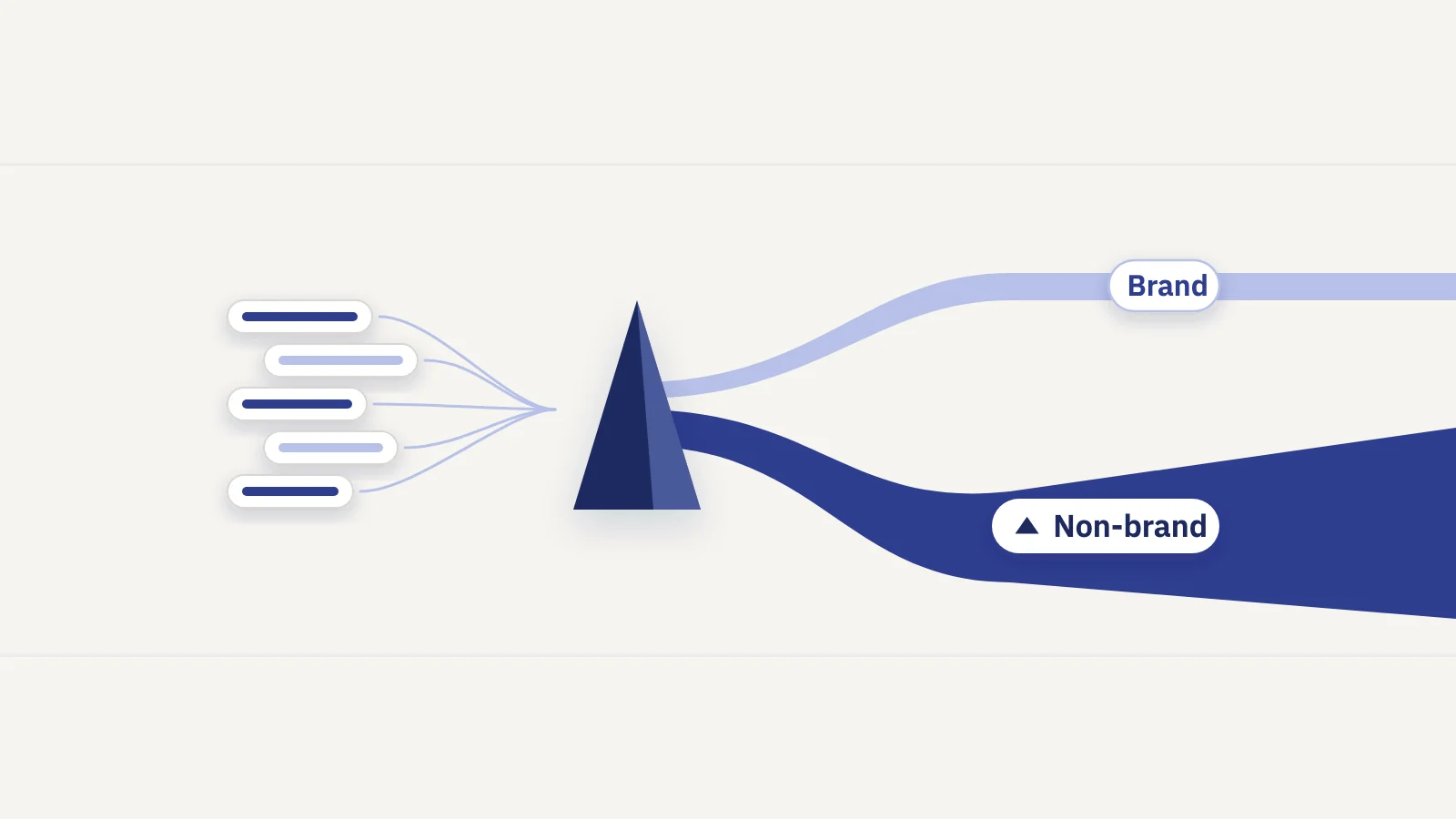
Branded traffic comes from people who already know you; non-branded traffic comes from people who found you. Search Console mixes both into one total, so here is how to split them, with Google's branded queries filter or your own regex, and how to report each half.
Why split branded and non-branded traffic
A branded search contains your brand name, a misspelling of it, or a product only you sell: "fernway boots", "fernwey returns", "trailpack 40 review". A non-branded search doesn't: "best waterproof hiking boots", "how to pack a backpack".
The two groups behave differently and answer to different teams:
- Branded demand is created by marketing, PR, word of mouth and the product itself. A TV campaign, a podcast mention or a good launch shows up as more branded searches. SEO can lose branded clicks (a broken page, a competitor bidding on your name) but rarely creates them.
- Non-branded traffic is the SEO result. It measures how well your content and site win searches from people who had no intent to visit you. That's the number that should move when you publish, fix or consolidate pages.
- Branded queries flatter every average. Google notes that branded queries typically lead to higher-ranking pages and higher click-through rates. Mixed into site totals, they lift CTR and average position and hide what happens on the competitive queries.
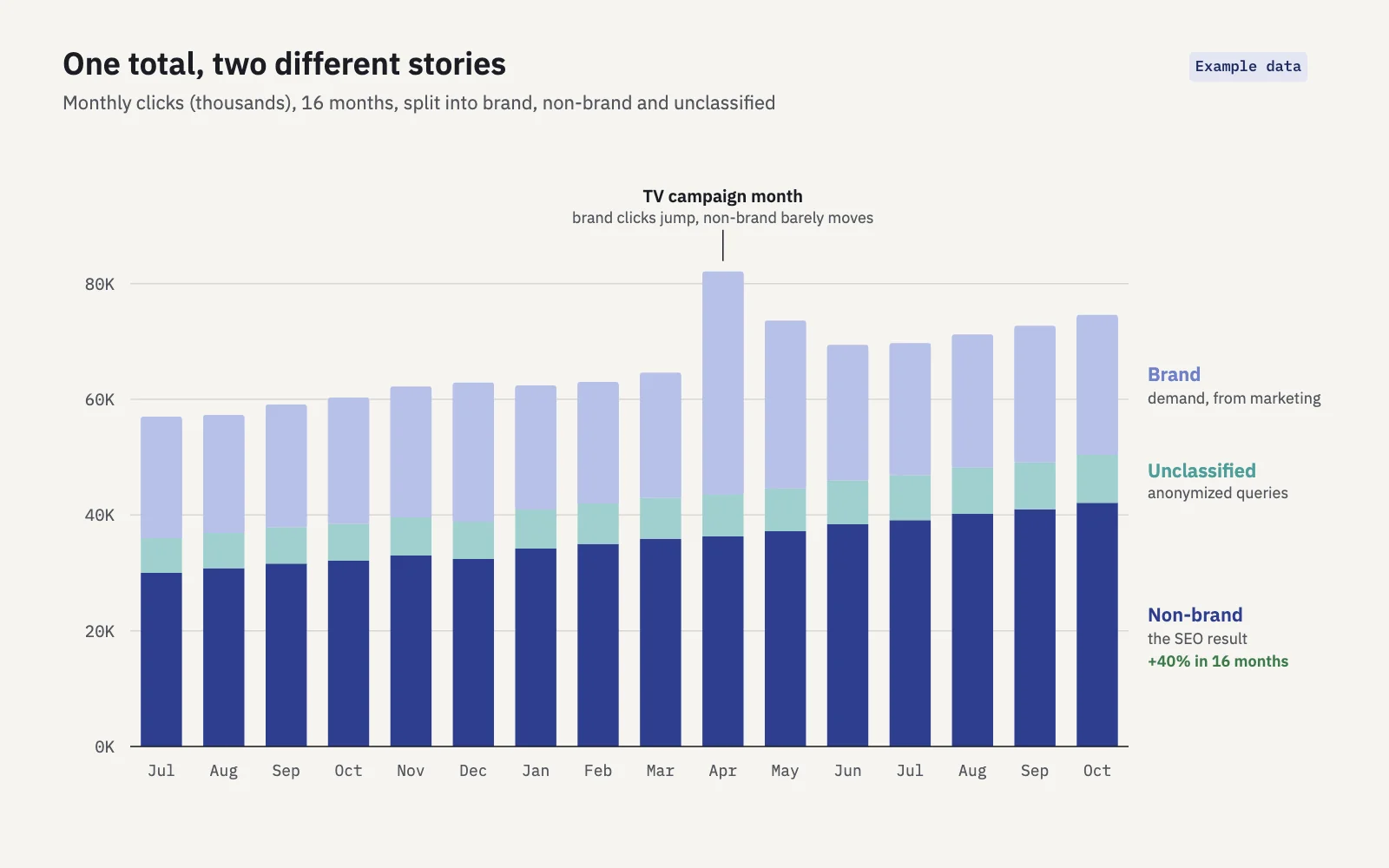
Example data. The total bars mostly show one campaign spike; the non-brand layer shows the SEO trend underneath.
When the two are mixed, a good brand month can hide a non-brand decline, and a quiet brand month can make a solid SEO quarter look flat. Splitting them is the first step of most honest SEO KPIs.
Google's branded queries filter
In November 2025, Google announced a branded queries filter for the Performance report. On March 11, 2026 Google updated the post to say the filter is available to all eligible sites.
What it does. In Performance > Search results, the filter splits query data into two views: Branded (queries with your brand name or closely associated products) and Non-branded (all other queries). It works with every search type in that report (web, image, video and news) and limits clicks, impressions, CTR and position to the chosen group. The Insights report also has a card comparing branded and non-branded clicks.
How it classifies. It isn't a keyword list or a regex. Google uses an internal, AI-assisted system that includes your brand name in all languages, typos, and queries that name a unique product or service of yours without naming the brand. Google's own example: "Gmail" counts as branded for google.com.
Its limits:
- Top-level properties only. It isn't available for URL-path properties (example.com/blog/) or subdomain properties (shop.example.com).
- Enough data required. Sites need a sufficient volume of queries and impressions; low-traffic sites won't see it.
- History starts in March 2025. The help page says the filter provides 16 months of data, counted from when it was first introduced in March 2025, so it can't show your brand split before then.
- It can be wrong. Google says some queries may be misidentified, and you can't correct the classification or add terms to it.
- It stays in the reports. Google's documentation describes it in the Performance and Insights reports. If you work with exported data, the API or Looker Studio, plan on your own regex.
If you can't see the filter, the property type and traffic volume are the two reasons Google gives.
The regex fallback
The regex route predates the brand filter and works on every property. In the Performance report, click + Add filter > Query, choose Custom (regex), then pick Matches regex for branded or Doesn't match regex for non-branded. Search Console uses RE2 syntax and, per its filtering documentation, regex matching is not case-sensitive by default. Google's own regex tips use brand segmentation as the first example, with a pattern of name variants and misspellings joined by | (Search Central blog).
| Branded queries filter | Your own regex | |
|---|---|---|
| Who decides what's branded | Google's AI-assisted system | You |
| Catches typos and other languages | Yes, automatically | Only the ones you list |
| Catches product names | Unique products Google associates with you | The ones you list |
| Property types | Top-level properties with enough traffic | All |
| Editable | No | Yes |
| Works in exports and the API | Not documented | Yes, same pattern |
| History | From March 2025 | Full 16 months |
Use both if you have both: Google's filter as a check on your regex, your regex as the definition you report on, because you can explain and repeat it.
How to build a brand regex, step by step
Say the brand is Fernway, an outdoor gear shop at fernway.com, with a backpack line called Trailpack.
- List the forms of the name. The name itself, split and hyphenated versions ("fern way", "fern-way"), the plural or possessive ("fernways"), abbreviations people actually use, and the domain. A pattern that matches "fernway" also matches "fernway.com" and "www fernway com", so the domain usually needs no extra term.
- Mine your own queries for misspellings. In the Queries tab, add a Query filter "containing" the first three or four letters of the brand ("fern"), sort by impressions and note every variant: "fernwey", "ferway", "fernwy". Repeat with a later fragment ("rnway") to catch typos at the start of the word.
- Add products, apps and people that are unique to you. "Trailpack" belongs in the pattern; "rain jacket" doesn't, even if it's your best seller. Add the founder's name or a podcast name only if searches for them mean the brand.
- Combine the parts. Join variants with
|, use a character class for a swapped vowel (w[ae]y) and?for an optional character ([ -]?,s?). Wrap the whole group in\b ... \b(word boundaries) so short names don't match inside other words. - Test both directions. Apply Matches regex and scan the top queries for false positives. Then switch to Doesn't match regex, sort by clicks and look for brand variants that slipped through. Fix and repeat until both lists look clean.
- Write it down and review it. Keep the final pattern in a shared doc so every report uses the same definition, and recheck it every quarter and after every product launch or rename.
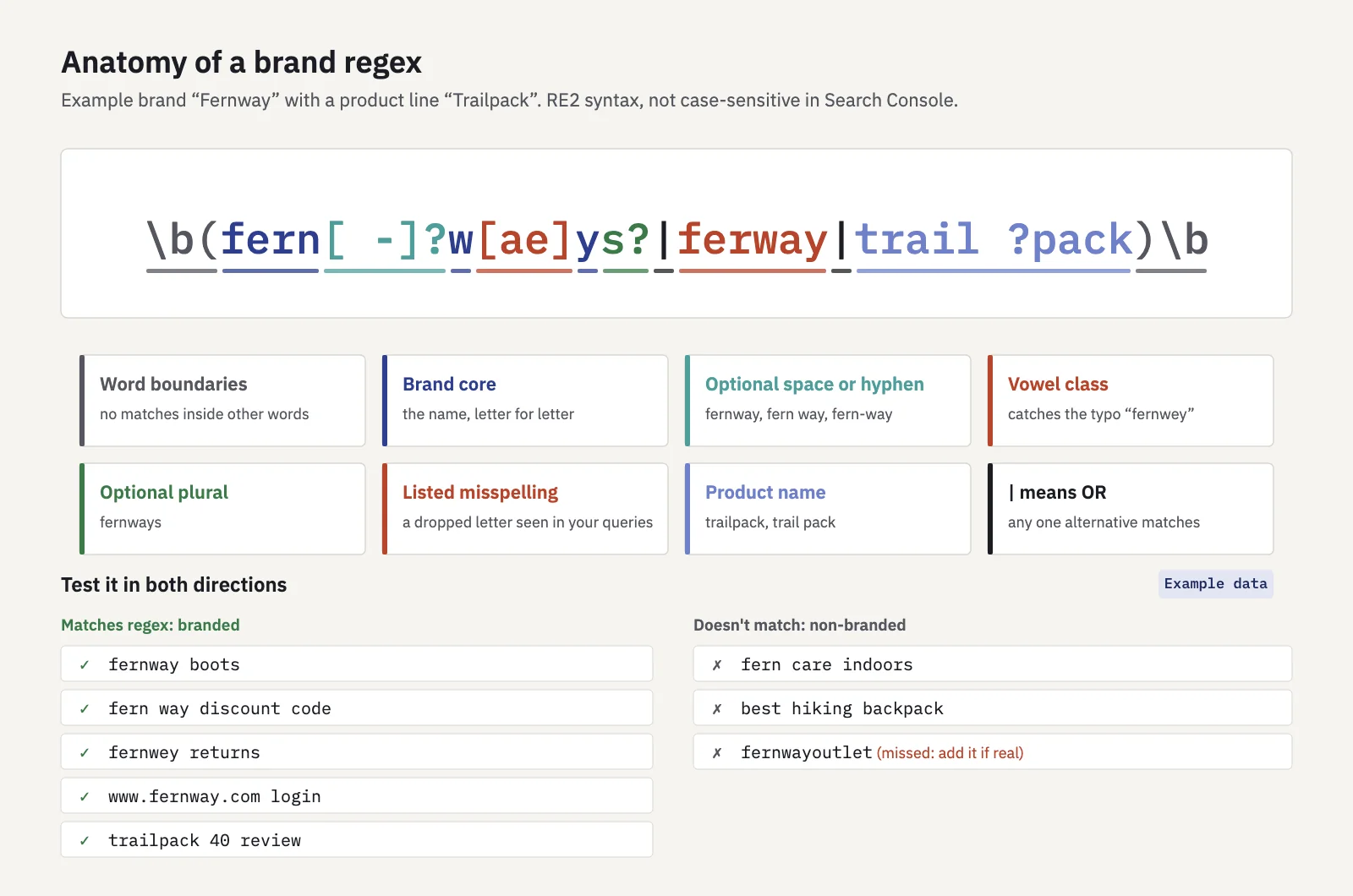
The finished example pattern, with test queries. Patterns are illustrative; build yours from your own query list.
Don't stop at a short stem like fern to "catch everything". It would also match "fern care indoors" and inflate branded traffic with gardening searches. A slightly longer list of exact variants is safer than a broad stem.
Edge cases: generic names and navigational queries
Most brand regexes are easy until the name is a common word or the query is half brand, half topic. A decision table helps you make each call once and apply it consistently.
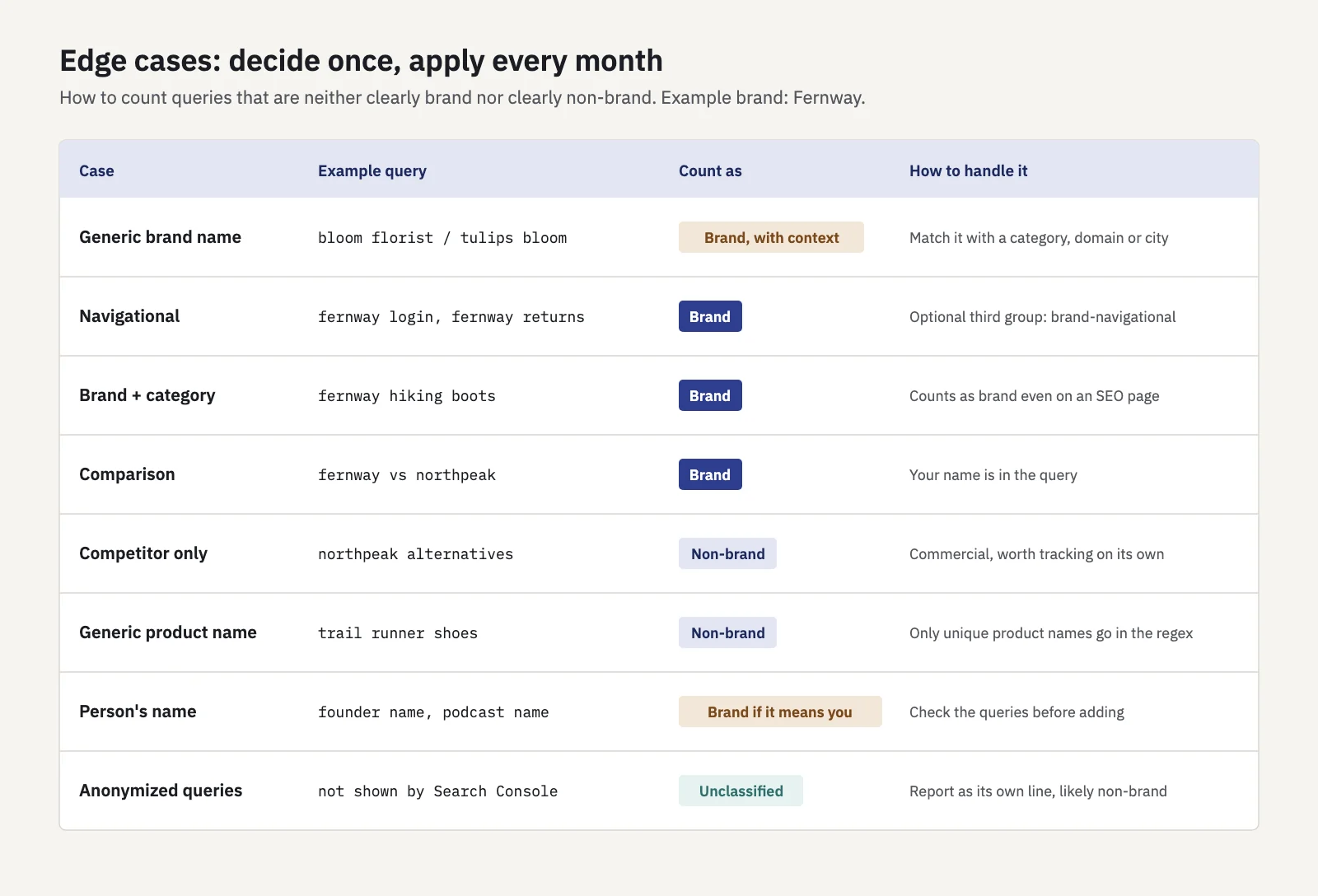
Generic brand names. If your brand is a dictionary word (say a florist called Bloom), "bloom" alone will match "when do tulips bloom". Only count the word when it comes with your context: the domain, a category term or a location, for example \bbloom (florist|flowers|delivery)\b|bloomflowers. Accept that you'll miss some branded searches; a clean undercount is better than a noisy overcount. Google's filter has an advantage here, because it judges context rather than characters.
Navigational queries. "fernway login", "fernway returns", "fernway near me" and "fernway customer service" are branded. They come mostly from existing customers and often grow when the business grows, not when SEO improves. Some teams split them into a third group, brand-navigational, so branded demand from new interest ("fernway boots review") isn't hidden by support traffic.
Brand plus category. "fernway hiking boots" is branded: the searcher chose you before choosing a product. Count it as brand, even though the landing page is a category page you optimize for SEO.
Competitor names. "fernway vs northpeak" contains your name and counts as brand. "northpeak alternatives" doesn't and is non-brand, even though it's commercial and worth tracking.
Anonymized queries. Search Console omits rare queries for privacy, and Google's documentation notes that a query filter excludes them from the totals. They can't be classified by your regex, so brand clicks plus non-brand clicks from two regex filters will add up to less than the site total. Most anonymized queries are long-tail searches, so treat the gap as "unclassified, likely non-brand" and keep it as its own line rather than folding it into either side.
How to report the split
A brand split is only useful if every report reads it the same way:
- Report two or three lines, never just a share. Brand clicks, non-brand clicks and, if you use regex, unclassified clicks. "Non-brand is 62% of traffic" can rise because brand fell; absolute numbers show which.
- Make non-brand the SEO headline. Non-brand clicks and impressions, compared year over year to remove seasonality, are the clearest measure of SEO work. Brand clicks go in a separate "demand" row next to marketing activity.
- Read CTR and position per group. A blended average position mixes branded positions near the top with competitive ones lower down. See average position in Search Console for why that average misleads on its own.
- Annotate brand spikes. Campaigns, press coverage and launches explain brand jumps; noting them in the report stops anyone from crediting them to SEO.
- State the definition. Name the method (Google's filter or your regex), keep the pattern in an appendix and note any change to it, because a new term changes history.
For a layout that puts this into a monthly page, see the SEO report template; for a client-facing version, see the SEO client dashboard.
In Serplyze, brand terms live in each project's settings: plain words match whole words regardless of case, a term starting with - excludes queries, and a term wrapped in slashes is an RE2 regex. The Traffic page then shows brand, non-brand and anonymized clicks as separate shares, has a Brand / Non-brand type filter for queries, and an Exclude branded checkbox that hides branded keywords and queries. These numbers use your terms, not Google's filter, so the two can differ.
Once the split is in place, the rest of your analysis gets cleaner too: keyword cannibalization checks, CTR baselines and forecasts all work better on non-brand queries alone.
Key takeaways
- Branded traffic measures existing demand created by marketing and PR; non-branded traffic is the SEO result. Report them separately.
- Google's branded queries filter is AI-assisted, catches typos and unique product names, and is limited to top-level properties with enough traffic and data from March 2025.
- A regex works everywhere, is editable and repeatable: list name forms, mine misspellings, add unique products, wrap in word boundaries and test in both directions.
- Decide edge cases once: generic names need context terms, navigational queries are brand, and anonymized queries stay unclassified.
- Report absolute brand and non-brand numbers, year over year, with the definition written down.
Serplyze tracks your keywords from your own Search Console data and shows brand and non-brand clicks side by side, using the brand terms you set. Start free and see what your non-brand traffic is really doing.