A meta description is the short summary of a page that Google may show under your title in search results. For pages that already rank, a better one can lift clicks without any change in position, and Search Console gives you everything you need to test whether it did.
What a meta description is
The meta description is an HTML element in the page's <head>:
<meta name="description" content="Measure your foot, then match it to our size chart for 14 brands, in US, UK and EU sizes.">
Visitors never see it on the page itself. Its job is in the results page: when Google uses it as the snippet, it is the two or so lines a searcher reads before deciding whether to click. That makes it one of the few things you control that acts directly on click-through rate (CTR) for queries you already rank for.
Google often rewrites it
Writing a description doesn't mean Google will show it. Google's documentation on snippets says snippets are primarily created from the page content itself, and that Google uses the meta description when it describes the page better than other parts of the content. Three more points from the same page matter for testing:
- Snippets depend on the query. Google may show different snippets for different searches, so one page can show your description for one query and a paragraph from the page for another.
- There is no length limit. A description can be as long as you like, but the snippet is cut as needed to fit the device width.
- You can limit snippets. The
nosnippetandmax-snippetrobots rules and thedata-nosnippetattribute control what Google may show. Check that none of them is set by accident on a page you want to test.
The practical consequence: before you rewrite a description, search the page's main queries and look at what Google actually shows. If it already ignores your description in favour of page text, changing the description may change nothing; improving the opening paragraph that Google is quoting may do more.
What makes a good one for queries you already rank for
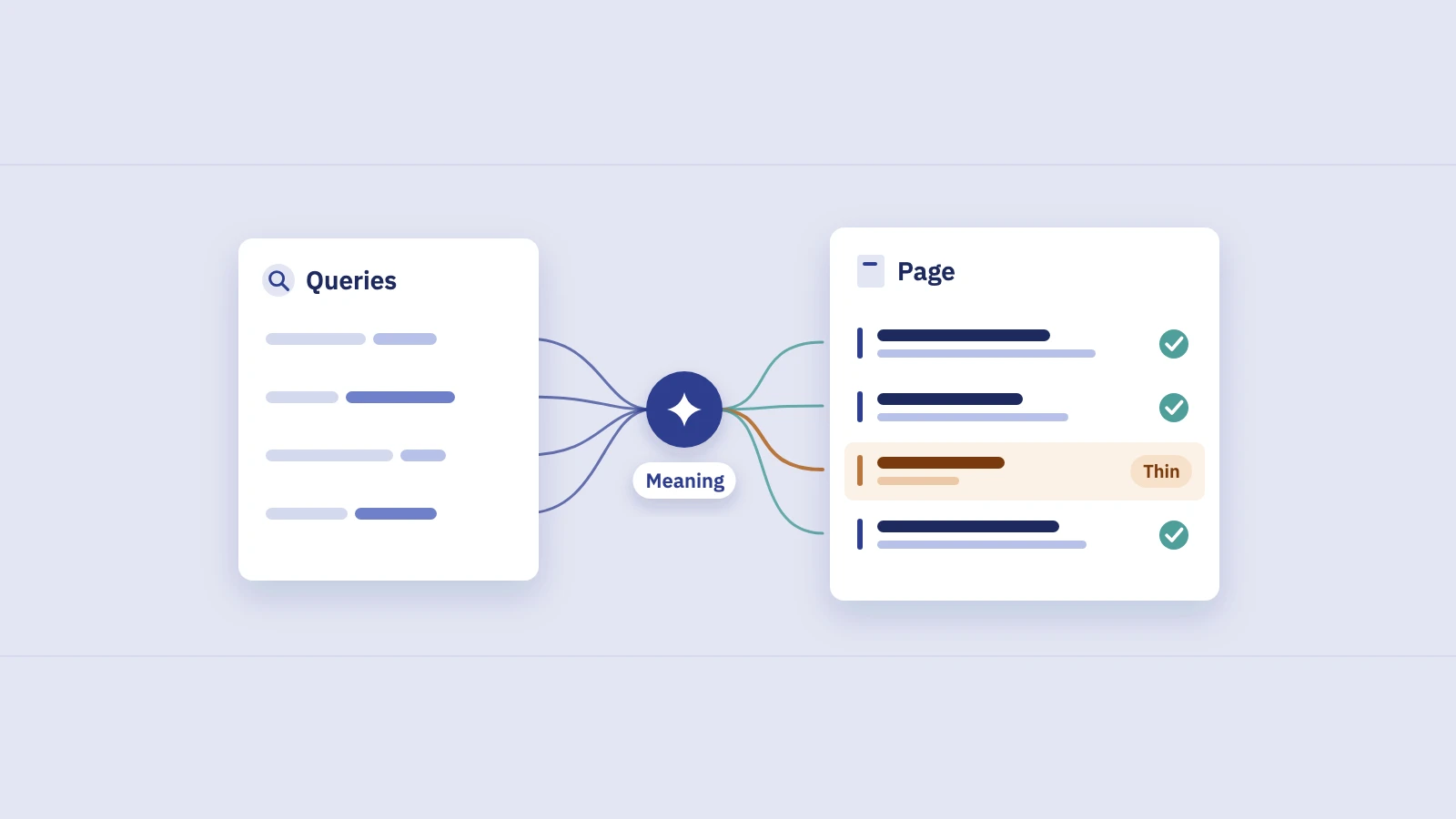
You aren't writing for a keyword you hope to rank for. You are writing for the queries that already bring impressions. Find them first: in Performance > Search results, add a Page filter for the URL via + Add filter, then open the Queries tab and sort by impressions. The top three to five queries are your brief.
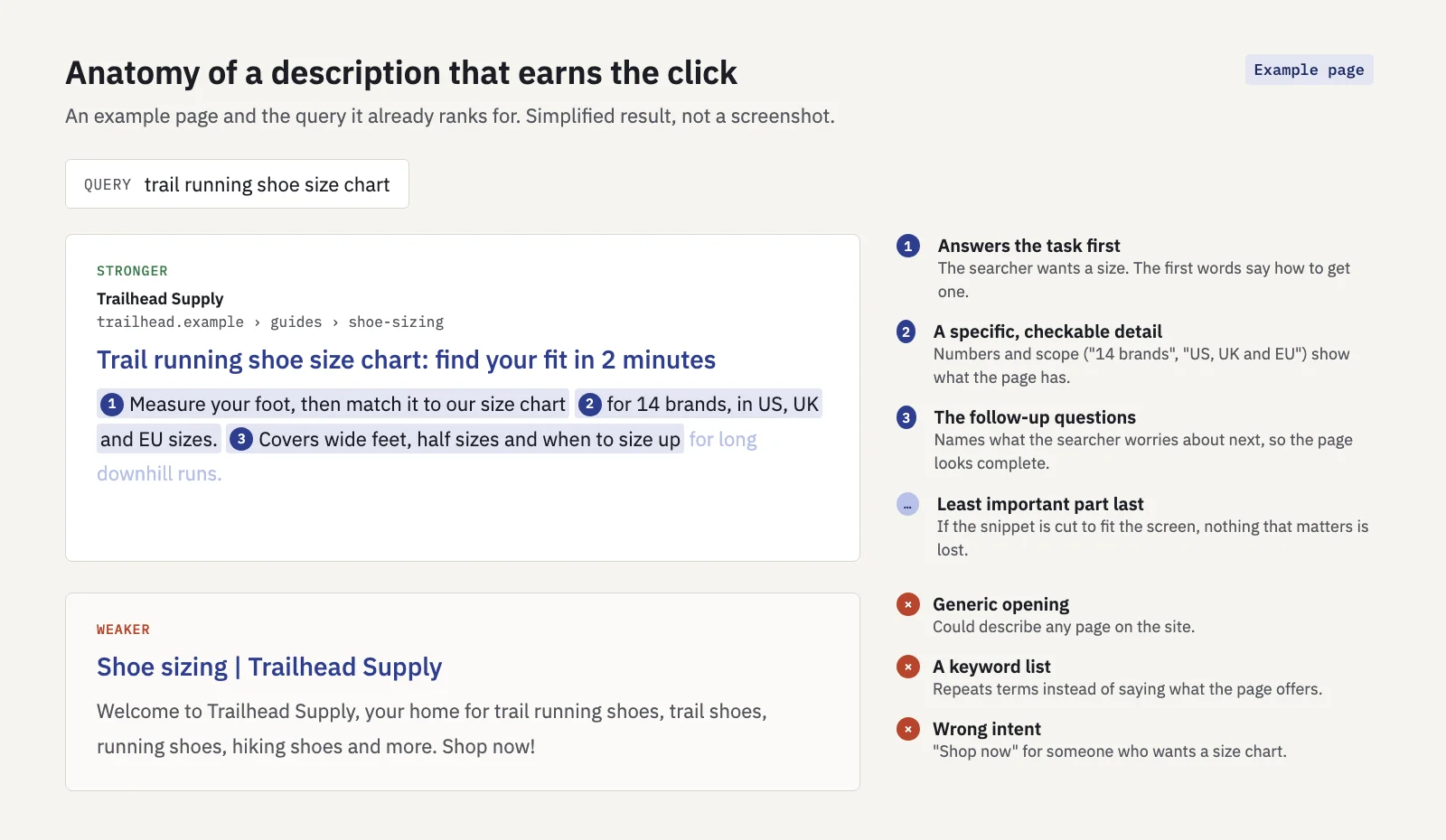 Example page. The stronger description answers the query; the weaker one could describe any page.
Google's own guidance on quality meta descriptions asks for descriptions that are unique to each page, accurately summarize it, and include relevant details such as prices, dates or the author, and it warns against long strings of keywords. For pages that already rank, add four habits:
- Answer the task the query describes. If the top query is "size chart", say how the page gets the searcher a size. Match the intent: "shop now" on an informational query loses the click.
- Be specific. Numbers, scope and concrete details ("14 brands", "updated for 2026", "free returns") tell the searcher what they get. Vague claims ("the best guide") don't.
- Cover the next question. Mention the follow-up concern the searcher has (wide feet, pricing, compatibility), so the page looks complete before they click.
- Front-load. Put the part that wins the click first, so truncation on a narrow screen only cuts the least important words.
Keep the title and description working together: the title states what the page is, the description why this result is the one to click.
How to pick pages to test
Testing a description on a page with a few dozen impressions a month tells you nothing; random variation will swamp the result. Pick pages where a better snippet has room to matter and the numbers are big enough to read:
- Open Performance > Search results, set the date to the last 3 months and open the Pages tab.
- Sort by impressions and look at the top of the list. These are the pages with enough data to test.
- Compare each page's CTR with your CTR curve at its average position, built from your own non-brand queries. A page well below it is a candidate. Our guide to benchmarking CTR against your own data walks through building the curve.
- Check the position is stable. Use Date > Compare against the previous period. If the position moved by a place or more, the CTR change is mostly about rank, not the snippet.
- Look at the live results page for the page's top queries: what snippet Google shows, and what sits above you (ads, an AI Overview, shopping units).
- Shortlist the pages with the most clicks at stake, roughly (curve CTR − actual CTR) × impressions.
| Good test candidate | Poor test candidate |
|---|---|
| Thousands of impressions a month | A few dozen impressions |
| Position steady within one place | Position climbing or falling |
| CTR well below your curve at that position | CTR already at or above the curve |
| Google shows your description for the main queries | Google quotes page text instead |
| One clear group of queries | Hundreds of unrelated queries |
How to test with before/after windows in Search Console
Search Console has no built-in A/B test for snippets, and you can't show two descriptions to different searchers at once. What you can do is a before/after comparison with equal windows, read against the rest of the site.
- Record the baseline. With a Page filter (exact URL), note clicks, impressions, CTR and average position for the 28 days before the change. Note the same four numbers for the whole site.
- Change one thing. Rewrite the description only. If you change the title in the same week, you won't know which did what.
- Write down the date it went live. A spreadsheet row with the page, date and old and new text is enough.
- Ask Google to recrawl. In the URL Inspection tool, request indexing for the page. It doesn't guarantee a quick update, but it doesn't hurt.
- Leave a gap for the recrawl. Skip the first week after the change; those days mix the old and new snippet.
- Measure 28 days after the gap. Then open Date > Compare > Custom and set the after window against the before window, both 28 days. Equal windows built from whole weeks keep the weekday mix the same.
- Set the page's change against the site's change. Divide one by the other: relative change = (1 + page change) ÷ (1 + site change) − 1.
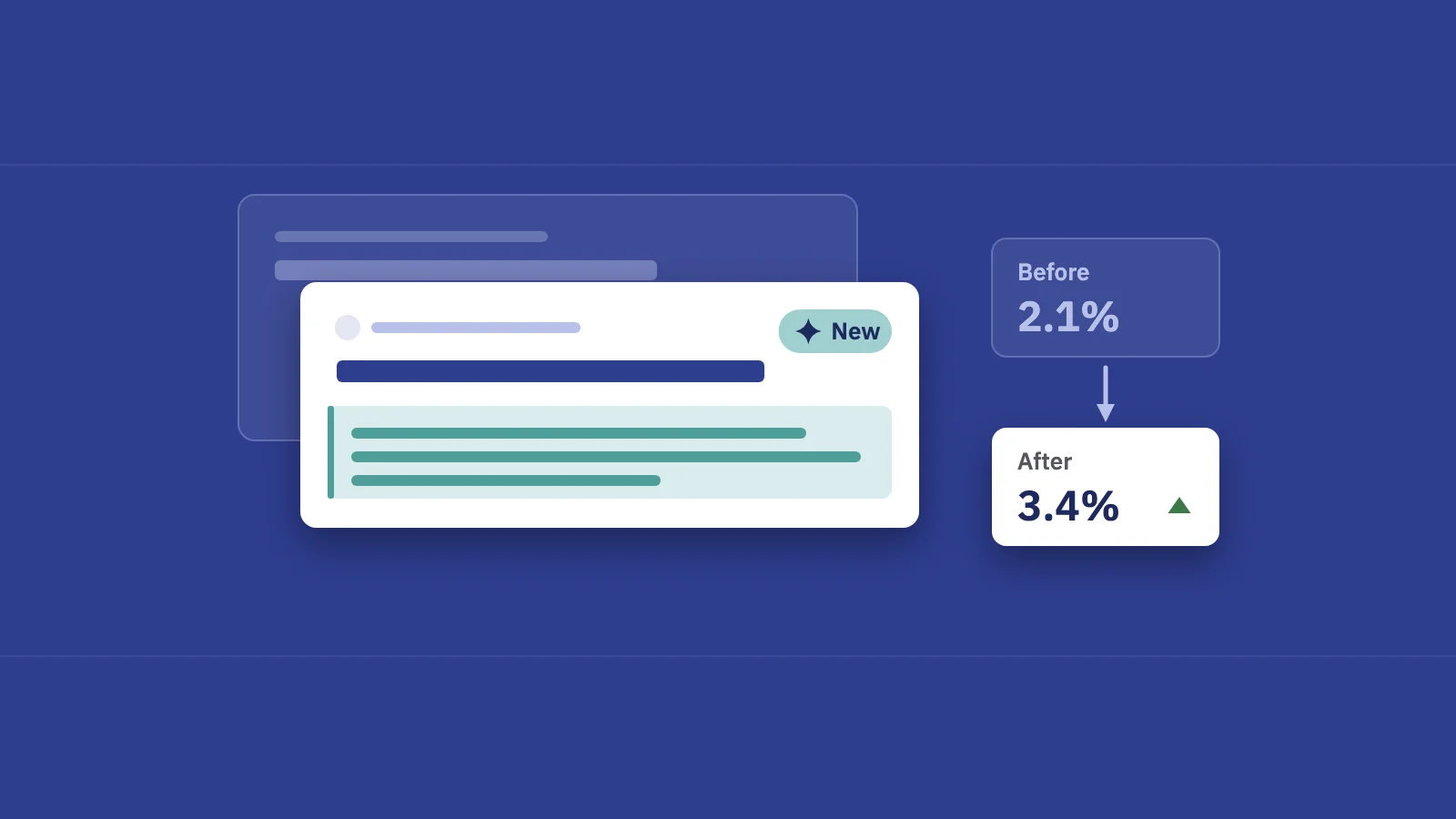
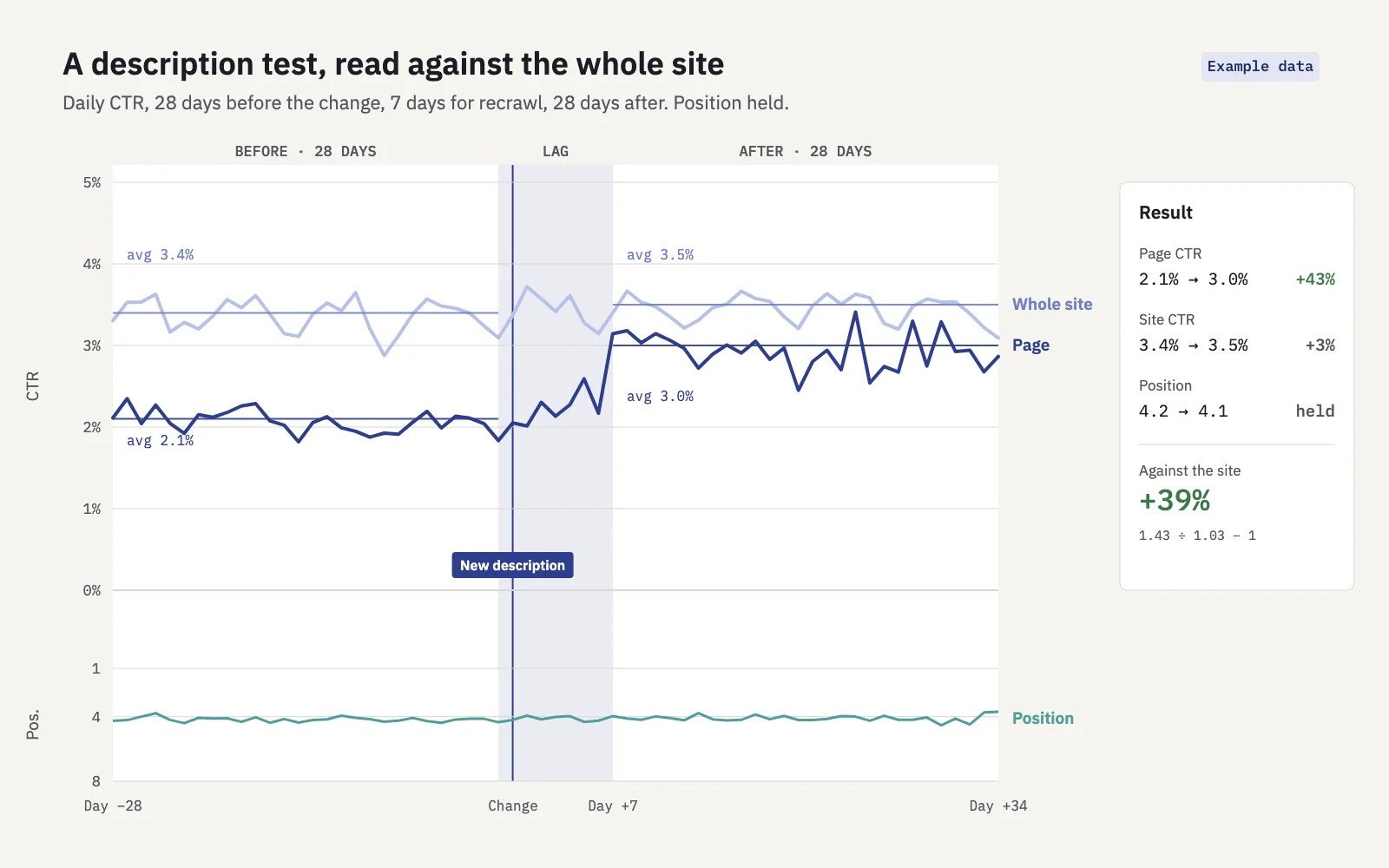 Example data. The page beat the site's own trend by 39%, with position steady.
Say a page's CTR went from 2.1% to 3.0% (+43%), while the site's CTR went from 3.4% to 3.5% (+3%) in the same windows. Against the site, the lift is 1.43 ÷ 1.03 − 1 = +39%. If the site had risen 40% in the same weeks (a seasonal peak, say), the same page result would be close to zero.
Serplyze's Actions do this bookkeeping for you on paid plans. Log the change (type Title / meta) with the pages and tracked keywords it targets, and Serplyze compares the 28 days before with 28 days starting 7 days after, against the whole site in the same windows. The result is Positive or Negative at ±10% against the site, and shows Measuring until Search Console's data for the after window is final. You can also log a title or meta change straight from a row in Traffic's CTR drop at top view.
How long to wait
Two delays stack up. First, Google has to recrawl the page and pick up the new description. Google's guide to asking for a recrawl says crawling can take anywhere from a few days to a few weeks. Second, you need a full measurement window after that.
For most pages, plan on about five weeks from the change: a week of lag and four weeks of measurement. Check the lag rather than assume it: search the page's main query, and if the old description still shows after a week, extend the gap. For pages with few impressions, use longer windows (8 or 12 weeks) instead of reading a noisy month. And remember the most recent days in Search Console are preliminary and can still change, so don't close the test until the after window's data has settled.
Avoiding false conclusions
A before/after comparison shows correlation, not proof. These are the usual ways a description test fools you:
| Trap | What it looks like | How to check |
|---|---|---|
| Seasonality | CTR and clicks rise across the site in the same weeks | Compare with the site's change, and with the same period last year |
| Position change | The page moved from 5 to 3, and CTR rose with it | Read average position for both windows; if it moved a place or more, the test is confounded |
| Query mix | New low-CTR queries arrive and pull the page's CTR down | In Compare mode, look at the Queries tab for the page; judge on the top queries that appear in both windows |
| SERP changes | An AI Overview or shopping unit appears above you | Search the main queries again; check Search appearance |
| Google ignored the description | The snippet shown is still page text | Search the main queries after the lag |
| Other changes | Content, internal links or a template changed in the same weeks | Keep a change log; test one thing per page at a time |
| Google updates | A core update lands inside the window | Check Google's update dates; see our core update impact guide |
Position deserves the most attention, because CTR depends on it so heavily. A CTR rise that comes with a better position is a ranking result, not a snippet result. Our guide to average position covers why that number can move without any real ranking change, too.
If a test comes back flat, that is still an answer. Either the snippet wasn't the problem (look at intent and SERP features instead) or Google isn't showing it. Write it down and move to the next page on the list.
Key takeaways
- A meta description is a summary in the page's head that Google may use as the snippet; Google creates most snippets from page content and can vary them by query.
- Write for the queries the page already gets: answer the task, be specific, cover the next question, and put the important part first.
- Test pages with high impressions, a stable position and CTR well below your own curve.
- Compare equal windows before and after, skip a week for the recrawl, and set the page's change against the whole site's.
- Rule out position changes, seasonality, query mix and SERP changes before you credit the description.
Serplyze logs each change and measures it against your whole site from your own Search Console data. Start free and find the pages worth testing first.